
Memoire
FreeMaintainedDesign system MCP server. 20 tools: extract design tokens from any URL, pull from Figma or Penpot, generate React + shadcn/ui components from specs, run WCAG au

About
Design system MCP server. 20 tools: extract design tokens from any URL, pull from Figma or Penpot, generate React + shadcn/ui components from specs, run WCAG audits, sync tokens bidirectionally.
README


Memi
The design layer for agentic AI.
Give your coding agent an interface brief before it edits. Memi maps the UI already in your repository, surfaces file-anchored accessibility and design-system risks, and gives you a deterministic check to rerun before merge. Start with the CLI, then add the same gate to every pull request.
Memi Studio is available today; Memi Canvas is currently in development. No account, API key, Figma file, global install, or daemon is required for the first audit.
Start with your next interface · Get Memi Studio · Read the research
Quickstart: find your first interface issue
Run one non-destructive audit in any frontend repository. It needs no account, API key, Figma file, global install, or daemon.
npx -y @memi-design/cli@latest diagnose . --json --no-write --fail-on none
The result carries normalized finding IDs, confidence, provenance, and file:line evidence so an agent can act on a specific finding instead of guessing.
Give the same context to your coding agent:
npx skills add memi-design/memi --skill audit-frontend-design
Then ask:
Audit this frontend before editing it. Prioritize the five changes that will matter most to users, reuse the existing system, and verify the result after the patch.
If Memi catches a real interface issue in your project, share the finding. Real reports are the most useful signal for what to improve next.
Cost and offline operation
Local source diagnosis uses deterministic rules: no model call, API key, or model fee. It checks the repository you provide and returns findings your agent can verify. Installation, CPU time, CI runners, and any agent you choose still have costs. The published research has not established an end-to-end dollar or token savings advantage.
Start with one diagnosis, address the highest-confidence finding, and rerun the same check. Use --agent-context for a bounded file index instead of sending a whole repository to a model. Its routing is heuristic; a smaller context is not proof of a cheaper successful task. --files scopes reported findings without launching Git; it still scans the tree for aggregate statistics.
Published beta: Install the exact 2.8.0-beta.2 package for the 2.8 frontend workflow. Stable remains 2.7.9; the beta is not a stable release. See current release state and known limitations.
The beta2 npm release record identifies its published source and immutable artifact evidence. The beta1 npm release record preserves the earlier release's history; it does not validate beta2. The 2.8 locked default and explicit capability contract do not apply retroactively to 2.7.9.
npx -y @memi-design/[email protected] --version
npx -y @memi-design/[email protected] agent brief . --frontend --intent "Improve this interface" --json
The beta keeps managed security review, SwiftUI parity, and full DesignWorkbench certification explicitly pending. It is not stable or employer-approved. Publication provenance and platform receipts belong to the exact released artifact.
The beta prevents local diagnosis from writing project files by default, keeps paid integrations optional, and requires explicit grants for networking, subprocesses, and source report persistence. An npm install needs registry access; offline first-run claims require the separately verified bundle. See the acceptance ledger, known limitations, and release truth.
The 2.8 frontend workflow: the beta provides a repository-aware frontend brief, four useful locked MCP tools, validated Figma/Paper evidence inputs, and explicit component-reuse conflicts. See the frontend workflow for runnable beta commands and the release plan for remaining gates. Managed independent security scanning and the reviewed-candidate-audit and swiftui-rendered-rerun receipts remain pending for stable. Paper pixel parity is unassessed. Of 158 inventoried CLI paths, 105 remain deferred; broad grants do not enable them. No complete-task dollar or token savings claim is established.
What 2.8 changes for frontend agents
| In 2.7.9 | In the 2.8 beta |
|---|---|
| Diagnosis, agent briefs, token tools, Figma bridge, and skills already existed. | agent brief --frontend joins actual exports, props, CSS/DTCG tokens, and CSF stories in a 2–16 KiB JSON response. |
| Harness configuration exposed a broad tool catalog. | Locked stdio starts without sockets or project writes; four read tools are available without grants. |
| A design mapping could become stale or a generator warning could be ignored. | Explicit mappings are checked against current exports, required props, token references, and optional source hashes. Registry specs marked as mapped block duplicate generation; a host envelope supplies reuse guidance. |
| Paper had no dedicated integration. | Codex can supply selected Paper or Figma context through the same validated envelope; no extra model session or bundled connector is required. |
| Static diagnosis could present unassessed categories as passing. | Quality scores cover assessed categories only; coverage and scan omissions are separate. Browser verification remains unassessed until actually run. |
The practical benefit is more useful local evidence and clearer failure signals: a brief identifies an existing component before an agent duplicates it, diagnosis distinguishes unchecked categories from assessed findings, and diagnose --receipt-only provides a separate metadata-only result without persisting a source report. Regression tests also exposed and corrected candidate defects in bounded file reads, malformed event handling, and failure exit codes. Those corrections improve specific behavior; they do not establish universal design quality, security certification, or lower task cost.
Earlier packed results at source 2a6d0e44 are historical evidence for those exact bytes. Later defensive runtime fixes supersede that artifact as a release candidate; each corrected source checkpoint is verified through a separate local package and digest. See the verification record for the source, artifact, and scope of each result. Local candidate receipts remain evidence for their original bytes; they do not replace the published npm record.
The repository remains authoritative for code. Memi supplies evidence; Codex edits and runs the project's actual checks. Existing custom CSS and component systems do not need a shadcn migration. This beta deliberately defers many legacy command paths; it is not yet a drop-in upgrade for every 2.7 workflow.
Put the check on every pull request
Copy examples/github-actions/memi-design.yml into your repository as .github/workflows/memi-design.yml. The starter is pinned to the reviewed public Action commit and gives reviewers:
- a PR check that fails only on newly introduced interface debt;
- a
memi-design-healthartifact with the human-readable report; and - SARIF annotations when the repository grants
security-events: write.
The workflow does not need an API key or a Memi secret. Fork pull requests still receive the check and report; SARIF upload is skipped automatically when GitHub does not grant that permission.
If you prefer to configure it by hand, the complete GitHub Action guide documents every input, output, permission, and evidence file.
One product layer, three surfaces
| Surface | What it is | Status |
|---|---|---|
| Memi CLI | Interface intelligence and deterministic checks for local repositories, agents, and CI. | Available today |
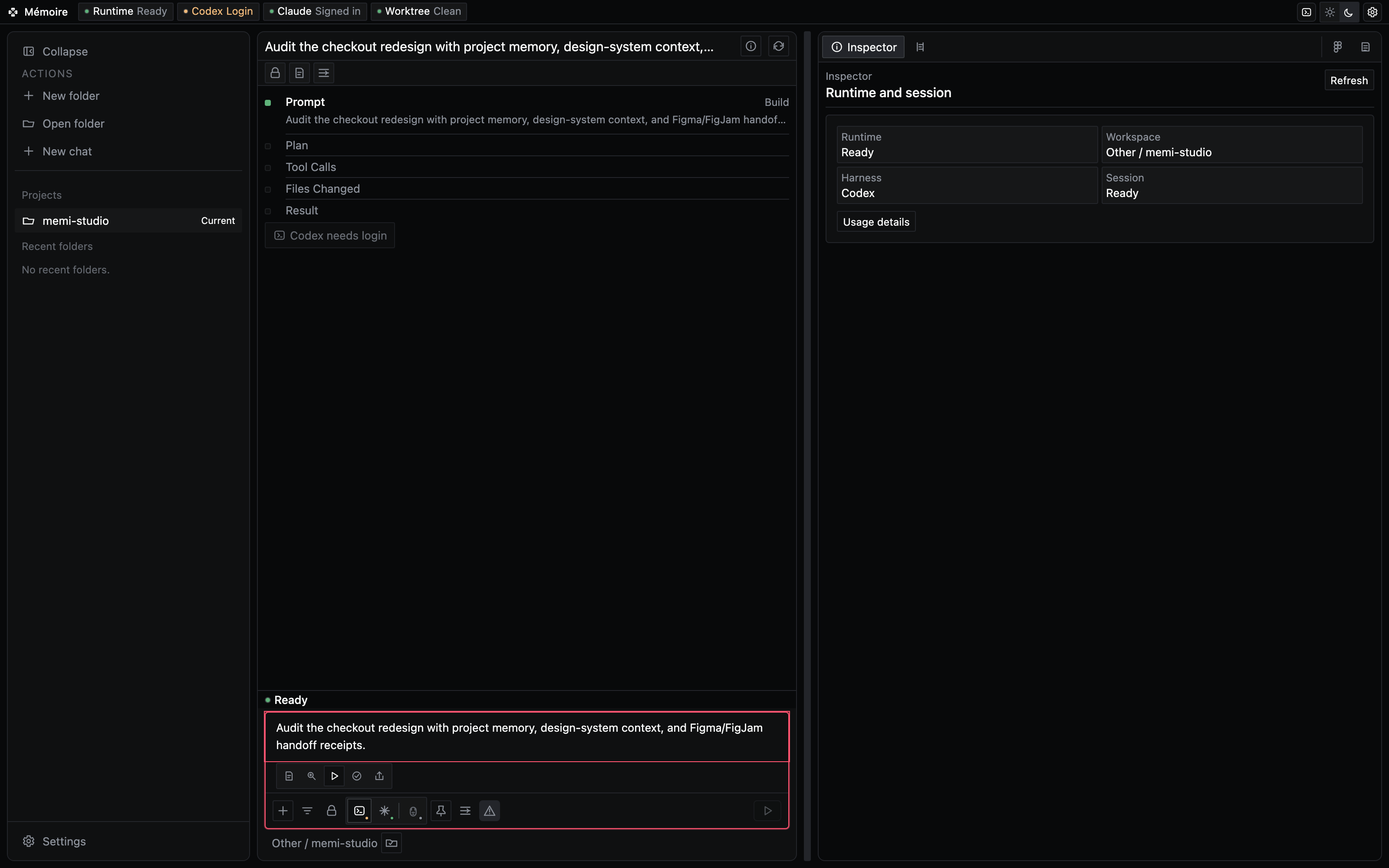
| Memi Studio | A macOS workbench for bringing project context, agent workflows, and verification together. | Available today |
| Memi Canvas | A visual workspace for design-system context and controlled agent proposals. | currently in development |
See the product
| Memi Studio | Memi Canvas — in development |
|---|---|
 |
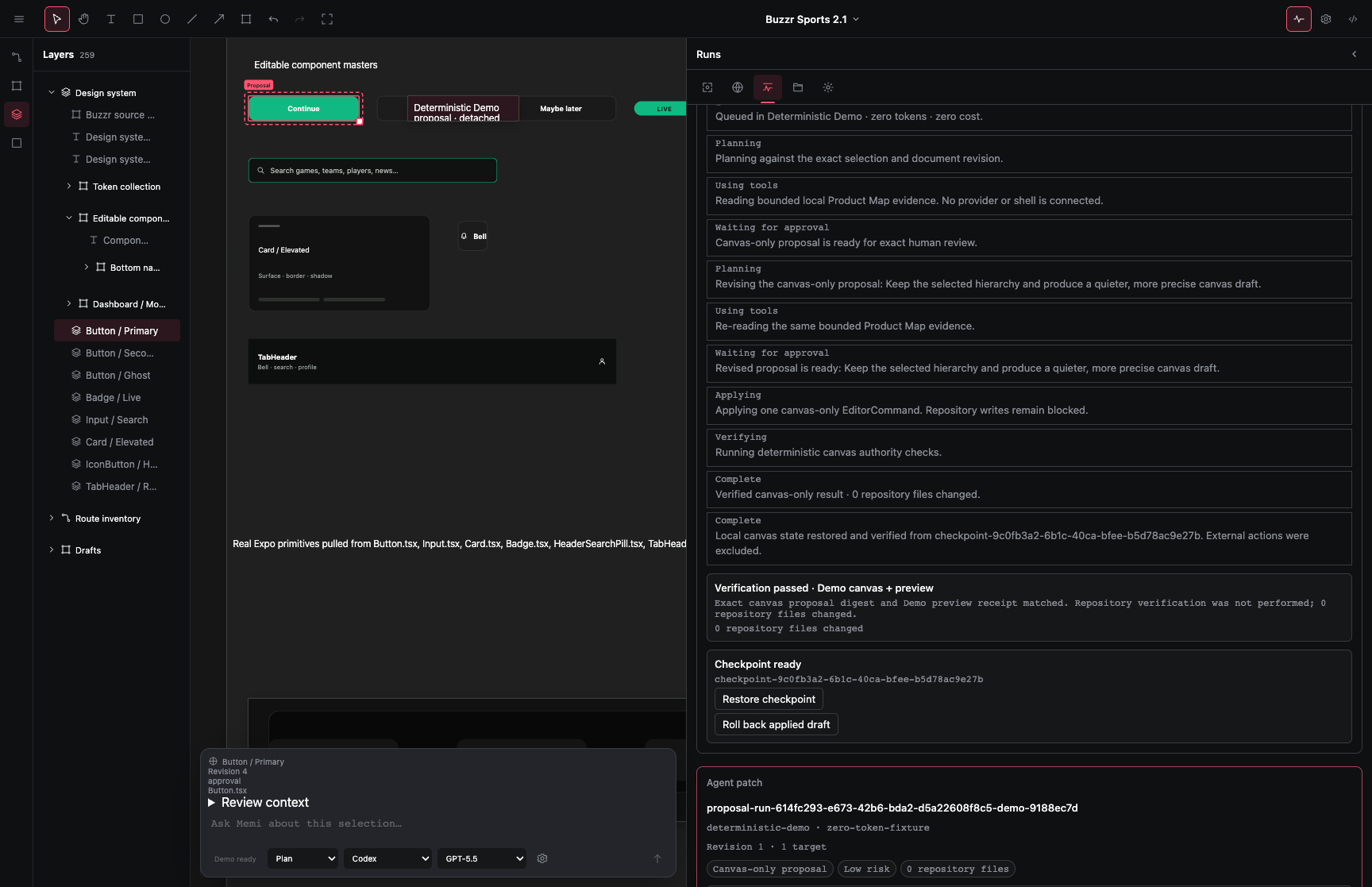 |
| Bring an agent prompt, project memory, and a verification surface into one workbench. | Preview design-system context, inspect a proposal, and keep a human in the loop. This preview shows an active development build, not a released product guarantee. |
What Memi adds to an agent workflow
| Before the edit | During the edit | Before merge |
|---|---|---|
| Discover components, tokens, routes, states, and accessibility gaps. | Give the agent a scoped brief that names the system it must preserve. | Rerun deterministic checks and surface new interface debt in CI. |
| Need | Start with |
|---|---|
| Find UI risks and product-system context | audit-frontend-design |
| Plan a change around existing components and tokens | remember-design-system |
| Keep new interface debt out of pull requests | enforce-design-ci |
| Build and verify native Apple interfaces | build-swiftui-interface |
Compatible with the shadcn registry and v0 design systems.
Evidence at a glance
The V15 confirmatory audit is a public technical disclosure, not a leaderboard. It separates receipt admission, rendered design quality, functional acceptance, and resource observations.
| Measured record | Exact reading |
|---|---|
| 36 / 36 frozen receipts admitted | Every preregistered agent cell had an auditable receipt. This is receipt admission, not universal performance. |
| 10 complete model-graded matched pairs | Rendered design-quality comparisons that survived the prespecified screen. This is model-graded evidence, not independent practitioner review. |
| Buzzr / Expo: mean +1.4; Paraform / web: mean −0.4 | The scoped non-inferiority gate passed on both graded task families. It does not establish general superiority. |
| 0 / 21 corrected task-by-resource tests rejected | The study did not establish a speed, cost, or token-use advantage. |
Separate historical release record: the 2.7 candidate record reported 2,187 / 2,187 tests passed. It is release evidence, not part of V15 and not proof that every project benefits.
Benchmarks and paper
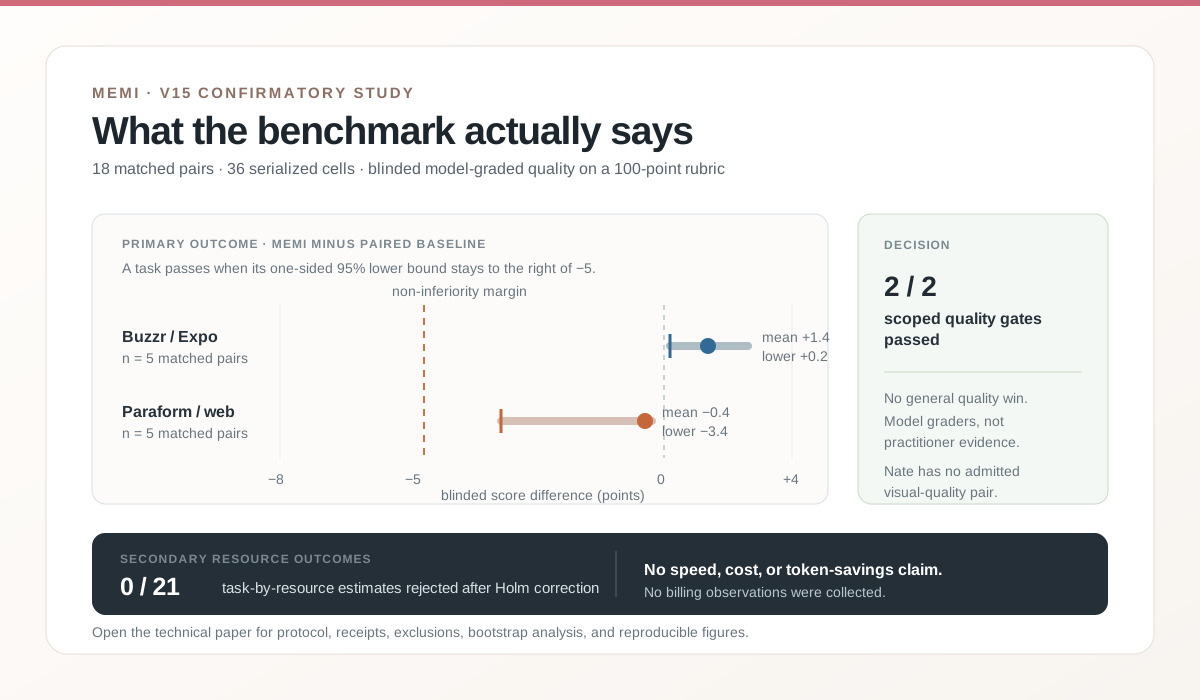
Quality non-inferiority passed for the scoped Buzzr and Paraform task families. The full paper reports exclusions, failed paths, and limitations without imputation. No superiority, speed, or dollar-savings claim is made. Read the conference-style audit PDF, inspect the protocol and receipts, or review the V17 preregistration.
Memi InterfaceBench v1 is a 100 target tasks specification with 5 pinned seed tasks; it is not an aggregate performance score. The historical candidate record reported 2,187/2,187 tests and 70.57% statements coverage. The greater-than-25% claim remains not verified. Inspect the benchmark contract and workflow evidence.
Memi DesignWorkBench v2 holds 300 task contracts and requires practitioner calibration before any certification claim.
Prompts that map to real workflows
| Goal | Copy-paste prompt | Supporting workflow |
|---|---|---|
| Establish a baseline before a UI change | Audit this frontend before editing it. Prioritize the five changes with the clearest file:line evidence. |
audit-frontend-design |
| Turn evidence into a scoped plan | Turn the findings into a scoped UI change plan. Reuse existing components and tokens before editing. | remember-design-system |
| Protect a pull request | Set up a deterministic design CI gate for this pull request. Fail only on newly introduced interface debt and save SARIF plus the HTML report. | enforce-design-ci |
Research, stated plainly
The research is disclosure material, not a product leaderboard. It keeps functional, rendered-quality, and resource evidence separate so a result cannot be made to say more than the study supports.
Choose your integration
| Surface | Start here | Best for |
|---|---|---|
| One-time CLI run | npx -y @memi-design/[email protected] diagnose . --no-write |
Trying Memi without installing |
| Global CLI | npm i -g @memi-design/cli |
Daily local use |
| Agent Skill | npx skills add memi-design/memi --skill audit-frontend-design |
Codex, Claude Code, Cursor, and compatible agents |
| GitHub Action | Copy the starter workflow | Pull-request design CI |
| MCP server | memi mcp start --no-figma |
Any MCP client |
| Studio | brew install --cask memi-design/memi/memi-studio |
Supervised macOS workflows |
GitHub Action
name: design
on: [pull_request]

permissions:
  contents: read

jobs:
  memi:
    runs-on: ubuntu-latest
    permissions:
      contents: read
      security-events: write
    steps:
      - uses: actions/checkout@3d3c42e5aac5ba805825da76410c181273ba90b1 # v7.0.1
        with:
          fetch-depth: 0
      - uses: memi-design/memi@5fcbf39e1255af0c14c5a17ba6bde8cf1206e525 # v2.7.9
        with:
          version: "2.7.9"
          report: true
          upload-sarif: true
The Action adds code-scanning annotations, a step summary, and a memi-design-health artifact. Existing debt can be baselined while newly introduced debt fails the gate.
GitHub Action guide · CI recipes · current versions
Agent and MCP setup
memi agent install codex --project .
memi agent install claude-code --project .
memi agent install cursor --project .
memi agent install grok-build --project .
{
  "mcpServers": {
    "memoire": {
      "command": "memi",
      "args": ["mcp", "start", "--no-figma"]
    }
  }
}
Codex plugin marketplace:
codex plugin marketplace add memi-design/memi --ref main --sparse .agents/plugins --sparse plugins/memoire
Agent stack guide · copy-paste recipes · full skill router
Trust and proof
- Release gates — package, provenance, clean-install, MCP, plugin, binary, and public-surface checks.
- Current release truth — the public versions for CLI, Studio, and website.
- Reproducible case studies — pinned evidence, abstentions, and paired protocols.
- Dependency trust ledger — direct dependency purpose, dynamic boundaries, and review policy.
- Trust Core index — locked-default contract and evidence status for the 2.8 beta.
- Threat model and egress map — protected assets, side-effect boundaries, and destinations.
- Data retention and uninstall/recovery — what can persist and how to preserve state.
- Dependency/license review and supported platforms — artifact and sandbox gates.
- Employer review packet — artifact-bound approval checklist; internal use requires written employer approval.
- Known limitations and release truth — beta versus stable language and open evidence.
- Organization compatibility — sibling surfaces, including independently gated Studio and Canvas.
- llms.txt — compact machine-readable product map.
The deterministic first audit requires no source upload or telemetry. Connected
integrations expand the boundary and require explicit review. Memi also has no
npm install-time lifecycle scripts, provides agent-kit --dry-run --json, pins
the Action immutably, and documents third-party boundaries in NOTICE.
Community
We welcome contributions. See CONTRIBUTING.md for setup and pull-request guidance. Bugs and feature requests belong in issues; questions and real project reports belong in Discussions.
Useful contributions include reproducible audit fixtures, framework adapters, skill improvements, accessible UI cases, motion checks, and before/after reports.
License
Studio interface references and adapted components include Hermes WebUI and the MIT Warp UI framework boundary around warpui_core and warpui; Warp AGPL application and client code is not copied into Memi.
MIT. See NOTICE for optional adapters and complete third-party attribution.
Install Memoire in Claude Desktop, Claude Code & Cursor
unyly install memoireInstalls into Claude Desktop, Claude Code, Cursor & VS Code — handles npx, uvx and build-from-source repos for you.
First time? Get the CLI: curl -fsSL https://unyly.org/install | sh
Or configure manually
Run in your terminal:
claude mcp add memoire -- npx -y @memi-design/cliStep-by-step: how to install Memoire
FAQ
Is Memoire MCP free?
Yes, Memoire MCP is free — one-click install via Unyly at no cost.
Does Memoire need an API key?
No, Memoire runs without API keys or environment variables.
Is Memoire hosted or self-hosted?
Self-hosted: the server runs locally on your machine via the install command above.
How do I install Memoire in Claude Desktop, Claude Code or Cursor?
Open Memoire on unyly.org, pick your client tab (Claude Desktop, Claude Code, Cursor) and press Install — the config is generated automatically, no JSON editing.
Changes
Versions and requested access over time.
- New version published
- New version published
- New version published
- New version published
- New version published
- New version published
- New version published
- New version published
Related MCPs
LibreOffice Tools
Enables AI agents to read, write, and edit Office documents via LibreOffice with token-efficient design. Supports multiple formats including DOCX, XLSX, PPTX, a
 by passerbyflutter
Figma
Extract design specs and assets
 by Figma
dannote/figma-use
Figma control: create shapes, text and components, and set styles, auto-layout, variables and exports.
 by dannote
Logo.dev
Search and retrieve company logos by brand or domain. Customize size, format, and theme to match your design needs. Accelerate design, prototyping, and content
 by NOVA-3951
Design Inspiration Server
Searches top design platforms like Dribbble and Behance to provide UI inspiration, color palettes, and layout patterns via the Serper API. It allows users to re
 by YonasValentin
PIX4Dmatic
Enables GUI automation for controlling PIX4Dmatic on Windows through MCP. Supports launching, focusing, capturing screenshots, sending hotkeys, clicking UI elem
 by jangjo123
mcp-dockmaster
An Open-Sourced UI to install and manage MCP servers for Windows, Linux and macOS.
ariekogan/ateam-mcp
Build, validate and deploy multi-agent AI solutions on the ADAS platform: design skills with tools and manage the solution lifecycle.
 by ariekogan
thinkchainai/mcpbundles
Create custom tool bundles, connect providers with OAuth or API keys, and use one MCP server across many integrations, with a UI for bundles and credentials.
 by thinkchainai
jau123/MeiGen-AI-Design-MCP
Image generation and editing with a curated prompt library, prompt enhancement and routing across local ComfyUI, MeiGen Cloud and OpenAI-compatible APIs.
 by jau123
Compare Memoire with
Not sure what to pick?
Find your stack in 60 seconds
Author?
Embed badge for your README
Browse similar
All design MCPs