
Mergetrain
FreeNot checkedQueue committed branches from parallel coding-agent worktrees, test them together in order, keep integration pushes human-gated, and recover interrupted pushes.

About
Queue committed branches from parallel coding-agent worktrees, test them together in order, keep integration pushes human-gated, and recover interrupted pushes.
README
Safely integrate committed branches from parallel coding agents.
mergetrain is a local-first deploy train for coding-agent worktrees. Agents commit and enqueue their branches; one runner assembles them in order, tests the combined tree, and atomically updates your Git refs only after explicit approval. It is intentionally optimized as an owner-operated local utility, not a hosted team platform.
There is no mergetrain account, hosted control plane, OAuth app, or product telemetry. Queue and runner state stay on your machine; only your configured Git remote and trusted gate or verification commands may contact external services.
The problem
Worktrees let several agents edit one repository without sharing a checkout. They do not decide landing order, test the combined result, prevent push races, or tell you what happened if a laptop dies mid-push.
Without an integration boundary, the human becomes that boundary: rebase every finished branch, rerun gates after each merge, resolve cross-branch failures, and decide which session may push. The parallel coding gain disappears at the last mile.
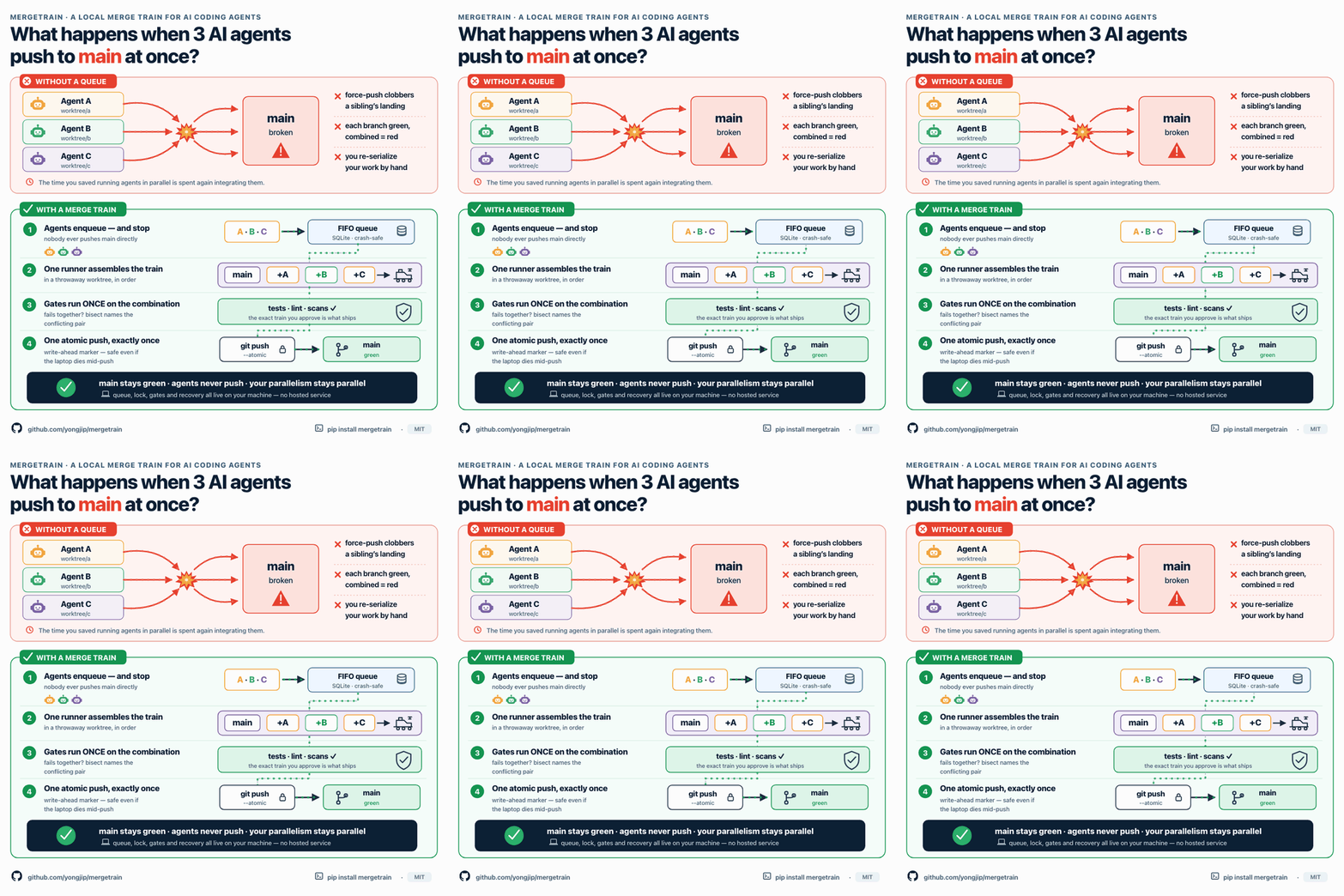
mergetrain makes that last mile a durable protocol:
agent branches → FIFO queue → isolated integration worktree → combined gates
               → explicit approval → one atomic push → post-push verification
Who should use it?
Use mergetrain when:
- multiple coding agents finish branches in the same repository throughout the day;
- agents work in Git worktrees and should enqueue rather than push deploy refs;
- the combined result must pass local tests before it lands;
- you want unattended processing only for explicitly pre-approved jobs; or
- one local hub should show queues and runners across several repositories.
It is harness-agnostic: Codex, Claude Code, agy, scripts, and humans all use the same CLI and JSON contract.
Who should not use it?
You probably do not need mergetrain when:
- one person or agent lands one branch at a time;
- every change already goes through a PR and your forge-native merge queue;
- you need a hosted review UI, organization-wide permission system, or remote runner service; or
- you are looking for a general job queue, CI provider, or deployment platform.
For PR-first teams, use GitHub Merge Queue or GitLab Merge Trains. mergetrain is for local-agent, worktree-first integration, with or before a PR.
Enforcement boundary
Lease tokens fence concurrent and stale mergetrain runners. They do not
intercept an arbitrary git push from a task agent that has shell access and an
integration-branch credential. To make “one runner owns the push” an enforced
property rather than a protocol assumption, use this topology:
task agents: commit + exact-SHA enqueue; no integration push credential
runner:      separate deploy identity
remote:      protected integration branch; runner or reviewed PR path only
Without credential separation and remote protection, mergetrain still provides safe train assembly and recovery semantics, but it cannot prevent a participant from bypassing the queue. See the security boundary.
See it in 60 seconds
uvx mergetrain demo
The demo creates a disposable repository and local bare remote, then runs four
real branches through FIFO merge, a combined-only gate failure, conflict
attribution, and deployment of the compatible train. Use --keep to inspect the
result afterward.

Install and first run
# Install the machine-level CLI
uv tool install mergetrain          # or: pipx install mergetrain
# macOS: brew install yongjip/tap/mergetrain

# Codex: add the Git marketplace, then install the native skill + pinned MCP server
codex plugin marketplace add yongjip/mergetrain --ref main
codex plugin add mergetrain@mergetrain

# agy: install the native skill + pinned MCP server
agy plugin install https://github.com/yongjip/mergetrain

cd /path/to/your/repo

# Write .mergetrain.yaml plus agent instructions
mergetrain init --project my-app --write

# After an agent commits its task branch
mergetrain enqueue \
  --task "add health check" \
  --branch agent/health

# Read state and deploy end to end
mergetrain status
mergetrain deploy
For long-running gates, run mergetrain validate earlier; it never pushes and
leaves one exact train Ready for the later deploy confirmation.
deploy names the configured atomic Git ref update; it does not imply an App
Store, Kubernetes, or other provider release.
mergetrain init also writes agent-facing instructions. The essential rule is
simple: agents commit and enqueue; one runner owns merge → test → push → verify.
Unattended daemons process only jobs that a human explicitly enqueued with
--auto. For manual jobs, daemon --validate-only can run merge and gates in
the background, but it pauses at the validated-train approval boundary and
never pushes.
See the quickstart for configuration, dashboard, daemon, and multi-repository Hub setup.
Why not just worktrees and git merge?
Worktrees solve parallel editing. mergetrain solves serialized integration.
| Integration concern | Worktrees + manual merge | mergetrain |
|---|---|---|
| Landing order | A person or agent decides repeatedly | Durable FIFO queue |
| Combined validation | Rerun manually after each merge | Gates run over the exact assembled train |
| Cross-branch failure | Diagnose by hand | Isolation runs identify the conflicting pair |
| Push ownership | Every session can race the ref | One lease-fenced runner owns the push |
| Approval | Shell convention | Explicit validate/deploy intent; --auto is opt-in |
| Crash recovery | Infer from local logs | Reconcile SQLite evidence against remote refs |
Plain worktrees remain the execution lanes. mergetrain is the spine that joins their results without turning the operator into a merge coordinator.
Why not GitHub or GitLab merge queues?
They solve a related problem for a different operating model.
| Forge-native queue | mergetrain | |
|---|---|---|
| Primary unit | Pull/merge request | Committed local task branch |
| Validation | Forge merge group + remote CI | Local assembled train + shell gates |
| Review | Built-in conversation and approvals | No code-review UI |
| Infrastructure | Forge integration and hosted services | Local SQLite, Git worktrees, any Git remote |
| Best fit | PR-first teams and distributed review | High-throughput local agent integration |
The models can coexist: push a validated train to a review branch and open one PR, or reserve individual PRs for changes that need discussion. The PR workflow guide covers direct, one-PR, split-PR, and validation-only patterns.
Core safety guarantees
- Exact train identity. Approval names the task HEADs and integration base; changed branches or a moved base cannot silently reuse that approval.
- Combined gates before push. A green branch is not enough. The assembled train passes the configured gates, or nothing lands.
- One fenced mergetrain owner. SQLite claims and lease tokens prevent concurrent or stale mergetrain runners from mutating the same train; remote enforcement additionally requires the credential topology above.
- Atomic remote update. Payload refs and a permanent
refs/mergetrain/deploys/<sha>recovery ref update together. - Remote-truth recovery. Write-ahead markers and pinned commits let
reconciledetermine whether a killed push landed, without replaying a successful deploy or calling a missing one shipped. - Explicit automation. A bare run never deploys. Daemons touch only
pre-approved
--autojobs whose destination and gate/reuse/verify policy still match, and MCP deploy still requires attributable human confirmation. - One state entry point.
statusprojects internal detail into Waiting, Running, Ready, Attention, and Done, and returns the next safe command.inspectsupplies job-level evidence only when it is needed.
Queue state, locking, train assembly, and gates stay local. Your configured Git remote and post-push verification may still use external services. Gate and verify commands are trusted code; review the security boundary before enabling unattended jobs.
These guarantees are exercised on macOS and Linux across Python 3.10–3.14 and
on Windows, including real-Git fault injection around git push --atomic. A
dedicated soak repository completed 20 landed trains at a 100% land rate,
including planned conflict recovery and a real killed-push reconciliation whose
verdict matched the remote. See the
soak evidence,
then use mergetrain stats --json to inspect evidence from your own queue.
Go deeper
- Start: Quickstart · Install · CLI · Config
- Understand: Design and architecture · Machine contract · PR workflow comparison
- Operate: Efficient operation · Failure modes and recovery · Daemon · Multi-repo Hub
- Trust and extend: Security · Agent contract · Agent adoption benchmark · Product-name-free discovery benchmark · Local multi-agent benchmark · MCP server · Adapter pattern · Product scope
Stable interface
The normal CLI is deliberately limited to six verbs:
init status enqueue validate deploy inspect
Version 3 is the long-lived product grammar. There is no planned v4: new capabilities must fit these verbs or stay in advanced operator surfaces, and the v3 JSON and MCP contracts evolve additively. See the compatibility policy.
The latest published release is shown by the PyPI badge above. Issues and operating reports are welcome on GitHub.
License
Released under the MIT License.
Installing Mergetrain
This server has no published package — it is built from source. Open the repository and follow its README.
▸ github.com/yongjip/mergetrainFAQ
Is Mergetrain MCP free?
Yes, Mergetrain MCP is free — one-click install via Unyly at no cost.
Does Mergetrain need an API key?
No, Mergetrain runs without API keys or environment variables.
Is Mergetrain hosted or self-hosted?
Self-hosted: the server runs locally on your machine via the install command above.
How do I install Mergetrain in Claude Desktop, Claude Code or Cursor?
Open Mergetrain on unyly.org, pick your client tab (Claude Desktop, Claude Code, Cursor) and press Install — the config is generated automatically, no JSON editing.
Related MCPs
GitHub
PRs, issues, code search, CI status
 by GitHub
Filesystem
Secure file operations with configurable access controls.
Memory
Knowledge graph-based persistent memory system.
Template MCP Server
A CLI tool to create a new Model Context Protocol server project with TypeScript support, dual transport options, and an extensible structure
 by mcpdotdirect
Amap Maps Mcp Server
MCP server for using the AMap Maps API
 by duxiaohui
Supabase
Database, auth and storage
 by Supabase
Everything
Reference / test server with prompts, resources, and tools.
Git
Tools to read, search, and manipulate Git repositories.
Sequential Thinking
Dynamic and reflective problem-solving through thought sequences.
Time
Time and timezone conversion capabilities.
Compare Mergetrain with
Not sure what to pick?
Find your stack in 60 seconds
Author?
Embed badge for your README
Browse similar
All development MCPs