
Microsoft Security Copilot
FreeNot checkedIntegrates Microsoft Security Copilot with Microsoft Sentinel for running KQL queries, managing skillsets, and executing prompts using Azure Identity Authentica

About
Integrates Microsoft Security Copilot with Microsoft Sentinel for running KQL queries, managing skillsets, and executing prompts using Azure Identity Authentication
README
A Python-based MCP server using FastMCP library that provides integration with Microsoft Security Copilot and Microsoft Sentinel using Azure Identity Authentication.
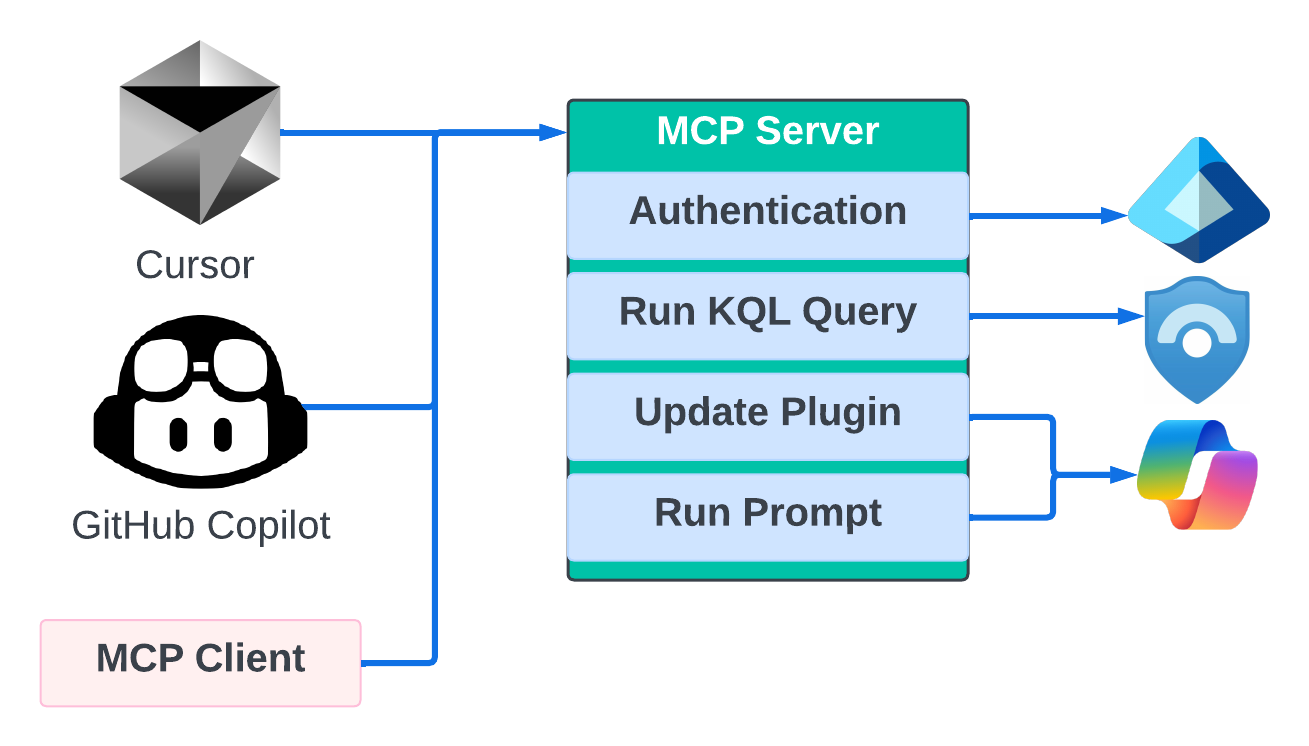
Overview
This project implements an MCP server that enables:
- Running KQL queries against Microsoft Sentinel
- Uploading/Updating Microsoft Security Copilot skillsets/plugins
- Running prompts and skills in Microsoft Security Copilot
The server acts as a bridge between development environments and Microsoft Security Copilot, allowing for testing, deployment, and execution of skills and plugins. It uses SSE as transport layer for the MCP server. There are many use cases for the current integration. One of the most interesting ones is to support the development, test and deployment of Security Copilot KQL Skills.
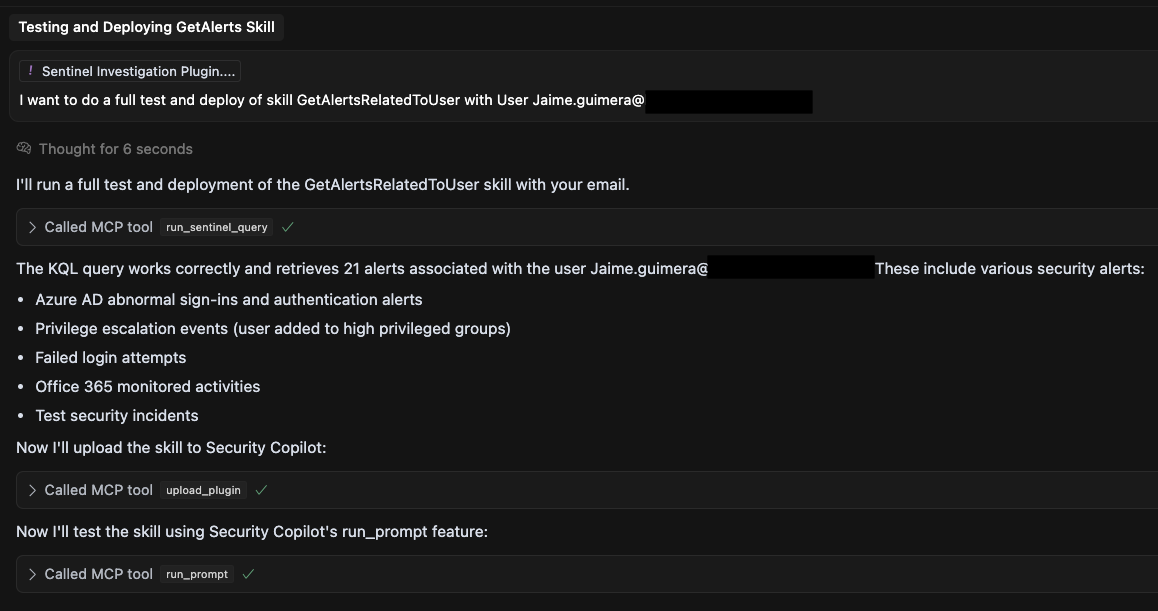
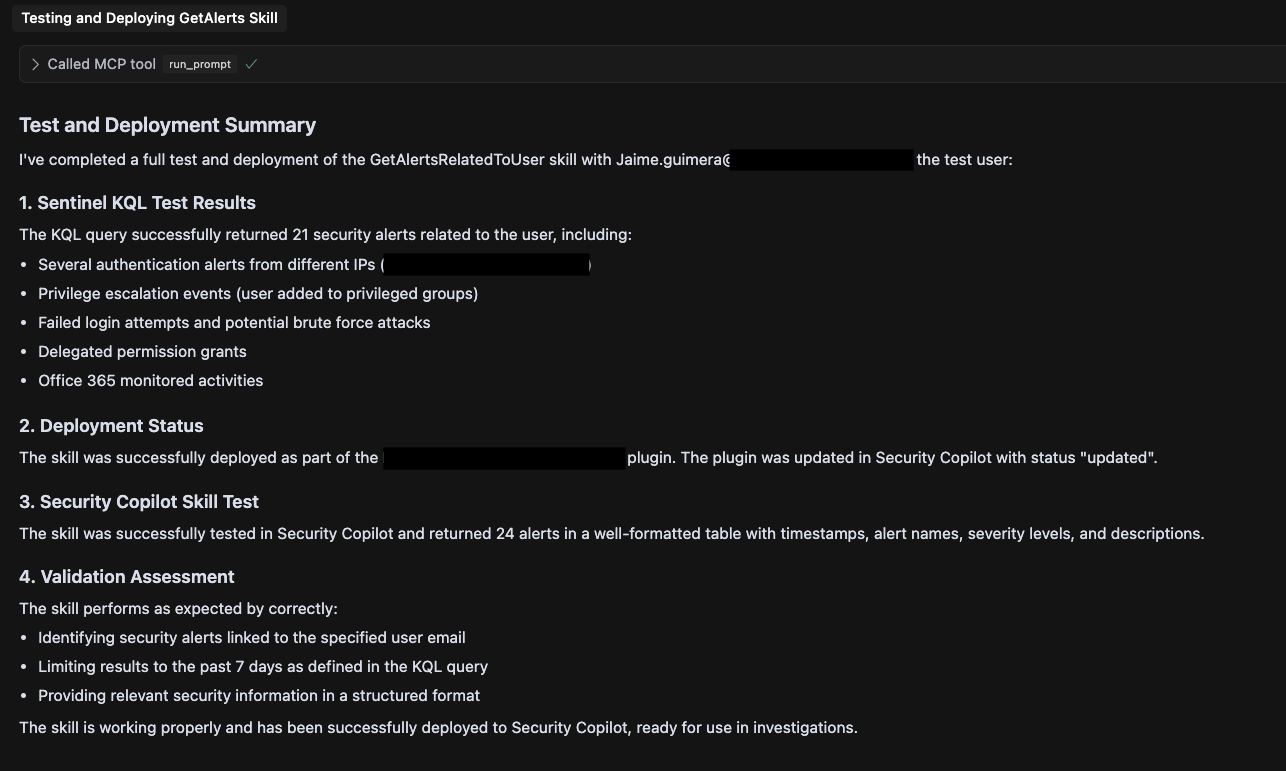
Features
- Sentinel Integration: Execute KQL queries against your Sentinel workspace
- Security Copilot Management:
- List existing skillsets/plugins
- Upload new or update existing skillsets/plugins
- Run prompts or skills within Security Copilot
- Authentication Support: Multiple authentication methods including interactive browser, client secret, and managed identity
Roadmap
The next features will include:
- Promptbook test and Update
- Run Advance Hunting queries in Defender XDR
Prerequisites
- Python 3.8+
- Microsoft Sentinel workspace
- Microsoft Security Copilot access
- Appropriate Azure permissions for Sentinel and Security Copilot
Installation
Clone the repository:
git clone https://github.com/jguimera/SecurityCopilotMCPServer.git
cd SecurityCopilotMCPServer
Install dependencies:
pip install -r requirements.txtCreate a
.envfile with the following configuration:#Add App Reg to use ClientID and Secret authentication #AZURE_TENANT_ID=your_tenant_id #AZURE_CLIENT_ID=your_client_id #AZURE_CLIENT_SECRET=your_client_secret SENTINEL_SUBSCRIPTION_ID=your_subscription_id SENTINEL_RESOURCE_GROUP=your_resource_group SENTINEL_WORKSPACE_NAME=your_workspace_name SENTINEL_WORKSPACE_ID=your_workspace_id #Authentication Options: interactive, client_secret AUTHENTICATION_TYPE=interactive
Usage
Starting the Server
Run the MCP server:
python server.py
To run tests before starting the server:
python server.py --run-tests
Available Tools
The MCP server provides the following tools:
- run_sentinel_query: Execute KQL queries in Sentinel
- get_skillsets: List skillsets in Security Copilot
- upload_plugin: Upload or update a skillset/plugin
- run_prompt: Run a prompt or skill in Security Copilot
MCP Client Config for Cursor
You can use this MCP server from the Client of your choice. In this repo you can find intructions and config files for Cursor.
Add the .cursor folder inside your client project to enable the MCP tools. This folder contains two files:
- Cursor Project Rules (securitycopilotdev.mdc): This file include some Custom Cursor Rules to help the agents in the process definition and understanding user prompts.
- MCP Client Configuration (mcp.json): File that connects Cursor to the MCP server.
You can invoke the tool directly using /tool_name parameter1="Value of the tool parameter" For example: /run_prompt content="List the most recent risky users"
More info: https://docs.cursor.com/context/model-context-protocol#configuring-mcp-servers
Contributing
Contributions are welcome! Please feel free to submit a Pull Request.
- Fork the repository
- Create your feature branch (
git checkout -b feature/amazing-feature) - Commit your changes (
git commit -m 'Add some amazing feature') - Push to the branch (
git push origin feature/amazing-feature) - Open a Pull Request
License
This project is licensed under the MIT License - see the LICENSE file for details.
Installing Microsoft Security Copilot
This server has no published package — it is built from source. Open the repository and follow its README.
▸ github.com/jguimera/securitycopilotmcpserverFAQ
Is Microsoft Security Copilot MCP free?
Yes, Microsoft Security Copilot MCP is free — one-click install via Unyly at no cost.
Does Microsoft Security Copilot need an API key?
No, Microsoft Security Copilot runs without API keys or environment variables.
Is Microsoft Security Copilot hosted or self-hosted?
Self-hosted: the server runs locally on your machine via the install command above.
How do I install Microsoft Security Copilot in Claude Desktop, Claude Code or Cursor?
Open Microsoft Security Copilot on unyly.org, pick your client tab (Claude Desktop, Claude Code, Cursor) and press Install — the config is generated automatically, no JSON editing.
Related MCPs
GitHub
PRs, issues, code search, CI status
 by GitHub
Filesystem
Secure file operations with configurable access controls.
Memory
Knowledge graph-based persistent memory system.
Template MCP Server
A CLI tool to create a new Model Context Protocol server project with TypeScript support, dual transport options, and an extensible structure
 by mcpdotdirect
Compare Microsoft Security Copilot with
Not sure what to pick?
Find your stack in 60 seconds
Author?
Embed badge for your README
Browse similar
All development MCPs