
Mistral Ocr
FreeNot checkedMCP Server Showcasing How to Use mistral Document OCR functionality

About
MCP Server Showcasing How to Use mistral Document OCR functionality
README
A Model Context Protocol (MCP) server that provides OCR (Optical Character Recognition) functionality using Mistral's OCR API. This server allows you to extract text content from PDF files and images through MCP-compatible clients like Cursor and Claude Desktop.
📖 For more context and practical usage examples, read the related article: How I Use Mistral Document AI to Consolidate My Notes
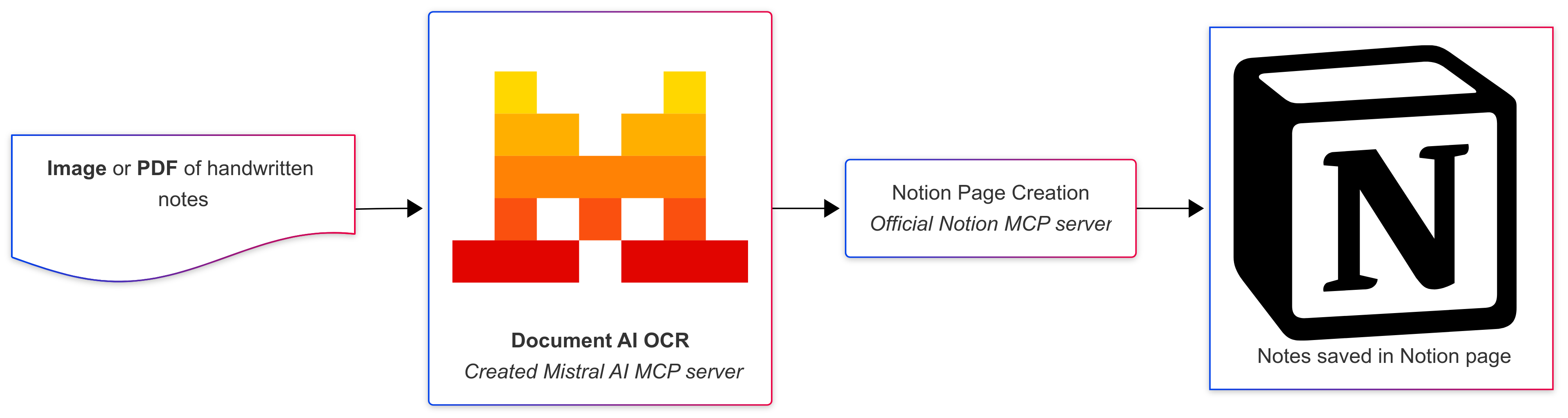
Usage example flowchart
Features
- Extract text from PDF files and images (JPG, JPEG, PNG, TIFF, BMP)
- Returns structured content with page-by-page breakdown
- Integrates seamlessly with MCP clients
- Built with FastMCP for optimal performance
Prerequisites
- uv package manager
- Python 3.10.1 or higher
- Mistral API Key : https://console.mistral.ai/api-keys
Installation
Clone the repository:
git clone https://github.com/lemopian/mistral-ocr-mcp.git
cd mistral-ocr-mcp
Install dependencies using uv:
uv syncSet up environment variables: Create a
.envfile in the project root:echo "MISTRAL_API_KEY=your_mistral_api_key_here" > .env
Configuration for MCP Clients
Add the following configuration to your MCP client config file:
{
  "mcpServers": {
    "mistral-ocr": {
      "command": "/Users/yourusername/.local/bin/uv",
      "args": [
        "--directory",
        "/path/to/mistral-ocr-mcp",
        "run",
        "main.py"
      ]
    }
  }
}
Important: Replace /path/to/mistral-ocr-mcp with the actual path to your cloned repository.
Usage
Once configured, the server provides the following tool:
extract_file_content
Extracts text content from PDF files and images.
Parameters:
file_path(string): Local path to the PDF or image file
Returns:
- Extracted text content as a string
Supported formats:
- PDF files (
.pdf) - Image files (
.jpg,.jpeg,.png,.tiff,.bmp)
Example usage :
Please extract the text from this document: /path/to/your/document.pdf
Development
Running the server directly
uv run main.py
Project structure
mistral-ocr-mcp/
├── mistral_ocr/          # Package directory
│   ├── __init__.py       # Package initialization
│   └── extractor.py      # Mistral OCR functionality
├── docs/                 # Documentation
│   └── flowchart.png     # Architecture flowchart
├── main.py               # MCP server implementation
├── pyproject.toml        # Project dependencies and configuration
├── uv.lock              # Dependency lock file
├── .env                 # Environment variables (create this)
├── .gitignore           # Git ignore rules
└── README.md            # This file
Environment Variables
MISTRAL_API_KEY: Your Mistral API key (required)
Troubleshooting
"MISTRAL_API_KEY must be set" error:
- Ensure you've created a
.envfile with your Mistral API key - Verify the API key is valid
- Ensure you've created a
"File not found" error:
- Check that the file path is correct and accessible
- Ensure the file format is supported
MCP connection issues:
- Verify the path to
uvis correct in your MCP configuration - Ensure the repository path is absolute and correct
- Check that all dependencies are installed with
uv sync
- Verify the path to
Installing Mistral Ocr
This server has no published package — it is built from source. Open the repository and follow its README.
▸ github.com/lemopian/mistral-ocr-mcpFAQ
Is Mistral Ocr MCP free?
Yes, Mistral Ocr MCP is free — one-click install via Unyly at no cost.
Does Mistral Ocr need an API key?
No, Mistral Ocr runs without API keys or environment variables.
Is Mistral Ocr hosted or self-hosted?
Self-hosted: the server runs locally on your machine via the install command above.
How do I install Mistral Ocr in Claude Desktop, Claude Code or Cursor?
Open Mistral Ocr on unyly.org, pick your client tab (Claude Desktop, Claude Code, Cursor) and press Install — the config is generated automatically, no JSON editing.
Related MCPs
GitHub
PRs, issues, code search, CI status
 by GitHub
Filesystem
Secure file operations with configurable access controls.
Memory
Knowledge graph-based persistent memory system.
Template MCP Server
A CLI tool to create a new Model Context Protocol server project with TypeScript support, dual transport options, and an extensible structure
 by mcpdotdirect
Compare Mistral Ocr with
Not sure what to pick?
Find your stack in 60 seconds
Author?
Embed badge for your README
Browse similar
All development MCPs