
Modular Context Obsidian Plugin
FreeNot checkedModular Context | Karpathy LLM Knowledge Base + Gmail & G-Cal — multi-account MCP server for Claude Code, encrypted local-first

About
Modular Context | Karpathy LLM Knowledge Base + Gmail & G-Cal — multi-account MCP server for Claude Code, encrypted local-first
README
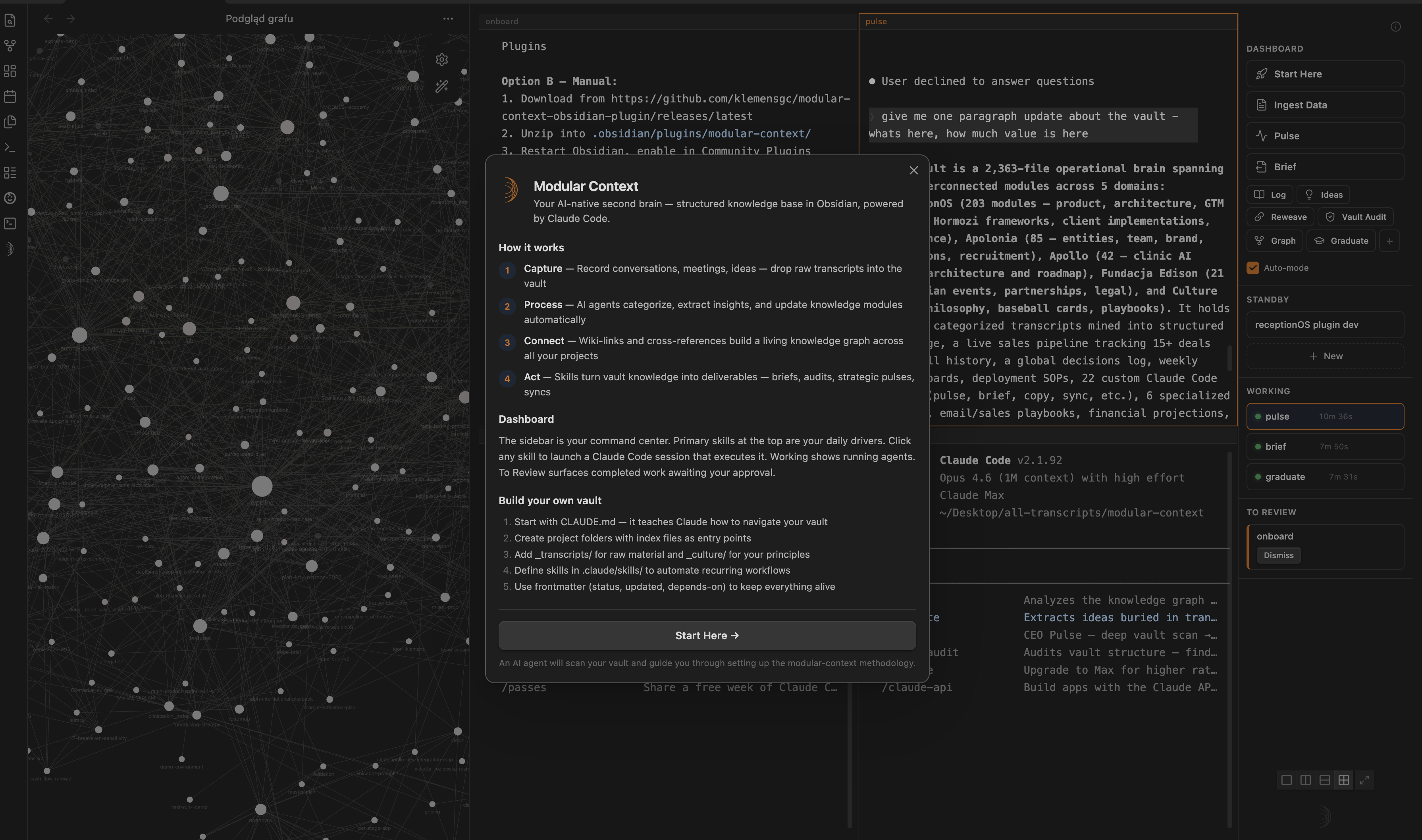
Your Obsidian vault as LLM-native knowledge base + multi-account Google Workspace (Gmail, Calendar, Drive, Docs, Sheets, Slides) exposed as 25 MCP tools for Claude Code. Local-first, encrypted, no telemetry.




What is this?
Two things in one plugin:
LLM Knowledge Base — Your Obsidian vault structured as Sources → Wiki → Schema (Karpathy-aligned framing). Multi-terminal Claude Code + Codex with skills sidebar, agent tracking, session glyphs. Your second brain seen by LLMs as a first-class context.
G-Suite MCP Server — Multi-account Google Workspace (Gmail, Calendar, Drive, Docs, Sheets, Slides) exposed as 25 native tools for Claude Code (
gmail_search,drive_list_files,docs_create_doc,sheets_append_row,slides_read_presentation, …). OAuth 2.0 + PKCE desktop flow, tokens encrypted via ElectronsafeStorage(OS keychain), no telemetry, no cloud.
One install, one onboarding, two productivity frontiers.
🏢 The AI Company Stack
The plugin isn't just a terminal + an MCP server — paired with the skills library it's a whole AI company stack running on one workflow: your vault is the brain, Claude Code is the operator, and each layer plugs into the next.
| Layer | What it does | Skills |
|---|---|---|
| 🎙️ Notetaker | Turn raw transcripts, calls and tweets into structured, tagged knowledge | process-transcripts, xdaily, graduate |
| 🧠 Self-healing Knowledge Base | The vault keeps itself current — reweaves stale modules, fixes links, audits structure, syncs sibling vaults | reweave, vault-audit, graph, sync, pulse |
| 📡 Communication layer | One read across mail, WhatsApp and Google Workspace — what's happening and what belongs to you | comms-review, whatsapp-digest, gsuite-analysis |
| 📊 CRM / ops | Ready skills that connect to ClickUp — review your sales funnel and pull your weekly plan straight from the workspace | clickup-review, review-core, tasklist |
Each layer is independently useful; together they run a one-person company on autopilot. Skills install from the in-app library (dependencies auto-resolve).
Architecture
   ┌──────────────────────────────────────────────────────────────────┐
   │  YOUR VAULT — your full context, structured so an LLM works on      │
   │  YOUR reality: projects · people · decisions · history              │
   │                                                                     │
   │  Sources  →  Wiki  →  Schema                                        │
   │  raw input   linked notes   structured & typed (LLM-navigable)      │
   └──────────────────────▲────────────────────────▲───────────────────┘
                    reads  │                        │  writes back
   ╔═══════════════════════╧════════════════════════╧═══════════════════╗
   ║              🦀  CLAUDE CODE  (the operator)  🦀                    ║
   ║                                                                     ║
   ║   ── works on your notes ──        ── works with the world ──       ║
   ║   🦀 Capture     🦀 Keep current    🦀 Communicate  🦀 Operate       ║
   ║   calls & files  fix outdated       read & send      review &       ║
   ║   → notes        notes + links      email·WhatsApp    act (CRM)      ║
   ╚══════════════════════════════════════════╦═════════════════╦═══════╝
                                              ▼                 ▼
   COMMUNICATIONS  (read + send)
   ├─ Gmail       ← search          → send / draft / labels
   └─ WhatsApp    ← read messages     (read-only · macOS)

   OPERATIONS  (read + write)
   └─ ClickUp     ← sales funnel · your tasks · weekly plan  → update · batch actions

   WORKSPACE  (Google · multi-account)
   ├─ Calendar  ← list           → create / update / delete
   ├─ Drive     ← list / search  → download / upload
   ├─ Docs      ← read           → create / update
   ├─ Sheets    ← read           → write / append
   └─ Slides    ← read           → create / add slide

   ── set up by ──▶  Modular Context Plugin  (installs skills · handles Google login)
Architecture decisions (full ADRs in docs/adrs/):
- ADR-001 — Hybrid OAuth: Quick Connect (shared client) + BYO (user-provided client)
- ADR-002 — Electron
safeStoragetoken storage (OS keychain) - ADR-003 + addendum — MCP server stdio lifecycle + plaintext credentials sidecar
- ADR-005 — Multi-account storage model (per-account folder + index)
Features
LLM Knowledge Base
- Multi-terminal split layouts — single, side-by-side, stacked, 2×2, 2×3, 2×4. Up to 8 sessions.
- Claude Code + Codex — toggle AI provider in settings; auto-launch on new terminal.
- Skills sidebar — 3 primary skills (full-width), rest in secondary grid. One-click launches.
- Agent tracker — Working / To Review / Standby states per session.
- Session glyphs — unique geometric shape per terminal. Skills inherit their icon.
- Compact mode — 48px icon-only sidebar, maximum terminal real estate.
- Fullscreen overlay — terminal fills Obsidian; sidebar docks right.
Escto exit. - Real PTY — zsh in a pseudo-terminal, not a basic runner.
- Wiki-link autocomplete —
[[inside terminal searches vault notes. - Drag-and-drop — Finder / Obsidian → terminal as shell-escaped paths.
- Session persistence — tab names, glyphs, layouts survive restarts.
- Smart Session Restore — on reopen, picker modal classifies saved sessions (Needs attention / Idle / Archive) instead of silent auto-resume. You choose what materializes — no accidental skill re-runs.
- Auto-onboarding — first install triggers a setup agent that scaffolds your vault.
G-Suite MCP Server (v2.1 — 25 tools)
- Multi-account — unlimited Google accounts in parallel (Testing mode: up to 100 test users per account)
- 25 tools for Claude Code across 6 Workspace products (Gmail ×4, Calendar ×6, Drive ×4, Docs ×3, Sheets ×5, Slides ×3 — see table below)
- Zero telemetry — no metrics, no crash reports, no external calls beyond OAuth + Google API
- Local-first — tokens encrypted via OS keychain (macOS Keychain / Windows DPAPI / Linux libsecret via
libsecret) - Auto-refresh — 50-minute timer per account, 5-minute expiry buffer
- Error taxonomy —
TOKEN_EXPIRED,ACCOUNT_NOT_FOUND,SCOPE_OUTDATED,RATE_LIMITED,PERMISSION_DENIED,QUOTA_EXCEEDED,NETWORK_ERROR - Hot reload — server re-reads credentials per tool call, zero-downtime refresh
3 primary skills (post-onboarding)
| Skill | Purpose | Uses |
|---|---|---|
| Synthesise Files | Turn raw files (transcripts, notes, backlog) into vault modules — categorize, tag, update, reweave neighbors | Your vault, optional _transcripts-backlog/ |
| WhatsApp Digest | Analyze WhatsApp groups for action items, blindspots, staleness vs vault | macOS WhatsApp.app |
| Gmail + G-Suite | Inbox sweep, stale follow-ups, calendar gap analysis, meeting prep, doc extraction, sheet logging, deck prep | MCP tools below |
All three write artifacts to _workspace/{YYYY-MM}/w{N}/. Secondary skills (Pulse, Brief, Log, Reweave, Graph, Graduate, Ideas, Vault-Audit) available in sidebar grid.
25 MCP tools
Gmail (4)
| Tool | Purpose |
|---|---|
gmail_search |
Query with Gmail syntax (is:unread, from:X, after:2026-04-01). Optional body extraction. |
gmail_draft |
Create draft — not sent. User opens webUrl in Gmail UI to send. |
gmail_send |
Send immediately. Skip draft for trusted, scripted sends. |
gmail_modify_labels |
Add/remove labels — system presets (INBOX, UNREAD, STARRED, IMPORTANT, SPAM, TRASH) + custom labels by name. |
Calendar (6)
| Tool | Purpose |
|---|---|
calendar_list_calendars |
Enumerate all calendars user has access to. |
calendar_list_events |
Events in time range. |
calendar_create_event |
Create event (sendUpdates: "none" default — no auto-invite spam). |
calendar_update_event |
Patch existing (only provided fields changed). |
calendar_delete_event |
Delete. |
calendar_freebusy |
Query busy windows across multiple calendars — ideal for "find time to meet". |
Drive (4)
| Tool | Purpose |
|---|---|
drive_list_files |
List with Drive query syntax filter, pagination, ordering. |
drive_search |
Full-text search across file content + names. Optional mimeType filter. Excludes trashed. |
drive_download_file |
Get file content. Google-native files auto-exported as text; binary returned as base64. |
drive_upload_file |
Create file with content + optional parentFolderId. Supports utf-8 / base64. |
Docs (3)
| Tool | Purpose |
|---|---|
docs_read_doc |
Plain-text extraction from doc body (walks paragraphs + tables). |
docs_create_doc |
New doc with title + optional initialContent. |
docs_update_doc |
mode: "append" (at document end) or mode: "replace" (wipe body + insert). |
Sheets (5)
| Tool | Purpose |
|---|---|
sheets_list_sheets |
Spreadsheet metadata + list of sheet tabs. |
sheets_read_range |
Read A1-notation range. Supports majorDimension + valueRenderOption. |
sheets_write_range |
Overwrite values at range. USER_ENTERED parses formulas + dates. |
sheets_append_row |
Append row(s) to data region end. |
sheets_create_spreadsheet |
New spreadsheet with optional initial sheet titles. |
Slides (3)
| Tool | Purpose |
|---|---|
slides_read_presentation |
Metadata + plain-text summary per slide. |
slides_create_presentation |
New presentation with title. |
slides_add_slide |
Insert slide with layout (BLANK / TITLE / TITLE_AND_BODY / SECTION_HEADER / TITLE_AND_TWO_COLUMNS / CAPTION_ONLY). |
Every tool accepts optional account param (email, case-insensitive). Omit → primary account. Unknown email → ACCOUNT_NOT_FOUND error.
OAuth scopes required (10 total): gmail.modify, calendar, drive.file, drive.metadata.readonly, documents, spreadsheets, presentations, plus OIDC openid email profile.
Google Cloud setup: Enable 6 APIs in your OAuth project — Gmail, Calendar, Drive, Docs, Sheets, Slides. Missing API returns PERMISSION_DENIED with direct enable link.
Install
Plugin
Requires Obsidian ≥ 0.15 and macOS (Linux + Windows may work; untested).
Via BRAT (Beta Reviewer plugin, recommended for now):
- Install BRAT from Community Plugins
Cmd+P→ "BRAT: Add a beta plugin" →klemensgc/modular-context-obsidian-plugin- Enable in Settings → Community plugins
Manual:
- Download
main.js,manifest.json,styles.css,mcp-server.jsfrom latest release - Copy to
<vault>/.obsidian/plugins/modular-context/ - Enable plugin in Settings → Community plugins → Modular Context
MCP server
Auto-installed on first Google Workspace: Connect. Plugin copies bundled binary to ~/.modular-context/mcp-google/dist/index.js (~100 MB one-time).
Repo structure
Monorepo with three packages:
modular-context-obsidian-plugin/
├── packages/
│   ├── plugin/        ← Obsidian plugin (main.ts, manifest, features + MCP client glue)
│   ├── mcp-google/    ← standalone MCP server (25 Google Workspace tools, Node)
│   ├── shared/        ← portable types + AgentTracker + PTY helper + UI primitives
│   └── app/           ← experimental standalone Electron app (WIP, not shipped)
├── README.md          ← you are here
├── banner.png
└── package.json       ← monorepo scripts (build:shared → build:mcp-google → build:plugin)
- packages/plugin/CHANGELOG.md — user-facing release notes (v1.0 → v2.0)
- packages/plugin/RELEASE-v2.0.0.md — v2.0 release highlights
- packages/mcp-google/README.md — MCP server docs (25 tools, accounts, env contract)
- packages/mcp-google/CHANGELOG.md — MCP server version history
- Skill library: separate repo klemensgc/modular-context-skills — plugin auto-syncs
Connect Google Workspace
Two paths:
- Quick Connect (no GCP setup) — use the shared OAuth client bundled with the pre-built release. Comment your email on #3 — Quick Connect: request test-user access to be added as a test user (usually within 24h). Then skip to step 5 below.
- BYO (your own GCP project) — full control, no test-user limit. Follow all 6 steps below.
6 steps (BYO path)
Create GCP OAuth Client
- Google Cloud Console → new project (e.g.
modular-context-gcp) - Enable APIs: Gmail API, Google Calendar API
- OAuth consent screen → External, Testing mode → add scopes:
gmail.modify,calendar, plusopenid,email,profile - Add yourself as test user
- Create credentials → OAuth 2.0 Client ID → Desktop app
- Copy Client ID + Client Secret
- Google Cloud Console → new project (e.g.
Fill
.env.localin the plugin's build folder:GOOGLE_OAUTH_CLIENT_ID=... GOOGLE_OAUTH_CLIENT_SECRET=...Rebuild (
npm run buildinpackages/plugin) if self-building. Pre-built release uses the shared Quick Connect client.Reload plugin —
Cmd+P→ "Reload app without saving"Connect —
Cmd+P→ "Google Workspace: Connect (or add account)" → browser OAuth → authorize → doneAdd more accounts — "Google Workspace: Add another account" any time
The plugin writes .mcp.json to your vault root + per-account sidecars to ~/.modular-context/mcp-google/accounts/{filename}/. Restart Claude Code session to pick up the MCP server.
Plugin commands
| Command | Purpose |
|---|---|
Google Workspace: Connect (or add account) |
Launch OAuth flow for new/additional account |
Google Workspace: Add another account |
Alias for above — clearer intent |
Google Workspace: Reconnect (upgrade scopes) |
Nuke tokens, re-auth all accounts with current scope set |
Google Workspace: Disconnect all accounts |
Remove all credentials + .mcp.json entry |
Google Workspace: Status |
List connected accounts, expiry times, scope status |
Google Workspace: Show MCP server logs |
Open ~/.modular-context/mcp-google/logs/server.log |
Plus 5+ non-Google commands for terminal / skill management. See Command Palette.
Security
- Tokens encrypted via Electron
safeStorage(OS keychain). Never leave disk in plaintext. - Credentials sidecar for MCP server: plaintext JSON at
0600perms in user-scope folder (comparable to~/.aws/credentials,~/.config/gcloud/). Plugin may re-encrypt in v2.1 (see ADR-003 addendum). - No telemetry. No crash reports. No metrics. Zero phone-home.
- Logs scrub tokens, emails, subjects via regex on every line.
- Multi-account isolation. Each account has separate credentials; MCP server honors
accountparam strictly.
Full threat model in docs/adrs/ADR-003-addendum-shared-state.md.
What's new in v2.0
- 3 primary skills reorganization —
Synthesise Files(was "Ingest Data"),WhatsApp Digest,Gmail + Calendar - New
gsuite-analysisskill — orchestrates 10 MCP tools with 4 playbook patterns - Graduated v1.5 / v1.6 / v1.7 beta milestones: OAuth + storage + MCP server + multi-account + full control
- OAuth scope upgrade:
gmail.modify+calendarfull (replacesgmail.readonly,gmail.send,calendar.events) mcp-google-workspace@ 1.1.0 stable (from 1.1.0-beta.1)- New tools:
gmail_send,gmail_modify_labels,calendar_list_calendars,calendar_update_event,calendar_delete_event,calendar_freebusy - Smart Session Restore Picker — replaces silent auto-resume on plugin reopen. Modal classifies saved sessions into Needs attention / Idle / Archive buckets; you pick what materializes. No accidental skill re-runs, no hidden respawns.
Full list in packages/plugin/CHANGELOG.md.
Troubleshooting
| Issue | Fix |
|---|---|
| Notice: "Reconnect required for {email}" | Google Workspace: Reconnect (upgrade scopes) — scopes changed |
TOKEN_EXPIRED from MCP tool |
User revoked access or refresh token rotated — Reconnect |
ACCOUNT_NOT_FOUND |
Account not connected — Add another account |
| MCP server not visible in Claude Code | Restart Claude Code session. .mcp.json loaded at session start. |
| Plugin reloaded but old behavior | Hard reload: Cmd+P → "Reload app without saving" (not just disable+enable) |
| Server logs empty | Normal — server only runs when Claude Code calls a tool. Not a daemon. |
Contributing
Plugin: modular-context-obsidian-plugin
Skills library: modular-context-skills (separate repo, auto-synced)
PRs welcome. Issues welcome. No support contract, but I read everything.
License
MIT © klemensgc / receptionOS
Installing Modular Context Obsidian Plugin
This server has no published package — it is built from source. Open the repository and follow its README.
▸ github.com/klemensgc/modular-context-obsidian-pluginFAQ
Is Modular Context Obsidian Plugin MCP free?
Yes, Modular Context Obsidian Plugin MCP is free — one-click install via Unyly at no cost.
Does Modular Context Obsidian Plugin need an API key?
No, Modular Context Obsidian Plugin runs without API keys or environment variables.
Is Modular Context Obsidian Plugin hosted or self-hosted?
Self-hosted: the server runs locally on your machine via the install command above.
How do I install Modular Context Obsidian Plugin in Claude Desktop, Claude Code or Cursor?
Open Modular Context Obsidian Plugin on unyly.org, pick your client tab (Claude Desktop, Claude Code, Cursor) and press Install — the config is generated automatically, no JSON editing.
Related MCPs
Gmail
Read, send and search emails from Claude
 by Google
Slack
Send, search and summarize Slack messages
 by Slack
Runbear
No-code MCP client for team chat platforms, such as Slack, Microsoft Teams, and Discord.
Discord Server
A community discord server dedicated to MCP by [Frank Fiegel](https://github.com/punkpeye)
Compare Modular Context Obsidian Plugin with
Not sure what to pick?
Find your stack in 60 seconds
Author?
Embed badge for your README
Browse similar
All communication MCPs