
MultiviewGrid
FreeNot checkedTactical multi-stream command center. YouTube, Twitch, HLS, DASH, RTSP, local files — drag, resize, and control from any device. Built with Electron + React.

About
Tactical multi-stream command center. YouTube, Twitch, HLS, DASH, RTSP, local files — drag, resize, and control from any device. Built with Electron + React.
README

Every feed. One wall. Full control.
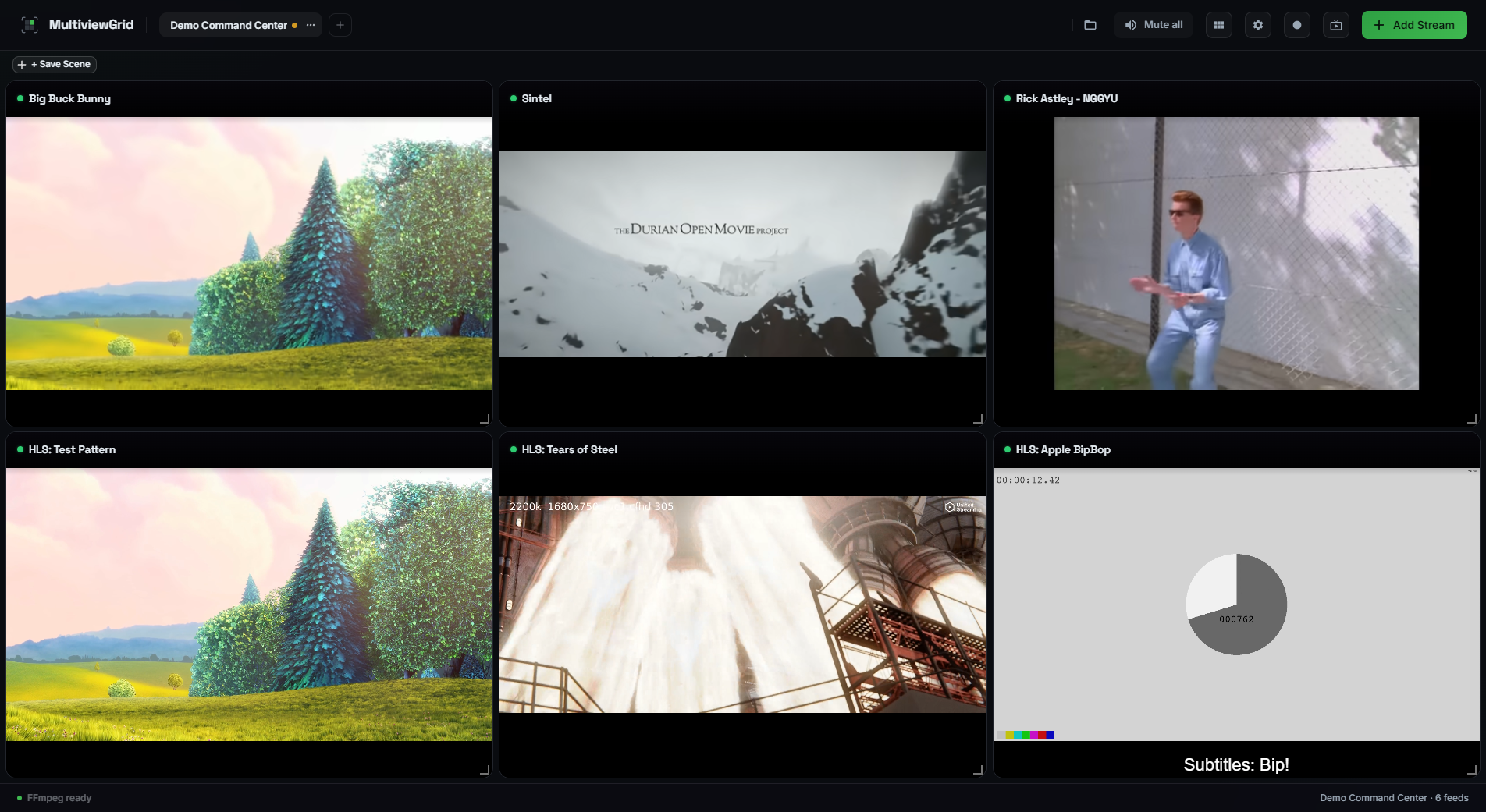
MultiviewGrid is a tactical multi-stream command center. Drag and drop live streams — YouTube, Twitch, HLS, DASH, RTSP cameras, local files — into a flexible drag-to-resize grid. Arrange them however you want, then control the entire wall from your phone using the built-in REST API and web dashboard. Built with Electron, React, and TypeScript.
Forked from LordKnish/StreamGrid (MIT) and heavily extended: remote command center dashboard, REST/SSE control API, scenes, browser tiles, capture tiles, and the Signal design system.
📚 Documentation: API Reference | Bruno API Collection | MCP Server
✨ Features
- Layouts that fill the window:
- Build ANY arrangement — from 2 feeds to 20+
- Drag to reorder and grab a corner to resize in real time
- One-click Auto-arrange packs every feed edge-to-edge, stretching tiles to fill the screen at the best fit for your window
- Grid management:
- Save unlimited grid presets and switch instantly (Ctrl/Cmd+1–9, Ctrl/Cmd+Tab)
- Rename, duplicate, export, and delete from the All grids view
- Import a shared grid straight from the + menu, or export yours to send to a friend
- The quick switcher (Ctrl/Cmd+K) jumps between grids in a keystroke
- Stream platform support:
- Local files — play video straight from your computer
- YouTube — standard videos, live streams, and shorts
- Twitch — channel live streams
- RTSP / RTSPS — IP cameras and streaming sources with automatic FFmpeg transcoding (auth, low-latency HLS, multiple concurrent streams, auto-retry)
- HLS — HTTP Live Streaming sources
- MPEG-DASH — Dynamic Adaptive Streaming over HTTP
- Sound management:
- Global mute/unmute for the whole wall
- Per-stream audio controls
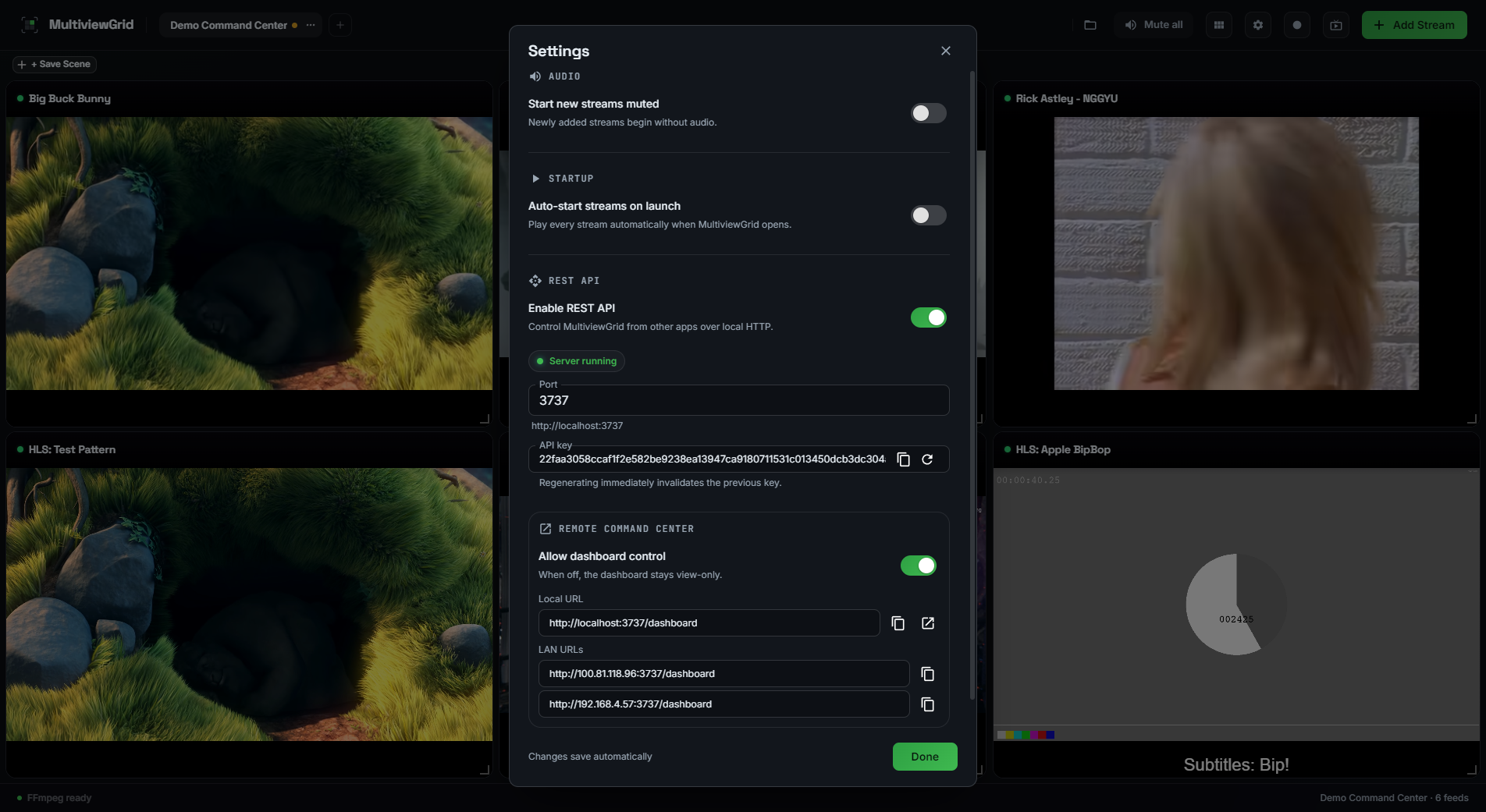
- Option to start streams muted
- Chat integration:
- YouTube and Twitch live chat as draggable, resizable panels
- Automation:
Auto-start all streams on launch (with configurable delay)
Automatic retry for failed streams with exponential backoff
REST API for full programmatic control — add/update/remove streams and manage grids remotely, with API-key auth and rate limiting
MCP server for agent-driven control — Claude, HAG, or any MCP client can add streams, trigger playback, and capture screenshots
M3U / M3U8 playlist import with automatic arrangement
- Persistent everything: aggressive auto-save on every meaningful change
- Cross-platform: Windows, macOS, and Linux
🚀 Getting Started
Option 1: Download Pre-built Application (Recommended)
- Visit the Releases section
- Download the latest version for your platform:
- Windows:
multiviewgrid-3.0.0-win-x64.exe - macOS (Intel):
multiviewgrid-3.0.0-mac-x64.dmg - macOS (Apple Silicon):
multiviewgrid-3.0.0-mac-arm64.dmg - Linux:
multiviewgrid-3.0.0-linux-x64.AppImage
- Windows:
- Install and run MultiviewGrid
Option 2: Build from Source
Prerequisites
- Node.js 18.x or higher
- npm 9.x or higher
- FFmpeg (required for RTSP streaming support)
Installing FFmpeg
Windows:
- Download FFmpeg from ffmpeg.org
- Extract to
C:\ffmpeg - Add
C:\ffmpeg\binto your system PATH - Or use Chocolatey:
choco install ffmpeg
macOS:
brew install ffmpeg
Linux (Ubuntu/Debian):
sudo apt update
sudo apt install ffmpeg
Linux (Fedora/RHEL):
sudo yum install ffmpeg
Steps
- Clone the repository
git clone https://github.com/KJ5IRQ/MultiviewGrid.git
cd MultiviewGrid
- Install dependencies
npm install
- Run in development mode (for testing/development)
npm run dev
- Package the application (for distribution)
npm run dist:win        # Windows (NSIS installer)
npm run dist:mac:x64    # macOS (Intel)
npm run dist:mac:arm64  # macOS (Apple Silicon)
npm run dist:linux      # Linux (AppImage + deb)
To produce an unpacked build for the current platform without an installer:
npm run build:unpack
- Find your built application in the
dist/directory, e.g.:- Windows:
dist/multiviewgrid-3.0.0-win-x64.exe - macOS:
dist/multiviewgrid-3.0.0-mac-*.dmg - Linux:
dist/multiviewgrid-3.0.0-linux-x64.AppImage
- Windows:
📹 RTSP Stream Support
MultiviewGrid supports RTSP (Real Time Streaming Protocol) streams from IP cameras, security systems, and other RTSP sources.
Requirements
- FFmpeg must be installed on your system (see installation instructions above)
- RTSP stream URL from your camera or source
RTSP URL Format
rtsp://[username:password@]host[:port]/path
Examples:
rtsp://192.168.1.100:554/stream1
rtsp://admin:[email protected]/live
rtsps://secure-camera.example.com/stream
How It Works
- MultiviewGrid detects RTSP URLs automatically
- FFmpeg transcodes the RTSP stream to HLS format in real-time
- The HLS stream is served locally and played in the app
- Low latency (~2-3 seconds) with automatic retry on connection loss
Adding an RTSP Stream
- Click the Add Stream button
- Enter your RTSP URL in the Stream URL field
- The app will show "RTSP stream (requires FFmpeg)" if detected
- Add a name and optional logo
- Click Add Stream
Troubleshooting RTSP Streams
"FFmpeg not installed" error:
- Install FFmpeg using the instructions above
- Restart MultiviewGrid after installation
- Verify FFmpeg is in your system PATH:
ffmpeg -version - The status bar shows whether FFmpeg was detected on launch
Stream fails to load:
- Verify the RTSP URL is correct
- Check if authentication is required (username/password)
- Ensure your firewall allows RTSP connections
- Try using TCP transport:
rtsp://camera?tcp
High latency or buffering:
- RTSP streams have inherent 2-3 second latency due to HLS transcoding
- Check your network connection to the camera
- Reduce the number of concurrent RTSP streams
Stream stops after a while:
- MultiviewGrid automatically retries failed streams (up to 3 times)
- Check camera timeout settings
- Verify network stability
Performance Tips
- Limit concurrent RTSP streams to 3-4 for best performance
- Use a wired network connection for cameras when possible
- Close unused RTSP streams to free resources
- RTSP transcoding uses ~100MB RAM per stream
🛠 Tech Stack
- Framework: Electron with electron-vite
- Frontend:
- State Management: Zustand
- Video Playback & Streaming:
- React Player - Multi-platform video support
- HLS.js - HLS streaming support
- dash.js - MPEG-DASH streaming support
- YouTube Player API integration
- Twitch Player API integration
- Layout: React Grid Layout
🏗 Project Structure
MultiviewGrid/
├── src/
│   ├── main/                 # Electron main process
│   │   └── index.ts         # Main process entry point
│   ├── preload/             # Preload scripts for IPC
│   │   ├── index.ts         # Preload implementation
│   │   └── index.d.ts       # TypeScript definitions
│   ├── renderer/            # React application
│   │   ├── src/
│   │   │   ├── assets/      # Images, icons, styles
│   │   │   ├── components/  # React components
│   │   │   │   ├── MultiviewGrid.tsx
│   │   │   │   ├── StreamCard.tsx
│   │   │   │   └── ...
│   │   │   ├── hooks/       # Custom React hooks
│   │   │   ├── store/       # Zustand state management
│   │   │   ├── theme.ts     # Design tokens + MUI theme
│   │   │   ├── types/       # TypeScript type definitions
│   │   │   ├── utils/       # Helpers (grid import, parsing)
│   │   │   ├── workers/     # Web workers
│   │   │   └── App.tsx      # Main React component
│   │   └── index.html       # HTML entry point
│   └── shared/              # Shared types between processes
│       └── types/
├── resources/               # Application resources
│   ├── icon.png            # App icon
│   └── icon.svg            # App icon (vector)
├── dist/                   # Built applications (after build)
├── out/                    # Compiled TypeScript (generated)
├── electron.vite.config.ts # Vite configuration
├── package.json           # Project dependencies
└── tsconfig.json          # TypeScript configuration
📋 Changelog
Version 3.0.0 (Latest)
Layout Engine & Grid Management
🚀 New & Improved
- Window-filling auto-arrange — a rebuilt layout engine that picks the best row/column split for the current window and stretches every tile edge-to-edge, with no empty bands or letterboxing between feeds
- Reliable grid management — fixed renaming in the All grids view, corrected grid duplication, and a redesigned, faster All grids browser with search
- Import from the + menu — right-click the new-grid + button to import a shared grid; import is also available from the All grids view
- Streamlined auto-arrange — the confirmation is now a simple prompt
- Live status bar — shows FFmpeg readiness, the active grid, and feed count
🐛 Bug Fixes
- Grids now stay in sync across the tab strip, quick switcher, and All grids view after rename/duplicate/delete/import
- Layout calculations measure the real canvas, so feeds fit the window accurately
Version 2.0.0
Major Feature Release - Automation & Advanced Controls
🚀 New Features
- REST API - Full programmatic control with authentication and rate limiting
- M3U Playlist Import - Import playlists with intelligent auto-arrangement
- RTSP Stream Support - Production-ready IP camera streaming with FFmpeg transcoding
- Sound Management System - Global and per-stream audio controls
- Auto-Start Streams - Automatically play all streams on launch
- Auto-Restart Failed Streams - Automatic retry with exponential backoff
- Auto-Arrange Grid - Intelligent grid layout
📚 Documentation
- Complete REST API documentation (docs/API.md)
- Bruno API test collection (bruno/README.md)
- Comprehensive RTSP setup guide in README
🐛 Bug Fixes
- Fixed Linux auto-updater errors
- Improved CSP handling for Twitch embeds
- Enhanced error handling across all components
Version 1.2.0
Major Performance Update & Enhanced Features
🚀 Performance Optimizations
- Removed artificial loading delays - Faster application startup
- Virtual grid rendering - Implemented react-window for efficient handling of large grids
- Player pool system - Reuses video player instances to optimize memory usage
- Debounced state updates - Reduced I/O operations with intelligent 5-second intervals
- Web worker integration - Layout calculations now run in separate thread for UI responsiveness
- Lazy loading - Chat components load on-demand for faster initial render
- Code splitting - Optimized bundle sizes with manual chunking strategy
- Performance monitoring - Built-in hooks to track and analyze app performance
💾 Enhanced Saving System
- Aggressive auto-save - Immediate saves on all critical operations:
- Stream addition/removal
- Stream property updates
- Layout changes (resize/reposition)
- Grid switching
- Application quit
- Browser refresh/close
🎯 New Features
- Local file support - Play video files directly from your computer
- Grid management system - Save, load, and organize multiple grid configurations
- Import grid configurations - Share and import grid setups from JSON files
- Auto-generated avatars - Streams without logos get unique identicon avatars
- Comprehensive error handling - Improved error boundaries and user feedback
🐛 Bug Fixes
- Fixed grid rename functionality
- Resolved Twitch streams not starting (added required parent parameter)
- Improved drag functionality and text selection handling
- Fixed duplicate logo URL issues
Version 1.1.0
Multi-Platform Streaming Support
- Added DASH streaming protocol support
- Integrated YouTube live chat functionality
- Added Twitch stream and chat support
- Improved URL handling and stream type detection
- Enhanced drag-and-drop functionality
- Added GitHub version checking with update alerts
Version 1.0.0
Initial Release
- Core multi-stream grid functionality
- Drag-and-drop stream repositioning
- Resizable stream windows
- Stream import/export capabilities
- Cross-platform support (Windows, macOS, Linux)
- HLS streaming support
- Persistent layout saving
🤝 Contributing
- Fork the repository
- Create your feature branch (
git checkout -b feature/amazing-feature) - Commit your changes (
git commit -m 'Add some amazing feature') - Push to the branch (
git push origin feature/amazing-feature) - Open a Pull Request
📄 License
This project is licensed under the MIT License - see the LICENSE file for details.
Installing MultiviewGrid
This server has no published package — it is built from source. Open the repository and follow its README.
▸ github.com/KJ5IRQ/MultiviewGridFAQ
Is MultiviewGrid MCP free?
Yes, MultiviewGrid MCP is free — one-click install via Unyly at no cost.
Does MultiviewGrid need an API key?
No, MultiviewGrid runs without API keys or environment variables.
Is MultiviewGrid hosted or self-hosted?
Self-hosted: the server runs locally on your machine via the install command above.
How do I install MultiviewGrid in Claude Desktop, Claude Code or Cursor?
Open MultiviewGrid on unyly.org, pick your client tab (Claude Desktop, Claude Code, Cursor) and press Install — the config is generated automatically, no JSON editing.
Related MCPs
ARA
Generate images, video and audio from any AI agent — one connector.
 by ARA
Omni Video
An MCP server that transforms LLM-enabled IDEs into professional video editors by pre-processing footage into text proxies, generating motion graphics via HTML/
 by buildwithtaza
YouTube
Transcripts, channel stats, search
 by YouTube
EverArt
AI image generation using various models.
 by modelcontextprotocol
Compare MultiviewGrid with
Not sure what to pick?
Find your stack in 60 seconds
Author?
Embed badge for your README
Browse similar
All media MCPs