
Nautobot
FreeNot checkedA Model Context Protocol (MCP) server for interacting with Nautobot APIs using semantic search and dynamic API requests.

About
A Model Context Protocol (MCP) server for interacting with Nautobot APIs using semantic search and dynamic API requests.
README
CI Documentation GitHub release (latest by date) GitHub Python Version Code style: ruff
A Model Context Protocol (MCP) server for interacting with Nautobot APIs using semantic search and dynamic API requests. This server provides intelligent access to Nautobot instances and a comprehensive knowledge base of Nautobot-related repositories.
📖 Documentation
🚀 Features
Core Capabilities
- Dynamic API Access: Perform CRUD operations on any Nautobot API endpoint
- Semantic Endpoint Discovery: Find relevant API endpoints using natural language queries
- Knowledge Base Search: Access indexed content from official Nautobot repositories
- Multi-Environment Support: Connect to different Nautobot instances (dev, staging, prod)
- Smart Caching: Efficient ChromaDB-powered vector storage with Git-based updates
API Tools
nautobot_dynamic_api_request: Execute any HTTP method against Nautobot APIsnautobot_openapi_api_request_schema: Discover API endpoints through semantic searchnautobot_kb_semantic_search: Search through indexed Nautobot documentation and code- Repository management tools for maintaining the knowledge base
📋 Prerequisites
- Python 3.11+ (< 3.12)
- Access to a Nautobot instance
- Git (for repository cloning and updates)
- GitHub token (for accessing repositories)
Design Overview
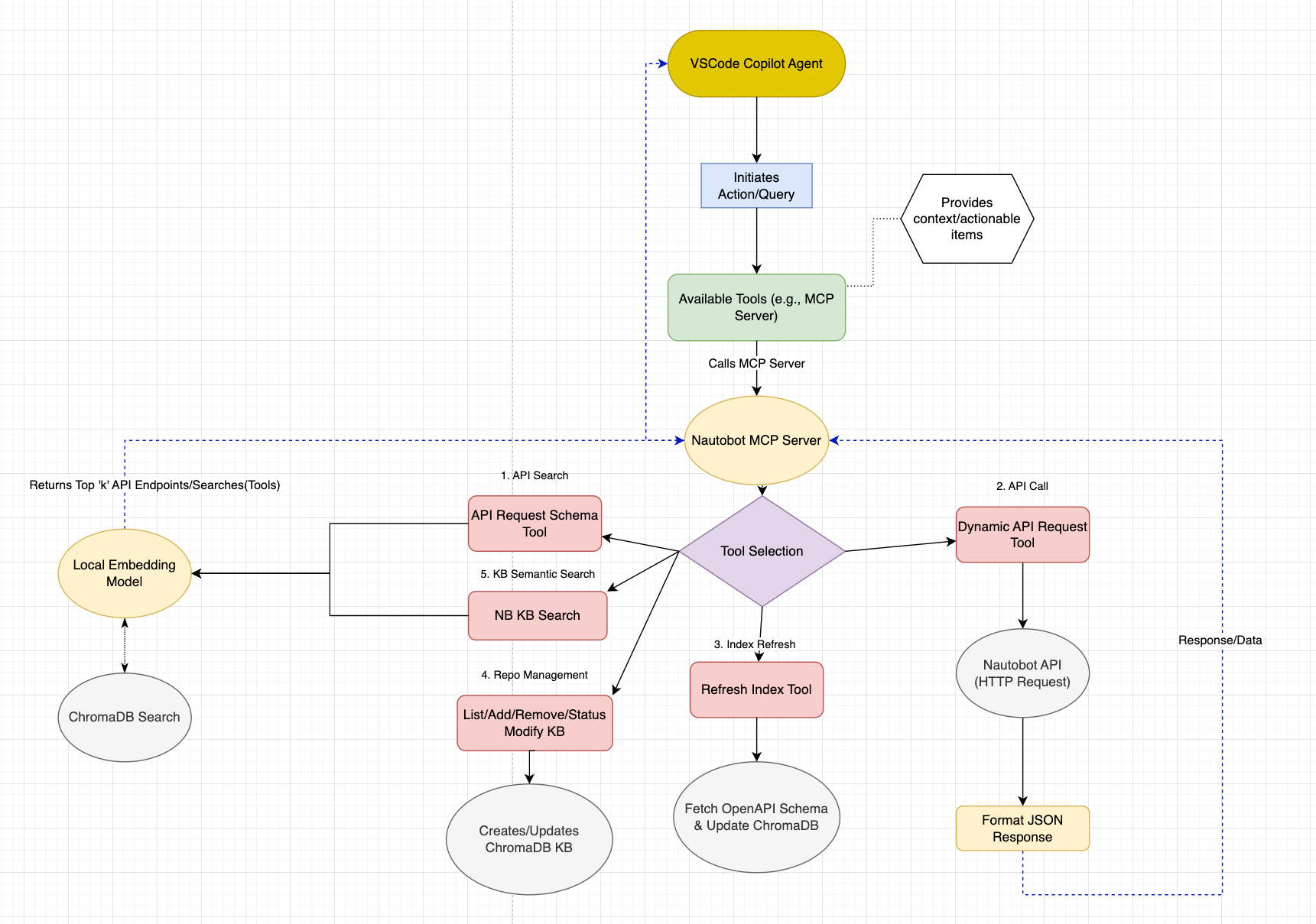
🛠️ Installation
Option 1: Docker Installation (Recommended)
The easiest way to run the Nautobot MCP server is using Docker:
Clone the repository:
git clone <repository-url>
cd nautobot_mcp
Configure environment variables:
cp .env.example .env
# Edit .env with your configuration
Run with Docker Compose:
# For stdio mode (default)
docker compose up -d

# For HTTP mode
MCP_TRANSPORT=http MCP_PORT=8000 docker compose up -d
Option 2: Local Python Installation
Clone the repository:
git clone <repository-url>
cd nautobot_mcp
Install dependencies:
# Using uv (recommended)
uv sync

# Or using pip
pip install -e .
Configure environment variables:
cp .env.example .env
# Edit .env with your configuration
⚙️ Configuration
Environment Variables
Create a .env file with the following variables:
# Nautobot API Configuration
NAUTOBOT_TOKEN=your_nautobot_api_token
NAUTOBOT_ENV=local  # Options: local, nonprod, prod

# Environment-specific URLs and tokens
NAUTOBOT_NONPROD_BASE_URL=https://nautobot-nonprod.example.com/
NAUTOBOT_NONPROD_TOKEN=your_nonprod_token
NAUTOBOT_PROD_BASE_URL=https://nautobot.example.com/
NAUTOBOT_PROD_TOKEN=your_prod_token

# GitHub Configuration (for knowledge base)
GITHUB_TOKEN=your_github_token

# Optional Configuration
SSL_VERIFY=False  # Set to True for production
POSTHOG_API_KEY=disable  # Analytics (optional)
Repository Configuration
The knowledge base automatically indexes official Nautobot repositories. You can customize this by editing:
config/repositories.json- Official and community repositoriesconfig/user_repositories.json- Your custom repositories
Example repository configuration:
{
  "name": "nautobot/nautobot",
  "description": "Core Nautobot application",
  "priority": 1,
  "enabled": true,
  "branch": "develop",
  "file_patterns": [".py", ".md", ".txt", ".rst", ".yaml", ".yml"]
}
Configuration Options Reference
| Environment Variable | Default | Description |
|---|---|---|
NAUTOBOT_TOKEN |
`` | API token for authentication |
NAUTOBOT_ENV |
local |
Environment selection (local/nonprod/prod) |
GITHUB_TOKEN |
"" |
GitHub token for repository access |
API_PREFIX |
nautobot_openapi |
MCP tool prefix |
SERVER_NAME |
any_openapi |
MCP server name |
SERVER_VERSION |
0.2.0 |
Server version |
LOG_LEVEL |
INFO |
Logging level |
EMBEDDING_MODEL |
all-MiniLM-L6-v2 |
Sentence transformer model |
DEFAULT_SEARCH_RESULTS |
5 |
Default number of search results |
POSTHOG_API_KEY |
disable |
PostHog analytics API key |
API_TIMEOUT |
10 |
Request timeout in seconds |
SSL_VERIFY |
True |
SSL certificate verification |
🚀 Usage
Starting the MCP Server
Docker Usage
stdio mode (for MCP clients like Claude Desktop, VS Code, etc.):
# Using docker compose
docker compose up -d

# Or using docker run
docker run -d \
  --name nautobot-mcp \
  --env-file .env \
  -v nautobot-mcp-chroma:/app/backend/chroma_db \
  -v nautobot-mcp-models:/app/backend/models \
  nautobot-mcp:latest --mode stdio
HTTP mode (for web-based integrations):
# Using docker compose
MCP_TRANSPORT=http MCP_PORT=8000 docker compose up -d

# Or using docker run
docker run -d \
  --name nautobot-mcp \
  --env-file .env \
  -e MCP_TRANSPORT=http \
  -e MCP_PORT=8000 \
  -p 8000:8000 \
  -v nautobot-mcp-chroma:/app/backend/chroma_db \
  -v nautobot-mcp-models:/app/backend/models \
  nautobot-mcp:latest --mode http --port 8000
View logs:
# Follow logs
docker compose logs -f

# View last 100 lines
docker compose logs --tail=100
Stop the server:
docker compose down

# To also remove volumes (warning: deletes ChromaDB data)
docker compose down -v
Local Python Usage
stdio mode:
python main.py
# or
python main.py --mode stdio
HTTP mode:
python main.py --mode http
# or with custom port
python main.py --mode http --port 9000
Legacy server files (still supported):
# stdio mode
python server.py

# HTTP mode
python server_http.py
The server will automatically:
- Initialize the ChromaDB collections
- Refresh the API endpoint index
- Update the knowledge base from configured repositories
- Start serving MCP requests
Integration with VS Code Copilot
Add to your VS Code MCP settings to use with GitHub Copilot:
- VS Code: Command Palete:
- '>MCP: Open User Configuration'
Local Installation:
{
	"servers": {
		"nautobot_mcp": {
			"type": "stdio",
			"command": "uv",
			"args": [
				"run",
				"--directory",
				"/path/to/nautobot_mcp",
				"python",
				"main.py",
				"--mode",
				"stdio"
			]
		}
	},
	"inputs": []
}
Docker Installation:
{
	"servers": {
		"nautobot_mcp": {
			"type": "stdio",
			"command": "docker",
			"args": [
				"run",
				"-i",
				"--rm",
				"--env-file",
				"/path/to/nautobot_mcp/.env",
				"-v",
				"nautobot-mcp-chroma:/app/backend/chroma_db",
				"-v",
				"nautobot-mcp-models:/app/backend/models",
				"nautobot-mcp:latest",
				"--mode",
				"stdio"
			]
		}
	},
	"inputs": []
}
Docker Configuration Notes
Data Persistence:
- ChromaDB data is stored in the
nautobot-mcp-chromavolume - Sentence transformer models are cached in the
nautobot-mcp-modelsvolume - Volumes persist across container restarts and rebuilds
- To reset the knowledge base, remove the volumes:
docker compose down -v
Environment Variables:
- All configuration is done through the
.envfile - The
.envfile is loaded automatically when usingdocker compose - For
docker run, use--env-file .envor-e VAR=valuefor individual variables
Transport Modes:
- stdio mode: For integration with MCP clients (Claude Desktop, VS Code, etc.)
- HTTP mode: For web-based integrations or REST API access
- Switch modes by setting
MCP_TRANSPORT=httporMCP_TRANSPORT=stdio
Resource Management:
- Default limits: 2 CPU cores, 4GB RAM
- Adjust in
docker compose.ymlunderdeploy.resources - Monitor usage:
docker stats nautobot-mcp-server
Logs:
- View logs:
docker compose logs -f - Logs are rotated (max 10MB per file, 3 files retained)
- Adjust in
docker compose.ymlunderlogging
### Example API Requests

#### Search for API Endpoints
```python
# Find endpoints related to devices
query = "get device information"
# Returns relevant endpoints like /dcim/devices/
Execute API Requests
# Get all locations
method = "GET"
path = "/dcim/locations/"
params = {"limit": 100}
Search Knowledge Base
# Find documentation about custom fields
query = "how to create custom fields in Nautobot"
# Returns relevant documentation and code examples
📁 Project Structure
nautobot_mcp/
├── server.py                 # Main MCP server
├── pyproject.toml            # Project configuration
├── .env                      # Environment variables
│
├── config/                   # Configuration files
│   ├── repositories.json     # Official repository definitions
│   └── user_repositories.json # User-defined repositories
│
├── helpers/                  # Core modules
│   ├── nb_kb_v2.py          # Enhanced knowledge base
│   ├── endpoint_searcher_chroma.py # API endpoint search
│   ├── content_processor.py  # Document processing
│   └── manage_repos.py       # Repository management
│
├── utils/                    # Utility modules
│   ├── config.py            # Configuration management
│   ├── embedding.py         # Vector embedding utilities
│   ├── git_manager.py       # Git operations
│   └── repo_config.py       # Repository configuration
│
├── examples/                 # Usage examples
│   ├── example_kb_search.py  # Knowledge base search demo
│   ├── config_demo.py       # Configuration examples
│   └── pynautobot_kb_example/ # PyNautobot integration
│
├── tests/                    # Test suite
│   ├── test_nb_kb_v2.py     # Knowledge base tests
│   ├── test_endpoint_searcher_chroma.py # API search tests
│   └── test_manage_repos.py  # Repository management tests
│
└── backend/                  # Data storage
    └── models/               # Cached embedding models
🔧 Development
Running Tests
# Run all tests
pytest

# Run specific test categories
pytest -m "unit"
pytest -m "integration"
pytest -m "not slow"

# Run with coverage
pytest --cov=helpers --cov=utils
Code Quality
The project uses several tools for code quality:
# Format code
ruff format .

# Lint code
ruff check .

# Pre-commit hooks (install once)
pre-commit install
Adding New Repositories
To add repositories to the knowledge base:
Add to configuration:
from helpers.manage_repos import RepositoryManager

manager = RepositoryManager()
manager.add_repository("owner/repo", category="custom", description="My custom repo")
Initialize the repository:
manager.initialize_repositories(force=True)
📖 Examples
Basic Knowledge Base Search
from helpers.nb_kb_v2 import EnhancedNautobotKnowledge

kb = EnhancedNautobotKnowledge()
results = kb.search("custom field validation", n_results=5)

for result in results:
    print(f"Repository: {result['metadata']['repository']}")
    print(f"File: {result['metadata']['file_path']}")
    print(f"Content: {result['document'][:200]}...")
API Endpoint Discovery
from helpers.endpoint_searcher_chroma import EndpointSearcherChroma

searcher = EndpointSearcherChroma()
endpoints = searcher.search("create new device", n_results=3)

for endpoint in endpoints:
    print(f"Method: {endpoint['method']}")
    print(f"Path: {endpoint['path']}")
    print(f"Description: {endpoint['description']}")
Dynamic API Requests
import requests
from utils.config import config

# Example: Get device count
response = requests.get(
    f"{config.NAUTOBOT_BASE_URL}/api/dcim/devices/",
    headers={"Authorization": f"Token {config.NAUTOBOT_TOKEN}"},
    params={"limit": 1},
    verify=config.SSL_VERIFY
)

total_count = response.json()["count"]
print(f"Total devices: {total_count}")
🤝 Contributing
- Fork the repository
- Create a feature branch (
git checkout -b feature/amazing-feature) - Commit your changes (
git commit -m 'Add amazing feature') - Push to the branch (
git push origin feature/amazing-feature) - Open a Pull Request
Development Guidelines
- Follow PEP 8 style guidelines
- Add tests for new functionality
- Update documentation for API changes
- Use type hints where appropriate
- Run the full test suite before submitting
🧪 Testing & Validation
Available Examples
The examples/ directory contains several demonstration scripts:
example_kb_search.py- Basic knowledge base search functionalityexample_job.py- Example Nautobot job integrationdemo_hybrid_processing.py- Demonstrates hybrid content processingexample_detailed_search_analysis.py- Advanced search analysisfetch_schema.py- OpenAPI schema fetching utilitypynautobot_kb_example/- PyNautobot integration examples
Running Tests
The project includes comprehensive tests in the tests/ directory:
# Run all tests
uv run python -m pytest tests/

# Run specific test files
uv run python tests/test_nb_kb_v2.py
uv run python tests/test_endpoint_searcher_chroma.py
uv run python tests/test_manage_repos.py
Validation
Test your configuration and server setup:
# Test configuration
uv run python -c "from utils.config import config; print('Config OK:', config.SERVER_NAME)"

# Test server initialization
uv run python -c "from server import main; print('Server imports OK')"
🛠️ MCP Tools Available
API Tools
nautobot_openapi_api_request_schema: Search for API endpoints by intentnautobot_dynamic_api_request: Execute API requests with any HTTP methodrefresh_endpoint_index: Manually refresh the endpoint search index
Knowledge Base Tools
nautobot_kb_semantic_search: Semantic search over Nautobot knowledge base repositoriesnautobot_kb_list_repos: List repositories configured in Nautobot knowledge basenautobot_kb_add_repo: Add a new repository to the Nautobot knowledge basenautobot_kb_remove_repo: Remove an existing repository from the Nautobot knowledge basenautobot_kb_update_repos: Update repositories in the Nautobot knowledge basenautobot_kb_init_repos: Initialize repositories in the Nautobot knowledge basenautobot_kb_repo_status: Show nautobot knowledge base repository status including document counts and indexing status
🐛 Troubleshooting
Common Issues
SSL Certificate Errors:
# Set SSL_VERIFY=False in .env for development
SSL_VERIFY=False
ChromaDB Permission Issues:
# Ensure proper permissions on the backend directory
chmod -R 755 backend/
GitHub API Rate Limits:
# Ensure you have a valid GitHub token
GITHUB_TOKEN=your_github_token
Repository Initialization Fails:
# Force reinitialize repositories
kb = EnhancedNautobotKnowledge()
kb.initialize_all_repositories(force=True)
Docker-Specific Issues
Container Won't Start:
# Check logs for errors
docker compose logs

# Verify environment variables
docker compose config

# Rebuild the image
docker compose build --no-cache
Volume Permission Issues:
# Check volume permissions
docker compose exec nautobot-mcp ls -la /app/backend/

# If needed, recreate volumes
docker compose down -v
docker compose up -d
Port Already in Use (HTTP mode):
# Check what's using the port
lsof -i :8000

# Use a different port
MCP_PORT=9000 docker compose up -d
Out of Memory Errors:
# Increase memory limits in docker compose.yml
# Under deploy.resources.limits.memory

# Check current usage
docker stats nautobot-mcp-server
ChromaDB Data Not Persisting:
# Verify volumes are created
docker volume ls | grep nautobot-mcp

# Inspect volume
docker volume inspect nautobot-mcp-chroma
Building Behind Corporate Proxy:
# Add proxy settings to docker compose.yml build args
docker compose build \
  --build-arg HTTP_PROXY=http://proxy.example.com:8080 \
  --build-arg HTTPS_PROXY=http://proxy.example.com:8080
Debug Mode
Enable debug logging by setting:
LOG_LEVEL=DEBUG
📞 Support
- 📖 Documentation - Comprehensive guides and references
- 🐛 Issue Tracker - Bug reports and feature requests
- 💬 Discussions - Questions and community support
- 📂 Examples - Check the
examples/directory for usage patterns - 🧪 Tests - Review the test suite for implementation details
🙏 Acknowledgments
- Nautobot - Network automation platform
- Model Context Protocol - MCP Python SDK
- ChromaDB - Vector database
- Sentence Transformers - Embedding models
📝 License
This project is licensed under the MIT License - see the LICENSE file for details.
Install Nautobot in Claude Desktop, Claude Code & Cursor
unyly install nautobot-mcpInstalls into Claude Desktop, Claude Code, Cursor & VS Code — handles npx, uvx and build-from-source repos for you.
First time? Get the CLI: curl -fsSL https://unyly.org/install | sh
Or configure manually
Run in your terminal:
claude mcp add nautobot-mcp -- uvx nautobot-mcpFAQ
Is Nautobot MCP free?
Yes, Nautobot MCP is free — one-click install via Unyly at no cost.
Does Nautobot need an API key?
No, Nautobot runs without API keys or environment variables.
Is Nautobot hosted or self-hosted?
A hosted option is available: Unyly runs the server in the cloud, no local setup required.
How do I install Nautobot in Claude Desktop, Claude Code or Cursor?
Open Nautobot on unyly.org, pick your client tab (Claude Desktop, Claude Code, Cursor) and press Install — the config is generated automatically, no JSON editing.
Related MCPs
GitHub
PRs, issues, code search, CI status
 by GitHub
Filesystem
Secure file operations with configurable access controls.
Memory
Knowledge graph-based persistent memory system.
Template MCP Server
A CLI tool to create a new Model Context Protocol server project with TypeScript support, dual transport options, and an extensible structure
 by mcpdotdirect
Compare Nautobot with
Not sure what to pick?
Find your stack in 60 seconds
Author?
Embed badge for your README
Browse similar
All development MCPs