
Nautobot Network Infrastructure
FreeNot checkedIntegrates with Nautobot network infrastructure management platform, enabling querying and interaction with network data through tools for retrieving informatio

About
Integrates with Nautobot network infrastructure management platform, enabling querying and interaction with network data through tools for retrieving information about devices, interfaces, circuits, IP addresses, and locations.
README
This project is no longer maintained or updated. I am archiving this repository due to limited time and bandwidth to continue development.
Nautobot MCP



This Nautobot app integrates the MCP (Model Context Protocol) server with Nautobot, providing AI-ready tools and interfaces for network automation and management.
Overview
Nautobot MCP enables AI assistants or applications to interact with your network data through a standardized protocol. The app runs an MCP server alongside Nautobot that exposes tools which can be used by AI systems.
https://modelcontextprotocol.io/introduction
Demo using Librechat - Connected to Nautobot MCP
https://github.com/user-attachments/assets/283d68c2-d35f-4506-b909-45c1850e7281
Installation
1. Install the package
pip install nautobot-mcp
2. Add to INSTALLED_APPS in your Nautobot configuration
# In your nautobot_config.py
PLUGINS = [
    "nautobot_mcp",
    # ... other plugins
]
3. Configuration
Configure the app through Nautobot's configuration system:
# In your nautobot_config.py
PLUGINS_CONFIG = {
    "nautobot_mcp": {
        "MCP_PORT": 8005,  # MCP server port
        "MCP_HOST": "0.0.0.0",  # Default is 0.0.0.0
        "MCP_CUSTOM_TOOLS_DIR": "/path/to/your/custom/tools",  # Directory for custom tools
        "MCP_LOAD_CORE_TOOLS": False,  # Load built-in tools
    },
}
4. Run nautobot post upgrade
nautobot-server post_upgrade
Custom Tools
You can create your own custom tools by defining Python functions in the directory specified in MCP_CUSTOM_TOOLS_DIR.
Example custom tool:
# In /path/to/your/custom/tools/my_tools.py

def some_tool(param1: str, param2: str) -> dict:
    """Some tool description"""
    # Your implementation here
    return {"result": f"Tool result for {param1} and {param2}"}
The MCP server will automatically discover and register all function-based tools in the specified directory.
Deployment Options
Method 1: Manual Start
You can start the MCP server manually:
nautobot-server start_mcp_server
Method 2: Systemd Service (Recommended for Production)
Create a systemd service file at /etc/systemd/system/nautobot-mcp.service:
[Unit]
Description=Nautobot MCP Server
After=network-online.target
Wants=network-online.target

[Service]
User=nautobot
Group=nautobot
WorkingDirectory=/opt/nautobot
ExecStart=/opt/nautobot/venv/bin/nautobot-server start_mcp_server
Restart=on-failure
RestartSec=30
PrivateTmp=true

[Install]
WantedBy=multi-user.target
Then enable and start the service:
sudo systemctl daemon-reload
sudo systemctl enable --now nautobot-mcp.service
Viewing Available Tools
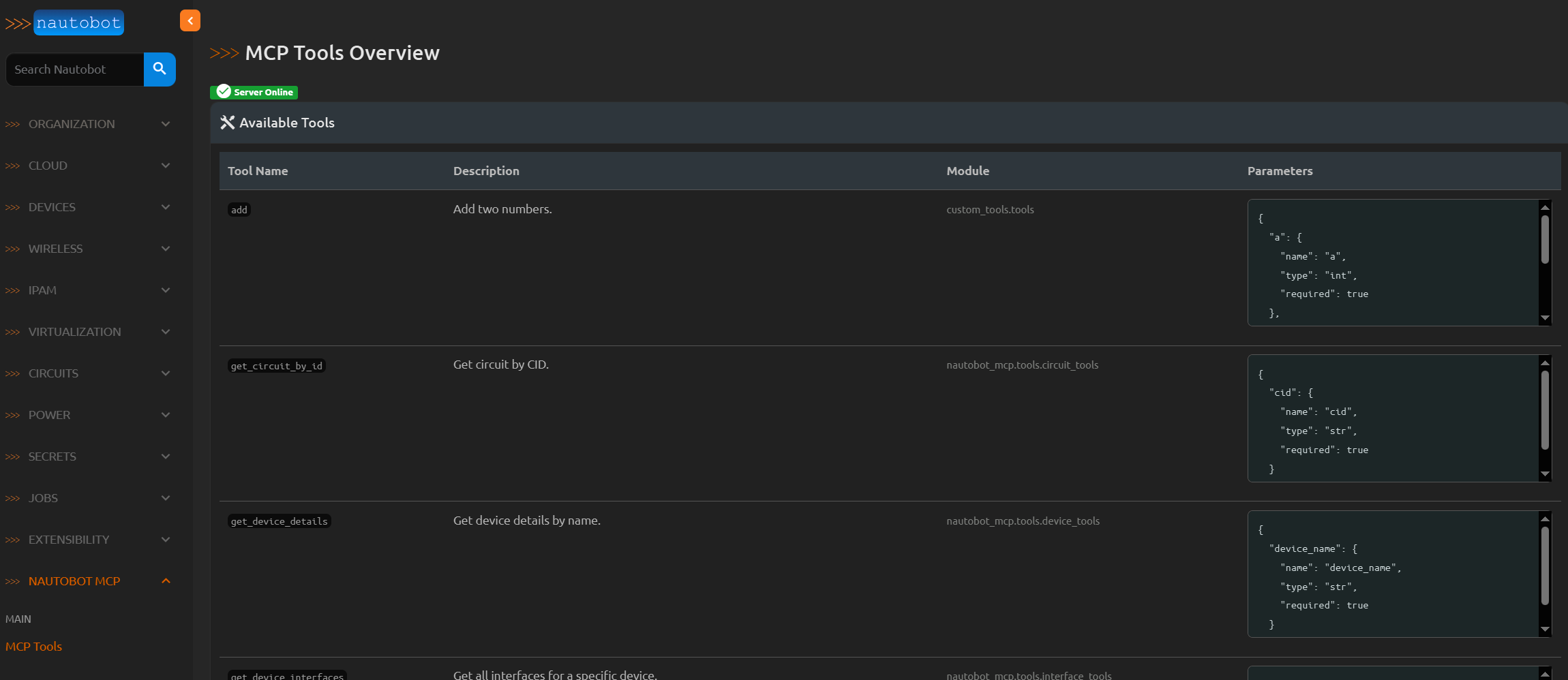
You can view all registered tools in the Nautobot web interface at:
https://your-nautobot-server/plugins/nautobot-mcp/tools/
This page shows all available tools, their descriptions, module paths, and parameter specifications.
TODO
- Add a way to route tool execution to a specific Nautobot worker.
- Enhance the tool view in the Nautobot web interface to show tool usage statistics.
- Create a docker container to run the MCP server.
- Add tests.
License
This project is licensed under the Apache License 2.0 - see the LICENSE file for details.
Installing Nautobot Network Infrastructure
This server has no published package — it is built from source. Open the repository and follow its README.
▸ github.com/gt732/nautobot-app-mcpFAQ
Is Nautobot Network Infrastructure MCP free?
Yes, Nautobot Network Infrastructure MCP is free — one-click install via Unyly at no cost.
Does Nautobot Network Infrastructure need an API key?
No, Nautobot Network Infrastructure runs without API keys or environment variables.
Is Nautobot Network Infrastructure hosted or self-hosted?
Self-hosted: the server runs locally on your machine via the install command above.
How do I install Nautobot Network Infrastructure in Claude Desktop, Claude Code or Cursor?
Open Nautobot Network Infrastructure on unyly.org, pick your client tab (Claude Desktop, Claude Code, Cursor) and press Install — the config is generated automatically, no JSON editing.
Related MCPs
GitHub
PRs, issues, code search, CI status
 by GitHub
Filesystem
Secure file operations with configurable access controls.
Memory
Knowledge graph-based persistent memory system.
Template MCP Server
A CLI tool to create a new Model Context Protocol server project with TypeScript support, dual transport options, and an extensible structure
 by mcpdotdirect
Compare Nautobot Network Infrastructure with
Not sure what to pick?
Find your stack in 60 seconds
Author?
Embed badge for your README
Browse similar
All development MCPs