
Nexus Core
FreeNot checkedA self-hostable, multi-MCP personal-assistant framework with multi-provider LLM orchestration, a real safety model, and a production-grade test suite. Nexus Cor

About
A self-hostable, multi-MCP personal-assistant framework with multi-provider LLM orchestration, a real safety model, and a production-grade test suite. Nexus Core is the engine behind a Telegram-based personal assistant: it takes a message (text or voice), routes it through an LLM, lets the model call tools exposed by a fleet of Model Context Protocol servers, gates anything destructive behind exp
README
A self-hostable, multi-MCP personal-assistant framework with multi-provider LLM orchestration, a real safety model, and a production-grade test suite.
Nexus Core is the engine behind a Telegram-based personal assistant: it takes a message (text or voice), routes it through an LLM, lets the model call tools exposed by a fleet of Model Context Protocol servers, gates anything destructive behind explicit human approval, and replies. It is designed to run on your own machine against your own accounts — no third-party assistant cloud in the middle.
This is a clean, reference extraction: all personal data, credentials, and proprietary business logic have been removed. Bring your own keys and accounts.
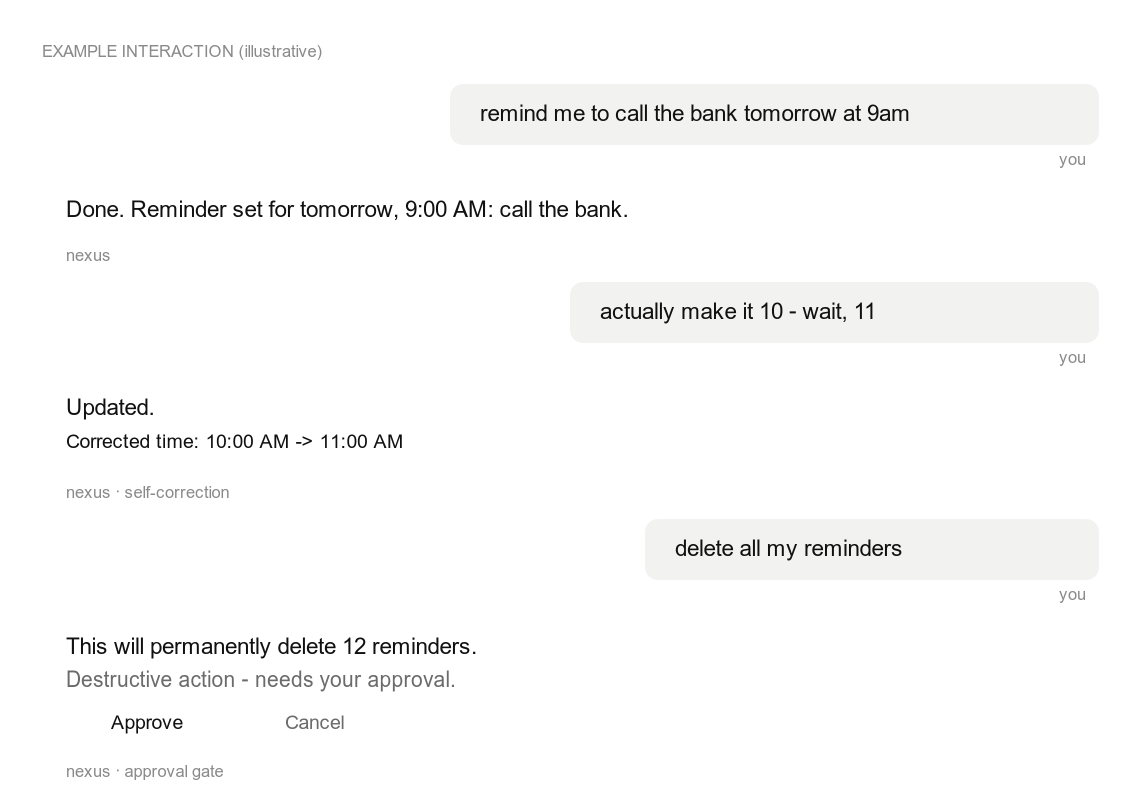
Illustrative interaction — showing in-message self-correction and the approval gate that holds destructive actions.
What's interesting here
- Multi-provider LLM orchestration (
services/brain_router.py) — a single entry point that routes a turn to a local Claude/Codex CLI subprocess (with the MCP servers loaded) or a local Ollama model, with circuit breakers, retries, and graceful fallback to a deterministic responder when every provider is down. - An agentic tool loop (
pipeline/tool_dispatcher.py) — the model proposes tool calls, the dispatcher executes them, feeds results back, and iterates to a final reply, with dedup, thread binding, and a hard iteration cap. - A real safety model — a destructive-intent classifier plus an approval-gate flow: anything that deletes, sends, or overwrites is held until the user approves it in-chat. Cross-user access is rejected; tool inputs are validated.
- Conversational recovery + self-correction — interprets messy follow-ups ("actually make it Tuesday", "June 2 no June 4") and echoes the correction so a revision is never silently applied.
- A fleet of MCP servers (
mcp_servers/) — reminders & tasks, a knowledge store, filesystem access behind a security boundary, PDF tools, Google Calendar / Gmail / Contacts, a browser agent, and a capability-introspection server. - Production hardening built in — user-scoped data access, pre-commit secret scanning + pre-push test hooks, structured logging with secret redaction, and a documented data map.
Architecture
Telegram ─► pipeline/unified.py ─► auth gate ─► tool_dispatcher ─┐
                                                                 │  proposes tool calls
                                  brain_router (Claude / Ollama) ◄┘
                                       │
            ┌──────────────────────────┼───────────────────────────┐
            ▼                          ▼                            ▼
     MCP servers (mcp_servers/)   services/ (domain logic)   repositories/ (SQLAlchemy)
     reminders, knowledge,        reminder, task, memory,    users, reminders, tasks,
     filesystem, pdf, calendar,   approval, recovery,        memories, approvals,
     email, contacts, web, self   self-correction, voice     conversation, audit, cron
See docs/ARCHITECTURE.md for the full tour.
MCP servers
| Server | Purpose |
|---|---|
nexus_reminders_tasks |
Reminders + tasks over the shared SQLite store |
nexus_knowledge |
Long-term key/value memory, decisions log, journal |
nexus_utils |
Time, math, units, cron management, and small utilities |
nexus_filesystem |
Read/search/write files behind an allow-list + denylist |
nexus_pdf_docs |
Generate, manipulate, and fill PDF forms |
nexus_calendar |
Google Calendar (OAuth, optional) |
nexus_email |
Gmail read/search/draft/send (OAuth, optional) |
nexus_contacts |
Google Contacts / People API (OAuth, optional) |
nexus_web |
Headless browser agent (Playwright, optional) |
nexus_self |
Capability introspection ("what can you access?") |
Quick start
git clone https://github.com/Noumenon-ai/nexus-core.git
cd nexus-core
python -m venv .venv && source .venv/bin/activate
pip install -r requirements.txt
# optional: local Whisper voice transcription (heavy — pulls torch);
# only needed for VOICE_INPUT_BACKEND=whisper_local
pip install -r requirements-voice.txt

cp .env.example .env          # fill in TELEGRAM_BOT_TOKEN + ALLOWED_TELEGRAM_IDS
./scripts/install-git-hooks.sh # optional: secret-scan + test gates

python -m pytest -q            # run the suite
python main.py                 # start the assistant
The Google, voice, and browser integrations are optional and key-gated — the core (reminders, tasks, knowledge, filesystem) runs with no third-party keys.
Configuration
All configuration is via environment variables — see .env.example
for the full annotated list. Nothing is hardcoded; secrets live only in .env
(gitignored) and never in the codebase.
Security
- Data isolation: every query on a user-scoped table filters by a
server-derived
user_id; cross-user access is rejected. - Approval gate: destructive tool calls require explicit in-chat approval.
- Secrets:
.gitignoreblocks every secret shape; a pre-commit hook scans staged diffs; logs are redacted. - Data map: docs/DATA_MAP.md lists what is stored, where, who can access it, and retention.
Testing
python -m pytest -q # 1500+ tests, synthetic fixtures, no network or keys required
License
MIT — see LICENSE.
Installing Nexus Core
This server has no published package — it is built from source. Open the repository and follow its README.
▸ github.com/Noumenon-ai/nexus-coreFAQ
Is Nexus Core MCP free?
Yes, Nexus Core MCP is free — one-click install via Unyly at no cost.
Does Nexus Core need an API key?
No, Nexus Core runs without API keys or environment variables.
Is Nexus Core hosted or self-hosted?
Self-hosted: the server runs locally on your machine via the install command above.
How do I install Nexus Core in Claude Desktop, Claude Code or Cursor?
Open Nexus Core on unyly.org, pick your client tab (Claude Desktop, Claude Code, Cursor) and press Install — the config is generated automatically, no JSON editing.
Related MCPs
Gmail
Read, send and search emails from Claude
 by Google
Slack
Send, search and summarize Slack messages
 by Slack
Runbear
No-code MCP client for team chat platforms, such as Slack, Microsoft Teams, and Discord.
Discord Server
A community discord server dedicated to MCP by [Frank Fiegel](https://github.com/punkpeye)
Compare Nexus Core with
Not sure what to pick?
Find your stack in 60 seconds
Author?
Embed badge for your README
Browse similar
All communication MCPs