
Notion Desktop
БесплатноНе проверенMCP server that lets AI agents control the Notion Desktop app through its debug mode. Claude Code plugin + npx for any MCP client.

Описание
MCP server that lets AI agents control the Notion Desktop app through its debug mode. Claude Code plugin + npx for any MCP client.
README
An MCP server that lets AI agents control the Notion Desktop app on your computer. It ships as a
Claude Code plugin and works with any other MCP client (Cursor, VS Code, Codex CLI, Gemini CLI and
others). It connects through Notion's debug mode. Notion starts with a remote debugging port
(localhost:9222), and the server drives the app over that port, the way browser automation tools
drive Chrome.
⚠️ Use at your own risk. An AI agent edits your real Notion content, and the debug port is open to local programs while it runs. Read Disclaimer and risks before you install.
Why use it instead of the official Notion connector
| Official Notion MCP / API | Notion-Desktop-MCP | |
|---|---|---|
| Sign-in | OAuth or an integration token | None. Uses the Notion Desktop app you are already logged in to |
| Workspace admin | An owner or admin often has to approve or install the integration | No admin step. Nothing is installed in the workspace |
| Page access | Pages must be shared with the integration | Every page you can open in the app |
| Guest workspaces | Usually not reachable (guests cannot add integrations) | ✅ Works wherever you are a guest with edit access |
| Runs where | Notion's servers / API | Your own computer, against your local Notion Desktop |
In short: if Notion Desktop is logged in on your PC, the agent can work in it. It does not work with Notion in a web browser.
Not needing approval is a technical fact, not permission. Your organisation's rules on automation and AI tools still apply; see Disclaimer and risks.
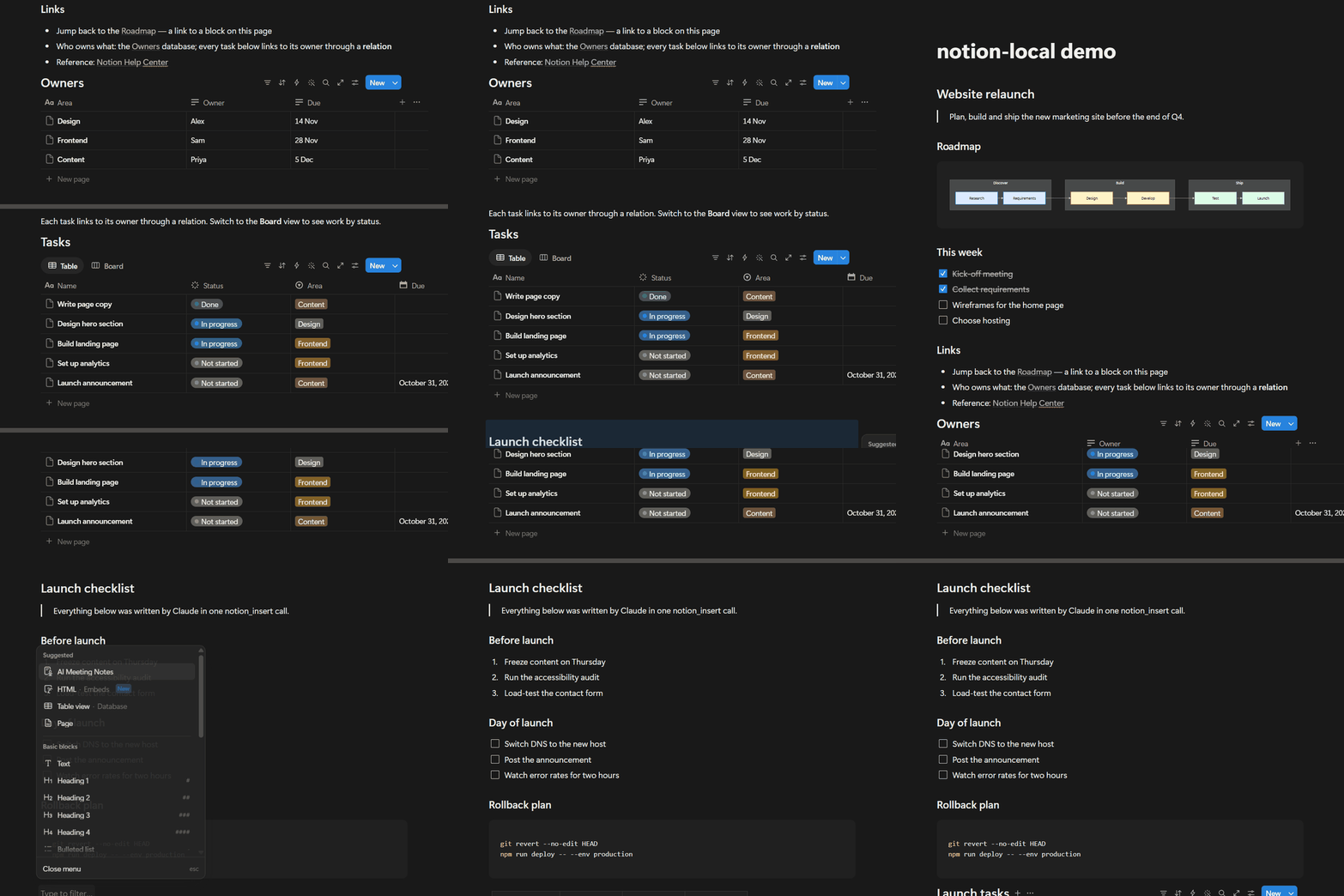
Real recording. One notion_insert call writes a 12-block section (headings, numbered list, to-dos,
code). One notion_create_database call then builds a 6-row database. The calls took about 5 s and
11 s.
How it works
AI agent ──MCP──▶ notion-desktop-mcp server ──CDP──▶ Notion Desktop in debug mode (localhost:9222)
notion_launchrestarts Notion Desktop with--remote-debugging-port=9222. Notion saves continuously, so the restart loses nothing.- The MCP server connects to that port with Playwright and exposes Notion-specific tools.
- On connect, the server sends every client short usage and safety instructions. Claude Code also
loads the full skill (
skills/notion-desktop-mcp/SKILL.md).
Without debug mode the tools cannot connect. Switching Notion back to normal mode closes the port.
Install
All installs need Node.js 18 or newer and the Notion Desktop app. Pick the section for your agent.
Claude Code
claude plugin marketplace add felixhorobot/Notion-Desktop-MCP && claude plugin install notion-desktop-mcp@notion-desktop-mcp
The same two steps from inside Claude Code:
/plugin marketplace add felixhorobot/Notion-Desktop-MCP
/plugin install notion-desktop-mcp@notion-desktop-mcp
Restart Claude Code and ask it to "start Notion in debug mode". Claude calls notion_launch. The
first start also installs the server's npm packages, which takes about 30 s.
Install from a clone, with desktop shortcuts (Windows)
git clone https://github.com/felixhorobot/Notion-Desktop-MCP
cd Notion-Desktop-MCP
powershell -ExecutionPolicy Bypass -File install.ps1
The script installs the dependencies, registers the MCP server, links the skill into
~/.claude/skills/notion-desktop-mcp, and adds two desktop shortcuts: Notion (Claude debug) and
Notion (normal). If you installed the plugin, run install.ps1 -ShortcutsOnly from a clone to get
only the shortcuts.
Other AI agents
npx fetches the server from GitHub and runs it, so there is no separate download. Besides Node.js,
this needs Git.
npx -y github:felixhorobot/Notion-Desktop-MCP
Register that command as an MCP server in your client. One-line setup where the client has a command for it:
| Client | Command |
|---|---|
| VS Code (Copilot agent mode) | code --add-mcp "{\"name\":\"notion-desktop-mcp\",\"command\":\"npx\",\"args\":[\"-y\",\"github:felixhorobot/Notion-Desktop-MCP\"]}" |
| Codex CLI | codex mcp add notion-desktop-mcp -- npx -y github:felixhorobot/Notion-Desktop-MCP |
| Gemini CLI | gemini mcp add notion-desktop-mcp npx -y github:felixhorobot/Notion-Desktop-MCP |
Clients configured with a JSON file (Cursor: ~/.cursor/mcp.json; Windsurf:
~/.codeium/windsurf/mcp_config.json; Claude Desktop: claude_desktop_config.json) take this entry:
{
  "mcpServers": {
    "notion-desktop-mcp": {
      "command": "npx",
      "args": ["-y", "github:felixhorobot/Notion-Desktop-MCP"]
    }
  }
}
On Windows, if a client cannot start npx, use "command": "cmd" with
"args": ["/c", "npx", "-y", "github:felixhorobot/Notion-Desktop-MCP"].
Then ask the agent to start Notion in debug mode (notion_launch). Every client receives the server's
safety instructions on connect. For the full guide, add skills/notion-desktop-mcp/SKILL.md to the
agent's own instruction file (for example AGENTS.md, GEMINI.md or a Cursor rule).
Only Claude Code and the npx start have been tested. The client commands above follow each client's
documented MCP setup; please report any that do not work.
Supported systems
| System | Status |
|---|---|
| Windows 11 | ✅ Built and tested on Notion Desktop 7.41.1 (Microsoft Store version) |
| Windows 10 | 🟡 Same app and launcher; not tested |
| macOS | 🟡 Not tested yet (details below) |
| Linux | ❌ Notion has no official desktop app for Linux |
macOS. The server, relay and skill are plain Node.js and run on any system. Keyboard shortcuts use
Playwright's ControlOrMeta, which becomes ⌘ on a Mac. A Mac launcher, launcher/notion.sh, restarts
Notion with --remote-debugging-port=9222. Two points are still open:
- Whether Notion Desktop for Mac accepts
--remote-debugging-port. Most Electron apps do; some disable it. - Small differences in the Mac interface that could break a selector.
To check the first point, run launcher/notion.sh debug and then
curl http://localhost:9222/json/version. A JSON reply means debug mode works. Please open an issue
with your result.
What it can do
Write a whole section in one call
Headings, a quote, to-dos, a table and a horizontal Mermaid roadmap, all from one notion_insert.
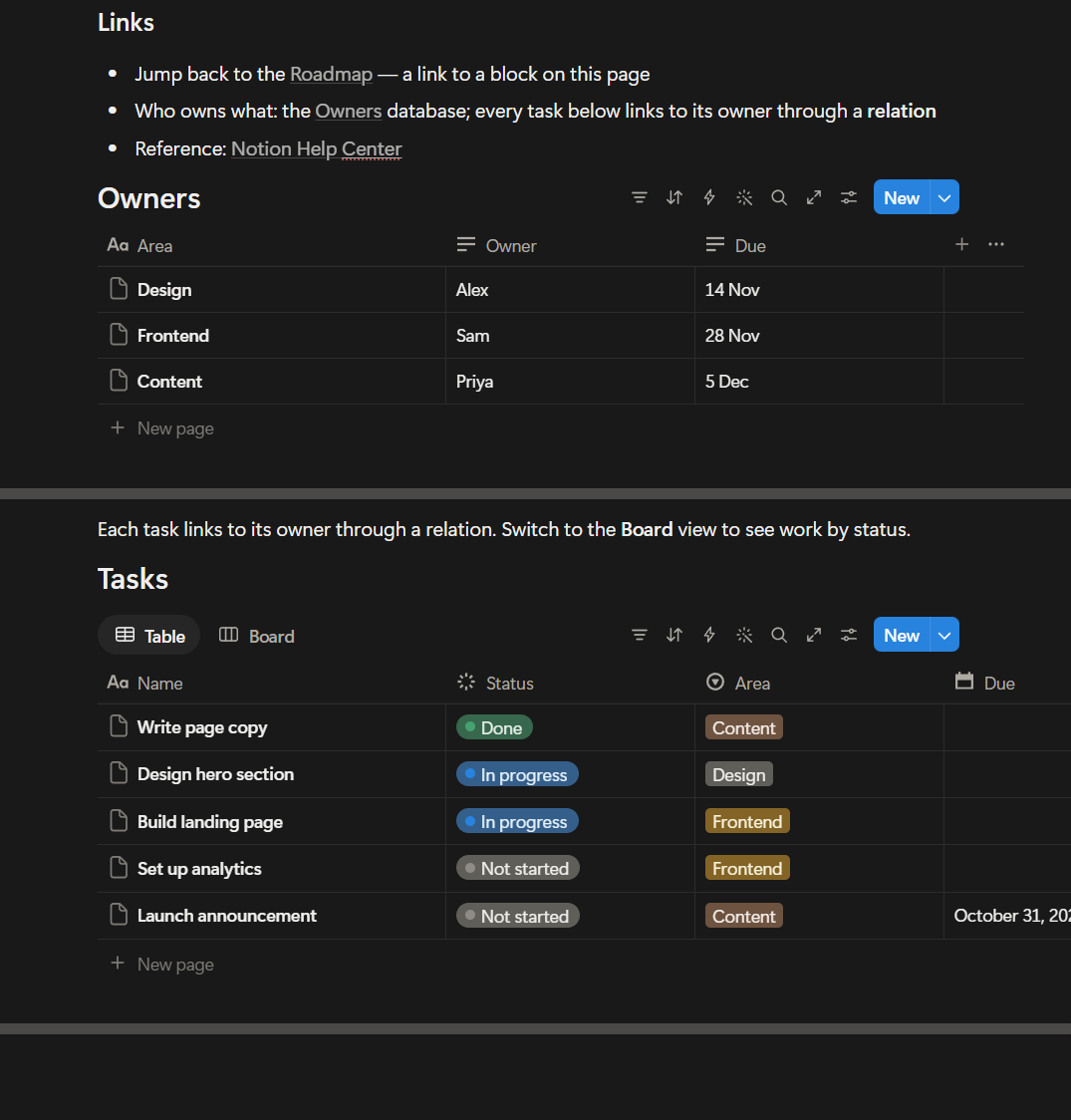
Links to blocks, databases and websites
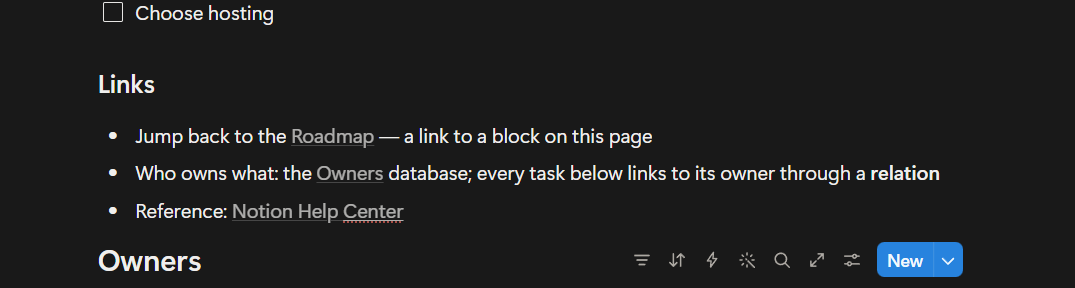
Related databases
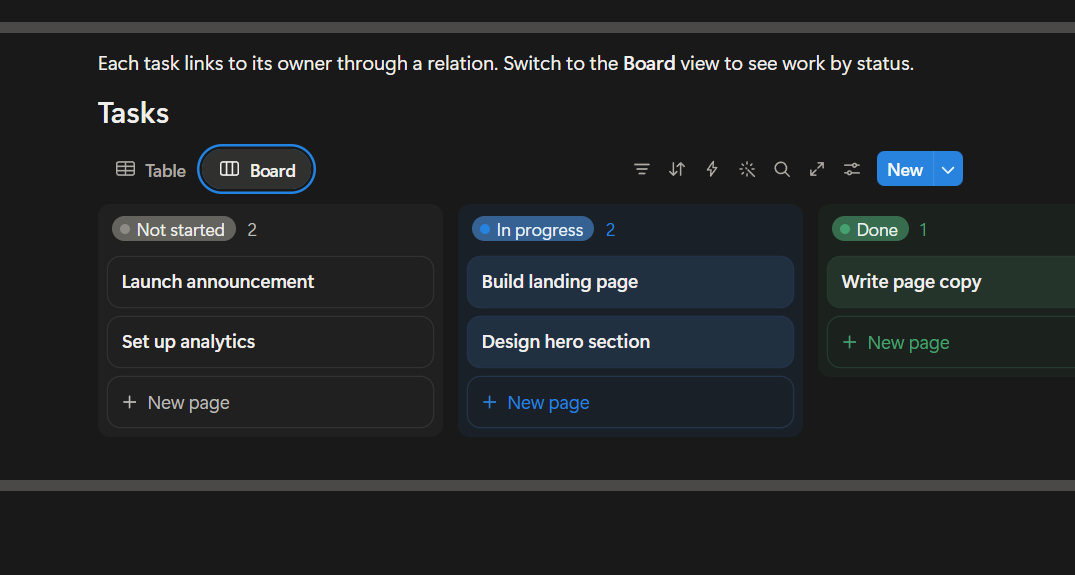
Owners and Tasks are real Notion databases. Each task links to its owner through a relation, and
the Status and Area properties are filled in.
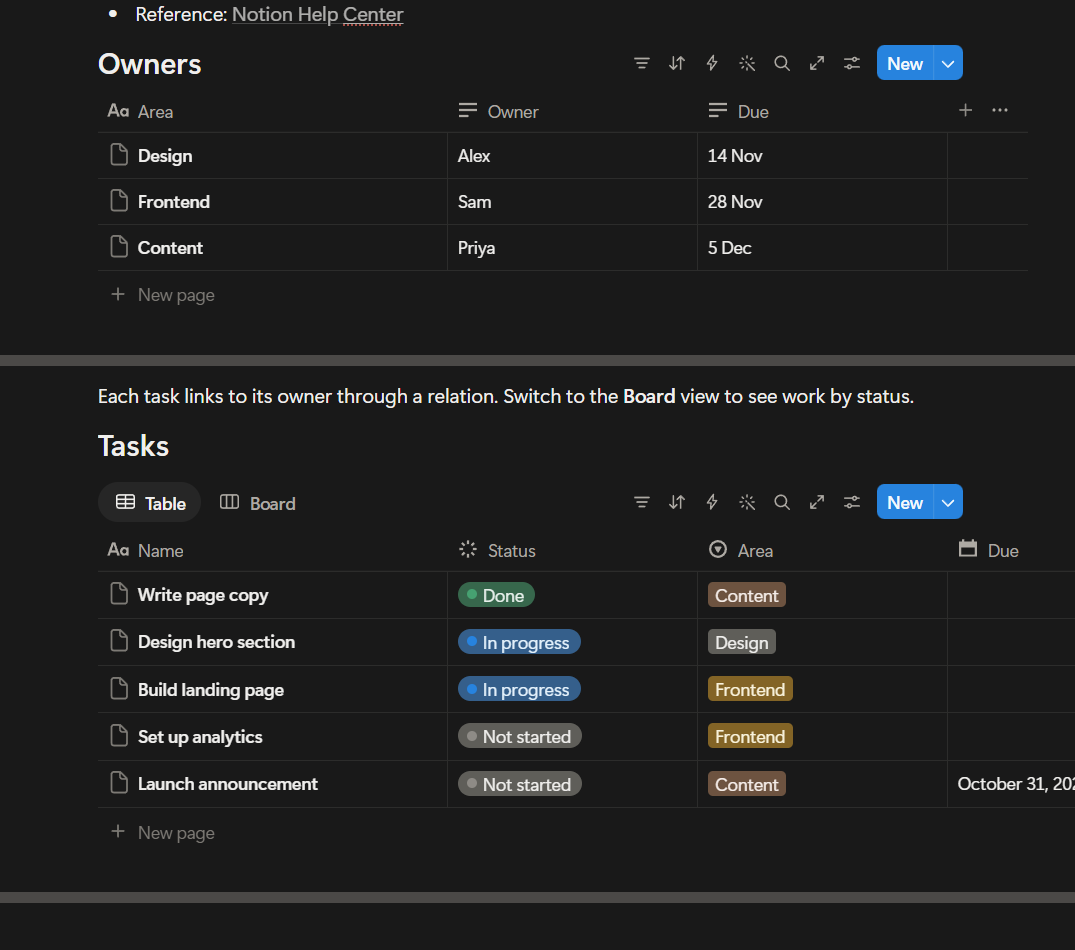
Board views
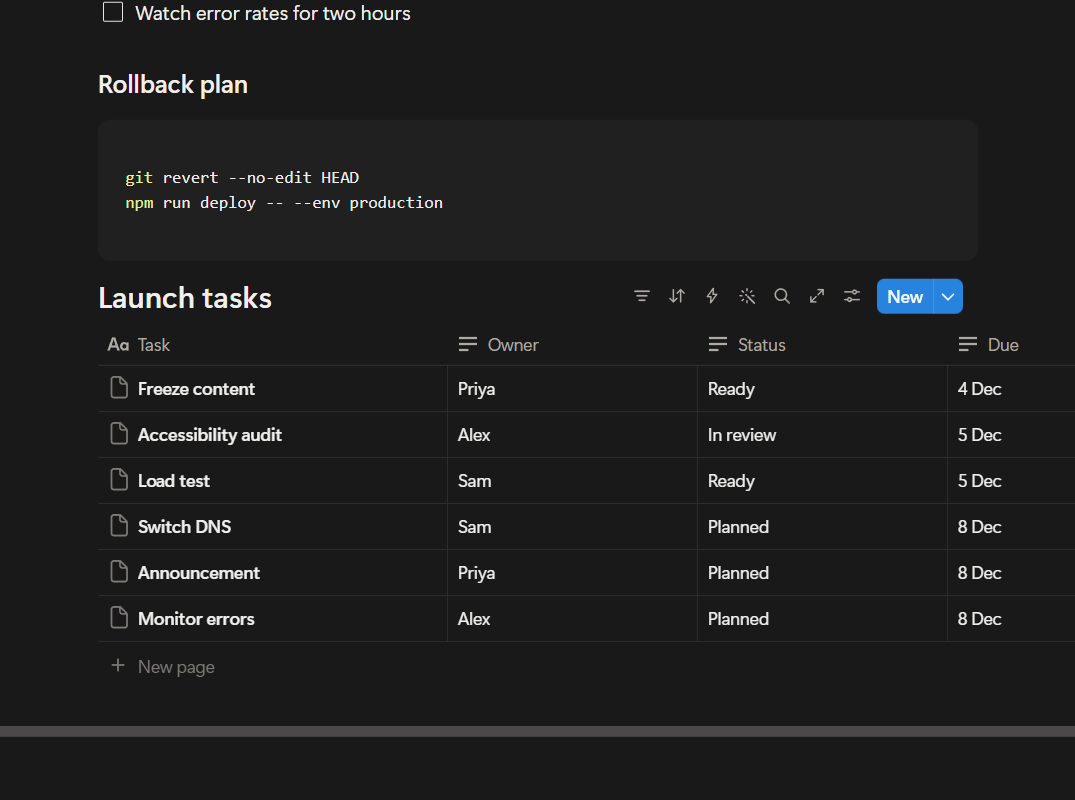
Create a database in one step
notion_create_database pastes a Markdown table and converts it to a database. The 6 × 4 table below
took one call. Filling the same cells one at a time takes about 1 s per cell.
Delete with a backup, then restore
A delete only previews until you confirm it. Each deleted block is saved as Markdown first, and
notion_restore_blocks puts it back in the same place.
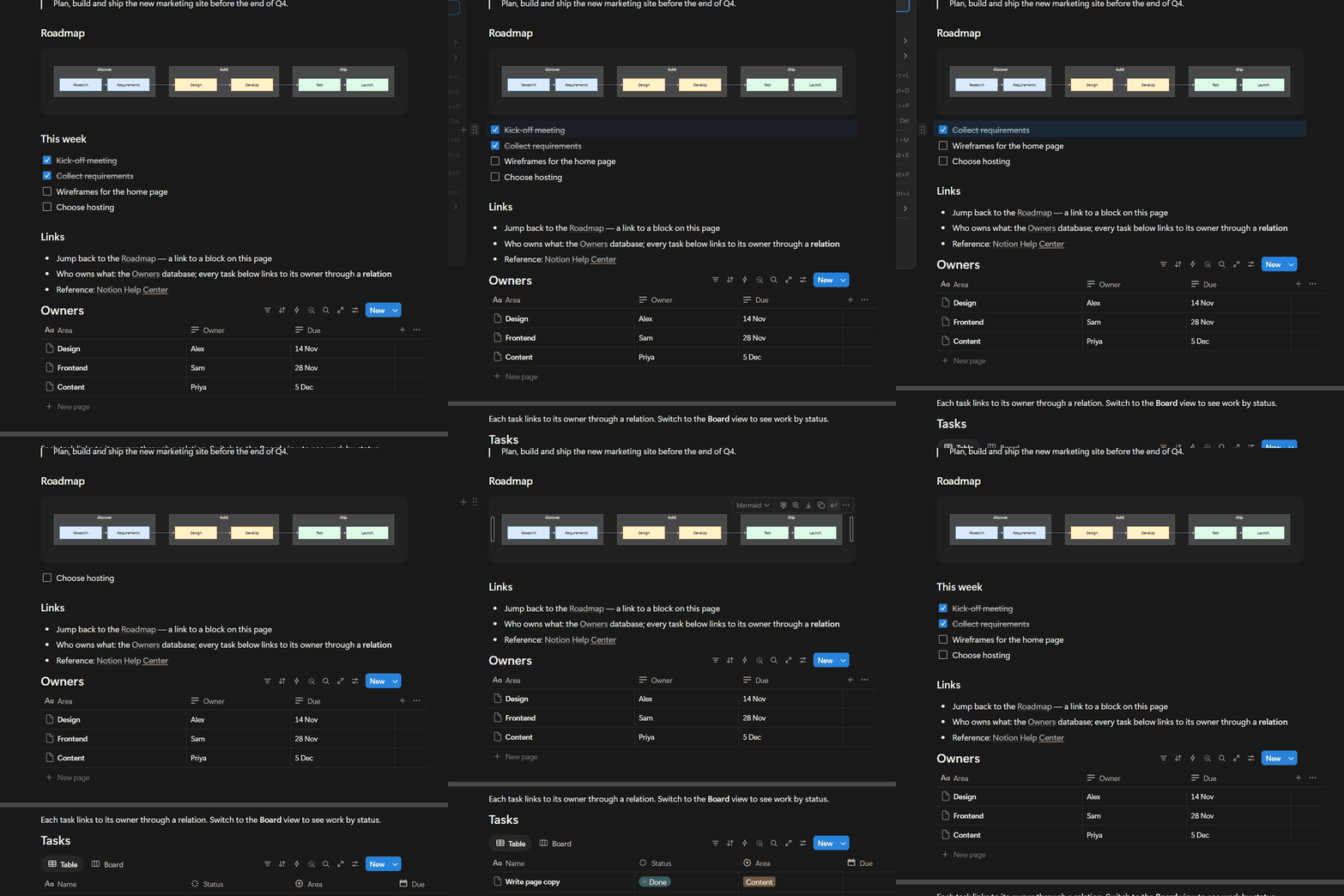
The "This week" section is deleted, then restored to the same position with its ticks intact.
Tools
| Tool | What it does |
|---|---|
notion_launch |
Restart Notion Desktop in debug mode, or back to normal mode |
notion_status |
Connection, workspace, open tabs, access level |
notion_open |
Open a page by URL or id |
notion_outline / notion_read |
Every block with its id / the page as Markdown |
notion_insert |
Add Markdown as blocks; undoes its paste if an existing block disappears |
notion_create_database |
Build a database from a Markdown table in one step |
notion_delete_blocks |
Preview, then delete with confirm:true; saves a Markdown backup first |
notion_list_deletions / notion_restore_blocks |
List past deletes; put blocks back where they were |
notion_trash_page / notion_restore_page |
Move a page to Notion Trash and back, by URL or title |
notion_switch_workspace, notion_screenshot |
Switch workspace or account; take a screenshot |
notion_run_code |
Run Playwright code with the page.n helpers (views, filters, relations, formulas) |
The skill in skills/notion-desktop-mcp/SKILL.md covers the tools, Notion behaviour verified on the live
app, and the rules for shared workspaces.
Safety
These rules are enforced by the server, not left to the prompt:
- Deleting blocks and trashing pages only preview until
confirm: trueis passed. - In guest or shared workspaces, and whenever the server cannot identify the workspace, deletes are
refused unless
allow_shared: trueis also passed. The server's instructions tell the agent to pass it only after you agree. - Block backups are stored in
~/.notion-desktop-mcp/deletions.jsonl. Restored blocks get new ids. Colours, the open or closed state of toggles, and code languages other than Mermaid are not kept. - Child pages and databases go to Notion Trash, which keeps them for 30 days.
notion_restore_pagebrings them back. - Each insert compares the whole page before and after, scrolling to include blocks Notion has unloaded. If a block that existed before is missing, the insert undoes its own paste.
Privacy
- Everything runs on your own computer. The project has no server, no telemetry and no analytics, and it sends nothing to the author or any third party.
- Notion content passes only between Notion Desktop and the AI agent you connect. What the agent does with it (for example, sending it to its model provider) is governed by that agent's own terms.
- Block backups are stored locally in
~/.notion-desktop-mcp/deletions.jsonl. Delete that file at any time to remove them.
Speed
- Send a whole section per
notion_insert. It is one paste, whatever the number of blocks. - Use
notion_create_databasefor tables of data. It is one step instead of one action per cell. - Per-cell edits (
n.db.setOptionand similar, throughnotion_run_code) take about 1 s each. Use them to set property types or fix single values. - The server connects to Notion on the first call and stays connected, so later calls skip that step.
Security
While Notion Desktop runs in debug mode, any program on your computer can connect to
localhost:9222 and act as you in Notion, including reading your session. The port accepts local
connections only. Use debug mode on a computer you trust, and switch back to normal mode
(notion_launch with mode: "normal") when you finish. notion_run_code runs any code you give it
against Notion; Claude Code asks for permission before running it unless you have allowed the tool.
Disclaimer and risks
You use this software at your own risk and are responsible for what it does in your Notion.
- Not official. This is an independent project. It is not affiliated with, endorsed by or supported by Notion Labs, Inc. or Anthropic. "Notion" is a trademark of Notion Labs, Inc.
- AI agents make mistakes. An agent can edit, move or delete content you did not intend to change.
The backup covers only blocks deleted through
notion_delete_blocks. Edits to existing text, property changes and actions run throughnotion_run_codehave no backup. Try it on a private test page first, review what the agent plans before it acts in shared workspaces, and rely on Notion's own page history and Trash for recovery. - Unofficial interface. The server drives Notion's interface through a debugging port that Notion does not offer as an automation API. A Notion update can break it without notice.
- Terms and policies. Check that automating the Notion app is allowed under Notion's terms and under your organisation's or workspace's policies, especially for work and shared workspaces.
- Local security. While debug mode is on, other programs on your computer can control Notion (see Security).
- No warranty. The software is provided "as is", without warranty of any kind, as stated in the MIT License. The authors are not liable for data loss or any other damage from its use.
Credit
Created by felixhorobot. You may fork, change and reuse this
project under the MIT License. The license requires you to keep the copyright notice: keep the
LICENSE file and credit the original project, for example:
Based on Notion-Desktop-MCP by felixhorobot.
Development
npm install
node server/test/call.mjs                           # list the tools
node server/test/call.mjs notion_status '{}'        # call one tool
node server/test/roundtrip.mjs <scratch-page-url>   # delete/restore round trip on a page you own
skills/notion-desktop-mcp/scripts/selftest.js runs 22 checks on the page.n helpers; run it with
notion_run_code in a private workspace. The tools drive Notion's interface, so run both tests again
after each Notion update.
| Path | Contents |
|---|---|
server/index.mjs |
MCP server and tools |
server/relay.mjs |
Relay that hides Notion's unresponsive debug targets and keeps your theme |
server/start.mjs |
Entry point; installs dependencies on first run |
skills/notion-desktop-mcp/ |
The skill: SKILL.md, reference notes, page.n helpers |
launcher/ |
notion.ps1 (Windows) and notion.sh (macOS) start Notion in debug or normal mode |
License
MIT © felixhorobot
Установка Notion Desktop
У этого сервера нет опубликованного пакета — он собирается из исходников. Открой репозиторий и следуй инструкции в README.
▸ github.com/felixhorobot/Notion-Desktop-MCPFAQ
Notion Desktop MCP бесплатный?
Да, Notion Desktop MCP бесплатный — установка в пару кликов через Unyly без оплаты.
Нужен ли API-ключ для Notion Desktop?
Нет, Notion Desktop работает без API-ключей и переменных окружения.
Notion Desktop — hosted или self-hosted?
Self-hosted: сервер запускается локально на твоей машине командой из раздела установки.
Как установить Notion Desktop в Claude Desktop, Claude Code или Cursor?
Открой Notion Desktop на unyly.org, выбери вкладку своего клиента (Claude Desktop, Claude Code, Cursor) и нажми Install — конфиг сгенерируется автоматически, без правки JSON.
Похожие MCP
GitHub
PRs, issues, code search, CI status
 автор: GitHub
Filesystem
Secure file operations with configurable access controls.
Memory
Knowledge graph-based persistent memory system.
Template MCP Server
A CLI tool to create a new Model Context Protocol server project with TypeScript support, dual transport options, and an extensible structure
 автор: mcpdotdirect
Server Sequential Thinking
MCP server for sequential thinking and problem solving
 автор: GitHub Actions

Unyly Deploy
Deploy sites and MCP servers to Unyly straight from your AI agent
 автор: Unyly
Amap Maps Mcp Server
MCP server for using the AMap Maps API
 автор: duxiaohui
PayMCP
Lightweight payments layer for MCP servers: turn tools into paid endpoints with a two-line decorator. [PyPI](https://pypi.org/project/paymcp/) · [npm](https://w
 автор: blustAI
Server For Power BI
Enables exploring Microsoft Fabric / Power BI workspaces and semantic models, and executing ad-hoc DAX queries.
 автор: Mitsubishi-Fuso
Gpt Image 2 Mcp
RunAPI GPT Image 2 MCP server for image generation: create tasks, poll results, and check pricing across 1 model from Claude Code, Codex, Cursor, and VS Code.
 автор: runapi-ai
Compare Notion Desktop with
Не уверен что выбрать?
Найди свой стек за 60 секунд
Автор?
Embed-бейдж для README
Похожее
Все в категории development