
Notion Schedule Agent
FreeNot checkedAn MCP server that turns your Notion task list into an AI-optimized daily schedule, reading tasks with page content and priorities from an Eisenhower matrix, an

About
An MCP server that turns your Notion task list into an AI-optimized daily schedule, reading tasks with page content and priorities from an Eisenhower matrix, and writing a clean schedule back to Notion.
README
An MCP server that turns your Notion task list into an AI-optimized daily schedule.
Every night you pull tomorrow's tasks from your "Upcoming Tasks" database and manually slot them into half-hour blocks. This agent does that for you — it reads your tasks (including page body content like workout plans and watchlists), understands priorities via the Eisenhower matrix, respects fixed-time commitments parsed from task names, and writes a clean schedule back to Notion.
Demo
1. Tasks in Notion with Eisenhower priorities and weekday assignments
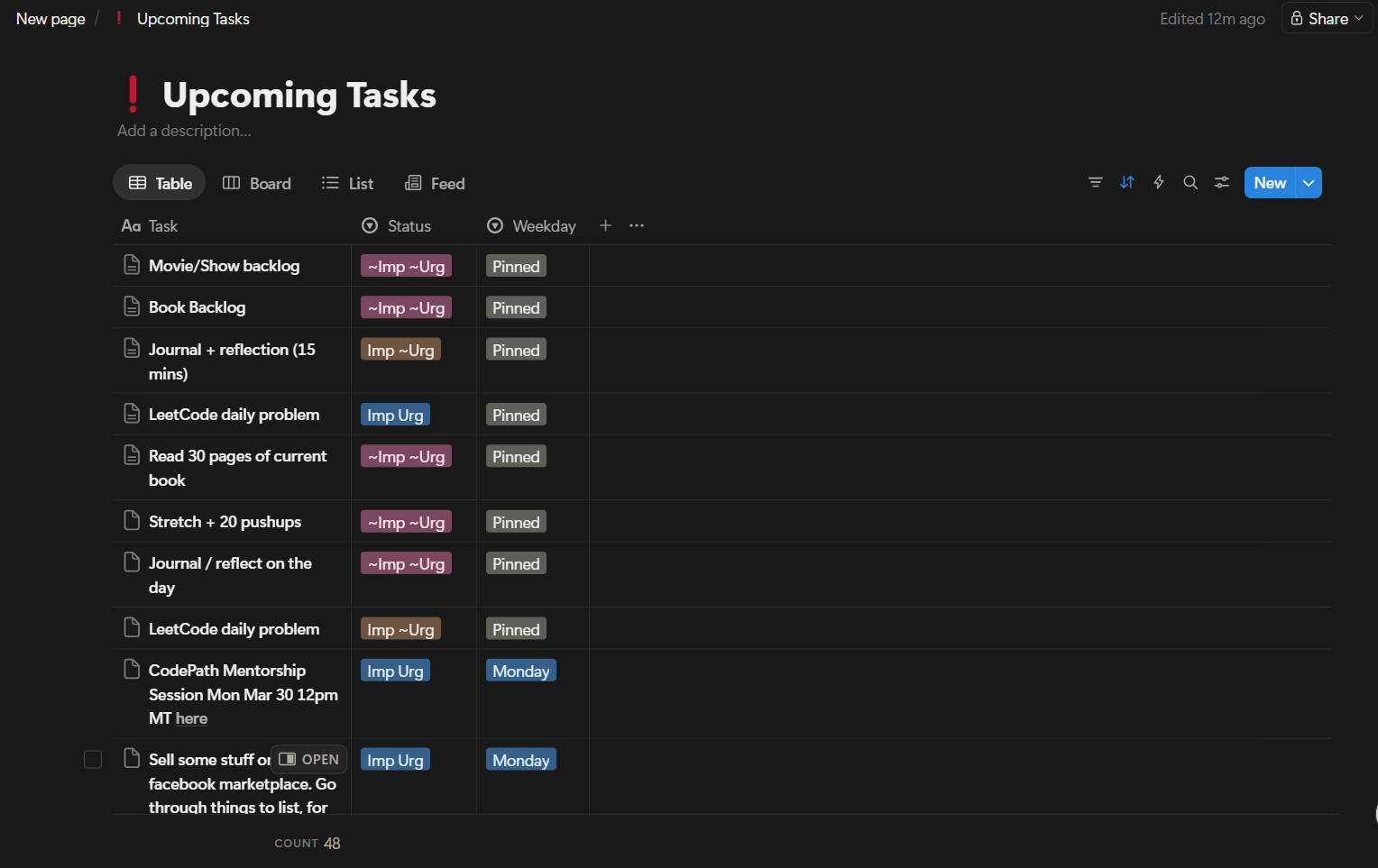
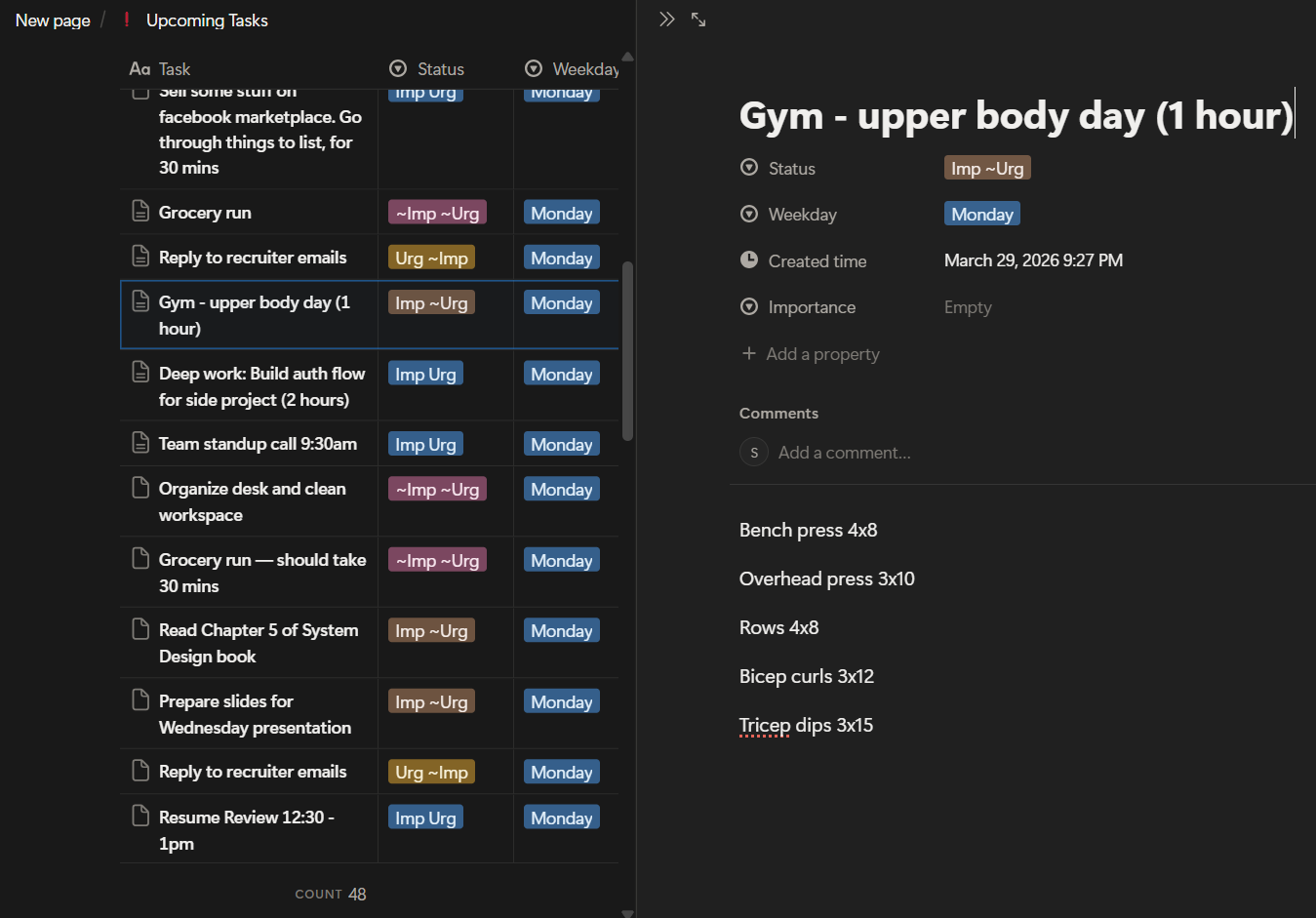
2. The agent reads full page content for smarter scheduling
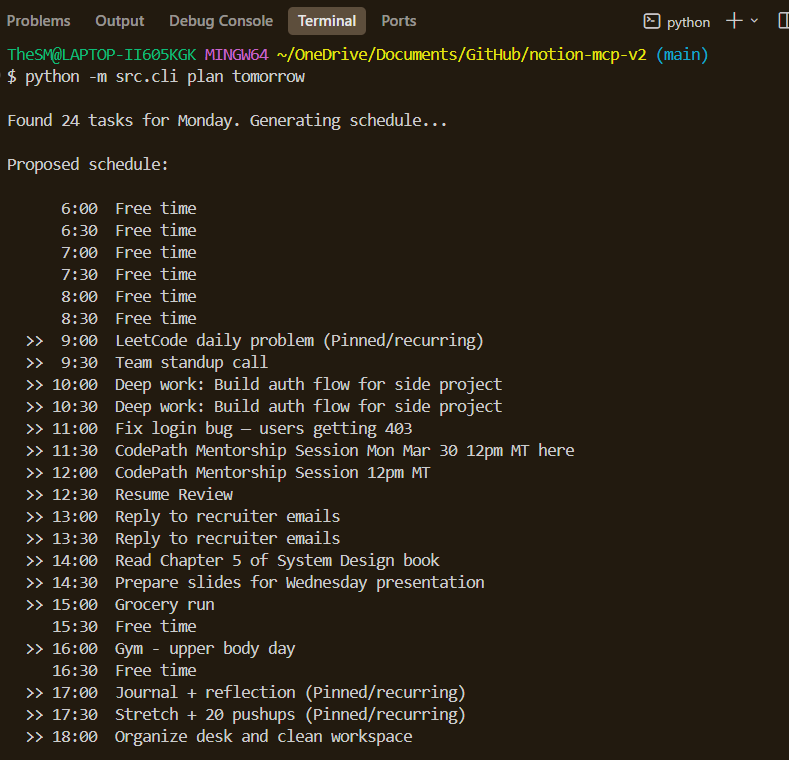
3. One command generates an AI-optimized daily schedule
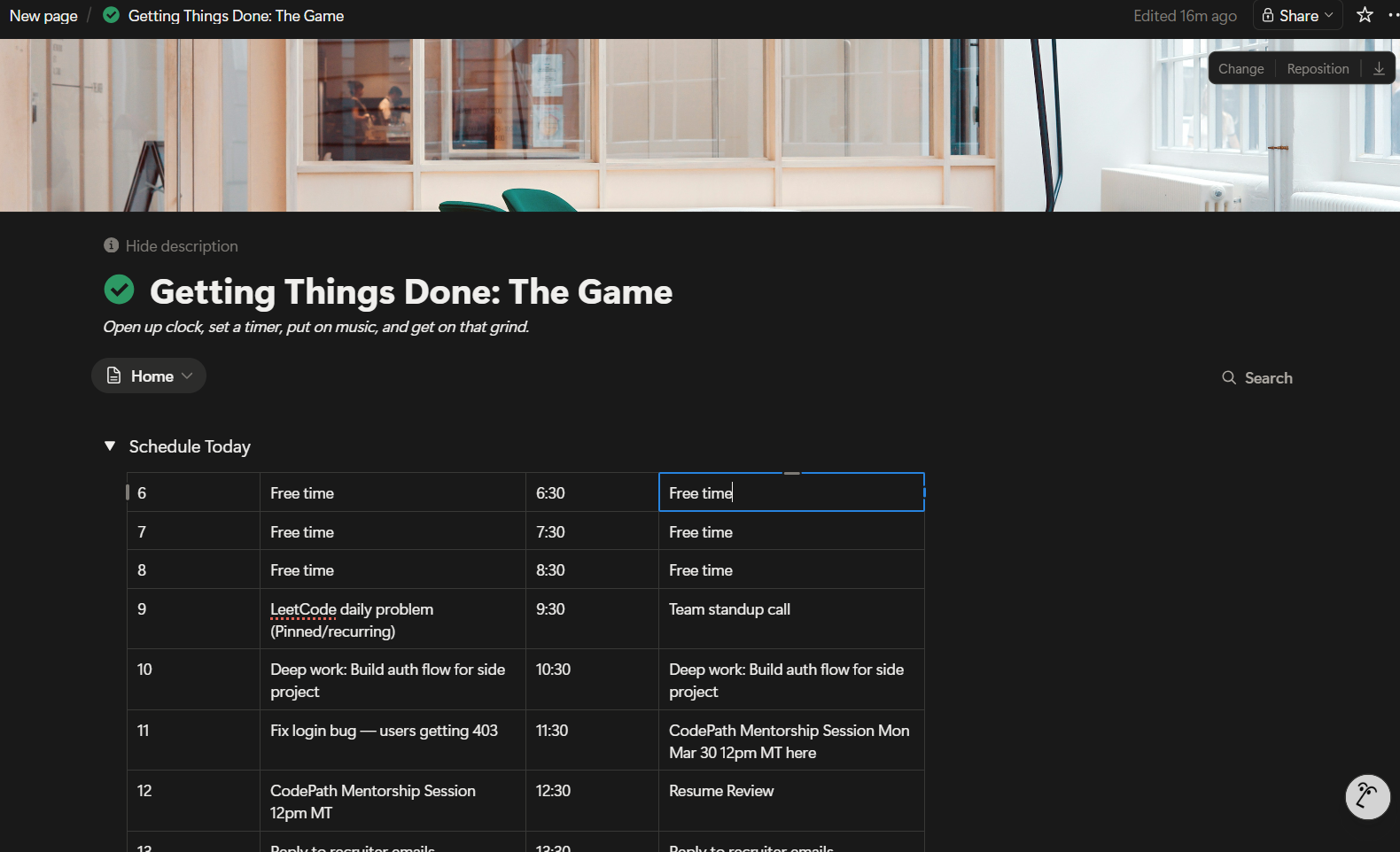
4. Schedule written back to Notion as a half-hour block table
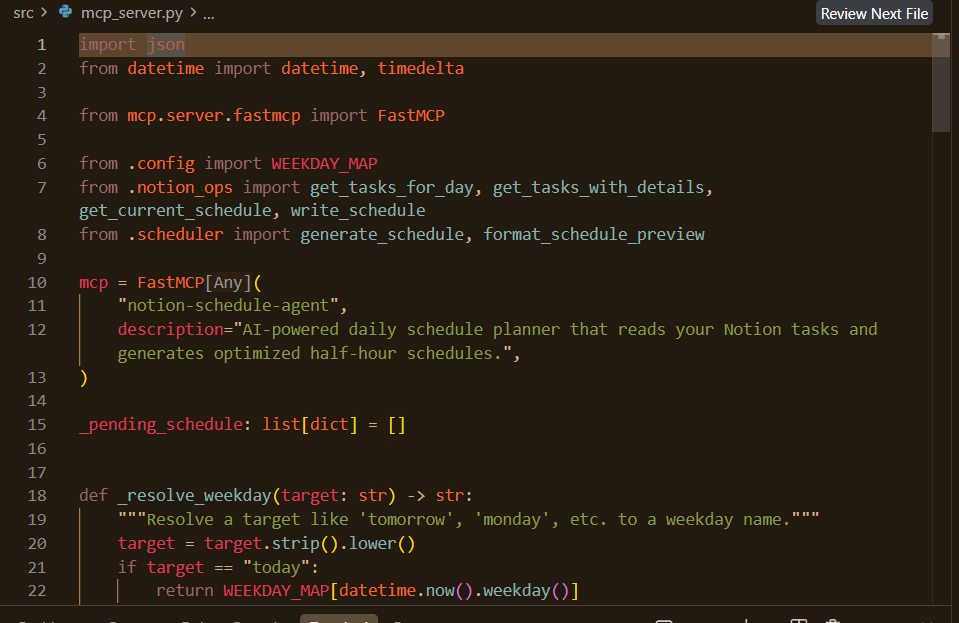
5. Built as an MCP server — usable from Claude Desktop, Cursor, or any MCP client
How It Works
┌──────────────────┐       ┌──────────────────┐       ┌──────────────────┐
│  Upcoming Tasks  │──────▶│   AI Scheduler   │──────▶│  Schedule Today  │
│  (Notion DB)     │       │   (OpenAI)       │       │  (Notion Table)  │
│                  │       │                  │       │                  │
│  • Task name     │       │  • Reads page    │       │  6:00  Free time │
│  • Priority      │       │    body content  │       │  9:00  LeetCode  │
│  • Weekday       │       │  • Parses times  │       │  9:30  Standup   │
│  • Page content  │       │  • Sorts by      │       │ 10:00  Deep work │
│                  │       │    priority      │       │  ...             │
└──────────────────┘       └──────────────────┘       └──────────────────┘
Priority System (Eisenhower Matrix)
| Status | Meaning | Scheduling |
|---|---|---|
Imp Urg |
Important & Urgent | Peak focus hours first |
Urg ~Imp |
Urgent, not important | Soon, lighter slots |
Imp ~Urg |
Important, not urgent | Focused time available |
In Progress |
Currently being worked on | Dedicated blocks |
~Imp ~Urg |
Neither important nor urgent | Fill remaining gaps |
Pinned |
Recurring/daily tasks | Spread across the day |
Key Features
- Deep content reading — reads the body of each task page (bullet lists, paragraphs) so the AI understands what "Gym - upper body" actually involves
- Time-locked tasks — parses times from task names (e.g. "Team standup 9:30am") and locks them to the correct slot
- Eisenhower priority — schedules Important & Urgent tasks in peak focus hours, lighter tasks in the evening
- Two-step workflow — preview the schedule before writing it to Notion
- MCP server — any MCP client can invoke
plan_day,get_tasks, andapply_schedule
Setup
1. Install dependencies
pip install -r requirements.txt
2. Create a Notion Integration
- Go to notion.so/my-integrations
- Click New integration, give it a name (e.g. "Schedule Agent")
- Copy the Internal Integration Secret — this is your
NOTION_API_KEY
3. Share your Notion pages with the integration
- Open your Upcoming Tasks database in Notion
- Click ... → Connections → select your integration
- Do the same for your Getting Things Done page (the one with "Schedule Today")
4. Get your database and page IDs
Open Upcoming Tasks in Notion. The URL looks like:
https://notion.so/workspace/YOUR_DB_ID?v=...Copy the 32-character hex ID.Open Getting Things Done page. Same format — copy the page ID.
5. Configure environment
cp .env.example .env
Edit .env with your keys:
NOTION_API_KEY=ntn_your_key_here
OPENAI_API_KEY=sk-your_key_here
NOTION_TASKS_DB_ID=your_database_id
NOTION_SCHEDULE_PAGE_ID=your_page_id
Usage
CLI Mode
# List tomorrow's tasks
python -m src.cli tasks tomorrow

# Generate and apply a schedule for tomorrow
python -m src.cli plan tomorrow

# Plan a specific day
python -m src.cli plan monday
The plan command shows a preview and asks for confirmation before writing to Notion.
MCP Server Mode
Run the server for use with Claude Desktop, Cursor, or any MCP client:
python -m src.mcp_server
Claude Desktop configuration
Add to your claude_desktop_config.json:
{
  "mcpServers": {
    "notion-schedule-agent": {
      "command": "python",
      "args": ["-m", "src.mcp_server"],
      "cwd": "/path/to/notion-mcp-v2",
      "env": {
        "NOTION_API_KEY": "ntn_...",
        "OPENAI_API_KEY": "sk-...",
        "NOTION_TASKS_DB_ID": "...",
        "NOTION_SCHEDULE_PAGE_ID": "..."
      }
    }
  }
}
Available MCP Tools
| Tool | Description |
|---|---|
get_tasks(day) |
List tasks for a given day from Notion |
plan_day(day) |
Generate an AI-optimized schedule (preview) |
apply_schedule() |
Write the previewed schedule to Notion |
day accepts "today", "tomorrow", or a weekday name like "Monday".
Tech Stack
- Python — core language
- Notion API via
notion-client— reads task database + page content, writes schedule table - OpenAI (
gpt-4o-mini) — intelligent scheduling with priority awareness - MCP (Model Context Protocol) via
mcpSDK — exposes tools to any MCP client
Project Structure
src/
  config.py        — environment config, time slots, priority mapping
  notion_ops.py    — Notion API operations (read tasks + page content, write schedule)
  scheduler.py     — OpenAI-powered schedule generation
  mcp_server.py    — MCP server entry point with tool definitions
  cli.py           — standalone CLI for direct usage
License
MIT
Installing Notion Schedule Agent
This server has no published package — it is built from source. Open the repository and follow its README.
▸ github.com/SeanOnamade/notion-mcp-v2FAQ
Is Notion Schedule Agent MCP free?
Yes, Notion Schedule Agent MCP is free — one-click install via Unyly at no cost.
Does Notion Schedule Agent need an API key?
No, Notion Schedule Agent runs without API keys or environment variables.
Is Notion Schedule Agent hosted or self-hosted?
A hosted option is available: Unyly runs the server in the cloud, no local setup required.
How do I install Notion Schedule Agent in Claude Desktop, Claude Code or Cursor?
Open Notion Schedule Agent on unyly.org, pick your client tab (Claude Desktop, Claude Code, Cursor) and press Install — the config is generated automatically, no JSON editing.
Related MCPs
Notion
Read and write pages in your workspace
 by Notion
Linear
Issues, cycles, triage — from Claude
 by Linear
Google Drive
Search and read your Drive files
 by Google
mindsdb/mindsdb
Connect and unify data across various platforms and databases with [MindsDB as a single MCP server](https://docs.mindsdb.com/mcp/overview).
 by mindsdb
Compare Notion Schedule Agent with
Not sure what to pick?
Find your stack in 60 seconds
Author?
Embed badge for your README
Browse similar
All productivity MCPs