
Npu Vision Fallback
FreeNot checkedProvides an MCP server for local low-power screen vision, enabling AI agents to perform OCR and UI detection on inaccessible screens (games, remote desktops) us

About
Provides an MCP server for local low-power screen vision, enabling AI agents to perform OCR and UI detection on inaccessible screens (games, remote desktops) using NPU acceleration and system OCR.
README
🔋 npu-vision-fallback
Local low-power vision for desktop AI agents
When accessibility APIs fail — NPU-first, zero GPU wake-up, 100% local
English
What is this?
A lightweight, local-first vision service for desktop agents that need to see and interact with screens where traditional accessibility APIs fall short—games, remote desktops, canvas apps, and more.
Built for efficiency: Native OS OCR · Intel NPU acceleration · Zero cloud calls · Battery-friendly by design
✨ Why Use This?
Desktop agents face a challenge: how to perceive UI when the accessibility tree is empty?
| Common Approach | The Problem |
|---|---|
| 🤖 Multimodal LLM screenshots | Expensive tokens, slow round-trips, coordinate hallucination |
| 🌳 OS Accessibility APIs only | Blind to games, canvas apps, remote desktops, emulators |
| 🔥 Heavy GPU OCR (PaddleOCR) | Big dependencies, high power draw, wakes discrete GPU |
npu-vision-fallback is your fallback layer — when the accessibility tree comes back empty, this gives your agent a small, fast, local vision service that doesn't touch the cloud or spin up the dGPU.
Perfect for:
- 🎮 Game UIs and emulators
- 🖥️ Remote desktop / VNC clients (no remote accessibility tree)
- 🎨 Canvas / WASM web apps rendering outside the DOM
- 💻 Local SLMs that can't afford multimodal screenshot tokens
🚀 Quick Start
1. Install (Windows + Intel NPU recommended)
pip install "npu-vision-fallback[ocr-win,detect]"
python scripts/download_ui_model.py  # One-time setup
2. Configure Claude Desktop
Add to your claude_desktop_config.json:
{
  "mcpServers": {
    "npu-vision-fallback": {
      "command": "npu-vision-fallback"
    }
  }
}
3. Use it
Restart Claude Desktop and try:
You: The accessibility tree for this game is empty. Can you read the screen at coordinates [0,0,1280,800] and find the "Start Game" button?
Claude: (calls
analyze_screen) I found a button labeled "Start Game" at [520, 580, 720, 640]. Want me to click its center at (620, 610)?
📦 Installation Options
Windows (Recommended)
Native OCR + NPU UI detection (~85 MB total):
pip install "npu-vision-fallback[ocr-win,detect]"
python scripts/download_ui_model.py
Linux / macOS
Cross-platform OCR + CPU detection (~130 MB):
pip install "npu-vision-fallback[ocr-rapid,detect]"
python scripts/download_ui_model.py
Full (All Backends)
For development or testing all backends:
pip install "npu-vision-fallback[all]"
python scripts/download_ui_model.py
Minimal Core
Just the MCP server (no OCR/detection, ~20 MB):
pip install npu-vision-fallback
💡 Note: The
detectextra uses OpenVINO (~80 MB) for runtime, not PyTorch. Model conversion requires thedev-convertextra (~2 GB), but that's a one-time setup most users skip.
🎯 Key Features
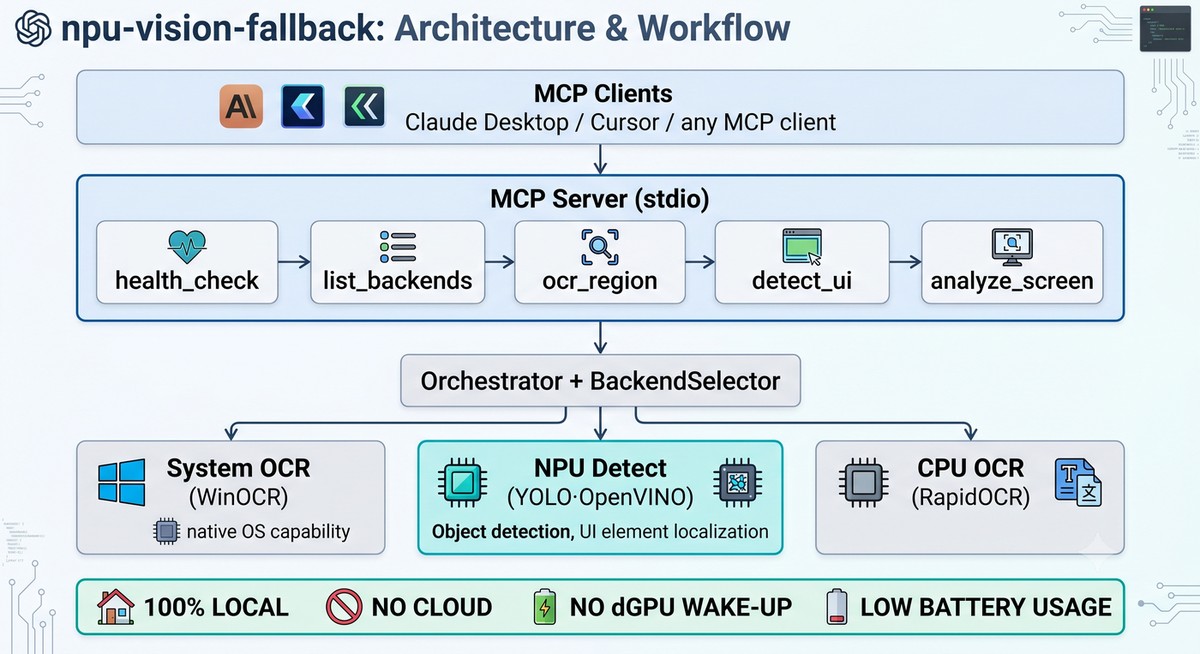
- 🔋 NPU-first architecture — UI detection runs on Intel AI Boost at ~80ms per call (~0.3J energy)
- ⚡ Zero dGPU wake-up — Default paths use NPU, system OCR, or CPU—laptop battery stays happy
- 🌐 Native OS OCR — Uses Windows OCR engine (macOS Vision planned) for quality
- 🧩 MCP protocol — Works with Claude Desktop, Cursor, or any MCP client out of the box
- 🪶 Lightweight — No PyTorch/TensorFlow at runtime; all heavy deps are optional
- 🛡️ Privacy-first — 100% local processing, no telemetry, no cloud
⚡ Performance
Measured on Intel Core Ultra 9 275HX (2560×1600 screen, on battery):
| Task | Backend | Latency | Energy | Notes |
|---|---|---|---|---|
| OCR | WinOCR | ~1100ms | 2.5J | Native Windows API (full screen) |
| OCR | RapidOCR | ~6300ms | 14.5J | Cross-platform ONNX CPU |
| UI Detection | OpenVINO NPU | ~80ms | 0.3J | YOLOv8n on Intel AI Boost |
| UI Detection | OpenVINO CPU | ~120ms | — | Fallback when no NPU |
Full benchmark details and reproduction steps: outputs/power_report.md
🛠️ MCP Tools
| Tool | Purpose | Key Arguments |
|---|---|---|
health_check |
Server status | — |
list_backends |
Available backends | — |
ocr_region |
Extract text from region | region=[x1,y1,x2,y2] |
detect_ui |
Find UI elements | region=[x1,y1,x2,y2] |
analyze_screen |
🌟 Combined OCR + detection | region=[x1,y1,x2,y2] |
analyze_screen is the primary tool — it fuses detection + OCR, returns spatially-sorted elements with text annotations. Perfect for agent navigation.
📚 Documentation
- Architecture Guide — System design and data flow
- Backend Reference — Per-backend capabilities and priorities
- FAQ — Common questions and troubleshooting
- Contributing — How to contribute
- Code Guide — Project constitution for contributors
🧪 Examples
| Example | Description |
|---|---|
| basic_ocr.py | Simple OCR call to screen region |
| agent_ui_navigation.py | Find and click UI elements |
| desktop_remote_vnc.py | Vision fallback in remote desktop |
uv run python examples/basic_ocr.py --region 0 0 1280 800
🗺️ Roadmap
- v1.1 — Multi-monitor support, DPI scaling awareness
- v2.0 — Custom model training interface, bring your own detector
- v2.1 — UI-TARS integration, macOS Vision backend, PP-OCR v4 on NPU
🤝 Contributing
Contributions welcome! See CONTRIBUTING.md for guidelines. Please read CLAUDE.md—it's the project constitution that ensures code quality and architectural consistency.
📋 Supported Backends
| Backend | Type | Device | Platform | Status |
|---|---|---|---|---|
winocr |
System OCR | CPU/NPU | Windows | ✅ Primary |
openvino_npu |
UI Detection | NPU | Win/Linux + Intel NPU | ✅ Primary |
openvino_cpu |
UI Detection | CPU | Win/Linux/macOS | ✅ Fallback |
rapid_ocr |
OCR | CPU | All | ✅ Cross-platform |
pytesseract |
OCR | CPU | All | ✅ Last-resort |
vision |
System OCR | ANE | macOS | 🚧 Planned |
📄 License
MIT © npu-vision-fallback contributors
🙏 Acknowledgments
Built with:
- Model Context Protocol (Anthropic) — Agent integration layer
- OpenVINO — NPU/CPU inference runtime
- Ultralytics YOLO — UI detection models
- RapidOCR — Cross-platform OCR engine
- Tesseract — OCR fallback
- python-mss — Screen capture library
Development assisted by Claude Code (Anthropic). Architecture design and code review powered by AI collaboration.
Install Npu Vision Fallback in Claude Desktop, Claude Code & Cursor
unyly install npu-vision-fallbackInstalls into Claude Desktop, Claude Code, Cursor & VS Code — handles npx, uvx and build-from-source repos for you.
First time? Get the CLI: curl -fsSL https://unyly.org/install | sh
Or configure manually
Run in your terminal:
claude mcp add npu-vision-fallback -- uvx npu-vision-fallbackFAQ
Is Npu Vision Fallback MCP free?
Yes, Npu Vision Fallback MCP is free — one-click install via Unyly at no cost.
Does Npu Vision Fallback need an API key?
No, Npu Vision Fallback runs without API keys or environment variables.
Is Npu Vision Fallback hosted or self-hosted?
Self-hosted: the server runs locally on your machine via the install command above.
How do I install Npu Vision Fallback in Claude Desktop, Claude Code or Cursor?
Open Npu Vision Fallback on unyly.org, pick your client tab (Claude Desktop, Claude Code, Cursor) and press Install — the config is generated automatically, no JSON editing.
Related MCPs
LibreOffice Tools
Enables AI agents to read, write, and edit Office documents via LibreOffice with token-efficient design. Supports multiple formats including DOCX, XLSX, PPTX, a
 by passerbyflutter
dannote/figma-use
Full Figma control: create shapes, text, components, set styles, auto-layout, variables, export. 80+ tools.
 by dannote
Logo.dev
Search and retrieve company logos by brand or domain. Customize size, format, and theme to match your design needs. Accelerate design, prototyping, and content
 by NOVA-3951
PIX4Dmatic
Enables GUI automation for controlling PIX4Dmatic on Windows through MCP. Supports launching, focusing, capturing screenshots, sending hotkeys, clicking UI elem
 by jangjo123
Compare Npu Vision Fallback with
Not sure what to pick?
Find your stack in 60 seconds
Author?
Embed badge for your README
Browse similar
All design MCPs