loading…
en/
Browse all
Oauth Callback
FreeMaintainedLightweight OAuth 2.0 callback handler for Node.js, Deno, and Bun with built-in browser flow and MCP SDK integration

About
Lightweight OAuth 2.0 callback handler for Node.js, Deno, and Bun with built-in browser flow and MCP SDK integration
README
npm version npm downloads MIT License TypeScript Run on Replit
A lightweight OAuth 2.0 callback handler for Node.js, Deno, and Bun with built-in browser flow and MCP SDK integration. Perfect for CLI tools, desktop applications, and development environments that need to capture OAuth authorization codes.
Features
- 🚀 Multi-runtime support - Works with Node.js 18+, Deno, and Bun
- 🔒 Secure localhost-only server for OAuth callbacks
- 🤖 MCP SDK integration - Built-in OAuth provider for Model Context Protocol
- ⚡ Single dependency - Only requires
openfor browser launching - 🎯 TypeScript support out of the box
- 🛡️ Comprehensive OAuth error handling with detailed error classes
- 🔄 Automatic server cleanup after callback
- 💾 Flexible token storage - In-memory and file-based options
- 🎪 Clean success pages with animated checkmark
- 🎨 Customizable HTML templates with placeholder support
- 🚦 AbortSignal support for programmatic cancellation
- 📝 Request logging and debugging callbacks
- 🌐 Modern Web Standards APIs (Request/Response/URL)
Installation
bun add oauth-callback open
Or with npm:
npm install oauth-callback open
Note: The
openpackage is optional but recommended for browser launching. If using pnpm, install it explicitly:pnpm add open
Quick Start
import open from "open";
import { getAuthCode, OAuthError } from "oauth-callback";

// Simple usage - pass `open` to launch browser
const result = await getAuthCode({
  authorizationUrl:
    "https://example.com/oauth/authorize?client_id=xxx&redirect_uri=http://localhost:3000/callback",
  launch: open,
});
console.log("Authorization code:", result.code);

// MCP SDK integration - use specific import
import { browserAuth, fileStore } from "oauth-callback/mcp";
const authProvider = browserAuth({ launch: open, store: fileStore() });

// Or via namespace import
import { mcp } from "oauth-callback";
const authProvider = mcp.browserAuth({ launch: open, store: mcp.fileStore() });
Usage Examples
Basic OAuth Flow
import open from "open";
import { getAuthCode, OAuthError } from "oauth-callback";

async function authenticate() {
  const authUrl =
    "https://github.com/login/oauth/authorize?" +
    new URLSearchParams({
      client_id: "your_client_id",
      redirect_uri: "http://localhost:3000/callback",
      scope: "user:email",
      state: "random_state_string",
    });

  try {
    const result = await getAuthCode({
      authorizationUrl: authUrl,
      launch: open,
    });
    console.log("Authorization code:", result.code);
    console.log("State:", result.state);

    // Exchange code for access token
    // ... your token exchange logic here
  } catch (error) {
    if (error instanceof OAuthError) {
      console.error("OAuth error:", error.error);
      console.error("Description:", error.error_description);
    } else {
      console.error("Unexpected error:", error);
    }
  }
}
Custom Port Configuration
import open from "open";
import { getAuthCode } from "oauth-callback";

const result = await getAuthCode({
  authorizationUrl: authUrl,
  launch: open,
  port: 8080, // Use custom port (default: 3000)
  timeout: 60000, // Custom timeout in ms (default: 30000)
});
MCP SDK Integration
The browserAuth() function provides a drop-in OAuth provider for the Model Context Protocol SDK:
import { browserAuth, inMemoryStore } from "oauth-callback/mcp";
import { Client } from "@modelcontextprotocol/sdk/client/index.js";
import { StreamableHTTPClientTransport } from "@modelcontextprotocol/sdk/client/streamableHttp.js";

const serverUrl = new URL("https://mcp.notion.com/mcp");

// Create MCP-compatible OAuth provider
const authProvider = browserAuth({
  port: 3000,
  scope: "read write",
  launch: open, // Opens browser for OAuth consent
  store: inMemoryStore(), // Or fileStore() for persistence
});

const client = new Client(
  { name: "my-app", version: "1.0.0" },
  { capabilities: {} },
);

// Connect with OAuth retry: first attempt completes OAuth and saves tokens,
// but SDK returns before checking them. Second attempt succeeds.
async function connectWithOAuthRetry() {
  const transport = new StreamableHTTPClientTransport(serverUrl, {
    authProvider,
  });
  try {
    await client.connect(transport);
  } catch (error: any) {
    if (error.message === "Unauthorized") {
      await client.connect(
        new StreamableHTTPClientTransport(serverUrl, { authProvider }),
      );
    } else throw error;
  }
}

await connectWithOAuthRetry();
Token Storage Options
import { browserAuth, inMemoryStore, fileStore } from "oauth-callback/mcp";

// Ephemeral storage (tokens lost on restart)
const ephemeralAuth = browserAuth({
  launch: open,
  store: inMemoryStore(),
});

// Persistent file storage (default: ~/.mcp/tokens.json)
const persistentAuth = browserAuth({
  launch: open,
  store: fileStore(),
  storeKey: "my-app-tokens", // Namespace for multiple apps
});

// Custom file location
const customAuth = browserAuth({
  launch: open,
  store: fileStore("/path/to/tokens.json"),
});
Pre-configured Client Credentials
If you have pre-registered OAuth client credentials:
const authProvider = browserAuth({
  clientId: "your-client-id",
  clientSecret: "your-client-secret",
  scope: "read write",
  launch: open, // Opens browser for OAuth consent
  store: fileStore(), // Persist tokens across sessions
});
Advanced Usage
import open from "open";

// With custom HTML templates and logging
const result = await getAuthCode({
  authorizationUrl: authUrl,
  launch: open,
  port: 3000,
  hostname: "127.0.0.1", // Bind to specific IP
  successHtml: "<h1>Success! You can close this window.</h1>",
  errorHtml: "<h1>Error: {{error_description}}</h1>",
  onRequest: (req) => {
    console.log(`Received request: ${req.method} ${req.url}`);
  },
});

// With cancellation support
const controller = new AbortController();

// Cancel after 10 seconds
setTimeout(() => controller.abort(), 10000);

try {
  const result = await getAuthCode({
    authorizationUrl: authUrl,
    signal: controller.signal,
  });
} catch (error) {
  if (error.message === "Operation aborted") {
    console.log("Authorization was cancelled");
  }
}
API Reference
getAuthCode(input)
Starts a local HTTP server to capture OAuth callbacks. Optionally launches the authorization URL via the launch callback.
Parameters
input(string | GetAuthCodeOptions): Either a string containing the OAuth authorization URL, or an options object with:authorizationUrl(string): The OAuth authorization URLport(number): Port for the local server (default: 3000)hostname(string): Hostname to bind the server to (default: "localhost")callbackPath(string): URL path for the OAuth callback (default: "/callback")timeout(number): Timeout in milliseconds (default: 30000)launch(function): Optional callback to launch the authorization URL (e.g.,open)successHtml(string): Custom HTML to display on successful authorizationerrorHtml(string): Custom HTML to display on authorization errorsignal(AbortSignal): AbortSignal for cancellation supportonRequest(function): Callback fired when a request is received (for logging/debugging)
Returns
Promise that resolves to:
{
  code: string;        // Authorization code
  state?: string;      // State parameter (if provided)
  [key: string]: any;  // Additional query parameters
}
Throws
OAuthError: When the OAuth provider returns an error (always thrown for OAuth errors)Error: For timeout or other unexpected errors
OAuthError
Custom error class for OAuth-specific errors.
class OAuthError extends Error {
  error: string; // OAuth error code
  error_description?: string; // Human-readable error description
  error_uri?: string; // URI with error information
}
browserAuth(options)
Available from oauth-callback/mcp. Creates an MCP SDK-compatible OAuth provider for browser-based flows. Handles Dynamic Client Registration (DCR) and token storage. Expired tokens trigger re-authentication.
Parameters
options(BrowserAuthOptions): Configuration object with:port(number): Port for callback server (default: 3000)hostname(string): Hostname to bind to (default: "localhost")callbackPath(string): URL path for OAuth callback (default: "/callback")scope(string): OAuth scopes to requestclientId(string): Pre-registered client ID (optional)clientSecret(string): Pre-registered client secret (optional)store(TokenStore): Token storage implementation (default: inMemoryStore())storeKey(string): Storage key for tokens (default: "mcp-tokens")launch(function): Callback to launch auth URL (e.g.,open)authTimeout(number): Authorization timeout in ms (default: 300000)successHtml(string): Custom success page HTMLerrorHtml(string): Custom error page HTMLonRequest(function): Request logging callback
Returns
OAuthClientProvider compatible with MCP SDK transports.
inMemoryStore()
Available from oauth-callback/mcp. Creates an ephemeral in-memory token store. Tokens are lost when the process exits.
Returns
TokenStore implementation for temporary token storage.
fileStore(filepath?)
Available from oauth-callback/mcp. Creates a persistent file-based token store.
Parameters
filepath(string): Optional custom file path (default:~/.mcp/tokens.json)
Returns
TokenStore implementation for persistent token storage.
How It Works
┌─────────────┐     ┌─────────────┐     ┌─────────────┐     ┌─────────────┐
│  Your App   │────▶│Local Server │────▶│   Browser   │────▶│OAuth Server │
│             │     │ :3000       │     │             │     │             │
│ getAuthCode │     │             │◀────│  Callback   │◀────│  Redirect   │
│     ▼       │◀────│ Returns     │     │ /callback   │     │  with code  │
│   {code}    │     │ auth code   │     │             │     │             │
└─────────────┘     └─────────────┘     └─────────────┘     └─────────────┘
- Server Creation — Spins up a temporary localhost HTTP server
- Browser Launch — Opens the authorization URL (if
launchcallback provided) - User Authorization — User grants permission on the OAuth provider's page
- Callback Capture — Provider redirects to localhost with the authorization code
- Cleanup — Server closes automatically, code is returned to your app
Security Considerations
- Localhost-only binding — Server rejects non-local connections
- Ephemeral server — Shuts down immediately after receiving the callback
- No credential logging — Tokens and codes are never written to logs
- State parameter support — Pass and validate state to prevent CSRF attacks
- Configurable timeouts — Server auto-terminates if callback isn't received
- PKCE compatible — Works with authorization servers that require PKCE
Running the Examples
Interactive Demo (No Setup Required)
Try the library instantly with the built-in demo that includes a mock OAuth server:
# Run the demo - no credentials needed!
bun run example:demo

# Run without opening browser (for CI/testing)
bun run examples/demo.ts --no-browser
The demo showcases:
- Dynamic client registration (simplified OAuth 2.0 DCR)
- Complete authorization flow with mock provider
- Multiple scenarios (success, access denied, invalid scope)
- Custom HTML templates for success/error pages
- Token exchange and API usage simulation
Real OAuth Examples
GitHub OAuth
For testing with GitHub OAuth:
# Set up GitHub OAuth App credentials
export GITHUB_CLIENT_ID="your_client_id"
export GITHUB_CLIENT_SECRET="your_client_secret"

# Run the GitHub example
bun run example:github
This example demonstrates:
- Setting up OAuth with GitHub
- Handling the authorization callback
- Exchanging the code for an access token
- Using the token to fetch user information
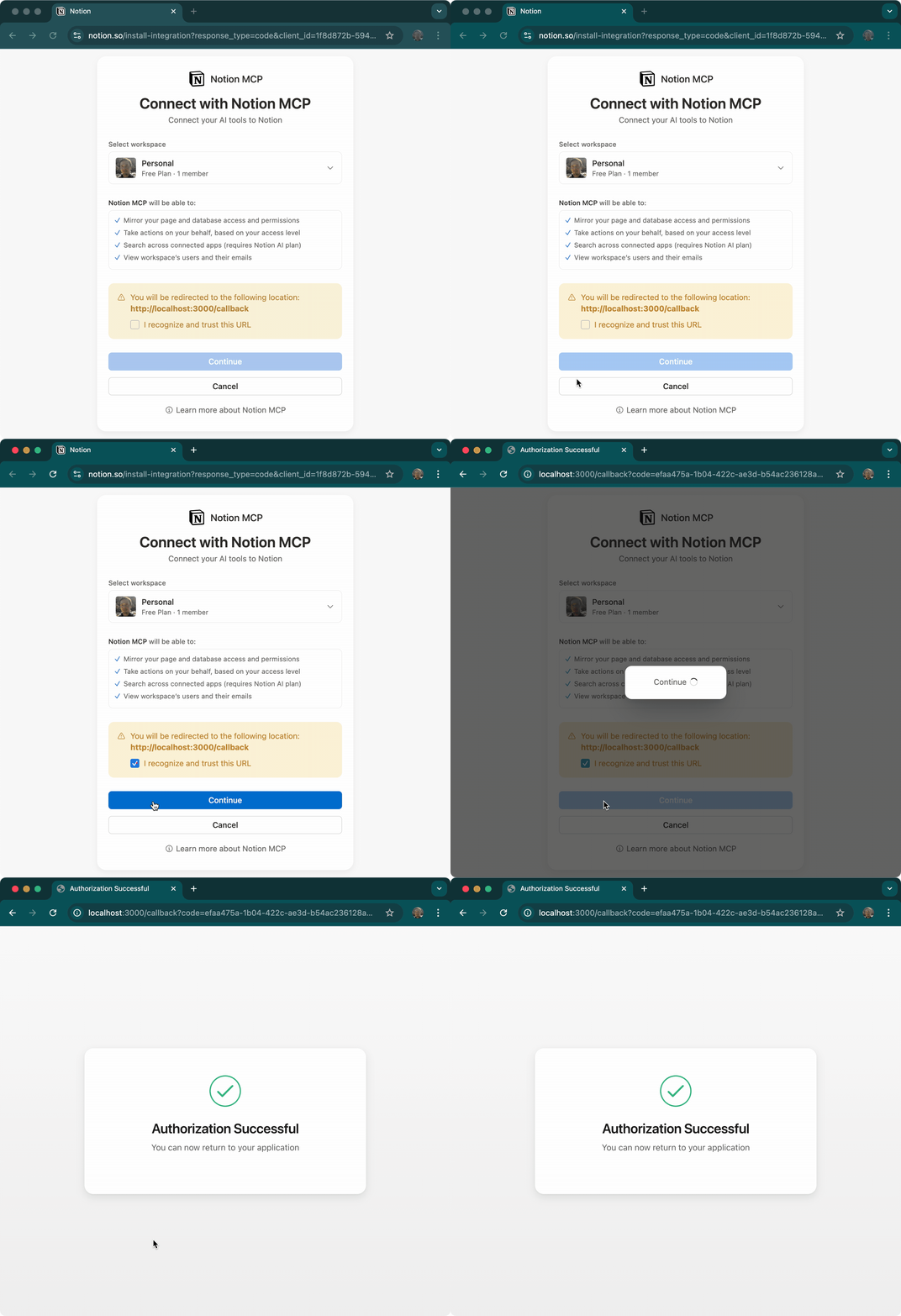
Notion MCP with Dynamic Client Registration
For testing with Notion's Model Context Protocol server:
# No credentials needed - uses Dynamic Client Registration!
bun run example:notion
This example demonstrates:
- Dynamic Client Registration (OAuth 2.0 DCR) - no pre-configured client ID/secret needed
- Integration with Model Context Protocol (MCP) servers
- Automatic client registration with the authorization server
- Using
browserAuth()provider with MCP SDK'sStreamableHTTPClientTransport - Token persistence with
inMemoryStore()for ephemeral sessions
Development
# Install dependencies
bun install

# Run tests
bun test

# Build
bun run build

# Run documentation locally
bun run docs:dev        # Start VitePress dev server at http://localhost:5173

# Run examples
bun run example:demo    # Interactive demo
bun run example:github  # GitHub OAuth example
bun run example:notion  # Notion MCP example with Dynamic Client Registration
Requirements
- Node.js 18+ (for native Request/Response support), Deno, or Bun 1.0+
- A registered OAuth application with a provider
- Redirect URI configured as
http://localhost:[port]/callback
Common Issues
Port Already in Use
If port 3000 is already in use, specify a different port:
const result = await getAuthCode({
  authorizationUrl: authUrl,
  launch: open,
  port: 8080,
});
Firewall Warnings
On first run, your OS may show a firewall warning. Allow the connection for localhost only.
Browser Doesn't Open
If the browser doesn't open automatically, manually navigate to the authorization URL.
Contributing
Contributions are welcome! See CONTRIBUTING.md for setup instructions.
Maintainers wanted — we're looking for people to help maintain this project. If interested, reach out on Discord or open an issue.
License
This project is released under the MIT License. Feel free to use it in your projects, modify it to suit your needs, and share it with others. We believe in open source and hope this tool makes OAuth integration easier for everyone!
Related Projects
- MCP Client Generator - Generate TypeScript clients from MCP server specifications. Perfect companion for building MCP-enabled applications with OAuth support (npm).
- React Starter Kit - Full-stack React application template with authentication, including OAuth integration examples.
Backers
Support this project by becoming a backer. Your logo will show up here with a link to your website.








Support
Found a bug or have a question? Please open an issue on the GitHub issue tracker and we'll be happy to help. If this project saves you time and you'd like to support its continued development, consider becoming a sponsor. Every bit of support helps maintain and improve this tool for the community. Thank you!
How to install
Run in your terminal:
claude mcp add oauth-callback --env GITHUB_CLIENT_ID="" --env GITHUB_CLIENT_SECRET="" -- npx -y oauth-callback
