
OKE Server
FreeNot checkedMCP server for Oracle Container Engine for Kubernetes (OKE) that enables inspection, querying, and troubleshooting of OKE clusters through safe, composable tool

About
MCP server for Oracle Container Engine for Kubernetes (OKE) that enables inspection, querying, and troubleshooting of OKE clusters through safe, composable tools.
README
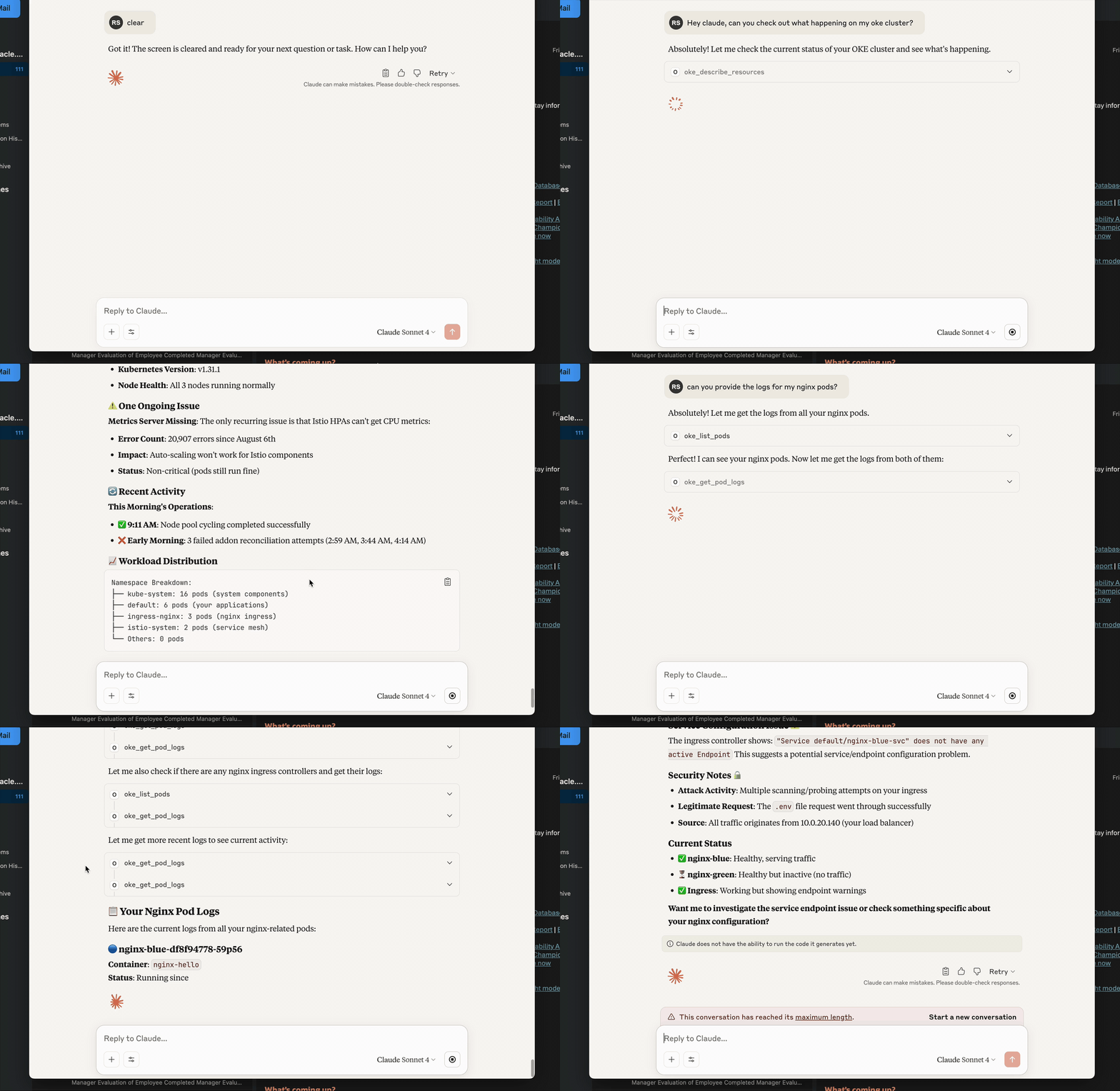
Model Context Protocol (MCP) server for Oracle Container Engine for Kubernetes (OKE). It lets MCP‑aware chat clients (e.g. Claude Desktop, VS Code Agent, custom CLI) inspect, query and troubleshoot your OKE clusters through a small set of safe, composable tools.
✨ Highlights
- Lean, LLM‑friendly APIs – small, consistent payloads (
{items,next,error}/{item,error}) with optionalverboseandhints. - OCI auth that “just works” – supports security token (local dev) and API keys.
- No venv required – run with uvx:
uvx oke-mcp-server --transport stdio. - Token rotation – refresh without restart using the
auth_refreshtool. - Production‑ready ergonomics – clear errors, pagination, predictable shapes.
Requirements
- Python 3.10+ (3.11+ recommended)
- uv (recommended): https://github.com/astral-sh/uv
- OCI credentials configured locally (see below)
Optional:
- MCP host/client (Claude Desktop, VS Code Agent Mode, etc.)
Install & Run (recommended)
Run the published package with uvx:
uvx oke-mcp-server --transport stdio
Or run a specific version:
uvx --from oke-mcp-server==0.2.* oke-mcp-server --transport stdio
The server speaks MCP over stdio. Most MCP hosts handle initialization automatically. For raw testing you can still send JSON‑RPC (see “Quick JSON‑RPC test”).
Configure Authentication
Option A — Security Token (best for local dev)
- Sign in via the OCI Console/CLI to obtain a security token.
- In your
~/.oci/configprofile (e.g.DEFAULT) include:[DEFAULT] tenancy=ocid1.tenancy.oc1..aaaa... region=eu-frankfurt-1 user=ocid1.user.oc1..aaaa... # usually present; not used by STS signer key_file=/path/to/your/api_key.pem # keep if you also use API key flows fingerprint=XX:XX:... # same as above security_token_file=/path/to/token # REQUIRED for STS - Export (or set in your MCP host env):
export OCI_CLI_AUTH=security_token - (When the token expires) call the MCP tool:
{"jsonrpc":"2.0","id":1,"method":"tools/call","params":{"name":"auth_refresh","arguments":{}}}
Option B — API Key
Use your standard ~/.oci/config profile with user, key_file, fingerprint, tenancy, region. Do not set OCI_CLI_AUTH=security_token.
The server also honors
OKE_COMPARTMENT_IDandOKE_CLUSTER_IDenvironment variables as defaults.
Using with an MCP Host
Claude Desktop (example)
Settings → MCP Servers → Add:
{
  "name": "oke",
  "command": "uvx",
  "args": ["oke-mcp-server", "--transport", "stdio"],
  "env": {
    "OCI_CLI_AUTH": "security_token",
    "OKE_COMPARTMENT_ID": "ocid1.compartment.oc1..aaaa...",
    "OKE_CLUSTER_ID": "ocid1.cluster.oc1.eu-frankfurt-1.aaaa..."
  }
}
That’s it—Claude will list the tools and can call them during chat.
Quick JSON‑RPC test (manual)
Start the server:
uvx oke-mcp-server --transport stdio
Then send:
{"jsonrpc":"2.0","id":0,"method":"initialize","params":{"protocolVersion":"2024-11-05","capabilities":{},"clientInfo":{"name":"manual","version":"0.0.0"}}}
{"jsonrpc":"2.0","method":"notifications/initialized","params":{}}
{"jsonrpc":"2.0","id":1,"method":"tools/list"}
{"jsonrpc":"2.0","id":2,"method":"tools/call","params":{"name":"meta_health","arguments":{}}}
Tools (stable set)
All list tools return:
{ "items": [...], "next": "<token|null>", "error": null, "meta": { ... } }
Single‑item tools return:
{ "item": { ... }, "error": null, "meta": { ... } }
Common inputs:
limit(default 20),continue_token(pagination)verbose: bool(include extra details)hints: bool(include lightweight graph hints where applicable)auth: "security_token" | null(override; otherwise server uses env/defaults)
Meta / Config
- meta_health →
{server, version, defaults, effective} - meta_env → redacted env snapshot for diagnostics
- auth_refresh → re‑loads auth (use after rotating security token)
- config_get_effective_defaults / config_set_defaults → manage fallback OCIDs
OKE / Kubernetes
- k8s_list — list Pods, Services, Namespaces, Nodes, Deployments, ReplicaSets, Endpoints, EndpointSlices, Ingress, Gateway, HTTPRoute, PVC, PV, StorageClass
- k8s_get — get a single resource by kind/namespace/name
- oke_get_pod_logs — stream recent logs from a container (supports
tail_lines,since_seconds,previous,timestamps) - oke_list_clusters / oke_get_cluster — cluster discovery and details (OCI)
For public logs on OKE, ensure worker nodes allow the API->kubelet path: TCP/10250 from the control‑plane CIDR/NSG. Timeouts when calling
read_namespaced_pod_logtypically mean this network path is blocked.
Troubleshooting
| Symptom | Likely Cause | Fix |
|---|---|---|
{'user':'missing'} from OCI SDK |
No valid signer or profile | Set OCI_CLI_AUTH=security_token or ensure ~/.oci/config has user/key_file/fingerprint |
| TLS bundle not found | Wrong Python cert path | Ensure certifi is installed in the environment running the server |
Logs 500 / i/o timeout to :10250 |
Control‑plane → node kubelet blocked | Open TCP/10250 from API endpoint CIDR in Security List / NSG |
Tool says cluster_id required |
No defaults present | Set OKE_CLUSTER_ID env or call config_set_defaults |
Project Structure
oke_mcp_server/
  __init__.py
  main.py
  auth.py
  config_store.py
  tools/
    k8s.py
    oke_cluster.py
pyproject.toml
Makefile
Install OKE Server in Claude Desktop, Claude Code & Cursor
unyly install oke-mcp-serverInstalls into Claude Desktop, Claude Code, Cursor & VS Code — handles npx, uvx and build-from-source repos for you.
First time? Get the CLI: curl -fsSL https://unyly.org/install | sh
Or configure manually
Run in your terminal:
claude mcp add oke-mcp-server -- uvx oke-mcp-serverFAQ
Is OKE Server MCP free?
Yes, OKE Server MCP is free — one-click install via Unyly at no cost.
Does OKE Server need an API key?
No, OKE Server runs without API keys or environment variables.
Is OKE Server hosted or self-hosted?
Self-hosted: the server runs locally on your machine via the install command above.
How do I install OKE Server in Claude Desktop, Claude Code or Cursor?
Open OKE Server on unyly.org, pick your client tab (Claude Desktop, Claude Code, Cursor) and press Install — the config is generated automatically, no JSON editing.
Related MCPs
GitHub
PRs, issues, code search, CI status
 by GitHub
Filesystem
Secure file operations with configurable access controls.
Memory
Knowledge graph-based persistent memory system.
Template MCP Server
A CLI tool to create a new Model Context Protocol server project with TypeScript support, dual transport options, and an extensible structure
 by mcpdotdirect
Compare OKE Server with
Not sure what to pick?
Find your stack in 60 seconds
Author?
Embed badge for your README
Browse similar
All development MCPs