
OmniMCP Container
FreeNot checkedA containerized MCP bridge that lets local or cloud LLMs access your filesystem and perform web searches via Ollama and FastMCP.

About
A containerized MCP bridge that lets local or cloud LLMs access your filesystem and perform web searches via Ollama and FastMCP.
README



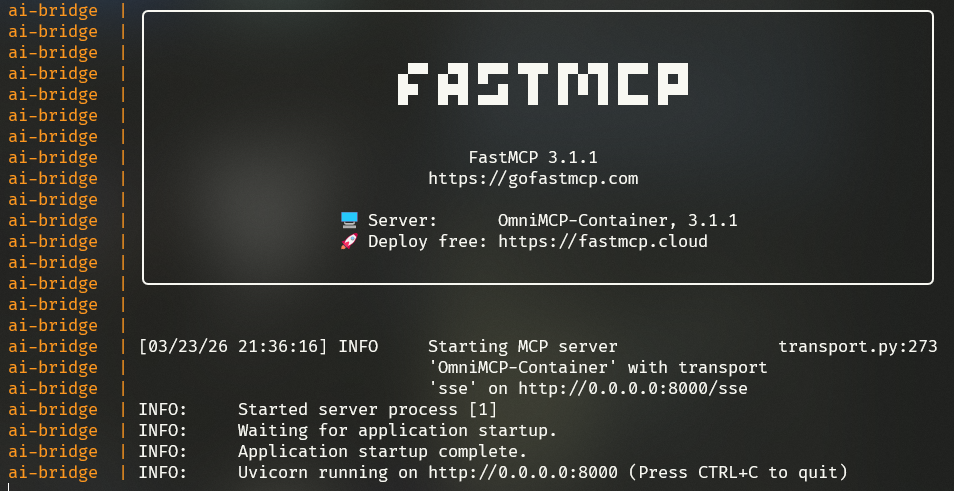
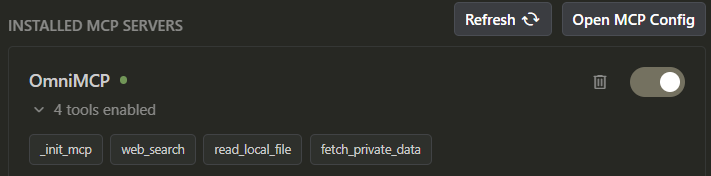
A containerized Model Context Protocol (MCP) bridge for local and external LLMs. This project provides a robust, extensible hub that allows you to use your local models (via Ollama) or cloud models while giving them access to your local filesystem and web search tools.
web_search mocked fetch_private_data using api.example.com
🌟 Key Features
- Local Inference: Integrated Ollama service for running models locally (no internet required).
- Bridge Service: Python-based MCP server using
FastMCPthat acts as the tool hub. - Filesystem Access: Secure access to your project files via mounted Docker volumes.
- Web Search: Extensible web search tool for real-time information.
- SSE Transport: Exposes the MCP server over HTTP (SSE) for easy integration with other apps.
🛠️ Stack
- Orchestration: Docker Compose
- Inference: Ollama
- MCP Framework: FastMCP (Python)
- Networking: LAN-ready SSE (Server-Sent Events)
🚀 Getting Started
1. Configure Environment
Copy the template and fill in your API keys (optional for local-only use):
cp .env.template .env
2. Launch the Hub
docker-compose up -d --build
3. Verify Services
- Ollama: Accessible at
http://localhost:11434 - MCP Bridge: Accessible at
http://localhost:8000/sse
📂 Mounting Your Project
To give the LLM access to your specific project files, place them in the my_project_files/ directory, or modify the volumes section in docker-compose.yml:
volumes:
  - ./your_local_path:/data
🔗 Connecting to Claude Desktop
To use this as an MCP server in Claude Desktop, add this to your claude_desktop_config.json:
{
  "mcpServers": {
    "omnimcp": {
      "command": "npx",
      "args": ["-y", "@modelcontextprotocol/inspector", "http://localhost:8000/sse"]
    }
  }
}
Note: This utilizes the MCP inspector to bridge the SSE connection to Claude Desktop's stdio-based expectations, or you can use other clients that support SSE directly.
🛠️ Customizing Tools
Add new tools in app.py by using the @mcp.tool() decorator.
📄 Licencia
Este proyecto está bajo la Licencia MIT - mira el archivo LICENSE para detalles.
Installing OmniMCP Container
This server has no published package — it is built from source. Open the repository and follow its README.
▸ github.com/hectorflores28/MCP-TemplateFAQ
Is OmniMCP Container MCP free?
Yes, OmniMCP Container MCP is free — one-click install via Unyly at no cost.
Does OmniMCP Container need an API key?
No, OmniMCP Container runs without API keys or environment variables.
Is OmniMCP Container hosted or self-hosted?
Self-hosted: the server runs locally on your machine via the install command above.
How do I install OmniMCP Container in Claude Desktop, Claude Code or Cursor?
Open OmniMCP Container on unyly.org, pick your client tab (Claude Desktop, Claude Code, Cursor) and press Install — the config is generated automatically, no JSON editing.
Related MCPs
GitHub
PRs, issues, code search, CI status
 by GitHub
Filesystem
Secure file operations with configurable access controls.
Memory
Knowledge graph-based persistent memory system.
Template MCP Server
A CLI tool to create a new Model Context Protocol server project with TypeScript support, dual transport options, and an extensible structure
 by mcpdotdirect
Compare OmniMCP Container with
Not sure what to pick?
Find your stack in 60 seconds
Author?
Embed badge for your README
Browse similar
All development MCPs