
Ontology Mcp Server RL Stable Baselines3
FreeNot checkedOntology Mcp Server RL Stable Baselines3 — Model Context Protocol server

About
Ontology Mcp Server RL Stable Baselines3 — Model Context Protocol server
README

🛍️ Ontology RL Commerce Agent (formerly "Ontology MCP Server") highlights the newest reinforcement-learning-driven closed loop. The system still relies on the Model Context Protocol (MCP) to combine ontology reasoning, e-commerce business logic, memory, and a Gradio UI so you can reproduce a full shopping assistant experience end-to-end.
🤖 RL-powered Agent: Stable Baselines3 PPO training pipeline ships in-tree. It covers the entire flow from data → training → evaluation → deployment, letting the Agent continually learn from real transcripts and tool logs so it automatically discovers safer, more efficient tool-chaining policies.
🚀 Quick Start
Option A: Docker (Recommended)
Requirements
- Docker 20.10+
- Docker Compose 2.0+
- 8 GB+ RAM
20 GB disk space
One-click boot
# 1. Clone the repo
git clone <repository-url>
cd ontology-mcp-server-RL-Stable-Baselines3

# 2. Configure environment variables
cp .env.example .env
nano .env  # fill in LLM API keys

# 3. Launch all services
docker-compose up -d

# 4. Tail logs
docker-compose logs -f

# 5. Stop services
docker-compose down
Service endpoints
- MCP Server: http://localhost:8000
- Agent UI: http://localhost:7860
- Training Dashboard: http://localhost:7861
Common commands
# Restart a single service
docker-compose restart agent-ui

# Enter a container for debugging
docker exec -it ontology-agent-ui bash

# Inspect status
docker-compose ps

# Clean and rebuild (use with caution)
docker-compose down -v
docker-compose build --no-cache
docker-compose up -d
GPU support (optional)
Install nvidia-docker, then uncomment the GPU block in docker-compose.yml under training-dashboard.
distribution=$(. /etc/os-release; echo $ID$VERSION_ID)
curl -s -L https://nvidia.github.io/nvidia-docker/gpgkey | sudo apt-key add -
curl -s -L https://nvidia.github.io/nvidia-docker/$distribution/nvidia-docker.list | \
  sudo tee /etc/apt/sources.list.d/nvidia-docker.list
sudo apt-get update && sudo apt-get install -y nvidia-docker2
sudo systemctl restart docker
Option B: Local Development
1. Environment preparation
Requirements
- Python 3.10+
- 8 GB+ RAM for inference/demos (32 GB+ for RL training)
- Linux/macOS/WSL2
- GPU optional (≥12 GB VRAM NVIDIA recommended)
40 GB disk (database, Chroma vectors, RL checkpoints)
Install dependencies
git clone <repository-url>
cd ontology-mcp-server-RL-Stable-Baselines3
python3 -m venv .venv
source .venv/bin/activate  # Windows: .venv\Scripts\activate
pip install -e .
2. Initialize the database
Docker deployments run these steps automatically on first launch. Manual steps are for local dev only.
export ONTOLOGY_DATA_DIR="$(pwd)/data"
python scripts/init_database.py        # Create tables
python scripts/seed_data.py            # Seed base users/products
python scripts/add_bulk_products.py    # Optional: +1000 products
python scripts/add_bulk_users.py       # Optional: +200 users
python scripts/update_demo_user_names.py --seed 2025
Sample users
| User ID | Name | Tier | Lifetime Spend | |
|---|---|---|---|---|
| 1 | Zhang San | [email protected] | Regular | CNY 0 |
| 2 | Li Si | [email protected] | VIP | CNY 6,500 |
| 3 | Wang Wu | [email protected] | SVIP | CNY 12,000 |
Sample products
- iPhone 15 Pro Max (CNY 9,999)
- iPhone 15 Pro (CNY 8,999)
- iPhone 15 (CNY 5,999)
- AirPods Pro 2 (CNY 1,899)
- Accessories, etc.
3. Configure the LLM
src/agent/config.yaml supports DeepSeek, OpenAI-compatible APIs, or local Ollama:
llm:
  provider: "deepseek"
  api_url: "https://api.deepseek.com/v1"
  api_key: "your-api-key-here"
  model: "deepseek-chat"
  temperature: 0.7
  max_tokens: 2000
Or via environment variables:
export OPENAI_API_URL="https://api.deepseek.com/v1"
export OPENAI_API_KEY="your-api-key"
export OPENAI_MODEL="deepseek-chat"

# Local Ollama (qwen3:8b example)
export LLM_PROVIDER="ollama"
export OLLAMA_API_URL="http://localhost:11434/v1"
export OLLAMA_MODEL="qwen3:8b"
export OLLAMA_API_KEY="ollama"  # Ollama ignores the value
3.1 Configure MCP base URL
Both the training script (train_rl_agent.py) and the Gradio Agent call MCP over HTTP. Override MCP_BASE_URL if needed:
# Local/dev
export MCP_BASE_URL="http://127.0.0.1:8000"

# Docker/production (container-to-container)
export MCP_BASE_URL="http://ontology-mcp-server:8000"
4. Start services
Option 1: start_all.sh (recommended)
./scripts/start_all.sh
# 默认汇总到 logs/server.log(按日轮转),若想恢复各脚本独立日志,运行前导出 DISABLE_SCRIPT_LOG_FILES=0
tail -f logs/server.log
Stop everything:
./scripts/stop_all.sh
Option 2: Start individually
./scripts/run_server.sh
./scripts/run_agent.sh
./scripts/run_training_dashboard.sh
./scripts/run_tensorboard.sh
Option 3: Manual commands
# Terminal 1: MCP Server (FastAPI)
source .venv/bin/activate
export ONTOLOGY_DATA_DIR="$(pwd)/data"
uvicorn ontology_mcp_server.server:app --host 0.0.0.0 --port 8000

# Terminal 2: Gradio UI
source .venv/bin/activate
export ONTOLOGY_DATA_DIR="$(pwd)/data"
export MCP_BASE_URL="http://127.0.0.1:8000"
python -m agent.gradio_ui

# Terminal 3: RL Training Dashboard
source .venv/bin/activate
export ONTOLOGY_DATA_DIR="$(pwd)/data"
export MCP_BASE_URL="http://127.0.0.1:8000"
python scripts/run_training_dashboard.py

# Terminal 4: TensorBoard
source .venv/bin/activate
tensorboard --logdir data/rl_training/logs/tensorboard --host 0.0.0.0 --port 6006
To change the Gradio bind address/port, set
GRADIO_SERVER_NAMEandGRADIO_SERVER_PORTbefore launching.run_agent.sh/run_training_dashboard.shacceptAGENT_HOST/PORTandTRAINING_DASHBOARD_HOST/PORT; they forward values to Gradio environment variables to keep ports 7860/7861 independent.
5. Access the UI
Visit http://127.0.0.1:7860.
Tabs:
- 💬 Plan: Chat interface + reasoning plan
- 🔧 Tool Calls: Live tool invocation log
- 🧠 Memory: Conversation memory (ChromaDB)
- 🛍️ Commerce Analytics: Quality score, intent tracker, conversation state, recommendation engine
- 📋 Execution Log: Full LLM I/O and tool traces
Memory flow (Mermaid)
flowchart LR
  subgraph Ingest[Ingest & Store]
    direction TB
    U(User input)
    U --> AT(ChromaMemory.add_turn)
    AT --> SUM(generate_summary)
    SUM --> DB((ChromaDB collection))
    AT --> DB
  end

  subgraph Extract[Extraction]
    direction TB
    AT --> EX(UserContextExtractor)
    EX --> UM(UserContextManager)
  end

  subgraph Retrieval[Retrieval & Injection]
    direction TB
    UM --> CTX(get_context_for_prompt)
    CTX --> NOTE_CTX(Inject context + history)
    NOTE_CTX --> AGT(Agent / LLM)
  end

  AGT --> TC(Tool calls)
  TC --> AT
  TC -->|create_order yields ORD...| UM
6. Sample dialogue
User: Hi
AI: Hello! Welcome... (intent: greeting)

User: Recommend a phone?
AI: [commerce.search_products] Returns 4 iPhone models...

User: Is iPhone 15 Pro Max in stock?
AI: [commerce.check_stock] In stock, 50 units...

User: Add to cart
AI: [commerce.add_to_cart] Added... (state: browsing → cart)
7. Interaction sequence diagrams
Log-driven segments for the full conversation (recommendation → multi-search → checkout → after-sales → analytics) live in docs/interaction_sequence_diagrams.md. Each section contains a Mermaid sequence diagram plus a PNG snapshot so you can line up raw logs, tool invocations, and the UI states.
8. Optional RL loop
scripts/generate_dialogue_corpus.pyfor the latest 200 fully real scenariospython test_rl_modules.pyto sanity-check RL modulespython train_rl_agent.py --timesteps ...to launch PPO training- Details below in 🧠 Reinforcement Learning (Phase 6)
🔧 MCP Server API
The MCP server exposes HTTP endpoints.
Health Check
curl http://localhost:8000/health
Capability list
curl http://localhost:8000/capabilities
Invoke a tool
curl -X POST http://localhost:8000/invoke \
  -H "Content-Type: application/json" \
  -d '{
    "tool": "commerce.search_products",
    "params": {
      "available_only": true,
      "limit": 5
    }
  }'
21 tools
Ontology tools (3)
ontology.explain_discountontology.normalize_productontology.validate_order
Commerce tools (18)
4. commerce.search_products
5. commerce.get_product_detail
6. commerce.check_stock
7. commerce.get_product_recommendations
8. commerce.get_product_reviews
9. commerce.add_to_cart
10. commerce.view_cart
11. commerce.remove_from_cart
12. commerce.create_order
13. commerce.get_order_detail
14. commerce.cancel_order
15. commerce.get_user_orders
16. commerce.process_payment
17. commerce.track_shipment
18. commerce.get_shipment_status
19. commerce.create_support_ticket
20. commerce.process_return
21. commerce.get_user_profile
🧠 Agent Architecture
Core components
ReAct Agent (
react_agent.py)- LangChain ReAct workflow (Reasoning + Acting)
- Auto tool selection and reasoning traces
- Multi-turn dialogue awareness
Conversation State (
conversation_state.py)- 8 phases: greeting → browsing → selecting → cart → checkout → tracking → service → idle
- Tracks VIP status, cart state, browsing history
- Auto transition detection from keywords & tool usage
System Prompts (
prompts.py)- Ecommerce persona: professional, friendly shopping advisor
- Uses a polite "nin" tone when generating Chinese prompts; avoids system jargon
- Confirms risky operations (payment, cancellation)
- Encourages clarifying questions instead of immediate refusal
Conversation Memory (
chroma_memory.py)- Backend: ChromaDB
- Retrieval modes:
recent,similarity,hybrid - Auto-summarizes each turn
- Persisted in
data/chroma_memory/
Quality Tracking (
quality_metrics.py)- Conversation quality score (0-1)
- User satisfaction estimation
- Tool efficiency & latency tracking
Intent Tracker (
intent_tracker.py)- 14 intents (greeting, search, view_cart, checkout, track_order, ...)
- Confidence scores + history
Recommendation Engine (
recommendation_engine.py)- Personalized product recommendations
- Uses browsing/cart history & membership tier
🧠 Reinforcement Learning (Phase 6)
Hardware tips: PPO training benefits from ≥8 cores, ≥32 GB RAM, and ≥1 GPU with ≥12 GB VRAM (RTX 3080/4090/A6000). CPU-only is possible but 100K steps may take 5-8 hours; GPU cuts it to ~1 hour. Reserve ≥15 GB for
data/rl_training/.
Goals & benefits
- Let the ReAct Agent self-improve via Stable Baselines3 PPO.
- Encode user context/intent/tool usage/product info into a 128-dim state.
- Multi-objective rewards (task success, efficiency, satisfaction, safety).
- Gymnasium environment reuses the LangChain Agent without re-implementing business logic.
Module overview (src/agent/rl_agent/)
| File | Role | Notes |
|---|---|---|
state_extractor.py |
Encode multi-source dialogue into 128-dim vector | Handles embeddings/simple features, tolerant of string/object intents |
reward_calculator.py |
Multi-objective rewards | task/efficiency/satisfaction/safety + episode aggregates |
gym_env.py |
EcommerceGymEnv |
22 discrete actions (21 tools + direct reply) |
ppo_trainer.py |
Training orchestration | DummyVecEnv + eval/checkpoint callbacks + TensorBoard |
train_rl_agent.py |
CLI entry | Configurable steps, eval freq, checkpoints, embeddings |
Scenario corpus data/training_scenarios/sample_dialogues.json includes 200 real conversations referencing real users/orders/products across 5 scenario categories.
Closed loop: Data → Training → Application
Data stage
- Ensure database is filled:
add_bulk_products.py,add_bulk_users.py,update_demo_user_names.py --seed 2025. - Generate 200 real scenarios:
python scripts/generate_dialogue_corpus.py. - Optional validation snippet (category counts) shown in README.zh.md.
- Ensure database is filled:
Training
source .venv/bin/activate
export ONTOLOGY_DATA_DIR="$(pwd)/data"
export MCP_BASE_URL="http://localhost:8000"
export OPENAI_API_URL="https://api.deepseek.com/v1"
export OPENAI_API_KEY="your-api-key"
export OPENAI_MODEL="deepseek-chat"
export TRAIN_DEVICE="gpu"  # fallback to cpu
python test_rl_modules.py
python train_rl_agent.py \
  --timesteps 100000 \
  --eval-freq 2000 \
  --checkpoint-freq 20000 \
  --output-dir data/rl_training \
  --max-steps-per-episode 12 \
  --scenario-file data/training_scenarios/sample_dialogues.json \
  --device "${TRAIN_DEVICE:-gpu}"
Logs stream to data/rl_training/logs/tensorboard/.
- Evaluation & artifacts
- Best model:
data/rl_training/best_model/best_model.zip - Final model:
data/rl_training/models/ppo_ecommerce_final.zip - Checkpoints:
data/rl_training/checkpoints/ppo_ecommerce_step_*.zip - Episode stats:
data/rl_training/logs/training_log.json
- Deployment
python - <<'PY'
from agent.react_agent import LangChainAgent
from agent.rl_agent.ppo_trainer import PPOTrainer

agent = LangChainAgent(max_iterations=6)
trainer = PPOTrainer(agent, output_dir="data/rl_training")
trainer.create_env(max_steps_per_episode=10)
trainer.load_model("data/rl_training/best_model/best_model.zip")

query = "I need ten flagship Huawei phones, budget around 7000"
action_idx, action_name, _ = trainer.predict(query)
print("RL suggested action:", action_idx, action_name)

result = agent.run(query)
print(result["final_answer"])
PY
RL dashboard (Gradio)
src/training_dashboard/ offers a self-contained console with corpus aggregation, training orchestration, metric visualization, model registry, and hot reload:
- Copy
config/training_dashboard.example.yaml→config/training_dashboard.yamland adjust paths. - Launch via
PYTHONPATH=src python scripts/run_training_dashboard.py. - Tabs: overview (live status, reward/length curves, logs), corpus management (static/log mixes), training control, model management.
Reward breakdown
R_task: +10 for successful orders; missing key info or empty replies deduct.R_efficiency: Fewer tool calls & low latency rewarded; excessive calls penalized.R_satisfaction: Uses live quality score to reward proactive guidance.R_safety: Starts at +1; SHACL failures or unsafe tools subtract up to 10.
Tuning tips
- Enable
--use-text-embeddingif resources allow for richer states. - Adjust
reward_weightsinPPOTrainerto balance success vs. safety. max_steps_per_episode: Short episodes for frequent eval; longer for complete shopping journeys.
🏗️ Ontology & Architecture
Ontology Semantic Model
The system defines 12 core business entities with complete relationships and properties:
Core Transaction Entities
User
- Properties: user_id, username, email, phone, user_level (Regular/VIP/SVIP), total_spent, credit_score
- Operations: Query user, User authentication
- Relationships: Creates orders, owns cart items, initiates support tickets
Product
- Properties: product_id, product_name, category, brand, model, price, stock_quantity, specs
- Operations: Search products, Get product details, Check stock, Get recommendations, Get reviews
- Relationships: Referenced by cart items, order items, and reviews
CartItem
- Properties: cart_id, user_id, product_id, quantity, added_at
- Operations: Add to cart, View cart, Remove from cart
- Relationships: Links users to products
Order
- Properties: order_id, order_no, total_amount, discount_amount, final_amount, order_status, payment_status
- Operations: Create order, Get order details, Cancel order, Get user orders
- Relationships: Contains order items, generates payment and shipment records
- Ontology Inference: Discount amount calculated by ontology rules based on user level, order amount, and first-order status
OrderItem
- Properties: item_id, order_id, product_id, product_name, quantity, unit_price, subtotal
- Relationships: Order contains multiple order items, each referencing a product
Payment
- Properties: payment_id, order_id, payment_method, payment_amount, payment_status, transaction_id, payment_time
- Operations: Process payment
- Relationships: Generated from orders
- Note: Transaction_id serves as payment receipt
Shipment
- Properties: shipment_id, order_id, tracking_no, carrier, current_status, current_location, estimated_delivery
- Operations: Track shipment, Get shipment status
- Relationships: Generated from orders, records shipment tracks
ShipmentTrack
- Properties: track_id, shipment_id, status, location, description, track_time
- Relationships: Multiple tracks belong to one shipment
Customer Service & After-sales Entities
SupportTicket
- Properties: ticket_id, ticket_no, user_id, order_id, category, priority, status, subject, description
- Operations: Create support ticket
- Relationships: Created by users for orders, contains support messages
SupportMessage
- Properties: message_id, ticket_id, sender_type, sender_id, message_content, sent_at
- Relationships: Multiple messages belong to one support ticket
Return
- Properties: return_id, return_no, order_id, user_id, return_type (return/exchange), reason, status, refund_amount
- Operations: Process return
- Relationships: Initiated from orders
Review
- Properties: review_id, product_id, user_id, order_id, rating (1-5 stars), content, images
- Operations: Get product reviews
- Relationships: Users review products
Architecture Diagram
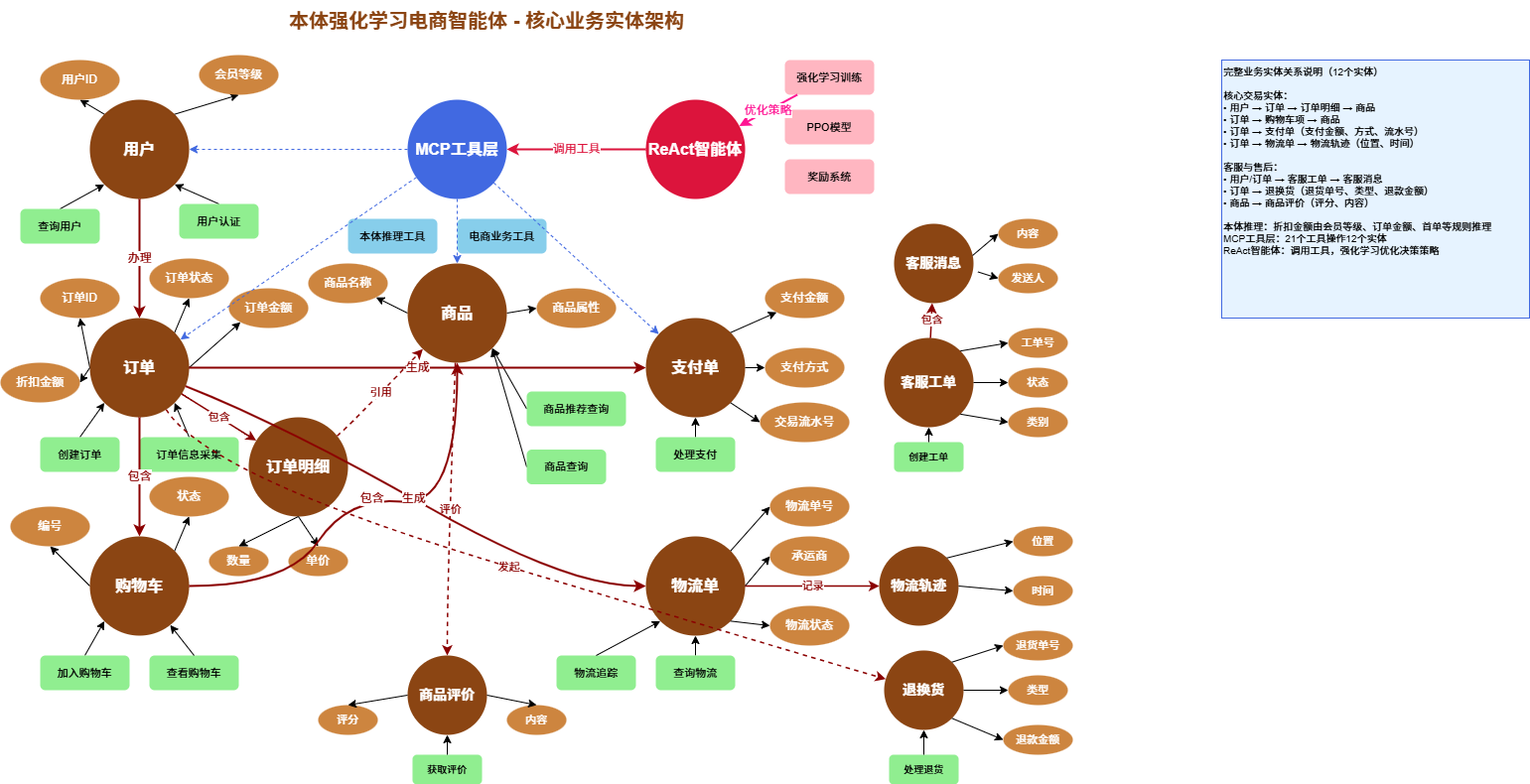
Entity Relationships:
- User → Order → OrderItem → Product
- Order → CartItem → Product
- Order → Payment (payment_amount, payment_method, transaction_id)
- Order → Shipment → ShipmentTrack (location, time)
- User/Order → SupportTicket → SupportMessage
- Order → Return (return_no, return_type, refund_amount)
- Product → Review (rating, content)
Ontology Inference:
- Discount rules: VIP/SVIP member discounts, volume discounts (≥5000/≥10000), first-order discount
- Shipping rules: Free shipping (order ≥500 or VIP/SVIP), next-day delivery (SVIP), remote area surcharge
- Return policy: 7-day no-reason return (Regular), 15-day (VIP/SVIP), category-specific rules
MCP Tools Layer: 21 tools operate on 12 entities via ontology reasoning ReAct Agent: Calls tools, optimized by reinforcement learning (PPO model, reward system)
🎯 Ontology Rule Coverage
100% of ontology_rules.ttl is implemented in ecommerce_ontology.py.
User tier rules (2)
| Rule | Trigger | Method |
|---|---|---|
| VIPUpgradeRule | Total spend ≥ 5000 | infer_user_level() |
| SVIPUpgradeRule | Total spend ≥ 10000 | infer_user_level() |
Discount rules (5)
| Rule | Trigger | Discount | Method |
|---|---|---|---|
| VIPDiscountRule | VIP users | 95% | infer_discount() |
| SVIPDiscountRule | SVIP users | 90% | infer_discount() |
| VolumeDiscount5kRule | Order ≥ 5000 | 95% | infer_discount() |
| VolumeDiscount10kRule | Order ≥ 10000 | 90% | infer_discount() |
| FirstOrderDiscountRule | First-time buyers | 98% | infer_discount() |
Membership discounts and volume discounts do not stack—best discount wins.
Shipping rules (5)
| Rule | Trigger | Shipping | Method |
|---|---|---|---|
| FreeShipping500Rule | Order ≥ 500 | CNY 0 standard | infer_shipping() |
| VIPFreeShippingRule | VIP/SVIP | CNY 0 standard | infer_shipping() |
| SVIPNextDayDeliveryRule | SVIP | CNY 0 next-day | infer_shipping() |
| StandardShippingRule | Regular < 500 | CNY 15 standard | infer_shipping() |
| RemoteAreaShippingRule | Remote address | +CNY 30 | infer_shipping() |
Return/exchange rules (5)
| Rule | Scope | Window | Extra conditions |
|---|---|---|---|
| Standard7DayReturnRule | Regular users | 7 days | No reason needed |
| VIP15DayReturnRule | VIP/SVIP | 15 days | No reason |
| ElectronicReturnRule | Electronics | Tier-based | Device unopened |
| AccessoryReturnRule | Accessories | Tier-based | Packaging intact |
| ServiceNoReturnRule | Services | N/A | Not returnable |
Combo strategies (2)
| Strategy | Scenario | Behavior |
|---|---|---|
| DiscountStackingStrategy | Multiple discounts | Picks optimal |
| ShippingPriorityStrategy | Multiple shipping options | Applies priority |
SHACL validation
commerce_service.py calls SHACL validation before creating orders to ensure data integrity, logging top violations and triple counts.
📊 Gradio UI Features
- 💬 Plan: Input area, AI response, reasoning plan, live state.
- 🔧 Tool Calls: Tool names/params, timestamps, results, errors.
- 🧠 Memory: History list, summaries, retrieval controls, session management.
- 🛍️ Commerce Analytics: Quality metrics, intent analysis, conversation state, recommendation engine.
- 📋 Execution Log: Full LLM input/output and tool traces.
📚 Documentation
- Phase 3 Completion Report
- Phase 4 Completion Report
- Memory Guide
- Memory Config Guide
- Execution Log Guide
- Gradio UI Guide
- Agent Usage Guide
🧪 Testing
source .venv/bin/activate
python test_memory_quick.py
python test_execution_log.py
python test_phase4_shopping.py
python test_phase4_advanced.py
python test_gradio_ecommerce.py
python test_rl_modules.py

pytest tests/
pytest tests/test_services.py
pytest tests/test_commerce_service.py
python train_rl_agent.py --timesteps 20000 --eval-freq 2000 --checkpoint-freq 5000
⚙️ Configuration
Environment variables
MCP / Data root
export ONTOLOGY_DATA_DIR="$(pwd)/data"
export APP_HOST=0.0.0.0
export APP_PORT=8000
Ontology toggle (config.yaml)
ontology:
   use_owlready2: true  # 默认启用,可通过 config.yaml 修改
如需在运行时临时关闭,可设置
ONTOLOGY_USE_OWLREADY2=false环境变量覆盖上述配置。
Agent & LLM
export MCP_BASE_URL="http://127.0.0.1:8000"
export OPENAI_API_URL="https://api.deepseek.com/v1"
export OPENAI_API_KEY="your-api-key"
export OPENAI_MODEL="deepseek-chat"
export LLM_PROVIDER="deepseek"
Gradio services
export GRADIO_SERVER_NAME=0.0.0.0
export GRADIO_SERVER_PORT=7860
export AGENT_HOST=0.0.0.0
export AGENT_PORT=7860
export TRAINING_DASHBOARD_HOST=0.0.0.0
export TRAINING_DASHBOARD_PORT=7861
export LOG_DIR="$(pwd)/logs"
export TB_LOG_DIR="$(pwd)/data/rl_training/logs/tensorboard"
export TB_HOST=0.0.0.0
export TB_PORT=6006

# 统一日志输出
export ONTOLOGY_SERVER_LOG_DIR="$(pwd)/logs"   # 默认也是 repo/logs
# 设为 0 可恢复各 run_*.sh 生成单独 log 文件
export DISABLE_SCRIPT_LOG_FILES=1
RL helpers
export TRAIN_DEVICE=gpu
export RL_OUTPUT_DIR="$(pwd)/data/rl_training"
Memory
export MEMORY_ENABLED=true
export MEMORY_BACKEND=chromadb
export CHROMA_PERSIST_DIR="data/chroma_memory"
export MEMORY_RETRIEVAL_MODE=recent
export MEMORY_MAX_TURNS=10
config.yaml example
See src/agent/config.yaml for complete options (DeepSeek/Ollama, memory, agent toggles).
🗄️ Database Schema
SQLite DB data/ecommerce.db contains 12 tables:
users,products,cart_items,orders,order_itemspayments,shipments,shipment_trackssupport_tickets,support_messages,returns,reviews
🎯 Use Cases
- Search & recommendation:
commerce.search_products+ recommendation engine. - Full purchase flow: browsing → selecting → cart → checkout → payment → tracking.
- Order management:
commerce.get_user_orders, cancel/return flows. - Ontology reasoning:
ontology.explain_discountfor contextual discount explanation.
🤝 Contributing
- Fork the project
git checkout -b feature/AmazingFeaturegit commit -m 'Add some AmazingFeature'git push origin feature/AmazingFeature- Open a Pull Request
🏷️ Release Highlights
v1.5.3 (2025-12-01) — Confirmation Memory & Full Tool Traces
- Confirmation-mode persistence: once users approve a critical tool (create order/payment), the run now writes sanitized arguments + observations back into
tool_log, memory, and conversation state so the next turn sees the finished order and avoids looping back into checkout. - Validation guard hard stop:
ontology_validate_orderis marked as a critical tool, the reminder copy blocks final answers until SHACL validation runs, and the agent now prompts the user to continue with payment right after order confirmation. - End-to-end tool transparency: streaming events ship the entire observation payload and the Gradio UI no longer truncates JSON, making audits and debugging far easier.
- New field report: added docs/articles/12-memory-intent-lessons.md to document the memory-related lessons learned (in English & Chinese index) so future contributors can avoid regressions.
v1.5.2 (2025-11-29) — Streaming Trace Baseline ✅
- True streaming pipeline:
react_agent.pynow exposes generator-basedrun_stream, DeepSeek adapter emits token deltas, and the Gradio UI renders thoughts + final answers token-by-token (commits 505b39e → 7c99e84 → aab0956). - Search accuracy upgrades: configurable multi-strategy intent tracker, LLM-powered query rewriter, FTS5 full-text index + hybrid fallback (FTS5 → LIKE → category) dramatically improve generic queries such as "electronic products".
- Traceability tooling: docs/interaction_sequence_diagrams.md records each conversation turn with Mermaid diagrams + PNG evidence (recommendation → multi-search → checkout → after-sales → analytics) and both READMEs now point to it. Tag
v1.5.2marks this baseline for downstream RL experiments.
v1.5.1 (2025-11-23)
- Inline charts (Markdown + Base64 PNG) with intent/user-context metadata and
_filter_charts_by_intent()privacy guard. analytics_service.pywith five chart data endpoints +analytics_get_chart_dataMCP tool (22nd capability).- Dependency alignment:
plotly>=6.1.0,<7.0.0,kaleido==0.2.1; diagnostic scripts (verify_chart_fix.py,test_chart_feature.py) and data/log backups. - Training dashboard UX: click-to-preview corpus, synchronized JSON view, host/port logs for multi-instance debugging.
v1.2.3 (2025-11-15) — Renaming & acknowledgments
- Rebranded to Ontology RL Commerce Agent; documented RL context.
- Added acknowledgments for Stable Baselines3/Gymnasium/TensorBoard, etc.
- Tooling: order ID validation to avoid
OverflowError; Ollama support forqwen3:8b.
v1.2.2 (2025-11-12) — README RL guide
- Added RL closed-loop description early in the README and emphasized data→training→TensorBoard→deployment.
v1.2.0 (2025-11-11) — Dynamic user context system
- Automatic extraction of user IDs, phone numbers, addresses, order IDs, product IDs.
- Prompt injection ensures continuity; regex engine handles multilingual/width variants.
- Set-based deduplication, strict
ORD...validation, product ID range guard. - Tests:
tests/test_user_context.py.
v1.2.1 (2025-11-11) — Recent order tracking hotfix
create_ordernow forces observation/input parsing for validORD...IDs, callingset_recent_order().
v1.1.0 (2025-11-10) — Gradio UI enhancements
- Ten quick-test buttons (ontology & SHACL actions).
- Streaming responses, proactive button state management, generator fixes.
v1.0.0 (2025-11-08) — Order validation baseline
- Automatic SHACL validation before order creation; detailed violation logging.
- Prompt improvements and 100% rule coverage (discount/shipping/returns/combination).
Base Version (2025-10)
- Phases 1-5 complete: ORM, ontology, 21 tools, ReAct Agent, Gradio UI.
📦 Version history
| Version | Date | Highlights | Download |
|---|---|---|---|
| v1.5.3 | 2025-12-01 | Confirmation-mode persistence, validation guard hard stop, full tool payload streaming, new memory lessons article | git checkout v1.5.3 |
| v1.5.2 | 2025-11-29 | Streaming generator pipeline, intent/query/search upgrades, log-driven diagrams + baseline tag | git checkout v1.5.2 |
| v1.5.1 | 2025-11-23 | Inline chart streaming, analytics MCP tool, dashboard UX upgrades | git checkout v1.5.1 |
| v1.5.0 | 2025-11-20 | RL closed loop, Docker/Compose packaging, 5-tab Gradio UI | git checkout v1.5.0 |
| v1.0.0 | 2025-10 | Phase 1-3 baseline (ontology + tools + agent) | git checkout v1.0.0 |
📝 Changelog
2025-12-01
- Confirmation loop persistence: the confirmation branch now pushes every executed tool (args + observations) back into
tool_log, memory, andConversationState, so follow-up turns immediately see the finished order instead of re-running checkout. - Mandatory SHACL validation:
ontology_validate_orderjoins theCRITICAL_TOOLSlist and the reminder copy blocks final replies until validation completes; after an order is confirmed the agent proactively asks whether to continue with payment. - Full tool outputs in chat: streaming events now include the complete JSON observation and the Gradio UI no longer truncates long payloads, making audits and debugging straightforward.
- New lessons-learned doc: published
docs/articles/12-memory-intent-lessons.mdto capture the practical dos/don’ts of using memory for intent detection and reasoning.
2025-11-30
- Ontology-first推理覆盖:
ecommerce_ontology.py现对折扣、物流、退货、取消四大流程优先加载ontology_rules.ttl,命中规则时返回rule_applied,无匹配才退回静态策略;对应tests/test_commerce_service.py、tests/test_services.py已通过全量 pytest。 - 日志统一与按日轮转:所有 Python 模块写入
logs/server.log(日切 +server_YYYYMMDD.log归档),start_all.sh默认设置DISABLE_SCRIPT_LOG_FILES=1防止重复日志,如需旧行为可手动置 0;新增ONTOLOGY_SERVER_LOG_DIR/ONTOLOGY_LOG_BACKUP_COUNT控制输出目录与留存天数。 - 本体资产清理:
ontology_commerce.ttl和ontology_ecommerce.ttl补齐 SWRL 前缀、变量、折扣实体与规则,使 Owlready2/外部引擎读取更稳;README/配置章节同步记录新的日志变量与使用方式。
2025-11-29
- True streaming loop:
react_agent.pynow exposes generator-basedrun_stream, the DeepSeek adapter emits token deltas, and the Gradio UI renders thoughts + final answers token-by-token for transparent reasoning playback. - Intent + retrieval stack: Configurable multi-strategy intent tracker, LLM-driven
query_rewriter.py, and the FTS5→LIKE→category fallback incommerce_service.py/db_service.pygreatly improve broad queries such as "electronic products" while preserving recall for niche intents. - Traceable documentation: docs/interaction_sequence_diagrams.md captures five log-sourced sequences with Mermaid + PNG evidence, READMEs link to it, and tag v1.5.2 marks the new baseline in the version history table.
See README.zh.md for the detailed Chinese changelog (mirrors the English highlights above).
🙏 Acknowledgments
- LangChain & FastAPI – ReAct agent orchestration + MCP server.
- Gradio – Five-tab ecommerce UI shell.
- ChromaDB & SQLite – Semantic memory + commerce data.
- Stable Baselines3 / Gymnasium / TensorBoard – RL training & visualization.
- DeepSeek – LLM provider.
- RDFLib & PySHACL – Ontology reasoning + SHACL validation.
- SQLAlchemy – ORM foundation.
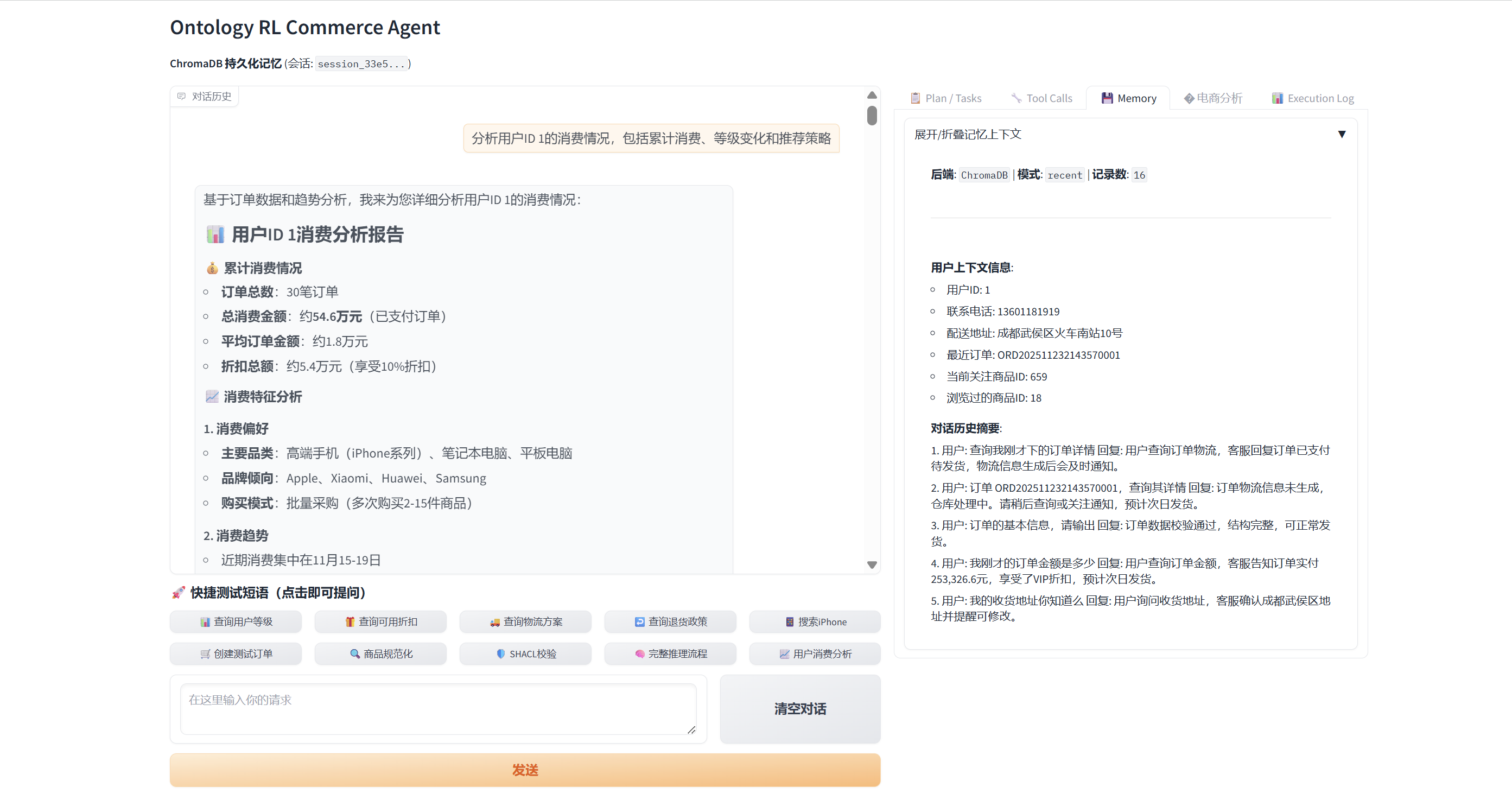
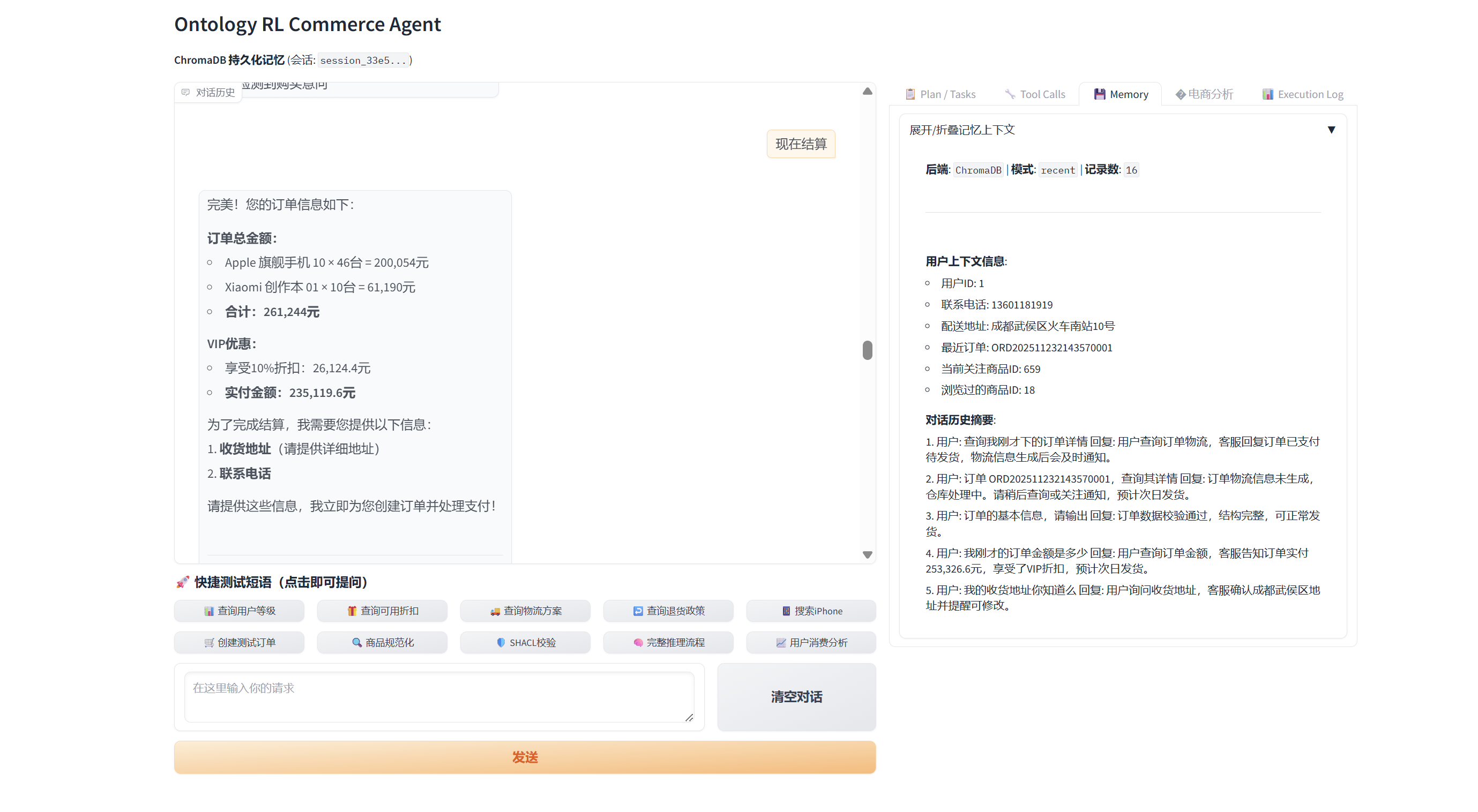
🧩 Case Study
- Scenario: VIP buyer with a CNY 200k budget asks the agent to “spend it all” on the most expensive phones, covering insights → recommendations → cart → payment → after-sales tracking.
- Highlights: 16-step memory chain, 22 MCP tools (6 ontology calls, 2 SHACL checks), dynamic charts, automated VIP discounting, cart + checkout orchestration.
- Full walk-through: docs/VIP_Customer_Case.md.
📖 Citation
@software{ontology_rl_commerce_agent_2025,
  author  = {Shark8848},
  title   = {Ontology RL Commerce Agent},
  year    = {2025},
  url     = {https://github.com/shark8848/ontology-mcp-server-RL-Stable-Baselines3},
  version = {v1.2.3}
}
📄 License
Released under the MIT License. A Simplified Chinese reference translation is available in LICENSE.zh.md.
📧 Contact
Author: [email protected] — please star the repo if it helps you!
from github.com/shark8848/ontology-mcp-server-RL-Stable-Baselines3
Installing Ontology Mcp Server RL Stable Baselines3
This server has no published package — it is built from source. Open the repository and follow its README.
▸ github.com/shark8848/ontology-mcp-server-RL-Stable-Baselines3FAQ
Is Ontology Mcp Server RL Stable Baselines3 MCP free?
Yes, Ontology Mcp Server RL Stable Baselines3 MCP is free — one-click install via Unyly at no cost.
Does Ontology Mcp Server RL Stable Baselines3 need an API key?
No, Ontology Mcp Server RL Stable Baselines3 runs without API keys or environment variables.
Is Ontology Mcp Server RL Stable Baselines3 hosted or self-hosted?
Self-hosted: the server runs locally on your machine via the install command above.
How do I install Ontology Mcp Server RL Stable Baselines3 in Claude Desktop, Claude Code or Cursor?
Open Ontology Mcp Server RL Stable Baselines3 on unyly.org, pick your client tab (Claude Desktop, Claude Code, Cursor) and press Install — the config is generated automatically, no JSON editing.
Related MCPs
GitHub
PRs, issues, code search, CI status
 by GitHub
Filesystem
Secure file operations with configurable access controls.
Memory
Knowledge graph-based persistent memory system.
Template MCP Server
A CLI tool to create a new Model Context Protocol server project with TypeScript support, dual transport options, and an extensible structure
 by mcpdotdirect
Compare Ontology Mcp Server RL Stable Baselines3 with
Not sure what to pick?
Find your stack in 60 seconds
Author?
Embed badge for your README
Browse similar
All development MCPs