
OOSDK Server
FreeNot checkedOntology-driven multi-agent platform that encodes business policy as code, enabling deterministic decision-making and multi-domain agent collaboration without c

About
Ontology-driven multi-agent platform that encodes business policy as code, enabling deterministic decision-making and multi-domain agent collaboration without code redeploy.
README
Business strategy as code. OOSDK drives a multi-agent system from a single ontology (ontology.yaml) that encodes a company's policies and decision rules. Change one line of policy and the agents' collaboration and branching change — no code redeploy. The ontology defines WHAT (policy/intent); the agents handle HOW (execution) — so routine decisions can be made deterministically by policy rather than by an LLM call.
The flagship of the SunnyLab build series. This is a sanitized public showcase — credentials, tokens, and infrastructure identifiers (GCP project, VM IP, Odoo tenant) were removed before publishing. Some modules require your own Odoo/Salesforce/GCP configuration to run end to end.
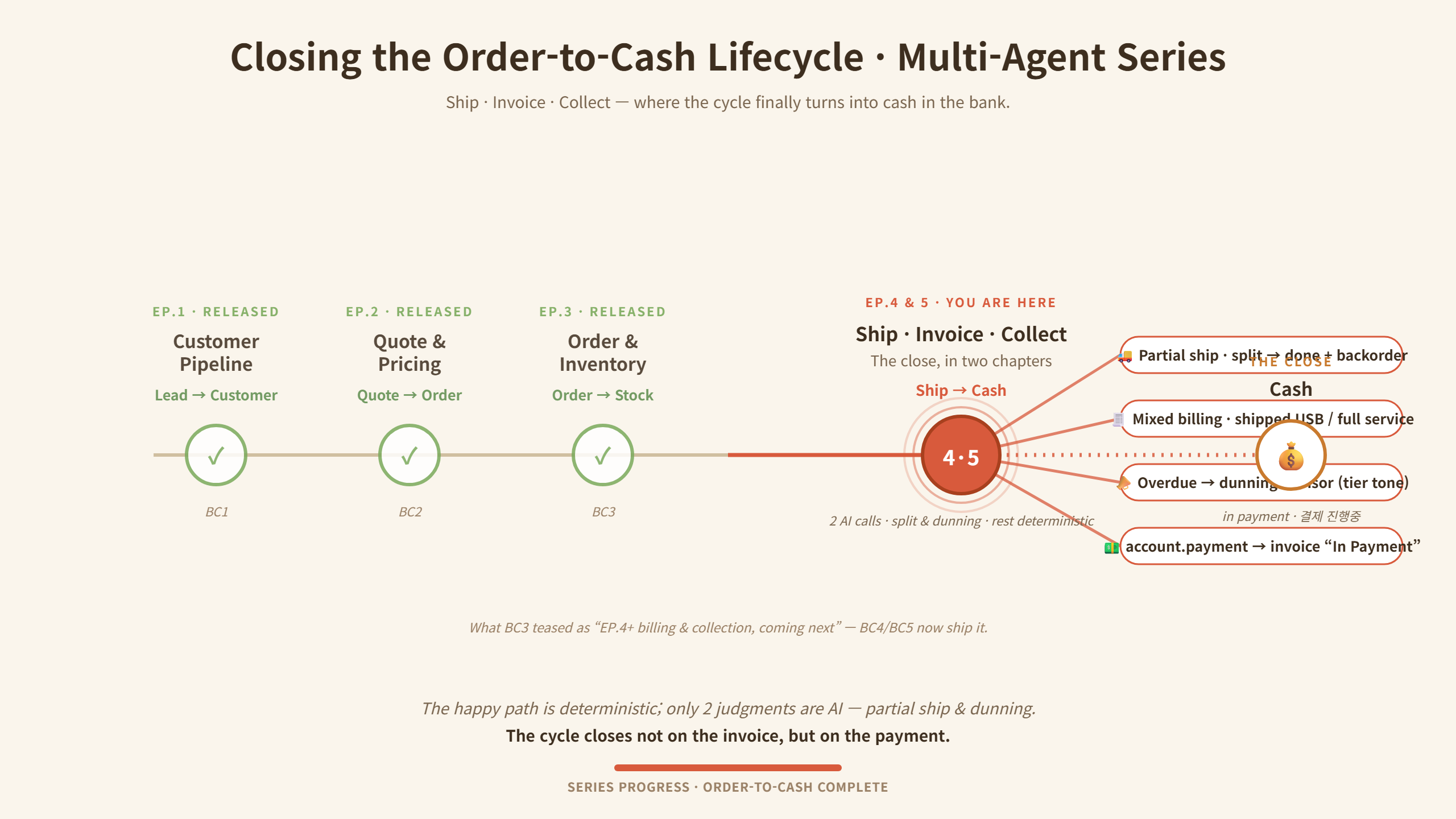
Order-to-cash now closes end-to-end — from Lead all the way to a real
account.payment("In Payment") in Odoo. Across the whole cycle the LLM speaks in exactly two seats (how to ship a short order, and who to chase first and in what tone); everything else — allocation, dispatch, invoicing, payment — is deterministic policy. That boundary is a single yaml toggle.
Core idea
ontology.yaml  (policy / strategy, human-editable)
        │   "WHAT to do, under which policy"
        ▼
Ontology Engine ── deterministic policy decisions ──►  Agents ("HOW", execution)
        │                                                 ├─ crm / erp / inventory / collections
        │                                                 ├─ cs / helpdesk / email / calendar
        └─ when needed: LLM reasoning + RAG               └─ analytics / report   (10 domain agents)
- Policy-driven dispatch — many decisions need zero LLM calls (cost + determinism)
- LLM only where the answer depends on context — caged as an advisor: whitelisted input, forced JSON, human approval, deterministic fallback if the model is off or fails
- Extensible by design — add a new domain agent on the same base; the ontology wires it in (the
collections_agentwas added this way to close the cycle)
Business Case (BC) series — order-to-cash, end-to-end
A B2B sales-to-cash cycle automated across stages, integrating Salesforce (SFDC) and Odoo ERP. Design thesis: the LLM speaks only in the few seats where the answer depends on context; the rest is deterministic policy.
- BC1 Customer pipeline — inbound email → sender lookup → tier routing, zero LLM (first-match ontology rules), idempotent lead creation:
- VIP → qualified lead + priority meeting booked within 24h + premium-tone invite
- Standard → qualified lead + RAG-drafted reply on an 8h SLA
- New prospect (unregistered) → lead (enrichment pending) + 24h welcome
- BC2 Sales — opportunity with tier-differentiated pricing & process, then ERP handoff on close:
- VIP → 5-stage process, negotiable pricing (discount up to a cap, approval beyond)
- Standard → 4-stage process, list price fixed (no discount authority)
- Closed Won → Odoo Sales Order auto-created & confirmed (idempotent) + thank-you (+ VIP kickoff meeting); Closed Lost → LLM lost-reason analysis + 180-day re-engage task (no ERP push)
- contract = Opportunity → Sales Order; pricing is deterministic, the only LLM call is Lost-reason analysis
- BC3 Order & inventory — confirmed SO → line split → deterministic allocation, with AI only where stock truly runs out:
- Line split — storable → delivery, service → license activation
- Allocation (deterministic) — VIP soft-preempt / Standard FIFO / partial-fill (Waiting) / re-allocate on stock receipt / batch pre-allocation, over a 4-state model (on-hand / reserved / available / incoming)
- Autonomous replenishment (AI) — when no rule can fill the shortage: an LLM qty advisor sizes the purchase, creates the incoming picking, and writes an LLM manager briefing — both AI points fall back to rules
- BC4 Ship · Invoice · Collect — closing the cycle in cash:
- Ship — partial-shipment advisor (split / wait) → human approve → one approval chains ship + invoice + notify
- Invoice — deterministic mixed billing (per-line invoice policy: shipped qty vs. full); no rule, no agent — by design
- Collect — dunning advisor (recovery priority + tier tone: VIP gentle / repeat-late firm) → approve → send + chatter →
account.payment→ invoice "In Payment"
Two AI advisor seats (partial-shipment, dunning); everything between is deterministic, and both execute only after a human approves.
Key capabilities
- Ontology engine that encodes business policy and drives multi-agent collaboration
- 10 multi-domain agents (CRM, ERP, inventory, collections, CS, helpdesk, email, calendar, analytics, report) over MCP / FastMCP
- Caged LLM advisors — two-step
trigger → confirm: the model only recommends, a human approves, and execution is deterministic (with a rule fallback if the model fails) - Order-to-cash close — partial shipping, mixed-billing invoicing, and AR collections → real Odoo
account.payment - Enterprise integration — SFDC + Odoo ERP adapters; RAG (ChromaDB); 3-tier memory (hot/warm/cold)
- Bilingual Streamlit dashboard (KR/EN) — decisions, inventory, ontology stats
- Cloud-native — Docker, Cloud Build, GitHub Actions (project/VM values are placeholders)
Tech stack
Python · MCP / FastMCP · Ontology-driven orchestration · Salesforce & Odoo ERP · ChromaDB (RAG) · Streamlit · Docker · Google Cloud · GitHub Actions
Project structure
ontology/            # ontology.yaml — business policy as code
mcp_server/          # ontology engine, domain agents, tools, adapters (SFDC/Odoo)
dashboard_modules/   # dashboard components
dashboard.py / dashboard_en.py   # Streamlit dashboards (KR/EN)
scripts/             # BC1-BC4 business-case demos & setup
assets/              # order-to-cash lifecycle diagram
tests/               # unit tests
.env.example         # required env vars (no real keys)
Setup
cp .env.example .env      # configure OpenAI/Google, Salesforce, Odoo (your own)
pip install -r requirements.txt

# 1) start the MCP server in HTTP (SSE) mode — serves the API on port 9101
MCP_MODE=sse python -m mcp_server.server

# 2) then launch a dashboard (KR / EN) in a separate shell:
streamlit run dashboard.py
The dashboard talks to the server API on port 9101, so start the MCP server first and keep it running; the dashboard shows no data until the server is up. External integrations (Odoo, Salesforce, GCP) need your own configuration to run end to end.
Tests & demos
# run the test suite
pytest              # or: pytest tests/

# BC demos — run in order (BC2 → BC3 → BC4 → BC5); each may need its own Odoo/SFDC setup
python scripts/bc2_to_odoo_handoff.py         # BC2  Closed Won → Odoo Sales Order
python scripts/bc3_inventory_demo.py          # BC3  order split + deterministic allocation
python scripts/bc4_demo_partial_shipment.py   # BC4  partial-shipment advisor → ship · invoice
python scripts/bc5_demo_replenishment.py      # BC5  autonomous replenishment + dunning
The demos drive live Odoo/Salesforce data, so each script may require its own tenant setup (the
bc*_setup_*.py/bc*_create_*.pyhelpers inscripts/seed the needed records). Additional scenarios live alongside these, e.g.bc4_demo_scenario_ABC.pyandbc5_demo_scenario12.py.
Note
Public portfolio showcase of an actively evolving project. For safety, all secrets/credentials and infra identifiers were stripped; external integrations (Odoo, Salesforce, GCP) require your own configuration. Architecture write-ups and demos: SunnyLab below.
SunnyLab — building agentic AI in public · Medium @sunnylabtv · YouTube @sunnylabtv
from github.com/sunnylabtv-crypto/ai_mcp_multi_agent_oosdk-public
Installing OOSDK Server
This server has no published package — it is built from source. Open the repository and follow its README.
▸ github.com/sunnylabtv-crypto/ai_mcp_multi_agent_oosdk-publicFAQ
Is OOSDK Server MCP free?
Yes, OOSDK Server MCP is free — one-click install via Unyly at no cost.
Does OOSDK Server need an API key?
No, OOSDK Server runs without API keys or environment variables.
Is OOSDK Server hosted or self-hosted?
A hosted option is available: Unyly runs the server in the cloud, no local setup required.
How do I install OOSDK Server in Claude Desktop, Claude Code or Cursor?
Open OOSDK Server on unyly.org, pick your client tab (Claude Desktop, Claude Code, Cursor) and press Install — the config is generated automatically, no JSON editing.
Related MCPs
GitHub
PRs, issues, code search, CI status
 by GitHub
Filesystem
Secure file operations with configurable access controls.
Memory
Knowledge graph-based persistent memory system.
Template MCP Server
A CLI tool to create a new Model Context Protocol server project with TypeScript support, dual transport options, and an extensible structure
 by mcpdotdirect
Compare OOSDK Server with
Not sure what to pick?
Find your stack in 60 seconds
Author?
Embed badge for your README
Browse similar
All development MCPs