
Open Claude In Chrome
FreeNot checkedClaude in Chrome, reverse-engineered and open-source. No domain blocklist. Any Chromium browser. Same 18 MCP tools, same performance.

About
Claude in Chrome, reverse-engineered and open-source. No domain blocklist. Any Chromium browser. Same 18 MCP tools, same performance.
README

Open Claude in Chrome
Official Claude in Chrome gives you 58 blocked domains and two browsers.
Open Claude in Chrome gives you the whole web.
Clean-room reimplementation of Anthropic's browser extension. No blocklist. Any Chromium browser. 100% feature & performance parity.
by noemica
What's different · Install · Imitation learning · Architecture · Demo · How I built it
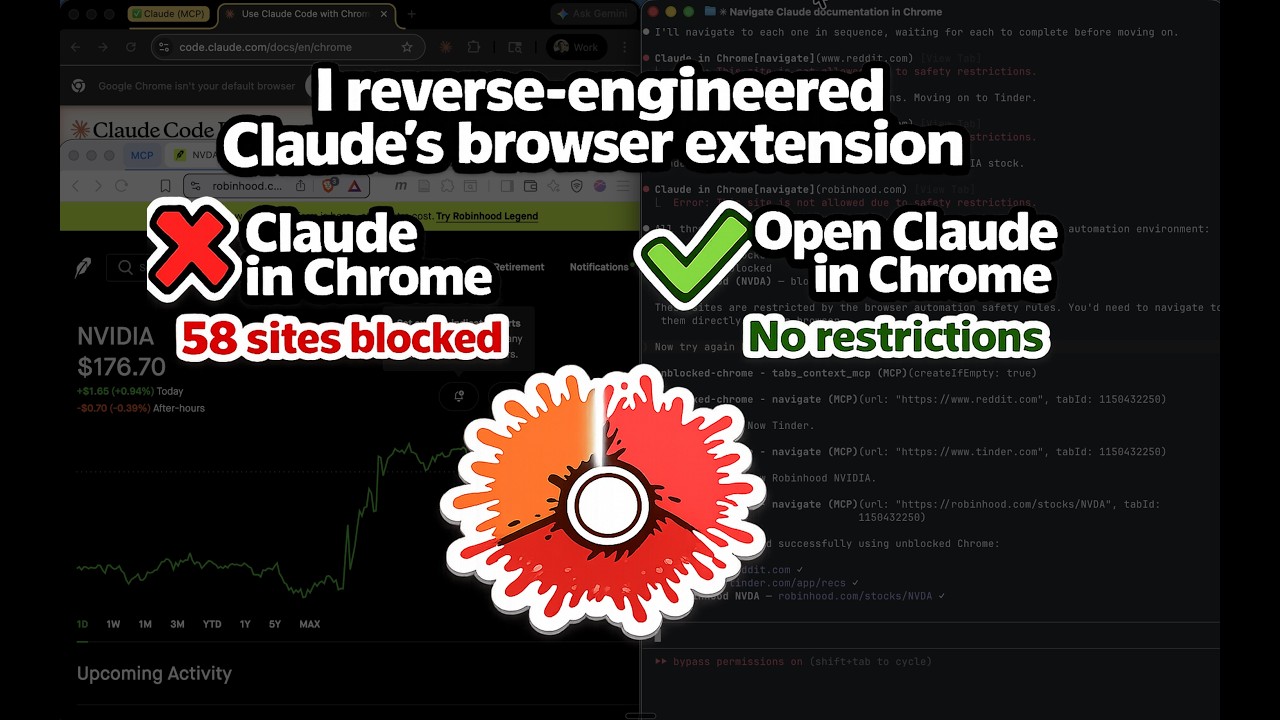
Watch Claude navigate Tinder, Reddit, and Robinhood — sites the official extension can't reach.
The official Claude in Chrome extension gives Claude Code full browser automation — as long as you stay within Anthropic's allowlist of "safe" sites. Open Claude in Chrome is a clean-room reimplementation that strips the restrictions while keeping all 18 MCP tools and matching the official extension's performance.
What's Different
| Claude in Chrome | Open Claude in Chrome | |
|---|---|---|
| Domain blocklist | 58 blocked domains across 11 categories | No blocklist. Navigate anywhere. |
| Browser support | Chrome and Edge only | Any Chromium browser (Chrome, Edge, Brave, Arc, Opera, Vivaldi, etc.) |
| Source code | Closed source | Open source (MIT) |
| Tools | 18 MCP tools | Same 18 MCP tools |
| Performance | Baseline | Identical |
Blocked Domains in the Official Extension
| Category | Blocked Sites |
|---|---|
| Banking | Chase, BofA, Wells Fargo, Citibank |
| Investing/Brokerage | Schwab, Fidelity, Robinhood, E-Trade, Wealthfront, Betterment |
| Payments/Transfers | PayPal, Venmo, Cash App, Zelle, Stripe, Square, Wise, Western Union, MoneyGram, Adyen, Checkout.com |
| BNPL | Klarna, Affirm, Afterpay |
| Neobanks/Fintech | SoFi, Chime, Mercury, Brex, Ramp |
| Crypto | Coinbase, Binance, Kraken, MetaMask |
| Gambling | DraftKings, FanDuel, Bet365, Bovada, PokerStars, BetMGM, Caesars |
| Dating | Tinder, Bumble, Hinge, Match, OKCupid |
| Adult | Pornhub, XVideos, XNXX |
| News/Media | NYT, WSJ, Barron's, MarketWatch, Bloomberg, Reuters, Economist, Wired, Vogue |
| Social Media |
Open Claude in Chrome has none of these restrictions.
Architecture
Default:
Claude Code <--stdio MCP--> mcp-server.js <--TCP--> native-host.js <--native messaging--> Extension <--> Browser
Code mode / hybrid (additive — mcp-server.js is reused unchanged as the upstream):
Claude Code <--stdio MCP--> server-{codemode,hybrid}.js
                              |  spawns + proxies via MCP
                              v
                            mcp-server.js (child) <--TCP--> native-host.js <--native messaging--> Extension <--> Browser
                              ^
                              |  HTTP tool-callback
                              |
                            workerd (wrangler dev sidecar)
                              |  Worker Loader → V8 isolate
                              v
                            sandboxed Worker runs LLM-written code
Three components:
- Extension — Manifest V3 with CDP-based browser automation (all 18 tools)
- MCP Server — Node.js process started by Claude Code, exposes tools via MCP
- Native Messaging Host — Bridge between the MCP server and the extension
The codemode and hybrid servers add a fourth piece — a wrangler dev subprocess hosting a Cloudflare Worker that runs the LLM-generated code in a V8 isolate. The Worker calls back to the proxy over HTTP for actual tool execution, which is forwarded to the unchanged upstream mcp-server.js.
Installation
One flow, top to bottom, turns everything on — all 18 browser tools,
execute_code, and the imitation-learning recorder.
Prerequisites
- Node.js v18+
- Any Chromium browser (Chrome, Edge, Brave, Arc, Opera, Vivaldi, etc.)
- Claude Code v2.1.80+ (the recorder needs channels; browser automation alone works on v2.0.73+)
- An OpenAI API key (used to transcribe recording narration)
Step 1: Install dependencies
npm install --prefix host
npm install --prefix host/codemode/worker
The second one is not optional: it provisions the sandbox that execute_code
runs in. Skip it and the server falls back to fetching wrangler over the network
on every cold start, which is the most common reason execute_code fails to
come up.
Step 2: Load the extension
- Go to
chrome://extensions(orbrave://extensions/edge://extensions) - Enable Developer mode
- Click Load unpacked and select the
extension/directory - Copy the extension ID shown under the extension name
Step 3: Register native messaging
./install.sh <your-extension-id>
If you use multiple browsers, pass all IDs: ./install.sh <chrome-id> <brave-id> <arc-id>
Step 4: Restart your browser
Close all windows and reopen. The browser reads native messaging host configs on startup.
Step 5: Set your OpenAI key and enable the microphone
Right-click the extension icon → Options. Both of these are required before recording:
- Paste your OpenAI key and click Save & validate (transcribes your narration).
- Click Enable microphone and allow the browser prompt. The recorder captures audio in a background page that can't show a permission prompt itself, so you grant mic access once here; otherwise recordings capture no voice.
Step 6: Add the server to Claude Code
The hybrid server exposes everything: all 18 tools directly, execute_code
alongside (the model picks per call), and the recording channel.
claude mcp add open-claude-in-chrome-hybrid -- node /absolute/path/to/host/codemode/server-hybrid.js
Find the absolute path with echo "$(pwd)/host".
Step 7: Launch with recording enabled
Channels are a research preview, so start Claude Code with the development flag (the name is the server from step 6):
claude --dangerously-load-development-channels server:open-claude-in-chrome-hybrid
Accept the one-time prompt and keep the session open — channels inject into a
live interactive session, not claude -p. That's it: browser automation and
recording are both on.
Verification
Start a new Claude Code session and run both checks.
1. Browser control — confirms the extension, native host and MCP server are wired up:
Navigate to reddit.com and take a screenshot
Reddit loads. No domain restriction.
2. The execute_code sandbox — confirms the wrangler sidecar is live:
In a single execute_code call: create a new tab, navigate to reddit.com, click
the first post, then go back to the listing and give me every post title except
the top three.
You should get the titles back from one tool call rather than a click-screenshot-click sequence. If the first attempt reports the sandbox is still starting, wait a few seconds and ask again — the sidecar boots in the background and the first call can arrive before it is ready. If it never comes up, see Keeping execute_code running.
Keeping execute_code running
Where it runs. execute_code evaluates your JavaScript in a Cloudflare
Worker (a V8 isolate) hosted by a workerd sidecar that the MCP server starts
with wrangler dev. That sidecar is a child process of the MCP server,
which Claude Code itself spawns. There is no separate daemon, nothing to start
by hand, and nothing that outlives Claude Code. It binds 127.0.0.1 on a free
port, runs out of host/codemode/worker, and keeps its state in a per-variant,
per-PID directory under your temp dir so the codemode and hybrid servers can run
at the same time without racing each other.
Its lifetime is the MCP server's lifetime. It is spawned in the background at server start so MCP startup never blocks on it (budget: 60s to boot, typically 3–5s), and it is torn down on SIGTERM/SIGINT/exit and when Claude Code closes the stdio pipe. So restarting or reconnecting the MCP server always gives you a fresh sidecar.
There is no health check and no auto-restart. If the sidecar dies
mid-session, execute_code stays down until the MCP server restarts. That is
the behaviour to recognise: browser tools still work, only execute_code fails.
To keep it reliable:
- Install the worker's dependencies (Step 1, or
./install.sh). Withouthost/codemode/worker/node_modulesthe server falls back tonpx --yes wrangler, which needs the network on every cold start. This is the single most common cause of a sandbox that "sometimes isn't there". - Recover with
/mcpin Claude Code. Reconnecting restarts the MCP server, which respawns the sidecar. - If that doesn't take, clear strays and reconnect:
pkill -f "server-hybrid|server-codemode"; pkill -f wrangler - Confirm it's up. The server logs
[wrangler] Ready on http://127.0.0.1:<port>and thensandbox prewarmed in <n>ms.pgrep -fl wranglershould show one process per registered codemode/hybrid server. - Expect partial degradation, not failure. If the sandbox never comes up the
18 passthrough tools keep working and only
execute_codeerrors, so a broken sidecar looks like "code mode stopped working", not "the browser stopped working".
Server variants
The hybrid server from Step 6 is the superset and the one the install steps assume. Two leaner variants exist if you want them, and they can coexist — register more than one.
Default — the 18 tools, nothing else:
claude mcp add open-claude-in-chrome -- node /absolute/path/to/host/mcp-server.js
Code mode — three tools: execute_code, screenshot, zoom. The model writes JS that calls chrome.* (the typed API for all 18 tools) in a sandboxed Cloudflare Worker, collapsing multi-step flows into one round trip:
claude mcp add open-claude-in-chrome-codemode -- node /absolute/path/to/host/codemode/server-codemode.js
Both of these carry the same sandbox as hybrid, so Keeping execute_code running applies to them too. Recording is only on the hybrid server.
Imitation Learning (Recording)
Teach Claude Code a browser task by doing it once. The extension records an expert rollout in two synchronized tracks — what you did (clicks, typing, scrolling, resolved to durable element anchors) and why (your spoken narration, transcribed) — across every tab, then hands the recording to a live Claude Code session over a channel. Claude reads the rollout and carries out the task, extrapolating to sister tasks. Enabled by the Installation flow above. Full design: docs/imitation-learning-alignment.html.
Record
- Tell the session you're about to teach it something.
- Click the toolbar icon to start. The badge walks a fixed pipeline:
…(booting the mic, ~2.5s) →REC(talk now). Clicks during…are ignored. - Act and narrate out loud. Hold Alt while clicking to demonstrate an action without it firing (override/mask mode).
- Click the icon again to stop. The badge shows
…while the recording is transcribed and saved — clicks are ignored until the paste-able reference lands on your clipboard and the icon shows 📋. Only then is the icon live again. Paste the reference into Claude Code to point it at the recording. (If a Claude session with the channel is connected, it's also notified automatically and the tooltip says so — but the clipboard copy happens either way.)
Recorded sessions are browsable under the extension's Options page (all captured data, disclosed in layers), each with its own Copy reference button.
Verify recording works
The minimum end-to-end check, the recorder's equivalent of the reddit test above. Do it in a session launched per step 7.
- In the Claude Code session, say: "I'm going to teach you something — wait for my signal."
- Click the toolbar icon (badge shows
REC). Navigate to any page, click a couple of things, and say two or three sentences out loud about what you're doing. Click the icon again to stop. - Confirm:
- The icon shows a 📋 and the reference is on your clipboard (paste it anywhere to check — it points at the recording folder).
- Options → Recorded sessions shows the session with events > 0, utterances > 0, a working audio player, a frame count, and your words under Narration.
trace.jsonandimages/exist under~/.config/open-claude-in-chrome/recordings/<recording_id>/.- If a channel session is connected: a
<channel … event="recording_complete" …>message appears and Claude acknowledges it and reads the trace.
If utterances is 0 or there's no audio, the mic wasn't enabled — redo
Installation step 5. If nothing saved (no 📋), the native host isn't running —
rerun ./install.sh <extension-id> and restart the browser. If no channel
message appears, the session wasn't launched with the flag in step 7 (or a
stale MCP server is running — pkill -f "server-hybrid" and reconnect with
/mcp).
The real test (beyond the minimum): one narrated rollout of a task, then a sister task — same shape, different specifics — that Claude completes unaided from the recording. That's the proof the trace teaches rather than replays.
Status & limitations
The MCP channel, the recording_ack round-trip, the primary→client event
routing, the transcription + track merge, and the native-host file writes are
validated outside the browser; the in-browser capture, mic, and stop pipeline
are wired and awaiting your live pass above. Known v1 choices:
- The bundle is written by the native host (a Node process with filesystem access) to
~/.config/open-claude-in-chrome/recordings/<id>/—trace.json,SCHEMA_v0.md, andimages/. Nochrome.downloads, so no OS save dialog, and it saves whether or not Claude is connected. - Four tracks: behavior (discrete actions), cursor (raw trajectory), images (240p frames captured on events, ≤1/sec), narration. All references and files are just data; the agent reads what it wants.
- The viewer keeps small copies of the audio and frames in IndexedDB (the Options page can't read the on-disk files). Long recordings accumulate; a "keep last N" cleanup is a later refinement.
- The capture layer is purpose-built (anchors + effects + heuristics), not a vendored rrweb.
Code Mode Test Client
A self-explanatory in-browser test suite for comparing default / code-mode / hybrid behavior across the kinds of flow they each should excel at. Lives in scratch/test-form/.
Serve it
cd scratch/test-form
python3 -m http.server 8765
Open http://localhost:8765/. The page is a four-challenge suite the agent works through end-to-end:
- Single-Screen Form — everything visible in one screenshot. A model that captures the layout once should be able to batch all clicks + types + submit into a single round trip.
- Multi-Step Wizard — three steps where step 2's fields depend on step 1's choice. Forces screenshot → action → screenshot, no batching across steps.
- Repeat Submissions — the same Challenge 1 form, submitted three times with different values. Coordinates don't change; this is where pre-planned batching pays off most.
- Click Sequence — a 3×3 grid plus a randomly-generated ordering. Every coordinate is visible at once; the model can batch nine sequential clicks from one screenshot.
Completion is non-ambiguous: the suite ends on a green "All Challenges Complete" banner with a per-challenge wall-clock table. A sticky progress header on every page shows the current challenge number and a ✓ for each completed one.
Run the experiment
YOU MUST NOT USE THE FOLLOWING TOOLS IN ANY CAPACITY: form_input || javascript_tool

TASK:
Open http://localhost:8765/ on a new tab and complete every challenge on the page. Follow the on-page instructions until you reach the "All Challenges Complete" banner.

For the MCP use only (not any of the other ocic MCPs): open-claude-in-chrome||open-claude-in-chrome-codemode||open-claude-in-chrome-hybrid
What to look for across the three MCP variants:
- Challenge 1: ratio of screenshots to actions. Default tends to look-act-look-act; code-mode/hybrid should look once then batch.
- Challenge 2: all three should look comparable — visual feedback is required between steps regardless of MCP.
- Challenge 3: this is where the gap should open. One screenshot up front, then three batched form-fills in code-mode/hybrid vs. fresh look-act loops in default.
- Challenge 4: similar. Coordinates fixed, sequence visible. Code mode batches the nine clicks; default clicks one at a time.
If the model still uses direct tools on the second submission, that's a signal the execute_code description needs tuning — see host/codemode/common.js (buildExecuteCodeDescription) and the per-server EXTRA_NOTES.
Results
Final Results Table
Available Tools
All 18 tools, identical to Claude in Chrome:
| Tool | Description |
|---|---|
tabs_context_mcp |
Get tab group context |
tabs_create_mcp |
Create new tab |
navigate |
Navigate to URL, back, forward |
computer |
Mouse, keyboard, screenshots (13 actions) |
read_page |
Accessibility tree with element refs |
get_page_text |
Extract article/main text |
find |
Find elements by text/attributes |
form_input |
Set form values by ref |
javascript_tool |
Execute JS in page context |
read_console_messages |
Console output (filtered) |
read_network_requests |
Network activity |
resize_window |
Resize browser window |
upload_image |
Upload screenshot to file input |
gif_creator |
GIF recording (stub) |
shortcuts_list |
List shortcuts (stub) |
shortcuts_execute |
Run shortcut (stub) |
switch_browser |
Switch browser (stub) |
update_plan |
Present plan (auto-approved) |
Updating After Code Changes
No build step. All files are plain JavaScript. After pulling or editing code:
| What changed | What to do |
|---|---|
extension/background.js, extension/content.js, extension/manifest.json, or extension/recorder/* |
Reload the extension: brave://extensions > click the reload icon |
host/mcp-server.js |
Kill stale servers and reconnect: pkill -f "node.*mcp-server" then /mcp in Claude Code |
host/codemode/*.js or host/codemode/worker/* |
Kill the codemode server: pkill -f "server-codemode|server-hybrid" and pkill -f wrangler, then /mcp in Claude Code |
host/native-host.js |
Restart the browser (close all windows, reopen) |
install.sh or native host name changed |
Re-run ./install.sh <extension-id>, restart browser, re-add MCP |
Quick reset (nuclear option)
If things are broken and you're not sure why:
# 1. Kill all MCP servers
pkill -f "node.*mcp-server"

# 2. Re-run install
./install.sh <your-extension-id>

# 3. Restart browser (close all windows, reopen)

# 4. Reload extension in brave://extensions

# 5. Reconnect in Claude Code
# /mcp
Multiple Sessions
Multiple Claude Code sessions can share the same browser extension. The first session becomes the "primary" (owns the TCP port), and subsequent sessions connect as clients through the primary. All sessions can use the browser simultaneously.
If a session disconnects, kill stale servers and reconnect:
pkill -f "node.*mcp-server"
# then /mcp in each Claude Code session
Troubleshooting
Extension not connecting
- Verify the extension is loaded and enabled
- Check that
./install.shwas run with the correct extension ID - Restart the browser completely (all windows)
- Verify the native messaging host manifest exists:
- Chrome (macOS):
~/Library/Application Support/Google/Chrome/NativeMessagingHosts/com.anthropic.open_claude_in_chrome.json - Brave (macOS):
~/Library/Application Support/BraveSoftware/Brave-Browser/NativeMessagingHosts/com.anthropic.open_claude_in_chrome.json - Edge (macOS):
~/Library/Application Support/Microsoft Edge/NativeMessagingHosts/com.anthropic.open_claude_in_chrome.json
- Chrome (macOS):
MCP server not found
Use an absolute path:
claude mcp add open-claude-in-chrome -- node /absolute/path/to/host/mcp-server.js
"Browser extension is not connected"
The MCP server started but the native host hasn't connected. Try:
- Open any webpage (wakes the service worker)
- Check service worker logs:
chrome://extensions> "Inspect views: service worker" - Verify
host/native-host-wrapper.shexists
Tools fail immediately after reconnect
Stale MCP server processes from previous sessions may be holding the port. Fix:
pkill -f "node.*mcp-server"
Then /mcp in Claude Code to reconnect. The fresh server will bind the port and accept the native host connection.
Port conflict
Default port is 18765. To change:
- Create
~/.config/open-claude-in-chrome/config.json:{ "port": 19000 } - Restart browser and Claude Code
License
MIT
Built by Sebastian Sosa (Noemica)
Installing Open Claude In Chrome
This server has no published package — it is built from source. Open the repository and follow its README.
▸ github.com/noemica-io/open-claude-in-chromeFAQ
Is Open Claude In Chrome MCP free?
Yes, Open Claude In Chrome MCP is free — one-click install via Unyly at no cost.
Does Open Claude In Chrome need an API key?
No, Open Claude In Chrome runs without API keys or environment variables.
Is Open Claude In Chrome hosted or self-hosted?
Self-hosted: the server runs locally on your machine via the install command above.
How do I install Open Claude In Chrome in Claude Desktop, Claude Code or Cursor?
Open Open Claude In Chrome on unyly.org, pick your client tab (Claude Desktop, Claude Code, Cursor) and press Install — the config is generated automatically, no JSON editing.
Related MCPs
GitHub
PRs, issues, code search, CI status
 by GitHub
Filesystem
Secure file operations with configurable access controls.
Memory
Knowledge graph-based persistent memory system.
Template MCP Server
A CLI tool to create a new Model Context Protocol server project with TypeScript support, dual transport options, and an extensible structure
 by mcpdotdirect
Compare Open Claude In Chrome with
Not sure what to pick?
Find your stack in 60 seconds
Author?
Embed badge for your README
Browse similar
All development MCPs