
Opencut
FreeNot checkedMCP server that enables LLM agents to control the OpenCut classic video editor's timeline through a Playwright-controlled browser, allowing automated video edit

About
MCP server that enables LLM agents to control the OpenCut classic video editor's timeline through a Playwright-controlled browser, allowing automated video editing tasks like adding media, inserting clips, splitting, trimming, and exporting.
README
MCP (Model Context Protocol) server for the OpenCut classic video editor.
Lets an LLM agent (Claude Code, Cline, etc.) drive the timeline via window.__editor
in a Playwright-controlled browser.
Status: PoC for a kenimoto.dev article series.
Runs against a fork, not upstream
This server does not target opencut-app/opencut-classic
(archived). It targets the kenimo49/opencut-classic
fork, which carries a small patch series that exposes internals needed for
automation. Point your docker compose / bun dev:web at the fork's main.
| Patch | What it exposes | Used by which tools |
|---|---|---|
| eca73042 — Phase 1 | window.__editor (the EditorCore singleton) |
every tool |
| a7443ec8 — Phase 1.1 | window.__opencut.mediaTimeFromSeconds (+ TICKS_PER_SECOND, mediaTime, roundMediaTime) |
any tool that takes a time argument (insert_clip, split_at, move, trim) |
The fork may drift further from upstream as we add hooks — e.g. data-testid
anchors for wait/assertion, or a headless-export toggle. Track the two together;
a version of this server may not work against an arbitrary snapshot of the fork.
Compatibility is pinned at repo level, not by semver (yet). The current commit of
this server was validated against kenimo49/opencut-classic@a7443ec8.
Demo
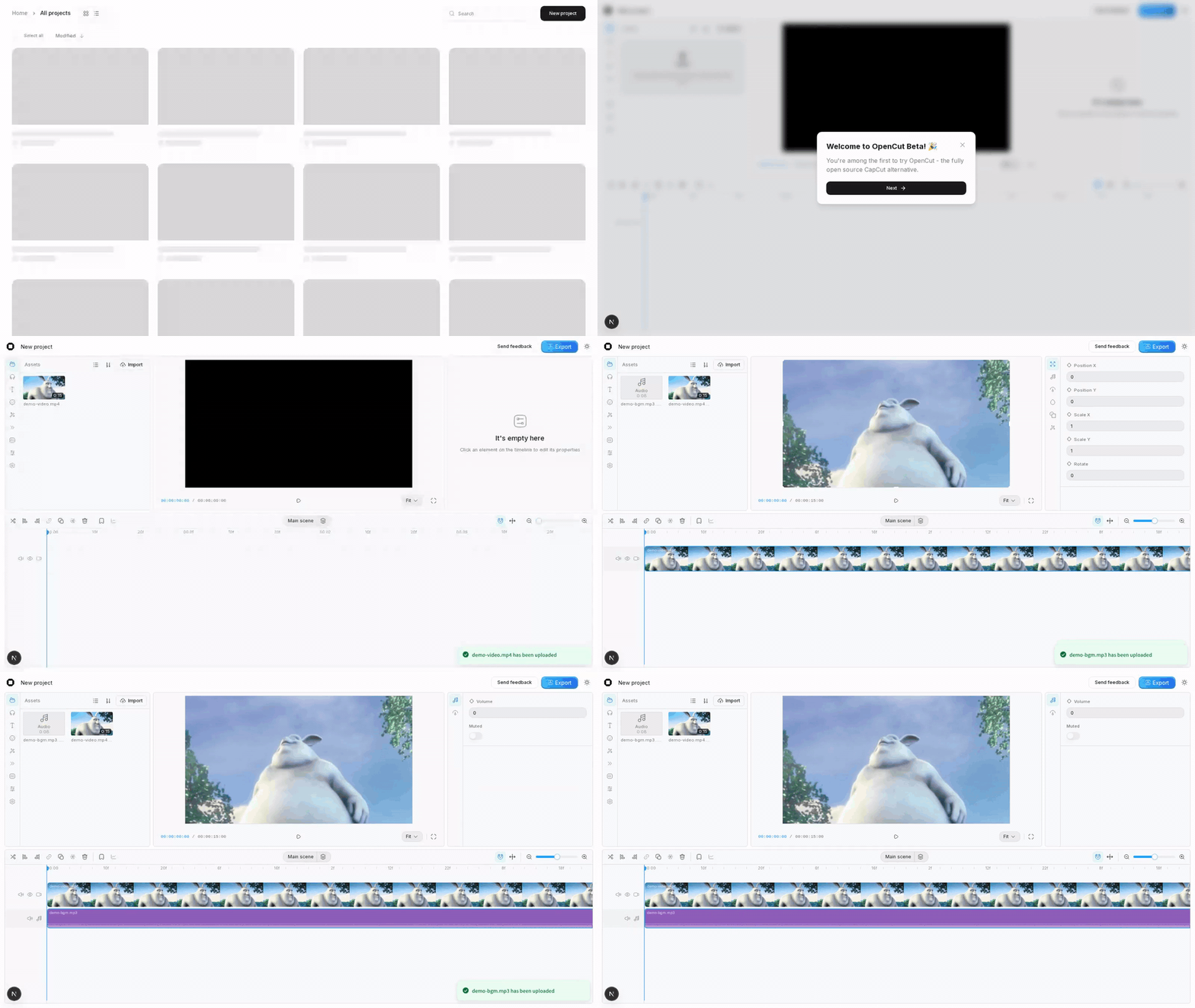
scripts/demo.ts runs a full end-to-end sequence: create a project, upload a video
- audio file, place both on the timeline via auto-placement, split the video at 5s. The Playwright screencast below is that run recorded verbatim.
Tools
| tool | description |
|---|---|
opencut_get_state |
Timeline snapshot (tracks, elements, assets). |
opencut_add_track |
⚠ empty tracks are pruned by the reactor — prefer omitting trackId on insert_clip. |
opencut_add_media |
Upload local file as MediaAsset. |
opencut_insert_clip |
Add element referencing MediaAsset. mode: "auto" when trackId omitted. |
opencut_split_at |
Split element(s) at a time (seconds). |
opencut_move / opencut_trim / opencut_delete |
direct pass-through to TimelineManager. |
opencut_undo / opencut_redo |
CommandManager history. |
opencut_export |
RendererManager.exportProject. |
opencut_screenshot |
debug: screenshot the editor viewport. |
Running
# 1. Start the FORK of classic (docker + bun dev:web on 3000).
git clone https://github.com/kenimo49/opencut-classic.git
cd opencut-classic
# ... see that repo's README for docker compose + env.local setup
bun run dev:web   # http://localhost:3000

# 2. Install and run this MCP (in a separate shell):
cd ../opencut-mcp
bun install
bunx tsx src/index.ts   # stdio transport

# 3. Or the integration demo:
bunx tsx scripts/demo.ts
Env:
OPENCUT_BASE_URL— defaulthttp://localhost:3000OPENCUT_HEADLESS—falseto see the browser (WSLg / X11 required)OPENCUT_VIDEO_DIR— set to record a webm screencast of the browserOPENCUT_DEMO_PACE=slow— triples inter-step pauses inscripts/demo.ts
Notes discovered during PoC
- Empty tracks are pruned every command via
CommandManagerreactor (editor/index.ts:playback.bindTimelineScope). Two-stepaddTrack+insertElementloses the track before the second call. PreferinsertElementwithplacement: { mode: "auto", trackType }— the command creates the track on demand and it survives because it has an element. - MediaTime is integer ticks, not seconds.
TICKS_PER_SECONDis 120,000 at runtime. Convert viawindow.__opencut.mediaTimeFromSeconds({ seconds })(Phase 1.1 exposure). - AudioElement discriminated union — uploads must carry
sourceType: "upload"in addition tomediaId. - Editor page is
/editor/[project_id]. Creating a project via the /projects UI is the boot path used by this server.
MIT.
Install Opencut in Claude Desktop, Claude Code & Cursor
unyly install opencut-mcpInstalls into Claude Desktop, Claude Code, Cursor & VS Code — handles npx, uvx and build-from-source repos for you.
First time? Get the CLI: curl -fsSL https://unyly.org/install | sh
Or configure manually
Run in your terminal:
claude mcp add opencut-mcp -- npx -y github:kenimo49/opencut-mcpFAQ
Is Opencut MCP free?
Yes, Opencut MCP is free — one-click install via Unyly at no cost.
Does Opencut need an API key?
No, Opencut runs without API keys or environment variables.
Is Opencut hosted or self-hosted?
Self-hosted: the server runs locally on your machine via the install command above.
How do I install Opencut in Claude Desktop, Claude Code or Cursor?
Open Opencut on unyly.org, pick your client tab (Claude Desktop, Claude Code, Cursor) and press Install — the config is generated automatically, no JSON editing.
Related MCPs
Playwright
Browser automation, scraping, screenshots
 by Microsoft
Puppeteer
Browser automation and web scraping.
 by modelcontextprotocol
opentabs-dev/opentabs
Plugin-based MCP server + Chrome extension that gives AI agents access to web applications through the user's authenticated browser session. 100+ plugins with a
 by opentabs-dev
robhunter/agentdeals
1,500+ developer infrastructure deals, free tiers, and startup programs across 54 categories. Search deals, compare vendors, plan stacks, and track pricing chan
 by robhunter
Compare Opencut with
Not sure what to pick?
Find your stack in 60 seconds
Author?
Embed badge for your README
Browse similar
All browse MCPs