
Password Generator Server
FreeNot checkedEnables generating secure passwords, exposing password policies, and providing reusable prompt templates for secure password creation through MCP primitives.

About
Enables generating secure passwords, exposing password policies, and providing reusable prompt templates for secure password creation through MCP primitives.
README
A simple Model Context Protocol (MCP) server built using the Python MCP SDK to demonstrate the three core MCP Primitives:
- 🛠️ Tools – Generate a secure password.
- 📄 Resources – Expose a password policy.
- 💡 Prompts – Provide a reusable prompt template for generating secure passwords.
This project accompanies my Medium article on MCP Inspector and MCP Primitives, providing a hands-on example to help you understand how these concepts work together.
Project Structure
MCP-INSPECTOR/
│
├── prompts/
│   ├── __init__.py
│   └── password_prompt.py
│
├── resources/
│   ├── __init__.py
│   └── password_resource.py
│
├── tools/
│   ├── __init__.py
│   └── password_tool.py
│
├── .gitignore
├── .python-version
├── app.py
├── pyproject.toml
├── README.md
├── server.py
└── uv.lock
Project Overview
- app.py – Creates the FastMCP server instance.
- server.py – Entry point that registers all MCP primitives and starts the server.
- tools/password_tool.py – Implements the Password Generator Tool.
- resources/password_resource.py – Exposes the Password Policy Resource.
- prompts/password_prompt.py – Defines the reusable Prompt template.
- pyproject.toml – Project configuration and project dependencies.
- uv.lock – Lock file generated by UV.
- README.md – Project documentation.
Clone the Repository
Clone the repository to your local machine.
git clone <YOUR_GITHUB_REPOSITORY_LINK>
Navigate to the project directory.
cd MCP-INSPECTOR
Synchronize and install all project dependencies.
uv sync
Activate the virtual environment.
Windows
.venv\Scripts\activate
Running the MCP Server with MCP Inspector
Start the MCP server using:
mcp dev server.py
This command starts the MCP server and automatically launches MCP Inspector in your browser.
Using MCP Inspector you can:
- View all registered MCP primitives.
- Execute Tools.
- Read Resources.
- Test Prompt templates.
- Validate your MCP server before integrating it with an MCP client.
Screenshot: MCP Inspector Home Page
Testing the Tool
Open the Tools section inside MCP Inspector.
Select generate_password and provide the required inputs such as:
- Password Length
- Include Special Characters
Execute the Tool to generate a secure password.
Screenshot: Password Generator Tool
Screenshot: Generated Password Output
Testing the Resource
Open the Resources section.
Select the password://policy resource.
The server returns the password policy and security recommendations exposed by the MCP server.
Screenshot: Password Policy Resource
Testing the Prompt
Navigate to the Prompts section.
Select create_secure_password_prompt.
Provide an account type such as:
- Banking
- Social Media
The Prompt generates a reusable instruction template for creating a secure password.
Screenshot: Prompt Execution
Installing the MCP Server in Claude Desktop
Open a new terminal and run:
mcp install server.py
Once the installation is complete, restart Claude Desktop if it is already running.
Claude Desktop will automatically discover the MCP server and its registered primitives.
You can now interact with the server using natural language.
For example:
Generate a strong password for my email.
or
Show me the password policy.
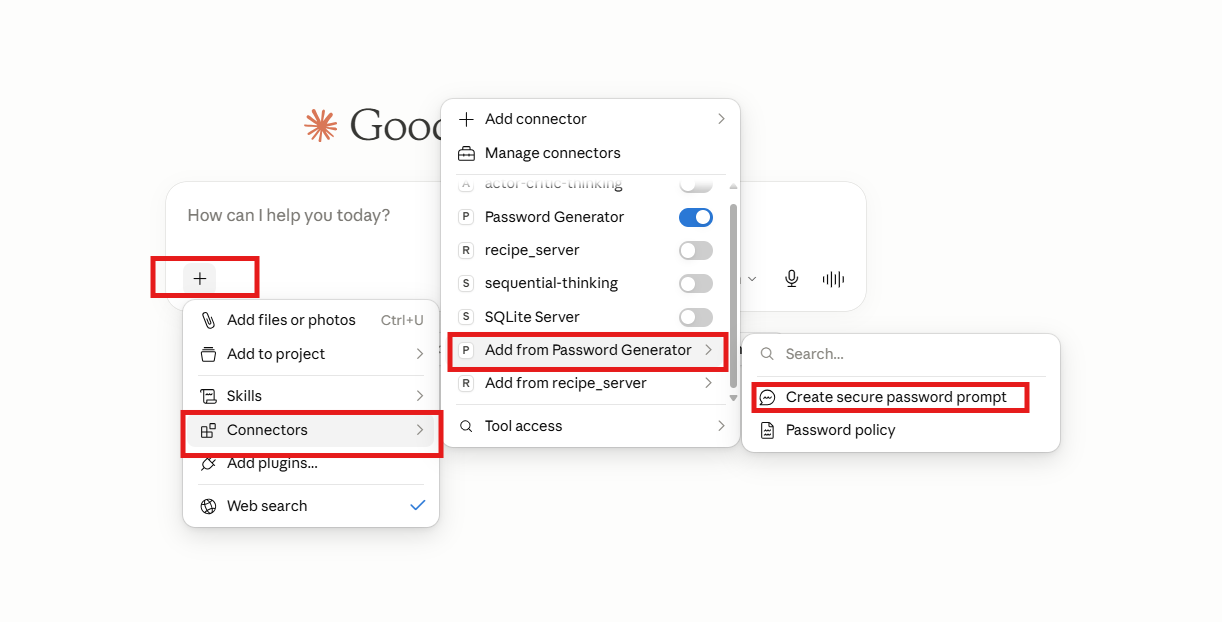 Claude Desktop Detecting the MCP Server
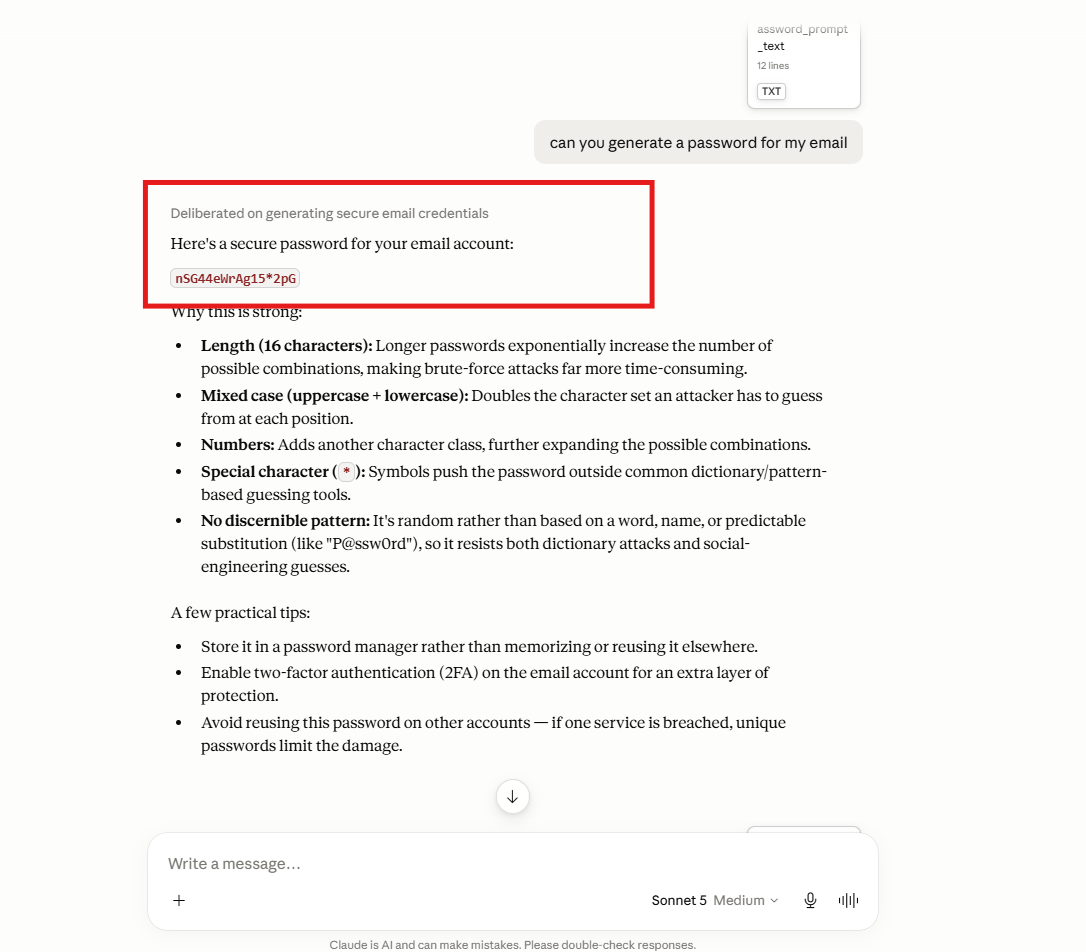 Claude Desktop Invoking the Password Generator Tool
Creating an MCP Project from Scratch
If you'd like to build your own MCP server from scratch, follow these steps.
1. Initialize a UV Project
uv init
2. Create a Virtual Environment
uv venv
3. Activate the Virtual Environment
Windows
.venv\Scripts\activate
4. Install the MCP SDK
uv add "mcp[cli]"
5. Start MCP Inspector
mcp dev server.py
6. Install the MCP Server in Claude Desktop
Open a new terminal and run:
mcp install server.py
MCP Primitives Included
🛠️ Tool
generate_password()
Generates a secure password with configurable length and optional special characters.
📄 Resource
password://policy
Returns the password generation policy and recommended password security practices.
💡 Prompt
create_secure_password_prompt()
Creates a reusable prompt template for generating a secure password for a specified account type.
Medium Article
If you're new to MCP and would like a detailed explanation of MCP Inspector and MCP Primitives, check out my accompanying Medium article.
Install Password Generator Server in Claude Desktop, Claude Code & Cursor
unyly install password-generator-mcp-serverInstalls into Claude Desktop, Claude Code, Cursor & VS Code — handles npx, uvx and build-from-source repos for you.
First time? Get the CLI: curl -fsSL https://unyly.org/install | sh
Or configure manually
Run in your terminal:
claude mcp add password-generator-mcp-server -- uvx mcp-inspectorFAQ
Is Password Generator Server MCP free?
Yes, Password Generator Server MCP is free — one-click install via Unyly at no cost.
Does Password Generator Server need an API key?
No, Password Generator Server runs without API keys or environment variables.
Is Password Generator Server hosted or self-hosted?
Self-hosted: the server runs locally on your machine via the install command above.
How do I install Password Generator Server in Claude Desktop, Claude Code or Cursor?
Open Password Generator Server on unyly.org, pick your client tab (Claude Desktop, Claude Code, Cursor) and press Install — the config is generated automatically, no JSON editing.
Related MCPs
GitHub
PRs, issues, code search, CI status
 by GitHub
Filesystem
Secure file operations with configurable access controls.
Memory
Knowledge graph-based persistent memory system.
Template MCP Server
A CLI tool to create a new Model Context Protocol server project with TypeScript support, dual transport options, and an extensible structure
 by mcpdotdirect
Compare Password Generator Server with
Not sure what to pick?
Find your stack in 60 seconds
Author?
Embed badge for your README
Browse similar
All development MCPs