
PasteAI
FreeNot checkedAn MCP server that lets AI publish markdown documents to a clean, themed web UI. One tool call creates a shareable doc.

About
An MCP server that lets AI publish markdown documents to a clean, themed web UI. One tool call creates a shareable doc.
README
PasteAI
Human review of beautiful reports, generated by AI
AI publishes markdown documents via MCP. You read them in a clean, themed web UI.
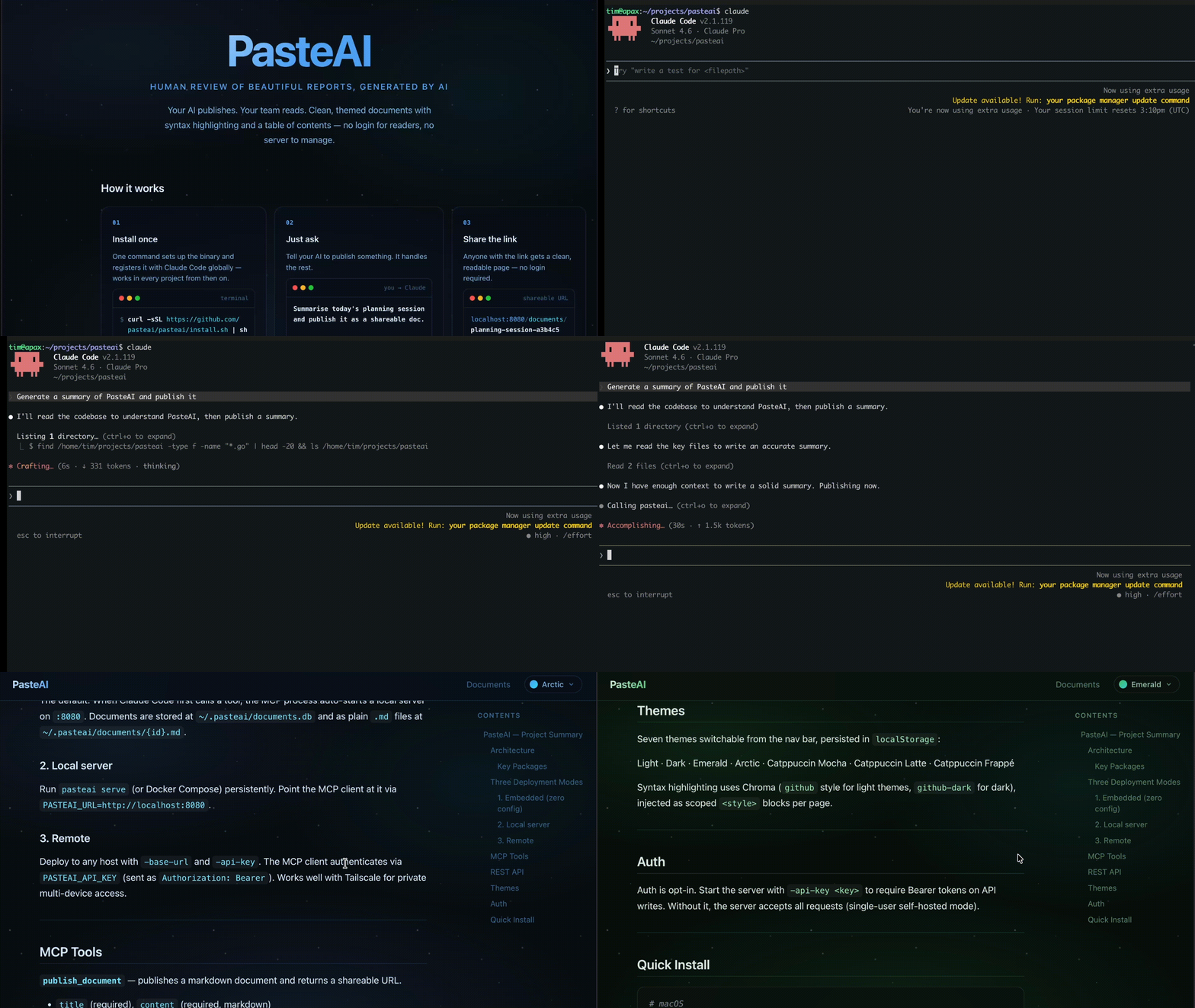
Quickstart
Run /setup in Claude Code — it installs the binary and configures MCP. Then restart your editor to activate.
Or install manually:
# macOS
brew install pasteai/pasteai/pasteai

# Windows
scoop bucket add pasteai https://github.com/pasteai/scoop-pasteai
scoop install pasteai

# Linux (Debian/Ubuntu)
# Download the .deb from https://github.com/pasteai/pasteai/releases/latest

# Any platform — prebuilt binary
curl -sSL https://raw.githubusercontent.com/pasteai/pasteai/main/install.sh | sh

# With Go
go install github.com/pasteai/pasteai/cmd/pasteai@latest
Then run pasteai setup to register with your AI editor(s). It configures Claude Code, Kiro, and opencode simultaneously.
To configure manually, add the entry to the appropriate config file:
Claude Code (~/.claude.json) and Kiro (~/.kiro/settings/mcp.json):
{
  "mcpServers": {
    "pasteai": {
      "command": "/full/path/to/pasteai",
      "args": ["mcp"]
    }
  }
}
opencode (~/.config/opencode/opencode.json):
{
  "mcp": {
    "pasteai": {
      "type": "local",
      "command": ["/full/path/to/pasteai", "mcp"]
    }
  }
}
Use the absolute path from which pasteai or $(go env GOPATH)/bin/pasteai — AI editors do not inherit your shell PATH.
Restart your editor, then ask: "Summarise what we discussed and publish it."
CLI Reference
| Command | Description |
|---|---|
pasteai setup |
Configure MCP in Claude Code, Kiro, and opencode (interactive or via flags) |
pasteai setup -mode embedded |
Configure without prompts (non-interactive) |
pasteai doctor |
Diagnose common setup problems |
pasteai serve [flags] |
Start the HTTP server |
pasteai mcp |
Start the MCP server (used by Claude Code) |
pasteai version |
Print version |
Which mode?
| Situation | Mode |
|---|---|
| Claude Code on your laptop | Embedded — default, nothing to configure |
| Claude running in a container or remote VM | Local server — run pasteai serve on the host, set PASTEAI_URL |
| Sharing with a team or reading across devices | Remote — deploy with -base-url, use Tailscale for private access |
Three Modes
1. Embedded (zero config)
Add the MCP config above and restart Claude Code. When Claude first calls a tool, PasteAI starts a local server automatically. Documents stored at ~/.pasteai/documents.db and as plain markdown files at ~/.pasteai/documents/{id}.md — readable without the server running.
2. Local server
Run the server persistently with Docker Compose and point the MCP client at it:
# docker-compose.yml
services:
  pasteai:
    image: ghcr.io/pasteai/pasteai:latest
    ports:
      - "8080:8080"
    volumes:
      - ${HOME}/.pasteai:/data
    restart: unless-stopped
mkdir -p ~/.pasteai
docker compose up -d
In ~/.claude.json:
{
  "mcpServers": {
    "pasteai": {
      "command": "/full/path/to/pasteai",
      "args": ["mcp"],
      "env": { "PASTEAI_URL": "http://localhost:8080" }
    }
  }
}
Good when you want the server always running, independent of Claude Code. For systemd, launchd, or nohup alternatives, see docs/server-setup.md.
3. Remote
Point PASTEAI_URL at any PasteAI instance. Both PASTEAI_API_KEY and -base-url are required on the server for remote access to work correctly.
Start the server with:
pasteai serve -api-key <your-key> -base-url https://your-server.example.com
In ~/.claude.json:
{
  "mcpServers": {
    "pasteai": {
      "command": "/full/path/to/pasteai",
      "args": ["mcp"],
      "env": {
        "PASTEAI_URL": "https://your-server.example.com",
        "PASTEAI_API_KEY": "your-key"
      }
    }
  }
}
Tailscale
To read documents from your phone or another machine, use Tailscale. Start pasteai serve, then browse to http://<tailscale-ip>:8080 from any device on your tailnet. Set -base-url http://<tailscale-ip>:8080 so document links resolve correctly.
MCP Tools
publish_document — publish a markdown document, returns a shareable URL.
| Parameter | Required | Description |
|---|---|---|
title |
yes | Document title |
content |
yes | Markdown content |
author |
no | Author name |
visibility |
no | public (default) or unlisted (link-only) |
list_documents — returns recent public documents.
get_document — retrieve a document by ID, including its full markdown content.
| Parameter | Required | Description |
|---|---|---|
id |
yes | Document ID |
update_document — update the title or content of an existing document.
| Parameter | Required | Description |
|---|---|---|
id |
yes | Document ID |
title |
no | New title (omit to keep existing) |
content |
no | New markdown content (omit to keep existing) |
delete_document — permanently delete a document by ID.
| Parameter | Required | Description |
|---|---|---|
id |
yes | Document ID |
claude.ai Custom Connectors (streamable-HTTP MCP)
To connect a deployed PasteAI server to claude.ai as a Custom Connector, start the server with -enable-mcp-http. This mounts a stateless streamable-HTTP MCP endpoint at /mcp alongside the web UI:
pasteai serve \
  -api-key <your-key> \
  -base-url https://your-server.example.com \
  -enable-mcp-http
Then in claude.ai → Settings → Connectors, add:
https://your-server.example.com/mcp
The /mcp endpoint requires the same Bearer token as the API when -api-key is set. The stdio transport (pasteai mcp) is unaffected — both can run simultaneously.
REST API
| Method | Path | Description |
|---|---|---|
POST |
/api/documents |
Create a document |
GET |
/api/documents |
List recent public documents |
GET |
/api/documents/{id} |
Get a document (with content) |
PUT |
/api/documents/{id} |
Update title or content |
DELETE |
/api/documents/{id} |
Delete a document |
GET |
/d/{id}/raw |
Raw markdown source |
curl -X POST http://localhost:8080/api/documents \
  -H 'Content-Type: application/json' \
  -d '{"title": "My Report", "content": "# Hello\n\nThis is my report.", "author": "Claude"}'
Response includes a url field: http://localhost:8080/d/{id}
Themes
Switch themes using the selector in the top nav. Choice is saved in localStorage.
Light · Dark · Emerald · Arctic · Catppuccin Mocha · Catppuccin Latte · Catppuccin Frappé
Contributing & License
Installing PasteAI
This server has no published package — it is built from source. Open the repository and follow its README.
▸ github.com/pasteai/pasteaiFAQ
Is PasteAI MCP free?
Yes, PasteAI MCP is free — one-click install via Unyly at no cost.
Does PasteAI need an API key?
No, PasteAI runs without API keys or environment variables.
Is PasteAI hosted or self-hosted?
Self-hosted: the server runs locally on your machine via the install command above.
How do I install PasteAI in Claude Desktop, Claude Code or Cursor?
Open PasteAI on unyly.org, pick your client tab (Claude Desktop, Claude Code, Cursor) and press Install — the config is generated automatically, no JSON editing.
Related MCPs
LibreOffice Tools
Enables AI agents to read, write, and edit Office documents via LibreOffice with token-efficient design. Supports multiple formats including DOCX, XLSX, PPTX, a
 by passerbyflutter
dannote/figma-use
Full Figma control: create shapes, text, components, set styles, auto-layout, variables, export. 80+ tools.
 by dannote
Logo.dev
Search and retrieve company logos by brand or domain. Customize size, format, and theme to match your design needs. Accelerate design, prototyping, and content
 by NOVA-3951
PIX4Dmatic
Enables GUI automation for controlling PIX4Dmatic on Windows through MCP. Supports launching, focusing, capturing screenshots, sending hotkeys, clicking UI elem
 by jangjo123
Compare PasteAI with
Not sure what to pick?
Find your stack in 60 seconds
Author?
Embed badge for your README
Browse similar
All design MCPs