
Patchwork Os
FreeNot checkedMCP bridge server for patchwork-os. Boots a stdio-HTTP bridge with MCP introspection over /mcp, supporting tools/list and the full MCP protocol over HTTP.

About
MCP bridge server for patchwork-os. Boots a stdio-HTTP bridge with MCP introspection over /mcp, supporting tools/list and the full MCP protocol over HTTP.
README
npm beta CI npm downloads license
You don't have an automation problem. You have a decision problem.
Every AI-agent horror story ends the same way: an action nobody stopped to question. Patchwork OS is the layer between the agent's impulse and the action — a local-first runtime where your AI can automate real work across your editor, GitHub, Slack, Gmail, and 45+ services, while anything consequential stops and asks you first.
Three ideas, one runtime:
Ask before acting. Every action is classified by blast radius — can it be undone, and how much breaks if it's wrong? Reversible things flow freely. Risky things wait in an approval queue with the evidence attached: what exactly will run, why it fired, and what happens if it's wrong.
Trust is earned, never assumed. Workers — named agents with jobs — start supervised and earn independence from their track record, per action type. Good at filing issues ≠ allowed to push code. One bad high-stakes action outweighs a hundred trivial successes. You set the ceiling; the math never raises it for them.
Every decision leaves a receipt. What was done, why it was allowed, and how it turned out — durable, replayable, explainable via
patchwork judgments, the dashboard's traces page, andpatchwork gate explain. When you approve something, you find out later whether you were right.
All of it runs on your machine: your model (Claude, GPT, Gemini, Grok, or local Ollama), your credentials, your logs. Nothing phones home unless you opt in to anonymous analytics.
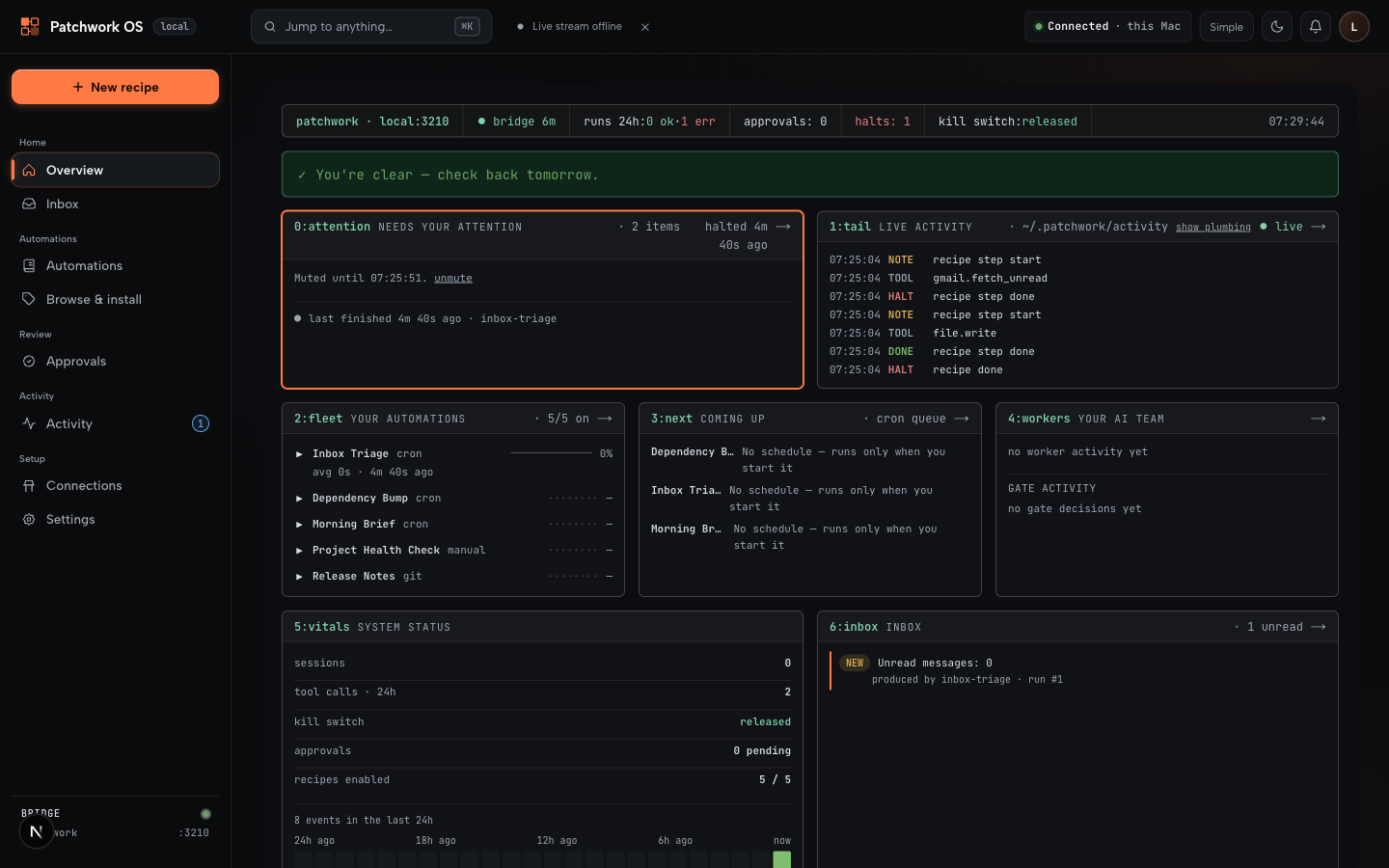
90-second start (no editor required)
npx patchwork-os@beta init   # scaffolds ~/.patchwork, prints your dashboard login
patchwork start              # bridge + dashboard
Open http://localhost:3200. From the browser: run and schedule YAML recipes, connect services (Gmail, Calendar, Slack, GitHub…), review what your agents drafted, and approve — or refuse — anything that wants to leave the machine.
Prereqs: Node 22+. macOS, Linux, and native Windows (no WSL).
The hero workflow — Morning Brief:
patchwork connections connect gmail
patchwork connections connect google-calendar
patchwork recipe run morning-brief
Every morning: a digest of your email, calendar, and overnight agent activity lands in your inbox as Markdown, with any drafted replies waiting for your approval — never auto-sent. No connectors yet? --local runs it against Ollama with your clipboard and recent files.
How it works
Recipes are plain YAML: a trigger (cron, file save, git commit, test run, or any webhook — iPhone Shortcut, Stream Deck, Home Assistant) plus steps. Share them like dotfiles, install them from the marketplace, or let the dashboard generate one from a sentence.
Workers are recipes with an identity and a track record. A worker that triages failing CI starts by only proposing ("this looks like a real break — file an issue?"). Confirm its filings were real and it earns a longer leash — for that job only. It can be demoted in one bad day. You can cap any worker permanently with one line of YAML.
The queue is where impulse meets judgment. Requests arrive sorted by blast radius with evidence inline. patchwork panic stops all automation instantly.
trigger → recipe/worker → [reversible? → run]
                           [risky?      → approval queue → your yes → receipt]
Also in the box: the Claude IDE Bridge
The foundation layer is a standalone MCP bridge that gives Claude Code eyes and hands in your editor — 177 tools: diagnostics, LSP navigation, refactoring with risk analysis, debugger, terminal, git/GitHub, file ops.
npm install -g patchwork-os
claude-ide-bridge install-extension     # VS Code / Cursor / Windsurf / Antigravity
claude-ide-bridge --workspace .
claude --ide                            # in another terminal
JetBrains via a companion plugin. Claude Desktop, Gemini CLI, Codex CLI, Grok Build, and claude.ai connect over stdio or HTTP. Use the bridge alone forever if that's all you need; the runtime is an optional layer on top.
claude --ide can't find an IDE? Set CLAUDE_CODE_IDE_SKIP_VALID_CHECK=true (patchwork init does this for you).
What's here
Decision layer — approval queue · blast-radius action classes · worker trust ramp · kill switch · decision receipts
Automation — YAML recipes · cron/file/git/test/webhook triggers · event hooks · multi-model (Claude, GPT, Gemini, Grok, Ollama)
Connectors — 45+, all writes governed by your policy: GitHub, Slack, Gmail, Calendar, Drive, Linear, Jira, Sentry, Notion, Stripe, PagerDuty, Datadog, …
IDE bridge — 177 MCP tools · VS Code-family extension · JetBrains plugin · plugins hot-reload (write tools mid-session)
Oversight — web dashboard · mobile push approvals (PWA) · halts/judgments CLI · trace memory across sessions
Deployment — your laptop · headless VPS with OAuth 2.0 (guide) · native Windows
Why not Zapier / an MCP server / a hosted assistant? Honest tradeoffs: documents/comparison.md.
Docs
Platform reference · Recipes & triggers · Worker autonomy · Plugin authoring · Architecture · Windows · ADRs
Telemetry
Off by default; nothing is sent unless you opt in. If you do: aggregate counts and latencies only — never paths, prompts, file contents, arguments, or anything from ~/.patchwork/. Details & source.
Contributing & support
Issues · Discussions · CONTRIBUTING.md
⭐ If this saved you a config file or a blown deploy, a star is the only signal I get that it's helping.
MIT © Oolab Labs
Install Patchwork Os in Claude Desktop, Claude Code & Cursor
unyly install patchwork-osInstalls into Claude Desktop, Claude Code, Cursor & VS Code — handles npx, uvx and build-from-source repos for you.
First time? Get the CLI: curl -fsSL https://unyly.org/install | sh
Or configure manually
Run in your terminal:
claude mcp add patchwork-os -- npx -y patchwork-osFAQ
Is Patchwork Os MCP free?
Yes, Patchwork Os MCP is free — one-click install via Unyly at no cost.
Does Patchwork Os need an API key?
No, Patchwork Os runs without API keys or environment variables.
Is Patchwork Os hosted or self-hosted?
Self-hosted: the server runs locally on your machine via the install command above.
How do I install Patchwork Os in Claude Desktop, Claude Code or Cursor?
Open Patchwork Os on unyly.org, pick your client tab (Claude Desktop, Claude Code, Cursor) and press Install — the config is generated automatically, no JSON editing.
Related MCPs
GitHub
PRs, issues, code search, CI status
 by GitHub
Filesystem
Secure file operations with configurable access controls.
Memory
Knowledge graph-based persistent memory system.
Template MCP Server
A CLI tool to create a new Model Context Protocol server project with TypeScript support, dual transport options, and an extensible structure
 by mcpdotdirect
Compare Patchwork Os with
Not sure what to pick?
Find your stack in 60 seconds
Author?
Embed badge for your README
Browse similar
All development MCPs