
Payment Ops Server
FreeNot checkedEnables AI assistants to handle payment support tasks by orchestrating between Stripe and an internal orders database, with human approval required for refunds.

About
Enables AI assistants to handle payment support tasks by orchestrating between Stripe and an internal orders database, with human approval required for refunds.
README






An MCP server that lets Claude handle payment support — look up customers, review charges, and issue refunds — by orchestrating between Stripe and an internal orders database, with human approval required before any money moves.
💡 Why This Exists
Stripe ships an official MCP server — but it only knows Stripe. Real companies wrap the payment provider with internal data and business rules. This server is that orchestration layer:
- 🔗 Joins Stripe payment data with internal order records via
stripe_customer_id - 📅 Enforces refund policy (no refunds older than 90 days)
- 🙋 Requires human confirmation before moving money
- 📝 Writes a full audit log of every refund to the orders DB
That's the layer every company has to build itself. The provider can't.
🏗️ Architecture
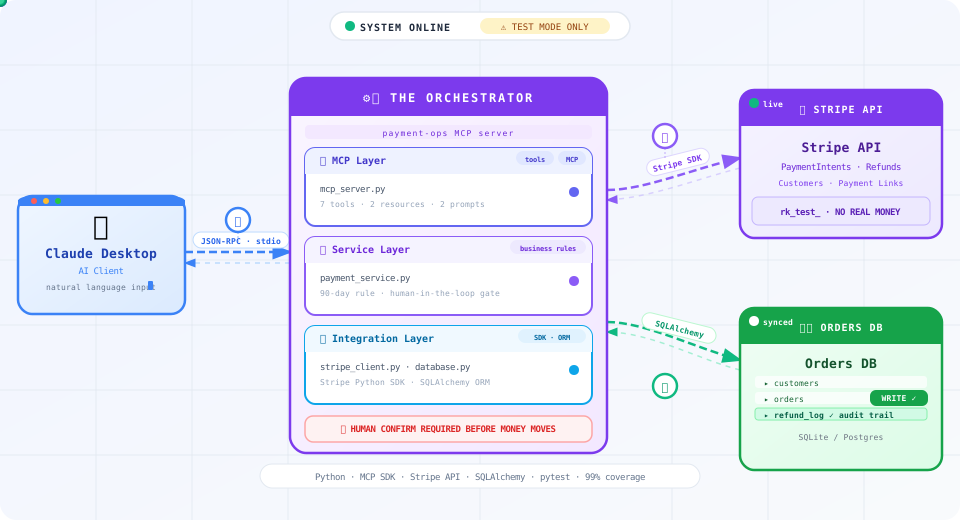
🛠️ Tools
| Tool | Type | What it does |
|---|---|---|
lookup_customer |
🔍 Read | Merges internal DB record + live Stripe status by email |
list_payments |
🔍 Read | Lists recent Stripe PaymentIntents for a customer |
get_order_history |
🔍 Read | Returns full order history from internal DB |
issue_refund |
✏️ Write | Two-step: preview → confirm → refund Stripe + log DB |
create_payment_link |
✏️ Write | Generates a Stripe test payment link |
revenue_summary |
🔍 Read | Aggregates paid orders over a date range |
flag_for_review |
✏️ Write | Flags a charge in the audit log for manual review |
Plus 2 resources (customer://email, payment://charge_id) and 2 prompts (daily_revenue_report, find_refund_candidates).
🔒 Safety Design
Three layers — never trust the model alone for money-moving actions:
- 🙋 Human-in-the-loop gate —
issue_refundrequiresconfirmed=True, which the model only sets after explicitly asking the user - 📅 Server-side business rule — refunds older than 90 days are rejected regardless of what the model requests
- 🗝️ Least-privilege Stripe key — restricted key scoped to Charges + Customers + Refunds only, limits blast radius
🗄️ Database Schema
customers
  id (uuid, pk)
  email (unique)
  name
  stripe_customer_id    ← join key to Stripe

orders
  id (uuid, pk)
  customer_id (fk)
  stripe_charge_id      ← Stripe PaymentIntent ID (pi_xxx)
  amount_cents
  currency
  status (paid / refunded / partially_refunded)
  created_at

refund_log              ← audit trail
  id (uuid, pk)
  order_id (fk)
  stripe_refund_id
  amount_cents
  reason
  refunded_by ("ai-assistant")
  created_at
⚙️ Setup
1. Clone and install
git clone https://github.com/srik4442/Payment-Ops-mcp.git
cd Payment-Ops-mcp
python3 -m venv .venv
source .venv/bin/activate
pip install -r requirements.txt
2. Get a Stripe test key
- Create a free account at stripe.com (test mode, no card needed)
- Go to Developers → API keys → Create restricted key
- Grant Write access to: Charges and Refunds, Customers, Payment Intents, Payment Links, Products
- Copy the
rk_test_...key
3. Configure environment
cp .env.example .env
# Edit .env and add your key:
# STRIPE_API_KEY=rk_test_your_key_here
# DATABASE_URL=sqlite:///./payments.db
4. Seed test data
python scripts/seed.py
Creates 5 test customers in both your local DB and Stripe, each with 2–3 test charges.
5. Connect Claude Desktop
Add to ~/Library/Application Support/Claude/claude_desktop_config.json:
{
  "mcpServers": {
    "payment-ops": {
      "command": "/absolute/path/to/.venv/bin/python",
      "args": ["/absolute/path/to/src/mcp_server.py"],
      "env": {
        "STRIPE_API_KEY": "rk_test_your_key_here",
        "DATABASE_URL": "sqlite:////absolute/path/to/payments.db"
      }
    }
  }
}
Restart Claude Desktop — you should see payment-ops connected.
6. Run the demo
Type into Claude Desktop:
"A customer, [email protected], emailed about a double charge. Look into it and refund the most recent payment."
🧪 Tests
python -m pytest tests/ --cov=src -v
24 tests · 99% coverage on business logic · Stripe client fully mocked (no real API calls in tests)
tests/test_payment_service.py::TestLookupCustomer::test_lookup_customer_merges_db_and_stripe PASSED
tests/test_payment_service.py::TestIssueRefund::test_issue_refund_preview_when_not_confirmed PASSED
tests/test_payment_service.py::TestIssueRefund::test_issue_refund_writes_refund_log_when_confirmed PASSED
tests/test_payment_service.py::TestIssueRefund::test_issue_refund_rejected_for_charge_older_than_90_days PASSED
...
🤔 Tech Decisions
Why MCP instead of a backend script? A script automates one fixed workflow. MCP exposes capabilities to any AI client so a human can drive novel, multi-step support tasks in natural language — without pre-coding every path.
Why SQLite? Zero-config for a portfolio project. The ORM (SQLAlchemy) makes swapping to Postgres a one-line config change.
Why test mode only? Test mode uses the identical Stripe API and code path as live — the only difference is the key prefix. Switching to production is one environment variable.
Why a restricted Stripe key? Least-privilege: the key can only touch Charges, Customers, and Refunds. Even if the key were compromised, the blast radius is contained.
Why store pi_xxx IDs (PaymentIntent) instead of ch_xxx (Charge)?
Modern Stripe workflows are built around PaymentIntents. Refunds via payment_intent work reliably across all payment methods.
🎬 Demo
Prompt typed into Claude Desktop: "A customer, [email protected], emailed about a double charge. Look into it and refund the most recent payment."
STEP 1  Claude calls lookup_customer("[email protected]")
        → queries Orders DB → finds Sarah + Stripe customer ID

STEP 2  Claude calls list_payments(customer="cus_xxx")
        → queries Stripe (test mode) → returns recent charges

STEP 3  Claude PAUSES:
        "I found a duplicate $49.99 charge. Refund the most recent one? Please confirm."
        → human-in-the-loop gate before any money moves

STEP 4  You reply "yes"
        → Claude calls issue_refund(confirmed=True)
        → refund issued in Stripe
        → order status updated + audit row written to DB

STEP 5  Claude confirms:
        "Refunded $49.99 to Sarah (re_3To18wCLuf9LMqJ11xb4XutS).
         Logged in orders DB as duplicate-charge reversal."
📄 Resume Bullet
AI Payment Operations Assistant (MCP Server) · Python, MCP SDK, Stripe API, SQLAlchemy, pytest
- Built a Model Context Protocol server that lets AI assistants perform payment support operations by orchestrating between the Stripe API and an internal order database, exposing 7 tools, resources, and prompt templates
- Implemented human-in-the-loop confirmation and server-side business rules to gate money-moving actions, with a full refund audit log written to the database for every transaction
- Applied production payment patterns — least-privilege restricted API keys, idempotency, and prompt-injection mitigation — and validated orchestration logic with a mocked-Stripe pytest suite at 99% coverage
Installing Payment Ops Server
This server has no published package — it is built from source. Open the repository and follow its README.
▸ github.com/srik4442/Payment-Ops-mcpFAQ
Is Payment Ops Server MCP free?
Yes, Payment Ops Server MCP is free — one-click install via Unyly at no cost.
Does Payment Ops Server need an API key?
No, Payment Ops Server runs without API keys or environment variables.
Is Payment Ops Server hosted or self-hosted?
Self-hosted: the server runs locally on your machine via the install command above.
How do I install Payment Ops Server in Claude Desktop, Claude Code or Cursor?
Open Payment Ops Server on unyly.org, pick your client tab (Claude Desktop, Claude Code, Cursor) and press Install — the config is generated automatically, no JSON editing.
Related MCPs
wenb1n-dev/SmartDB_MCP
A universal database MCP server supporting simultaneous connections to multiple databases. It provides tools for database operations, health analysis, SQL optim
 by wenb1n-dev
Postgres Server
This server enables interaction with PostgreSQL databases through the Model Context Protocol, optimized for the AWS Bedrock AgentCore Runtime. It provides tools
 by madhurprash
Postgres
Query your database in natural language
 by Anthropic
PostgreSQL
Read-only database access with schema inspection.
by modelcontextprotocolCompare Payment Ops Server with
Not sure what to pick?
Find your stack in 60 seconds
Author?
Embed badge for your README
Browse similar
All data MCPs