
Pdf Filler
FreeNot checkedEnables filling any PDF form, including scanned or AcroForm, through a browser-based drag-and-drop editor. Works entirely locally with no data leaving the machi

About
Enables filling any PDF form, including scanned or AcroForm, through a browser-based drag-and-drop editor. Works entirely locally with no data leaving the machine.
README
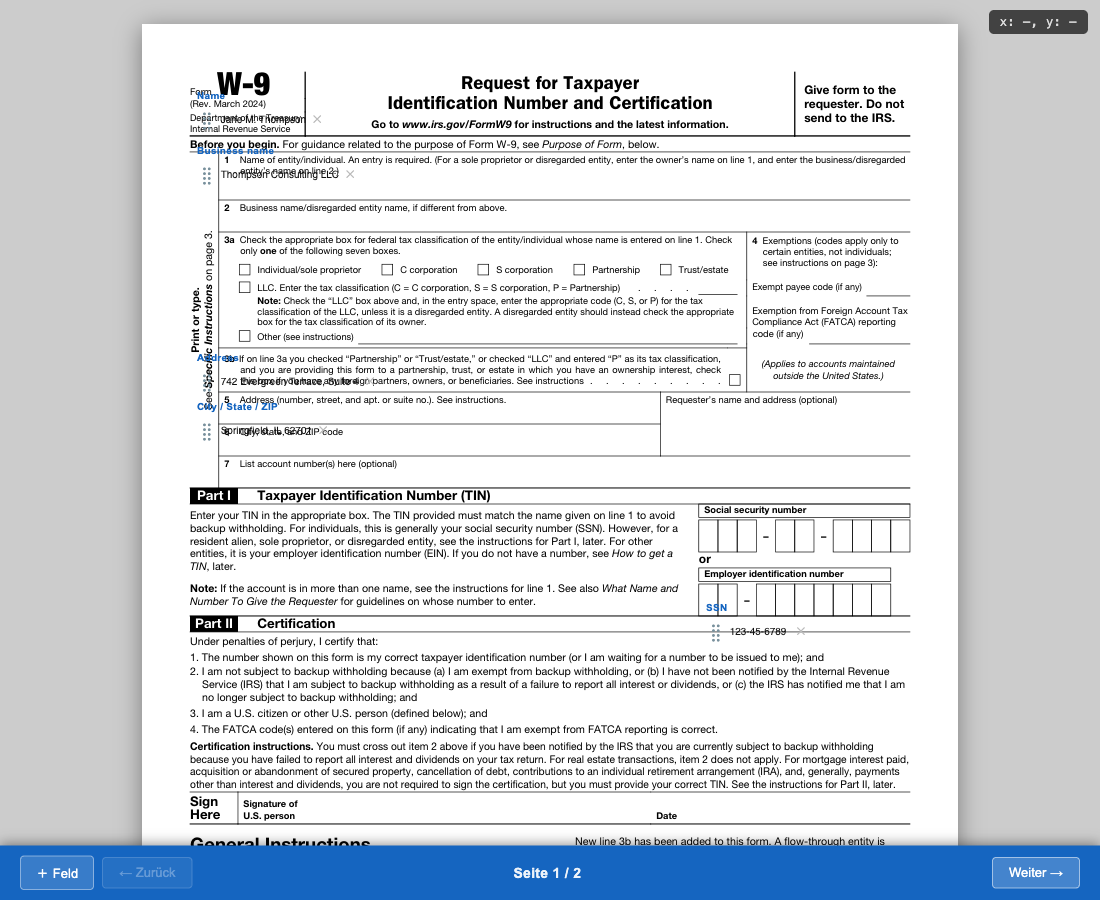
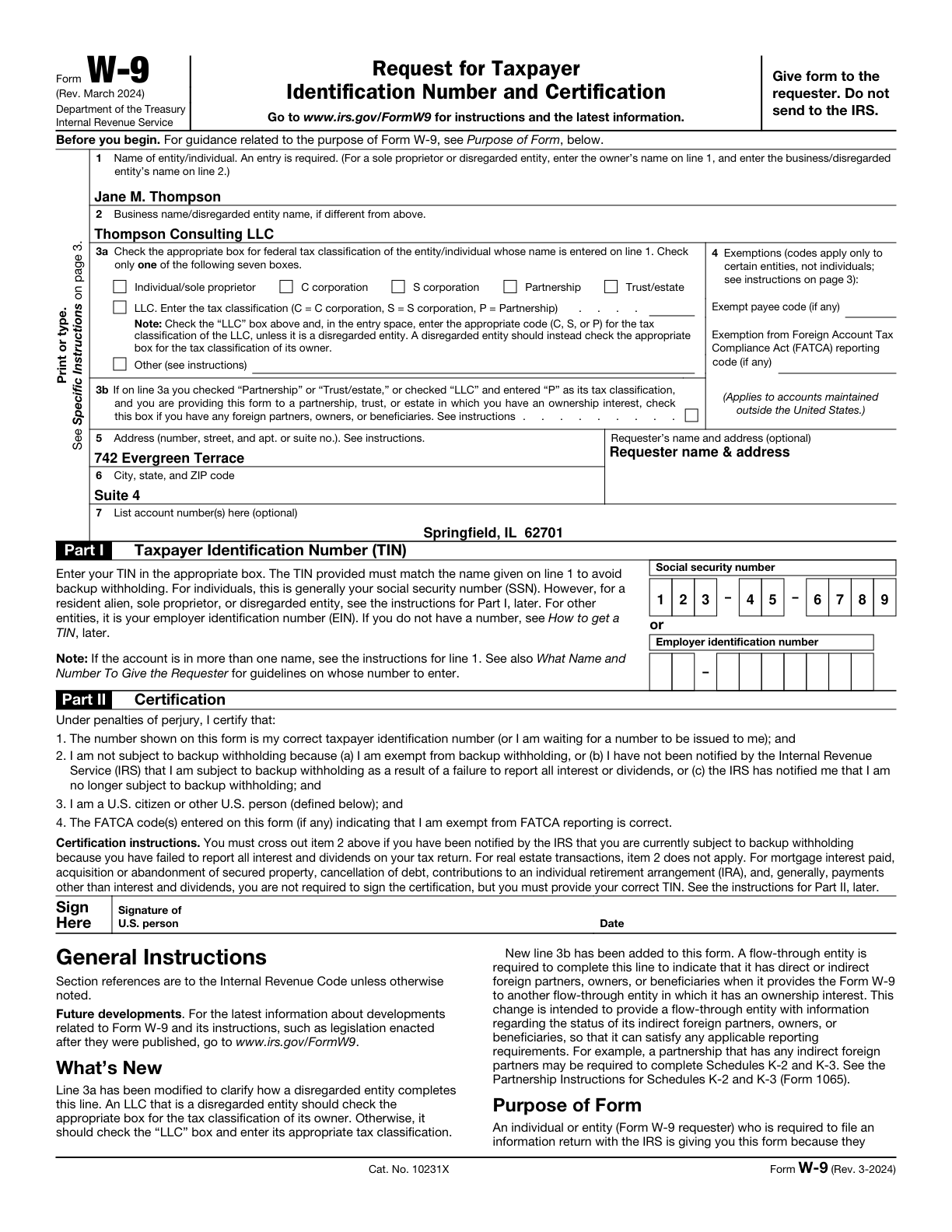
An MCP server that lets Claude fill any PDF form — scanned or AcroForm — through a browser-based drag-and-drop editor.
Editor — drag, reposition and edit fields directly on the rendered PDF page:
Result — the generated PDF with all fields overlaid:
How it works
- Claude renders the PDF to images and inspects the layout
- Claude places markers on each field and iterates until placement is correct
- Claude opens the editor — a self-contained HTML page where you drag fields, edit values and click Fertig
- PDF is generated automatically — the editor POSTs to a local receiver which runs headless Playwright to produce the final PDF
The entire stack runs locally. No data leaves your machine.
Tools exposed
| Tool | Description |
|---|---|
pdf_render |
Render all pages to PNG at a given DPI, returns scale factor |
pdf_preview |
Overlay numbered coloured marker dots on a page for iterative placement verification |
pdf_editor_multi |
Generate a multi-page drag-and-drop HTML editor pre-filled with field values |
pdf_fill |
Directly overlay text on a PDF without opening the browser editor |
pdf_merge |
Merge per-page PDFs into a single file |
pdf_memory_get |
Retrieve saved field layout for a known form type |
pdf_memory_set |
Save verified field layout so the same form can be filled again instantly |
pdf_receiver_start |
Start the local HTTP receiver that auto-generates the PDF on Fertig |
pdf_receiver_wait |
Block until the user clicks Fertig and the PDF is ready |
Prerequisites
- Python 3.9+
- pymupdf (
pip install pymupdf) - pypdf (
pip install pypdf) — for merging - Node.js + Playwright — for the auto-PDF-generation step (
npm i -g playwright)
Installation
1. Clone
git clone https://github.com/patroqueeet/pdf-filler-mcp.git ~/.claude/pdf-filler
2. Register with Claude Code
Add to ~/.mcp.json:
{
  "mcpServers": {
    "pdf-filler": {
      "command": "python3",
      "args": ["~/.claude/pdf-filler/filler.py", "serve"]
    }
  }
}
Restart Claude Code — the pdf_* tools will be available in any session.
Typical workflow
User: Fill out /tmp/application.pdf with my personal data

Claude:
  1. pdf_render       → get page images + scale_factor
  2. pdf_preview      → place marker dots, read result image, adjust
  3. pdf_memory_get   → check if layout is already saved
  4. pdf_receiver_start → start PDF receiver on port 7789
  5. pdf_editor_multi → open editor in browser
  6. pdf_receiver_wait → wait for user to click Fertig
  → returns: { done: true, output_path: "/tmp/application_filled.pdf" }
Editor features
- Click to create a field anywhere on the document image
- Drag the ⣿ handle to reposition
- Tab between fields; inline editing
- Checkbox type available via the ➕ button
- Multi-page navigation with per-page field state
- Print CSS hides all editor chrome — only text overlays are printed
Running the tests
pip install pymupdf pypdf pytest pytest-timeout
pytest tests/ -v
License
MIT — see LICENSE.
Install Pdf Filler in Claude Desktop, Claude Code & Cursor
unyly install pdf-filler-mcpInstalls into Claude Desktop, Claude Code, Cursor & VS Code — handles npx, uvx and build-from-source repos for you.
First time? Get the CLI: curl -fsSL https://unyly.org/install | sh
Or configure manually
Run in your terminal:
claude mcp add pdf-filler-mcp -- uvx --from git+https://github.com/patroqueeet/pdf-filler-mcp pdf-filler-mcpFAQ
Is Pdf Filler MCP free?
Yes, Pdf Filler MCP is free — one-click install via Unyly at no cost.
Does Pdf Filler need an API key?
No, Pdf Filler runs without API keys or environment variables.
Is Pdf Filler hosted or self-hosted?
Self-hosted: the server runs locally on your machine via the install command above.
How do I install Pdf Filler in Claude Desktop, Claude Code or Cursor?
Open Pdf Filler on unyly.org, pick your client tab (Claude Desktop, Claude Code, Cursor) and press Install — the config is generated automatically, no JSON editing.
Related MCPs
Playwright
Browser automation, scraping, screenshots
 by Microsoft
Puppeteer
Browser automation and web scraping.
 by modelcontextprotocol
opentabs-dev/opentabs
Plugin-based MCP server + Chrome extension that gives AI agents access to web applications through the user's authenticated browser session. 100+ plugins with a
 by opentabs-dev
robhunter/agentdeals
1,500+ developer infrastructure deals, free tiers, and startup programs across 54 categories. Search deals, compare vendors, plan stacks, and track pricing chan
 by robhunter
Compare Pdf Filler with
Not sure what to pick?
Find your stack in 60 seconds
Author?
Embed badge for your README
Browse similar
All browse MCPs