
Penny
FreeNot checkedMCP server for orchestrating coding tasks with frontier-model planning and local execution, enabling manifest validation, plan submission, status checks, cancel

About
MCP server for orchestrating coding tasks with frontier-model planning and local execution, enabling manifest validation, plan submission, status checks, cancellation, and report retrieval through Claude Code.
README
Penny
Spend frontier-model tokens on planning, not execution
CI License: MIT Python 3.14+ Status: alpha
Frontier planning · Local execution · Deterministic eval gates
Penny lets a frontier Claude model inspect a repository and produce a rigorous execution plan, then hands the implementation to a cheaper or local model. A deterministic Python orchestrator controls the workflow, runs the evals, and decides whether each step may proceed.
[!WARNING] Penny is alpha software. It launches an autonomous coding agent with permission to edit files and run commands inside a repository. Use it only in version-controlled projects, inspect the generated plan, and review the final diff before merging changes.
Why Penny?
Frontier coding models are excellent at understanding unfamiliar systems, making architectural decisions, and decomposing complex work—but long agentic sessions can consume a large number of expensive tokens.
Penny separates the expensive reasoning from the token-heavy implementation loop:
- Claude plans once using your Claude subscription.
- A cheaper or local model executes small, self-contained steps through Claude Code.
- Penny runs the evals itself and advances only when the required checks pass.
The worker never receives the frontier conversation, and the frontier model does not remain in the loop while files are read, edited, tested, and retried.
How it works
flowchart LR
    U[Developer request] --> P[Claude Code planner skill]
    P --> M[Execution manifest]
    M --> O[Penny orchestrator]
    O --> W[Claude Code worker]
    W --> E[Anthropic-compatible endpoint]
    E --> L[Local or cheaper model]
    L --> R[Repository changes]
    R --> V[Deterministic evals]
    V -->|Pass| N[Next step]
    V -->|Fail| T[Fresh retry session]
    T --> W
    N --> O
The YAML execution manifest is the contract between planning and execution. It contains:
- the task objective and acceptance criteria;
- ordered, self-contained worker prompts;
- allowed and forbidden path scopes;
- deterministic evals for every step;
- retry limits and final regression checks.
Frontier Claude
    decides what should change
    and how success will be proven

Worker model
    performs one bounded implementation step

Penny
    owns state, runs evals, enforces scope,
    retries failures, and decides when to advance
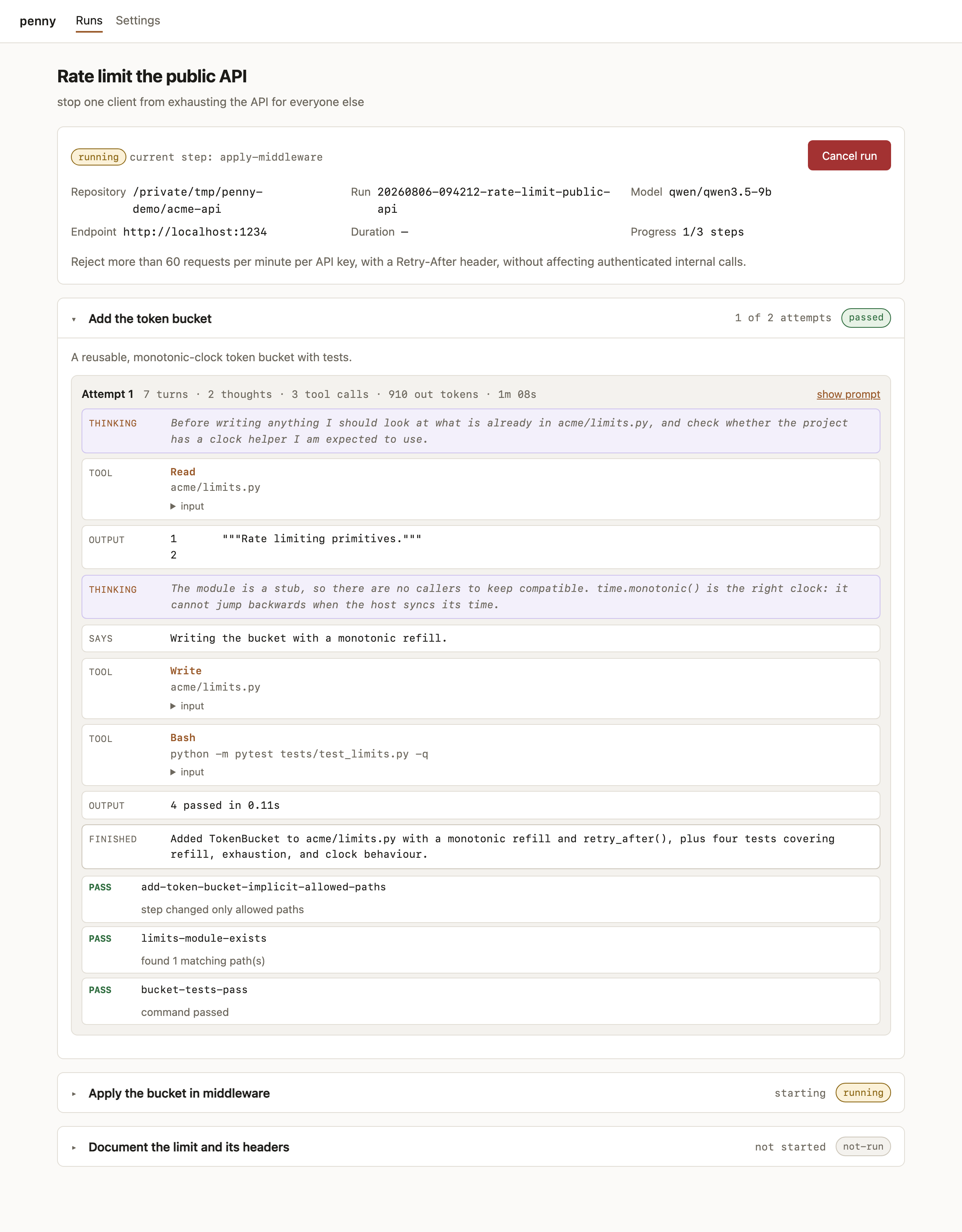
A real run
Adding an admin login page to a Python web project: planned by Claude Opus, implemented by qwen/qwen3.5-9b served from LM Studio on a laptop. Penny's own report.md, abridged:
# Admin login page (UI only, no backend auth)

- Status: **completed**
- Duration: 746.7s
- Model: qwen/qwen3.5-9b
- Endpoint: http://localhost:1234

## Steps

- `add-login-view` — passed (1 attempt(s))
  - **PASS** `login-module-exists` — found 1 matching path(s)
  - **PASS** `login-view-markup` — all required strings found
  - **PASS** `login-handler-behavior` — command passed
  - **PASS** `suite-green-after-login-view` — command passed
- `register-login-route` — passed (1 attempt(s))
- `add-login-tests` — passed (1 attempt(s))
- `add-login-styles` — passed (1 attempt(s))

## Final evals

- **PASS** `full-suite` — command passed
- **PASS** `pyproject-untouched` — command passed
- **PASS** `overall-scope` — all changed paths are allowed
Four steps, four files, twelve minutes, 39 eval assertions — and no frontier tokens spent after the plan was written.
Features
- Claude Code planning skill designed for subscription-backed frontier planning.
- Fresh worker session for every step and retry.
- Any sufficiently Anthropic-compatible
/v1/messagesendpoint. - Deterministic command, file, content, and Git-scope evals.
- Independent detection of out-of-scope changes.
- Durable run state, logs, transcripts, and reports.
- MCP integration for plan validation, submission, status, cancellation, and reports.
- Local web console for observing active and completed runs.
- Built-in environment doctor and deterministic end-to-end demo.
Requirements
Penny currently requires:
- macOS or Linux;
- Python 3.14 or newer;
- uv;
- Claude Code on
PATH; - Git;
- an Anthropic Messages API-compatible worker endpoint for real executions.
The worker endpoint may be provided by LM Studio, oMLX, a gateway, a remote inference server, or another compatible service. An OpenAI-only /v1/chat/completions endpoint is not enough; the worker path requires Anthropic-style messages, streaming, and tool use.
Quick start
1. Install Penny
git clone https://github.com/kangwa/penny.git
cd penny
uv sync
Optionally install the CLI on your PATH:
uv tool install --editable .
The examples below use uv run penny. After a tool install, you can use penny directly.
2. See it work before configuring anything
uv run penny demo
The demo exercises the complete orchestration loop in throwaway repositories. It validates a manifest, executes a two-step task, intentionally fails one attempt, retries it in a fresh session, and verifies every eval gate — then asserts each guarantee and exits non-zero if any is unmet.
It takes a few seconds, makes no model call, and requires no endpoint.
3. Install the Claude planner skill
Install it globally for your Claude Code user:
uv run penny skill install
Or install it into one repository only:
uv run penny skill install --project /path/to/project
Start a new Claude Code session after installing the skill.
4. Configure the worker endpoint
Create Penny's settings directory and copy the example configuration:
mkdir -p ~/.penny
cp penny.env.example ~/.penny/.env.penny
Edit ~/.penny/.env.penny:
# Root before /v1/messages
PENNY_BASE_URL=http://localhost:1234

# Any model identifier accepted by the endpoint
PENNY_MODEL=openai/gpt-oss-20b

# bearer -> Authorization: Bearer
# api-key -> x-api-key
PENNY_AUTH_TYPE=bearer
PENNY_AUTH_TOKEN=local

PENNY_MAX_TURNS=30
PENNY_AGENT_TIMEOUT=1800
Penny also reads .env.penny from its checkout and accepts ordinary environment variables. Explicit environment variables take precedence over the settings file.
[!IMPORTANT] Do not export
ANTHROPIC_BASE_URLglobally. Penny injects the worker endpoint only into the spawned worker process so your normal Claude Code session continues using your Claude subscription.
5. Check the complete worker chain
Run this from a clean Git repository:
uv run --project /path/to/penny penny doctor
doctor verifies:
- the current Git repository and working tree;
- the Claude Code executable;
- endpoint and model configuration;
- endpoint reachability;
- Anthropic Messages API compatibility;
- a real Claude Code read/edit/shell tool-use session in a temporary repository.
Useful variants:
# Fast configuration-only check
uv run --project /path/to/penny penny doctor --skip-smoke

# Machine-readable report
uv run --project /path/to/penny penny doctor --json
Plan and execute through Claude Code
Penny supports two workflows: an integrated MCP path and a manual CLI path.
MCP workflow
Register Penny's MCP server for the repository it is allowed to operate in:
uv run penny mcp install --project /absolute/path/to/project
The default local scope registers the server only for that repository. Restart Claude Code in the target project, then run:
/local-execution-planner Add idempotency support to payment creation
The planner skill will:
flowchart TD
    A[Inspect repository] --> B[Build execution manifest]
    B --> C[Validate through Penny MCP]
    C -->|Invalid| B
    C -->|Valid| D[Show plan and eval summary]
    D --> E{User confirms?}
    E -->|Yes| F[Submit plan]
    E -->|No| G[Stop without execution]
    F --> H[Return run ID and stop]
    H --> I[Penny continues independently]
Use wording such as “plan and execute” when you want the skill to submit the plan without an additional confirmation step.
The MCP server exposes operations for:
- environment diagnostics;
- manifest validation;
- plan submission;
- status retrieval;
- cancellation;
- final reports.
Submitted runs continue in a detached process and do not require the frontier Claude session to remain open.
Manual CLI workflow
You can also save the planner's YAML output and run it directly:
uv run --project /path/to/penny penny validate plan.yaml
uv run --project /path/to/penny penny run plan.yaml --dry-run
uv run --project /path/to/penny penny run plan.yaml
--repo defaults to the current directory. To execute against another repository:
uv run --project /path/to/penny penny run plan.yaml \
  --repo /absolute/path/to/project
Each run writes its artifacts under the target repository:
.local-agent/runs/<run-id>/
├── manifest.yaml
├── state.json
├── report.md
└── logs/
    ├── <step>-attempt-<n>-agent.log
    ├── <step>-attempt-<n>-evals.json
    └── final-evals.json
Read a saved run's state:
uv run penny status .local-agent/runs/<run-id>
Web console
Start the local run console:
uv run penny web --allow-root ~/Work
Then open http://127.0.0.1:8765.
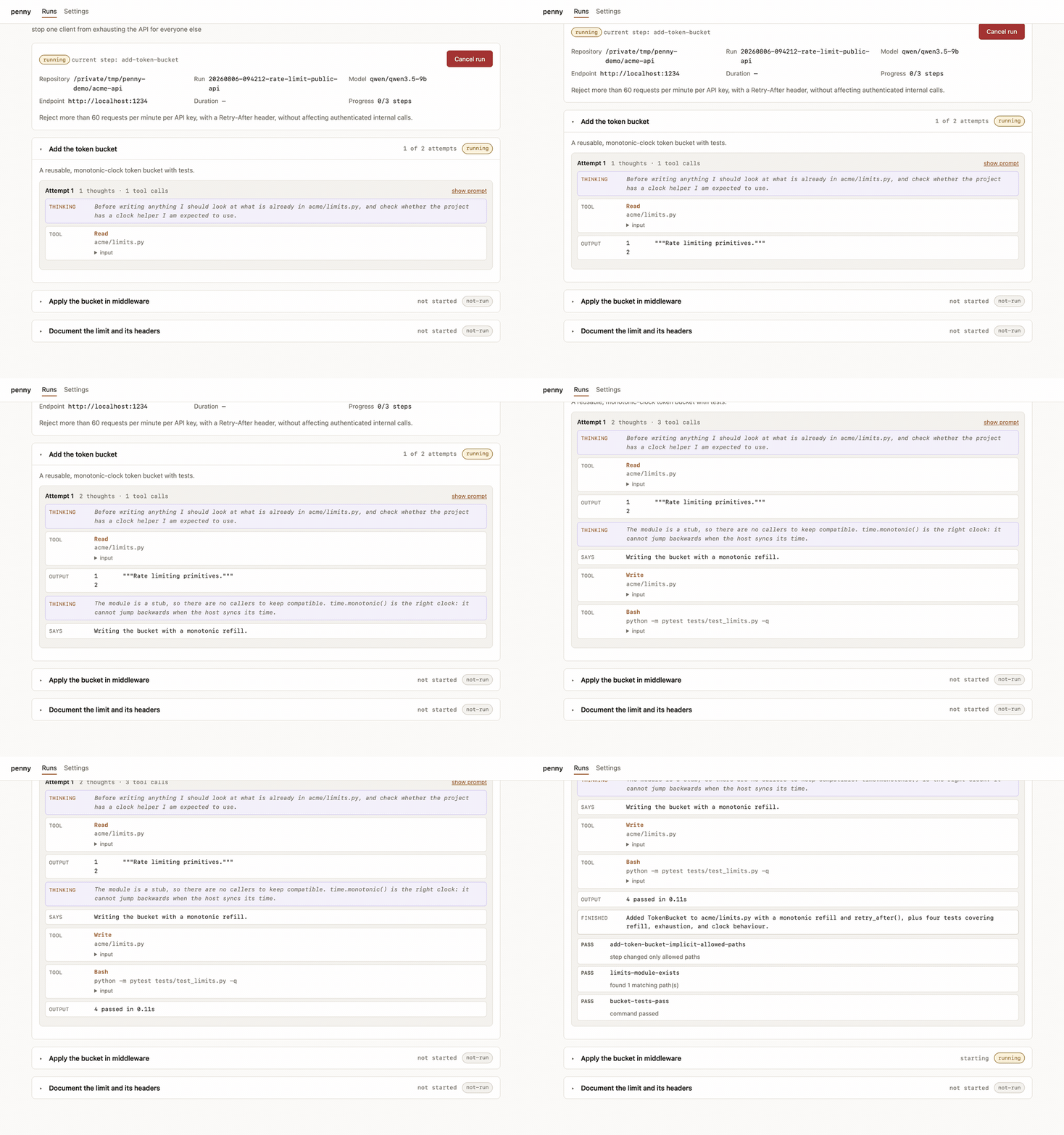
The console can:
- list active and completed runs;
- follow current steps and attempts;
- show worker prompts, reasoning, tool calls, and eval results;
- display changed files and final reports;
- cancel an active run;
- edit worker endpoint settings.
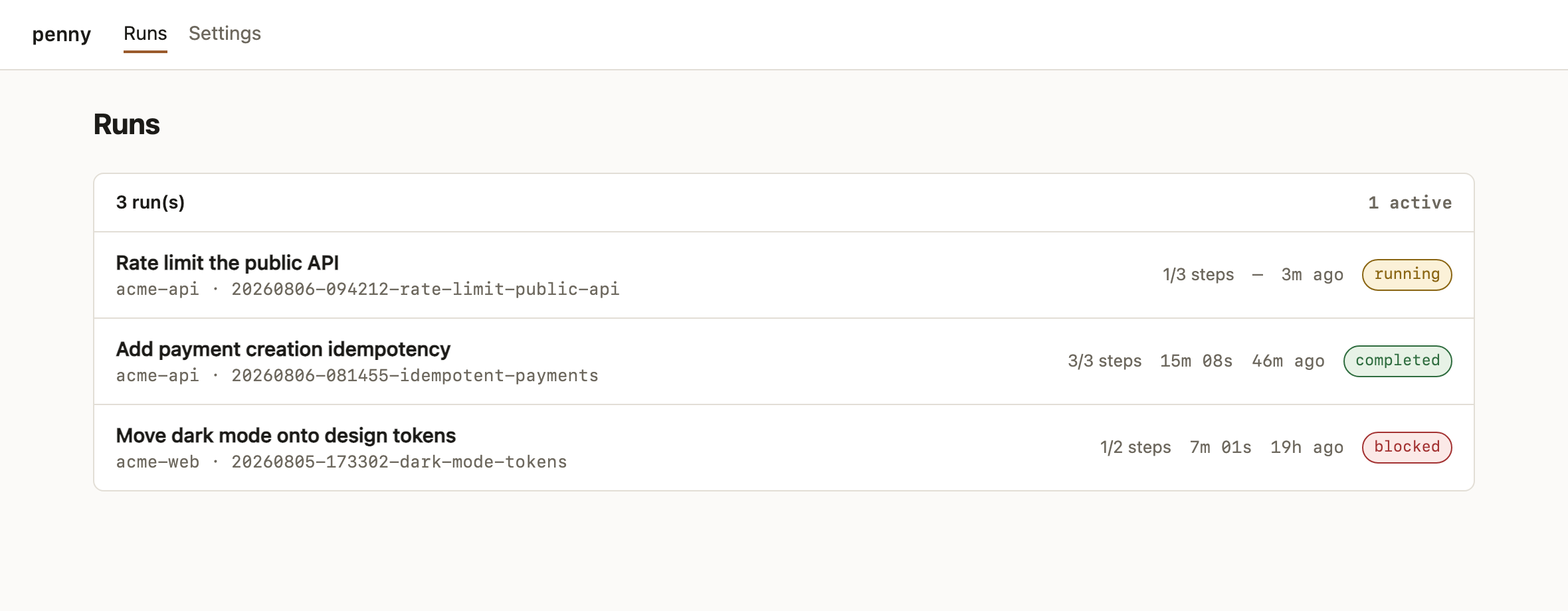
Every run in reach, with its status, progress, and duration:
[!CAUTION] The web console is unauthenticated and binds to loopback by default. Do not expose it publicly. The console is an observability and control layer; it does not execute steps or evals itself.
Safety model
Penny treats the worker model as untrusted.
The worker cannot declare success
The orchestrator runs every eval itself. A worker response saying “all tests pass” has no effect on workflow state.
Supported eval classes include:
- shell commands with bounded timeouts;
- file existence checks;
- file content assertions;
- Git diff allowlists;
- final regression suites.
Every attempt is scoped
Before an attempt, Penny records the repository state. After the worker exits, Penny independently checks which files changed and compares them with the step's allowed and forbidden path scopes.
Failures receive bounded retries
When an eval fails, Penny starts a fresh worker session containing only:
- the original step prompt;
- the relevant eval failures;
- the repository state left by the previous attempt.
The default is two attempts. After the limit is exhausted, the run becomes blocked instead of silently proceeding.
Credentials are isolated
The worker subprocess receives only its configured endpoint credentials. Penny strips inherited ANTHROPIC_* credentials so a failed local endpoint cannot silently fall back to the subscription-backed frontier account.
Repository access is explicit
The MCP server accepts only absolute paths inside explicitly configured roots and resolves them to real Git repositories before execution.
Worker endpoint configuration
Penny uses the following settings:
| Variable | Purpose | Default |
|---|---|---|
PENNY_BASE_URL |
Endpoint root before /v1/messages |
— |
PENNY_MODEL |
Model identifier accepted by the endpoint | — |
PENNY_AUTH_TYPE |
bearer or api-key |
bearer |
PENNY_AUTH_TOKEN |
Bearer token | — |
PENNY_API_KEY |
x-api-key credential |
— |
PENNY_CUSTOM_HEADERS |
Optional additional headers | — |
PENNY_MAX_TURNS |
Maximum Claude Code worker turns | 30 |
PENNY_AGENT_TIMEOUT |
Worker timeout in seconds | 1800 |
PENNY_CLAUDE_BIN |
Claude Code executable | claude |
PENNY_ENV_FILE |
Override settings-file location | auto-detected |
PENNY_MCP_ALLOWED_ROOTS |
Path-separated MCP repository roots | — |
PENNY_MCP_STATE_DIR |
MCP submission registry | ~/.penny |
The endpoint must support the parts of the Anthropic Messages API used by Claude Code, including streaming and structured tool-use exchanges. Compatibility with non-Anthropic models depends on both the endpoint implementation and the model's ability to use Claude Code's tools reliably.
See docs/orchestrator.md for endpoint examples, all CLI flags, troubleshooting, MCP security details, and worker invocation behaviour.
Execution manifests
The planner skill emits YAML manifests. The format is documented in:
- skill/local-execution-planner/references/manifest-format.md
- examples/example-manifest.yaml
- examples/calculator-demo.yaml
A simplified example:
task:
  id: payment-idempotency
  title: Add payment idempotency
  objective: Prevent duplicate payment creation for repeated requests.

steps:
  - id: add-model-support
    title: Add database support
    prompt: |
      Inspect the existing payment model and migration conventions.
      Add account-scoped idempotency support without changing current
      behaviour for requests that omit the key.
    allowed_paths:
      - payments/models.py
      - payments/migrations/**
      - payments/tests/**
    forbidden_paths:
      - settings/**
    max_attempts: 2
    evals:
      - id: model-tests
        type: command
        command: pytest payments/tests/test_models.py
        timeout_seconds: 300

final_evals:
  - id: payment-suite
    type: command
    command: pytest payments
    timeout_seconds: 900
A good manifest tells a weaker worker model exactly what to inspect, what behaviour to implement, what not to change, and how Penny will prove completion.
Command reference
| Command | Purpose |
|---|---|
penny skill install |
Install the planner skill globally or in one project. |
penny mcp install |
Register the MCP server with Claude Code. |
penny doctor |
Verify the repository, CLI, endpoint, API, and tool-use chain. |
penny validate PLAN |
Validate a YAML execution manifest. |
penny run PLAN |
Execute a manifest. |
penny status RUN_DIR |
Print a saved run's state. |
penny web |
Start the local run console. |
penny demo |
Run the deterministic end-to-end demonstration. |
Use penny <command> --help for all flags.
Project structure
penny/
├── skill/local-execution-planner/   # Claude Code frontier-planning skill
├── src/penny/                       # Orchestrator, CLI, MCP, doctor, console
├── examples/                        # Example execution manifests
├── docs/orchestrator.md             # Detailed reference documentation
├── tests/                           # Unit and integration tests
├── penny.env.example                # Worker endpoint configuration template
└── pyproject.toml
Development
Clone the repository and install all dependencies:
git clone https://github.com/kangwa/penny.git
cd penny
uv sync
Run the test suite:
uv run pytest
Run the deterministic vertical slice:
uv run penny demo
For skill development, install a symlink instead of copying the skill:
uv run penny skill install --link --force
Build the package:
uv build
Contributing
Penny is early-stage and contributions are welcome, particularly around:
- Anthropic-compatible endpoint interoperability;
- manifest and eval design;
- safer execution isolation;
- Git worktree support;
- resumable and parallel workflows;
- observability and run reporting;
- Linux and macOS compatibility;
- documentation and examples.
Before opening a pull request:
- keep changes focused;
- add or update tests;
- run
uv run pytest; - run
uv run penny demo; - avoid committing
.env.penny,.local-agent/, virtual environments, logs, or credentials.
Please open an issue before beginning a large architectural change so the approach can be discussed first.
CONTRIBUTING.md covers the development setup, the testing conventions, and what CI checks. Bug reports are most useful with penny doctor --json output and your endpoint and model — the issue template asks for both. Release notes live in CHANGELOG.md.
Penny runs an autonomous agent with permission to edit files and execute commands, so it has a threat model worth reading before you trust it with a repository: SECURITY.md. Report vulnerabilities privately rather than in a public issue.
Roadmap
Penny's current focus is making the basic planner-to-worker handoff dependable and auditable. Likely next areas include:
- Git worktree isolation for every run;
- pause, resume, and explicit step retry controls;
- improved endpoint compatibility diagnostics;
- richer manifest schema validation;
- resource and token accounting;
- optional frontier escalation when a run becomes blocked;
- broader platform and Python-version support.
The roadmap is directional rather than a commitment. Issues and pull requests should remain grounded in small, testable improvements.
Status and limits
Penny is alpha, and worth being precise about what that means:
- Version 0.3. The manifest format and run directory layout may still change. Installation and distribution details may change before a first stable release.
- Exercised against
qwen/qwen3.5-9bon LM Studio. Other Anthropic-compatible servers and models should work, andpenny doctoris how you find out. Small models vary enormously in how reliably they hold a Claude Code tool loop, and endpoint implementations vary in how faithfully they reproduce it. - Plan quality is the ceiling. Penny makes a weak worker safe, not smart. A vague step guarded by a weak eval produces a confidently wrong change that passes its gate.
- Costs are shifted, not removed. Planning still spends subscription usage; the worker spends electricity, wall-clock time, and your attention on review.
License
Penny is released under the MIT License.
Installing Penny
This server has no published package — it is built from source. Open the repository and follow its README.
▸ github.com/kangwa/pennyFAQ
Is Penny MCP free?
Yes, Penny MCP is free — one-click install via Unyly at no cost.
Does Penny need an API key?
No, Penny runs without API keys or environment variables.
Is Penny hosted or self-hosted?
Self-hosted: the server runs locally on your machine via the install command above.
How do I install Penny in Claude Desktop, Claude Code or Cursor?
Open Penny on unyly.org, pick your client tab (Claude Desktop, Claude Code, Cursor) and press Install — the config is generated automatically, no JSON editing.
Related MCPs
GitHub
PRs, issues, code search, CI status
 by GitHub
Filesystem
Secure file operations with configurable access controls.
Memory
Knowledge graph-based persistent memory system.
Template MCP Server
A CLI tool to create a new Model Context Protocol server project with TypeScript support, dual transport options, and an extensible structure
 by mcpdotdirect
Compare Penny with
Not sure what to pick?
Find your stack in 60 seconds
Author?
Embed badge for your README
Browse similar
All development MCPs