
Peppa Mcp Server On Lambda
FreeNot checkedPeppa Mcp Server On Lambda — Model Context Protocol server

About
Peppa Mcp Server On Lambda — Model Context Protocol server
README
- Check out the Building Serverless MCP Servers and What Does Peppa Pig Have To Do With It blog for the full story.
- This repo is not being maintained. See this repo for more examples of running Serverless MCP Servers on AWS.
--
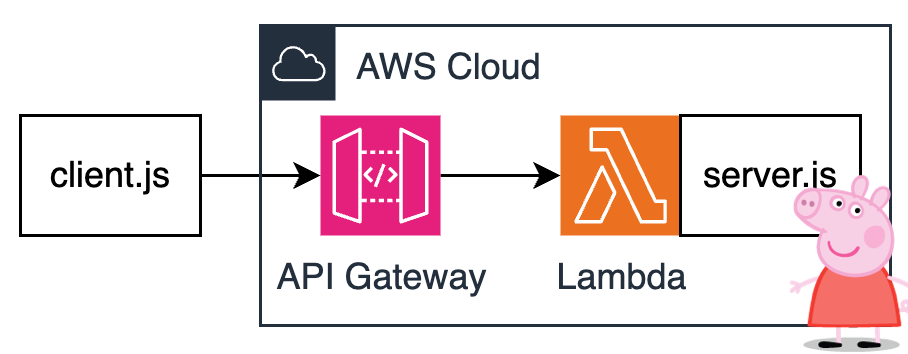
A Peppa MCP Server running natively on AWS Lambda and Amazon API Gateway without any extra bridging components or custom transports. This is now possible thanks to the Streamable HTTP transport introduced in v2025-03-26.
Architecture is as simple as it gets:
Prereqs
- AWS CLI
- Terraform
Instructions
Install dependencies:
cd src
npm install
cd ..
Bootstrap server and set env var with MCP Server endpoint:
cd terraform
terraform init
terraform plan
terraform apply
export PEPPA_MCP_SERVER_ENDPOINT=$(terraform output --raw endpoint_url)
cd ..
Note: It might take a few seconds for API Gateway endpoint to become operational.
Run client:
node src/client.js
Observe the response:
> node client.js
listResources response:  {
  resources: [
    {
      uri: 'peppa://timeslots',
      name: 'timeslots',
      description: 'Use this resource to get all open timeslots for ordering tickets     to the Peppa Pig Theme Park.',
      mimeType: 'text/plain'
    }
  ]
}
readResource response:  {
  contents: [
    {
      uri: 'peppa://timeslots',
      mimeType: 'text/plain',
      text: 'Available timeslots are: April 19th 2025, April 20th 2025, April 21st 2025'
    }
  ]
}
listTools response:  {
  tools: [
    {
      name: 'order-tickets',
      description: 'Use this tool to order tickets to the Peppa Pig Park.     The tool expects two parameters - timeslot and quantity.     The timeslot should be a stringified date.     The quantity should be a number.         Example:     order-tickets(timeslot: "April 19, 2025", quantity: 3)         The tool will return a text message with the order number.     ',
      inputSchema: [Object]
    }
  ]
}
callTool response:  {
  content: [
    {
      type: 'text',
      text: "You've ordered 3 tickets for April 19th, 2025.         Your order number is OINK-1234."
    }
  ]
}
Learn about mcp
Installing Peppa Mcp Server On Lambda
This server has no published package — it is built from source. Open the repository and follow its README.
▸ github.com/aal80/peppa-mcp-server-on-lambdaFAQ
Is Peppa Mcp Server On Lambda MCP free?
Yes, Peppa Mcp Server On Lambda MCP is free — one-click install via Unyly at no cost.
Does Peppa Mcp Server On Lambda need an API key?
No, Peppa Mcp Server On Lambda runs without API keys or environment variables.
Is Peppa Mcp Server On Lambda hosted or self-hosted?
Self-hosted: the server runs locally on your machine via the install command above.
How do I install Peppa Mcp Server On Lambda in Claude Desktop, Claude Code or Cursor?
Open Peppa Mcp Server On Lambda on unyly.org, pick your client tab (Claude Desktop, Claude Code, Cursor) and press Install — the config is generated automatically, no JSON editing.
Related MCPs
GitHub
PRs, issues, code search, CI status
 by GitHub
Filesystem
Secure file operations with configurable access controls.
Memory
Knowledge graph-based persistent memory system.
Template MCP Server
A CLI tool to create a new Model Context Protocol server project with TypeScript support, dual transport options, and an extensible structure
 by mcpdotdirect
Compare Peppa Mcp Server On Lambda with
Not sure what to pick?
Find your stack in 60 seconds
Author?
Embed badge for your README
Browse similar
All development MCPs