
Personal Letterboxd
FreeNot checkedSelf-hosted MCP server (Cloudflare Workers or Docker) that gives Claude your Letterboxd history, taste memory and a private film page

About
Self-hosted MCP server (Cloudflare Workers or Docker) that gives Claude your Letterboxd history, taste memory and a private film page
README
DatMomoAgain/personal-letterboxd-mcp MCP server
A personal MCP server that gives Claude (claude.ai, the apps and Claude Code) your Letterboxd history and a taste memory it keeps for you, so recommendations are based on what you've watched and what you wrote about it. It reads Letterboxd's official data export: no scraping, no password.
What it does
For Claude
- Reads your watched films, ratings, reviews and watchlist.
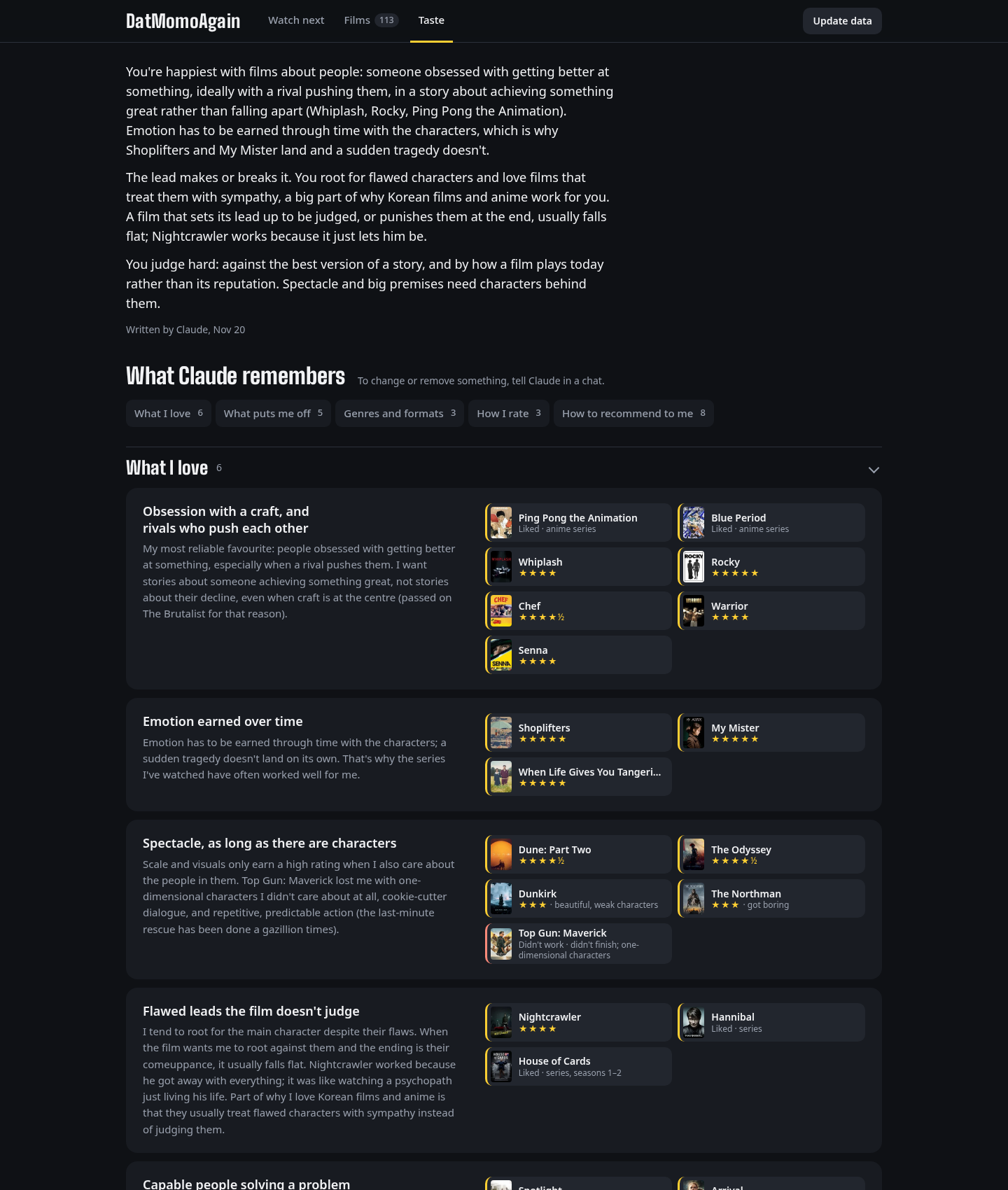
check_filmsgives everything known about a list of titles in one call;find_filmgets IMDb ids and real ratings. - Keeps a taste memory in your own storage, not Claude's memory, and reads it first in every chat. It asks before every write and is told not to overcorrect from one review.
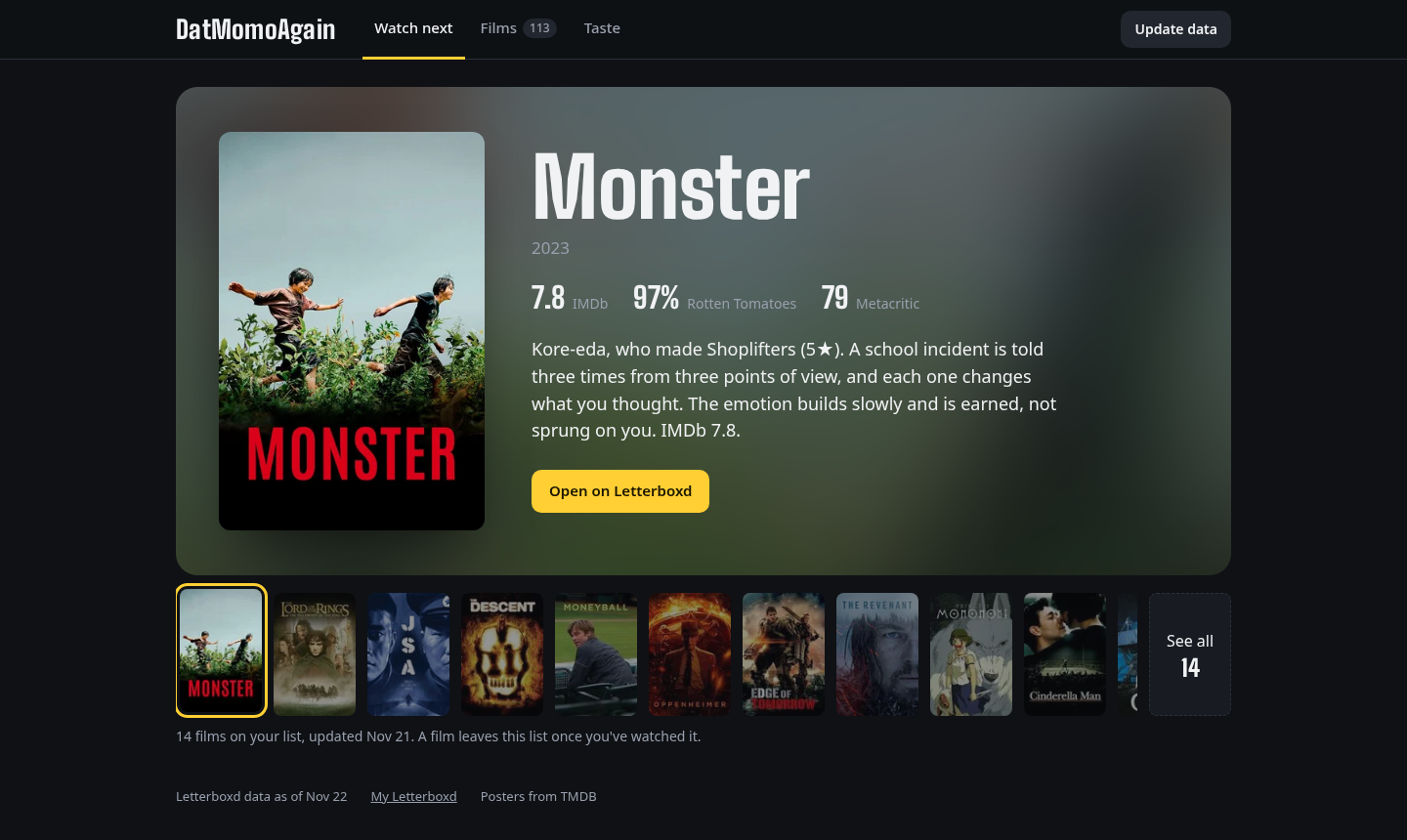
- Keeps your watch next list of films you've decided to watch, each with Claude's reason. Once you've watched one, the reason stays so Claude can learn what landed.
- Per title, for any film or series: a don't-recommend reason and one note about what you said in chats.
For you, a private page:
- Watch next: one pick at a time, with Claude's reason and IMDb, Rotten Tomatoes and Metacritic scores.
- Films: a poster wall of everything you've watched, with search and filters.
- Taste: Claude's overview and notes about your taste, with example films.
- An upload box for a new Letterboxd export, from any device.
Talking to it
Say which of three things you want:
Just watched The Revenant, gave it 3.5. Let's talk about it.
Recommend 5 films for tonight. Something tense, under 2 hours.
Review my taste notes against my whole history. Flag anything contradicted or out of date.
If Claude reads too much into something, "that was just about that film" corrects it.
Run your own copy
Each person runs their own copy on their own free Cloudflare account, or in a container (see "Without Cloudflare" below). In Claude Code, open this folder and ask it to set this up: the setup skill walks you through it.
You need Node 22+, a free Cloudflare account and your Letterboxd export (letterboxd.com → Settings → Data → Export your data). Optional: a TMDB API Read Access Token for posters, and an OMDb key for scores.
npm install
npx wrangler login
npm run setup
npm run setup deploys the Worker, makes a secret token, checks it works and saves two secret links:
.connector-url (for Claude) and .page-url (your page). There's no login: the token in these links
is the only lock, so treat them like passwords. If setup says your account has no workers.dev address,
open Workers & Pages in the Cloudflare dashboard once, then run it again.
Then:
- Open the link in
.page-urland upload your export ZIP. Re-upload a new export whenever you like. - Add the link in
.connector-urlas a custom connector in claude.ai (Settings → Connectors), or in Claude Code:claude mcp add --transport http letterboxd "$(cat .connector-url)" - Optional, in your own terminal (each asks for the key):
npx wrangler secret put TMDB_TOKENandnpx wrangler secret put OMDB_KEY
Later:
- Update:
git pull && npm run deploy. Then refresh the connector in claude.ai and start a new chat. - Leaked link:
npm run setup -- --new-token. The old links stop working. - Remove: delete the connector, then
npx wrangler delete. Your data stays in a KV namespace until you delete that too (npx wrangler kv namespace list, thennpx wrangler kv namespace delete --namespace-id <id>).
Without Cloudflare: the Dockerfile runs the same server in Docker or Podman, on
Cloudflare's open-source runtime, with your data in a volume. Put MCP_TOKEN= and the output of
openssl rand -hex 32 in .dev.vars (optionally TMDB_TOKEN= and OMDB_KEY= lines too), then:
docker build -t letterboxd-mcp .
docker run -d -p 8787:8787 -v letterboxd-data:/data --env-file .dev.vars letterboxd-mcp
Your links are <address>/mcp/<token> and <address>/home/<token>. Claude Code can use
http://127.0.0.1:8787 directly; claude.ai needs a public HTTPS address, such as a tunnel or a
reverse proxy in front of the container.
Development
npm test           # vitest
npx tsc --noEmit   # type check
npm run dev        # local server; put MCP_TOKEN=<64 hex chars> in .dev.vars
License and credits
MIT. Posters come from TMDB; this product uses the TMDB API
but is not endorsed or certified by TMDB. The display font is
Big Shoulders (SIL Open Font License, src/fonts/LICENSE).
Installing Personal Letterboxd
This server has no published package — it is built from source. Open the repository and follow its README.
▸ github.com/DatMomoAgain/personal-letterboxd-mcpFAQ
Is Personal Letterboxd MCP free?
Yes, Personal Letterboxd MCP is free — one-click install via Unyly at no cost.
Does Personal Letterboxd need an API key?
No, Personal Letterboxd runs without API keys or environment variables.
Is Personal Letterboxd hosted or self-hosted?
Self-hosted: the server runs locally on your machine via the install command above.
How do I install Personal Letterboxd in Claude Desktop, Claude Code or Cursor?
Open Personal Letterboxd on unyly.org, pick your client tab (Claude Desktop, Claude Code, Cursor) and press Install — the config is generated automatically, no JSON editing.
Related MCPs
GitHub
PRs, issues, code search, CI status
 by GitHub
Filesystem
Secure file operations with configurable access controls.
Memory
Knowledge graph-based persistent memory system.

Unyly Deploy
Deploy sites and MCP servers to Unyly straight from your AI agent
 by Unyly
Template MCP Server
A CLI tool to create a new Model Context Protocol server project with TypeScript support, dual transport options, and an extensible structure
 by mcpdotdirect
Server Sequential Thinking
MCP server for sequential thinking and problem solving
 by GitHub Actions
Amap Maps Mcp Server
MCP server for using the AMap Maps API
 by duxiaohui
PayMCP
Lightweight payments layer for MCP servers: turn tools into paid endpoints with a two-line decorator. [PyPI](https://pypi.org/project/paymcp/) · [npm](https://w
 by blustAI
demo
demo — MCP server via Smithery
 by yoojoohans-jpg
Server For Power BI
Enables exploring Microsoft Fabric / Power BI workspaces and semantic models, and executing ad-hoc DAX queries.
 by Mitsubishi-Fuso
Compare Personal Letterboxd with
Not sure what to pick?
Find your stack in 60 seconds
Author?
Embed badge for your README
Browse similar
All development MCPs