
Pfc
FreeNot checkedMCP server that gives AI agents full access to ITASCA PFC - browse documentation, run simulations, capture plots, all through natural conversation. Built on the

About
MCP server that gives AI agents full access to ITASCA PFC - browse documentation, run simulations, capture plots, all through natural conversation. Built on the Model Context Protocol, pfc-mcp turns any MCP-compatible AI client (Claude Code, Codex CLI, Gemini CLI, OpenCode, toyoura-nagisa, etc.) into a PFC co-pilot that can look up commands, execute scripts, monitor long-running simulations.
README

itasca-mcp
PyPI Downloads GitHub stars License: MIT Python 3.10+
itasca>model new ;now, with LLM.
itasca-mcp connects AI agents to ITASCA's numerical modeling software — PFC, FLAC, 3DEC, MPoint, and MassFlow — through the Model Context Protocol. Browse documentation, run simulations, and execute code, all through natural conversation.
itasca>model solve ;LLM solves.

Tools (10)
5 documentation tools — browse and search the selected engine's commands, Python API, and reference docs. No bridge required.
5 execution tools — interactive REPL, task submission, progress monitoring, interruption, and history. Requires bridge.
First-time Setup
Prerequisites
- An ITASCA engine installed — PFC, FLAC, 3DEC, MPoint, or MassFlow. 9.0+ recommended; PFC 6.0 / 7.0 and FLAC 7.0 are also supported.
- uv installed (for
uvx) - An AI agent — Claude Code, Codex CLI, Gemini CLI, or any MCP-capable client
Agentic Setup (Recommended)
Copy this to your AI agent and let it self-configure:
Fetch and follow this bootstrap guide end-to-end:
https://raw.githubusercontent.com/yusong652/itasca-mcp/main/docs/agentic/itasca-mcp-bootstrap.md
Manual Setup
1. Register the MCP server with your agent.
Most agents register it with a single command:
# Claude Code
claude mcp add itasca-mcp -- uvx itasca-mcp

# Codex / Codex-cli
codex mcp add itasca-mcp -- uvx itasca-mcp

# Gemini CLI
gemini mcp add itasca-mcp uvx itasca-mcp
Or fill in the MCP config file manually:
{
  "mcpServers": {
    "itasca-mcp": {
      "command": "uvx",
      "args": ["itasca-mcp"]
    }
  }
}
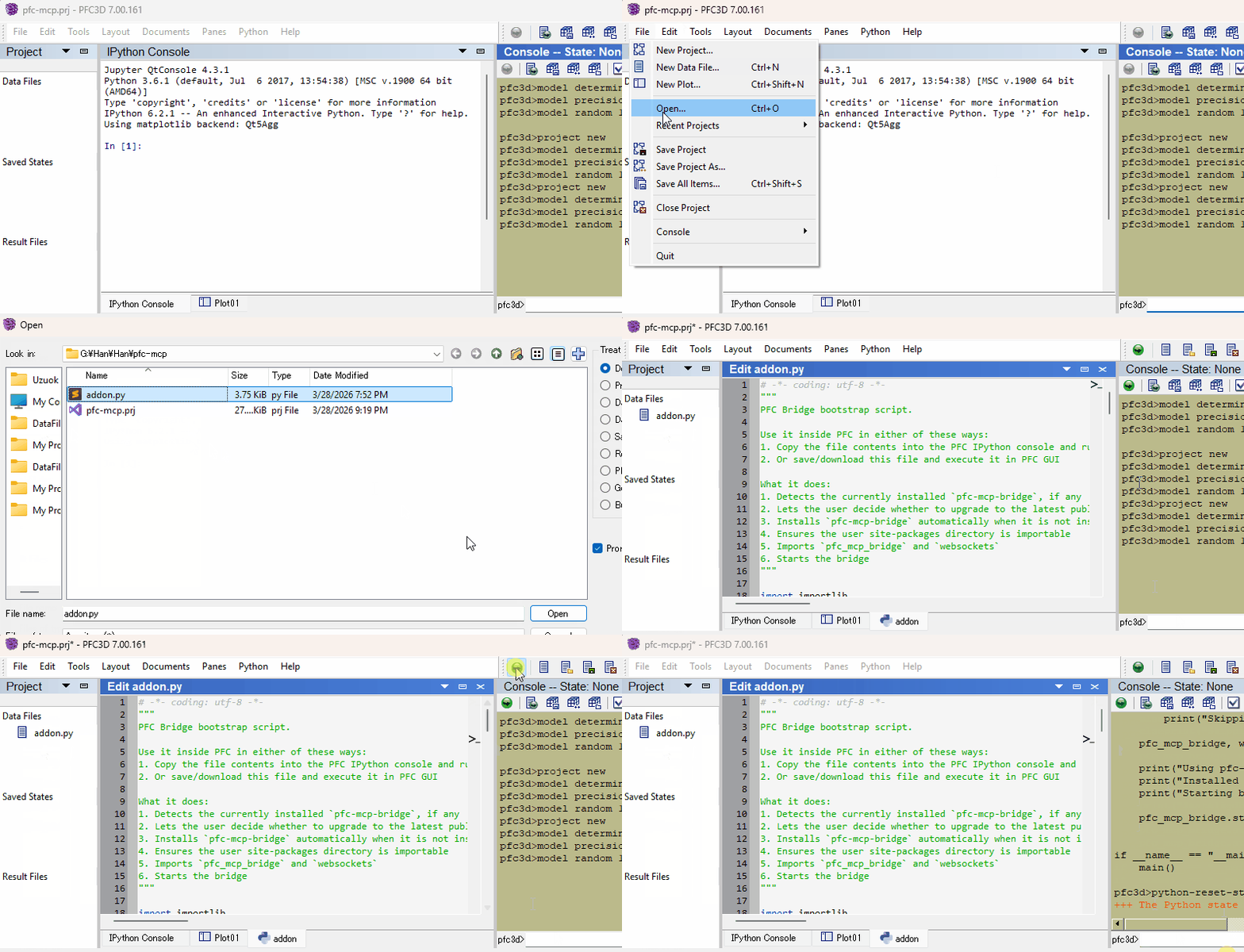
2. Start the bridge from inside the ITASCA engine:
Download addon.py, then use either of these two flows inside the engine GUI (PFC, FLAC, 3DEC, ...):
- Copy the file contents into the engine's IPython console and run them
- Or download the file and execute it in the engine GUI
Verify
Restart your AI agent and ask it to call itasca_execute_code to verify the connection.
Daily Startup
Once first-time setup is done, each new engine session only needs the bridge re-started — run this in the engine's IPython console and you're back online:
import itasca_mcp_bridge
itasca_mcp_bridge.start()
start() checks PyPI for a newer bridge release and self-upgrades before starting. The MCP client config persists.
Features
- Multi-engine corpus - command, Python API, and reference docs for PFC, FLAC, 3DEC, MPoint, and MassFlow, selected via the required
softwareparameter - Multi-version support - command docs across engine versions (PFC: 6.0/7.0/9.0, FLAC: 7.0/9.0) via the
versionparameter - Hierarchical documentation browsing - agents navigate the engine command tree to discover capabilities and boundaries, reducing hallucinated commands
- Enhanced plot documentation - plot items reference docs supplementing the official documentation
- Live REPL alongside running tasks - execute code while a simulation is running: check model state and intermediate results without stopping the task; also useful for quick iteration before writing a full script
- Task lifecycle management - submit long-running simulations, monitor progress, interrupt running tasks, and browse task history
- Multi-client compatible - works with Claude Code, Codex CLI, Gemini CLI, GitHub Copilot CLI, OpenCode, toyoura-nagisa, and other MCP clients
Troubleshooting
See Troubleshooting in the bootstrap guide.
Development
See Developer Guide: Install and Run from Source.
Contributing
PRs and issues are welcome! See the Developer Guide to get started.
License
MIT - see LICENSE.
Install Pfc in Claude Desktop, Claude Code & Cursor
unyly install pfc-mcpInstalls into Claude Desktop, Claude Code, Cursor & VS Code — handles npx, uvx and build-from-source repos for you.
First time? Get the CLI: curl -fsSL https://unyly.org/install | sh
Or configure manually
Run in your terminal:
claude mcp add pfc-mcp -- uvx itasca-mcpStep-by-step: how to install Pfc
FAQ
Is Pfc MCP free?
Yes, Pfc MCP is free — one-click install via Unyly at no cost.
Does Pfc need an API key?
No, Pfc runs without API keys or environment variables.
Is Pfc hosted or self-hosted?
Self-hosted: the server runs locally on your machine via the install command above.
How do I install Pfc in Claude Desktop, Claude Code or Cursor?
Open Pfc on unyly.org, pick your client tab (Claude Desktop, Claude Code, Cursor) and press Install — the config is generated automatically, no JSON editing.
Related MCPs
GitHub
PRs, issues, code search, CI status
 by GitHub
Filesystem
Secure file operations with configurable access controls.
Memory
Knowledge graph-based persistent memory system.
Template MCP Server
A CLI tool to create a new Model Context Protocol server project with TypeScript support, dual transport options, and an extensible structure
 by mcpdotdirect
Compare Pfc with
Not sure what to pick?
Find your stack in 60 seconds
Author?
Embed badge for your README
Browse similar
All development MCPs