
Phpman
FreeNot checkedphp manual: Man Page / Perldoc / Info / Pydoc / Ri Page Web Interface with JSON Markdown & MCP Server

About
php manual: Man Page / Perldoc / Info / Pydoc / Ri Page Web Interface with JSON Markdown & MCP Server
README
phpMan is an open-source Linux Command MCP Server and Structured JSON API web interface with HTML and markdown format. It provides comprehensive Unix/Linux man pages, perldoc, Python 3 (pydoc3), Ruby (ri), and texinfo, optimized for human developers and LLM AI Agents.
For AI Agents: Query Unix documentation via MCP protocol or REST API. Get structured man pages with parsed flags, examples, and cross-references.
Requirements
- PHP 8.0 or higher (for SQLite3 with FTS5 support)
- SQLite3 extension (bundled with PHP)
- FTS5 enabled (checked at runtime via PRAGMA compile_options)
- Web server (Apache/Nginx) or PHP built-in server
Quick Start (Local)
One command to download and run phpMan on your machine:
curl -fsSL https://raw.githubusercontent.com/chedong/phpman/master/install.sh | bash
Then open http://localhost:45678/ in your browser.
macOS users: If
phpis not found, install via Homebrew first:brew install phpDebian/Ubuntu users:
sudo apt-get install -y php-cli php-sqlite3After first launch, build the FTS5 search index for full-text search:
cd ~/.phpman && php cli/build-index.phpBatch LLM emoji enhancement (optional — requires API key):
php cli/batch-enhance.php man:ls,tar,grep
Screenshot
| Desktop | Mobile |
|---|---|
| phpMan Desktop | phpMan Mobile |
Configuration
All settings live in a single file: ~/.phpman/phpman.config.php. The webroot contains no config files — PHPMAN_HOME is baked into phpMan.php at deploy time.
| File | Location | Purpose | Edit? |
|---|---|---|---|
phpman.config.php |
~/.phpman/ |
Your settings — API keys, MCP auth, GA tracking, debug mode | Yes |
phpman.config.php.example |
~/.phpman/ (git) |
Template — copied by install.sh on first run |
No |
Zero config: If ~/.phpman/phpman.config.php doesn't exist, everything works with defaults — no LLM, no MCP auth, no GA tracking.
Minimal config (production):
define('PHPMAN_BASE_URL', 'https://www.example.com/phpMan.php');
With emoji enhancement + MCP auth:
define('PHPMAN_BASE_URL', 'https://www.example.com/phpMan.php');
define('LLM_API_KEY', 'sk-xxx');
define('LLM_API_URL', 'https://api.openai.com/v1/chat/completions');
define('LLM_MODEL', 'gpt-4o-mini');
define('MCP_API_KEY', 'your-secret-key-here');
Security: API keys are NEVER in webroot. If PHP parsing fails, only
PHPMAN_HOMEand version strings are exposed — no secrets.See
phpman.config.php.examplefor all available options.
Project Home
- GitHub: https://github.com/chedong/phpman
- Live Demo: https://www.chedong.com/phpMan.php
- Archived at SourceForge: https://sourceforge.net/projects/phpunixman
Development has moved to GitHub. The SourceForge repository is frozen at v2.1 and will not receive further updates.
Screenshot
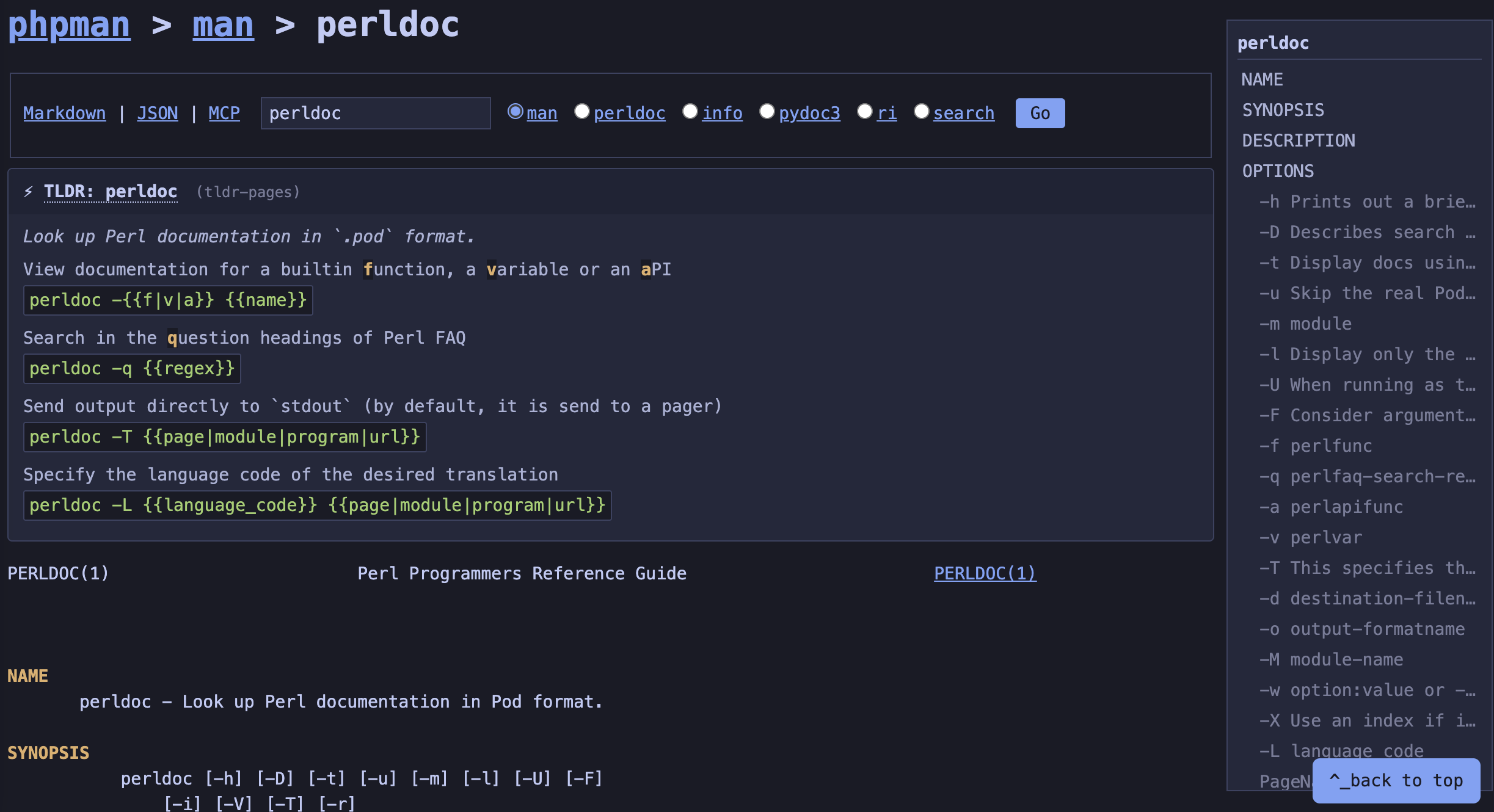
Quick Start for Agents
phpMan implements Model Context Protocol (MCP) via Streamable HTTP transport — no local installation or npx wrapper needed. Just point your MCP client at the endpoint URL.
Claude Desktop
Edit ~/Library/Application Support/Claude/claude_desktop_config.json (macOS) or %APPDATA%\Claude\claude_desktop_config.json (Windows):
{
  "mcpServers": {
    "phpman": {
      "url": "https://www.chedong.com/phpMan.php/mcp"
    }
  }
}
Cursor
Open Settings → MCP and click Add new MCP server, or edit .cursor/mcp.json in your project root:
{
  "mcpServers": {
    "phpman": {
      "url": "https://www.chedong.com/phpMan.php/mcp"
    }
  }
}
OpenAI Codex CLI
Add to ~/.codex/config.json:
{
  "mcp_servers": {
    "phpman": {
      "url": "https://www.chedong.com/phpMan.php/mcp"
    }
  }
}
Claude Code
claude mcp add --transport http phpman https://www.chedong.com/phpMan.php/mcp
Generic MCP Client (YAML)
Any MCP-compatible client that accepts YAML config:
mcpServers:
  phpman:
    url: "https://www.chedong.com/phpMan.php/mcp"
REST API (Fallback)
For clients that don't support MCP, use the REST endpoints directly:
# Get structured man page as JSON
curl "https://www.chedong.com/phpMan.php/man/ls/1/json"

# Get MCP-wrapped output (same format as MCP tools/call response)
curl "https://www.chedong.com/phpMan.php/man/ls/1/mcp"
MCP Server Protocol
phpMan implements the Model Context Protocol (MCP) specification version 2024-11-05 via Streamable HTTP transport.
Endpoint
POST https://www.chedong.com/phpMan.php/mcp
Content-Type: application/json
Available Tools
1. cli_help — Get Command Documentation
Returns structured documentation for any Unix command, Perl module, or GNU info page.
Input Schema:
{
  "command": "string (required) — Command name (e.g. 'ls', 'git', 'File::Basename')",
  "section": "string (optional) — Manual section (e.g. '1', '3pm'). Omit for best-match."
}
Returns:
content[0].text— Full JSON response as string (for LLM parsing)structuredContent— Programmatic access to flags, examples, synopsis, and cross-references
Example:
curl -X POST "https://www.chedong.com/phpMan.php/mcp" \
  -H "Content-Type: application/json" \
  -d '{
    "jsonrpc": "2.0",
    "id": 1,
    "method": "tools/call",
    "params": {
      "name": "cli_help",
      "arguments": {"command": "tar", "section": "1"}
    }
  }'
Auto-detection:
- Commands containing
::or section3pm/3perl→perldocmode - Commands containing
#→rimode (Ruby) - Commands containing
.(no::) →pydocmode (Python) - Other commands →
manmode
2. cli_search — Search Documentation
Search across man pages, Python modules, and Ruby classes using FTS5 full-text index with command-line fallback.
Input Schema:
{
  "query": "string (required) — Search keyword (e.g. 'recursive delete', 'network', 'cron')",
  "section": "string (optional) — Restrict to manual section (e.g. '1', '8')"
}
Returns:
content[0].text— JSON with search resultsstructuredContent— Programmatic access to results array
Example:
curl -X POST "https://www.chedong.com/phpMan.php/mcp" \
  -H "Content-Type: application/json" \
  -d '{
    "jsonrpc": "2.0",
    "id": 2,
    "method": "tools/call",
    "params": {
      "name": "cli_search",
      "arguments": {"query": "cron"}
    }
  }'
MCP Protocol Flow
1. Initialize (handshake):
{"jsonrpc":"2.0", "id":1, "method":"initialize", "params":{"protocolVersion":"2024-11-05"}}
Response includes serverInfo.name = "phpMan", capabilities.tools.listChanged = false
2. List Tools:
{"jsonrpc":"2.0", "id":2, "method":"tools/list"}
Returns the two tools above with their inputSchema
3. Call Tool:
{"jsonrpc":"2.0", "id":3, "method":"tools/call", "params":{"name":"cli_help", "arguments":{...}}}
4. Notifications (optional):
{"jsonrpc":"2.0", "method":"notifications/initialized"}
Server returns HTTP 202 (no-op)
Error Handling
MCP errors follow JSON-RPC 2.0:
{
  "jsonrpc": "2.0",
  "id": 3,
  "error": {
    "code": -32603,
    "message": "Internal error: Unknown tool: nonexistent"
  }
}
Common error codes:
-32700— Parse error (invalid JSON)-32600— Invalid request (missing method)-32601— Method not found-32602— Invalid params-32603— Internal error (tool execution failed)
JSON Schema Reference
Both MCP structuredContent and REST /json endpoints return the same schema.
Man Page Response
{
  "mode": "man",
  "parameter": "tar",
  "section": "1",
  "url": "https://www.chedong.com/phpMan.php/man/tar/1/json",
  "generated": "2026-01-15T10:30:00Z",

  "synopsis": "tar [OPTION...] [FILE]...",
  "summary": "tar - An archiving utility",

  "sections": {
    "NAME": {
      "content": "tar - An archiving utility",
      "subsections": []
    },
    "SYNOPSIS": {
      "content": "tar [OPTION...] [FILE]...",
      "subsections": []
    },
    "DESCRIPTION": {
      "content": "The GNU tar program...",
      "subsections": []
    },
    "OPTIONS": {
      "content": "",
      "subsections": [
        {
          "name": "-c, --create",
          "content": "Create a new archive",
          "flag": "-c",
          "long": "--create",
          "arg": null
        },
        {
          "name": "-f, --file=ARCHIVE",
          "content": "Use archive file or device ARCHIVE",
          "flag": "-f",
          "long": "--file",
          "arg": "ARCHIVE"
        }
      ]
    },
    "EXAMPLES": {
      "content": "tar -cvf archive.tar file1 file2\ntar -xvf archive.tar",
      "subsections": []
    }
  },

  "flags": [
    {
      "flag": "-c",
      "long": "--create",
      "arg": null,
      "description": "Create a new archive"
    },
    {
      "flag": "-f",
      "long": "--file",
      "arg": "ARCHIVE",
      "description": "Use archive file or device ARCHIVE"
    }
  ],

  "examples": [
    "tar -cvf archive.tar file1 file2",
    "tar -xvf archive.tar"
  ],

  "see_also": [
    {
      "name": "gzip",
      "section": "1",
      "url": "https://www.chedong.com/phpMan.php/man/gzip/1/json"
    }
  ]
}
Field Descriptions
| Field | Type | Description |
|---|---|---|
mode |
string | "man", "perldoc", "info", "pydoc", "ri", or "search" |
parameter |
string | Command or module name |
section |
string | Manual section number (e.g. "1", "3pm") |
url |
string | Canonical JSON API URL for this page |
generated |
string | ISO 8601 timestamp (UTC) |
synopsis |
string | Command synopsis (extracted from SYNOPSIS section) |
summary |
string | One-line description (extracted from NAME section) |
sections |
object | Map of section names → section objects |
sections[name].content |
string | Section body text (newline-separated) |
sections[name].subsections |
array | Level-2 headings within section |
subsections[].name |
string | Subsection heading (e.g. "-c, --create") |
subsections[].content |
string | Subsection body text |
subsections[].flag |
string|null | Short flag (e.g. "-c") — only for option subsections |
subsections[].long |
string|null | Long flag (e.g. "--create") — only for option subsections |
subsections[].arg |
string|null | Argument placeholder (e.g. "ARCHIVE") — only for option subsections |
flags |
array | Extracted command-line flags with descriptions |
flags[].flag |
string | Short flag (e.g. "-c") |
flags[].long |
string|null | Long flag (e.g. "--create") |
flags[].arg |
string|null | Argument placeholder |
flags[].description |
string | Flag description (single line) |
examples |
array | Command usage examples (from EXAMPLES section) |
see_also |
array | Cross-references to related man pages |
see_also[].name |
string | Related command name |
see_also[].section |
string | Related command section |
see_also[].url |
string | JSON API URL for related command |
Search Response
Search results aggregate three documentation sources:
{
  "mode": "search",
  "query": "json",
  "count": 26,
  "results": [
    {"name": "JSON::PP", "section": "3perl", "description": "JSON::XS compatible pure-Perl module"},
    {"name": "json_pp", "section": "1", "description": "JSON::PP command utility"}
  ],
  "pydoc_results": [
    {"name": "json", "description": "JSON (JavaScript Object Notation)"},
    {"name": "json.decoder", "description": "Implementation of JSONDecoder"}
  ],
  "ri_results": [
    {"name": "Psych::JSON", "description": "Ruby class/module"},
    {"name": "ActiveSupport::JSON", "description": "Ruby class/module"}
  ]
}
| Field | Description |
|---|---|
results |
Man page / perldoc matches |
pydoc_results |
Python 3 module matches |
ri_results |
Ruby class/module matches |
MCP Wrapper Format
When using /mcp endpoint or MCP POST, the response is wrapped:
{
  "content": [
    {
      "type": "text",
      "text": "<full JSON response as string>"
    }
  ],
  "structuredContent": {
    "command": "tar",
    "section": "1",
    "mode": "man",
    "summary": "tar - An archiving utility",
    "synopsis": "tar [OPTION...] [FILE]...",
    "flags": [...],
    "examples": [...],
    "see_also": [...],
    "section_outline": [
      {
        "name": "NAME",
        "lines": 1,
        "subsections": []
      },
      {
        "name": "OPTIONS",
        "lines": 45,
        "subsections": [
          {"name": "-c, --create", "lines": 3, "flag": "-c", "long": "--create"},
          {"name": "-f, --file=ARCHIVE", "lines": 5, "flag": "-f", "long": "--file", "arg": "ARCHIVE"}
        ]
      }
    ]
  }
}
The content[0].text field contains the full JSON response as a string (for LLM consumption). The structuredContent field provides programmatic access to key metadata (for agent tooling).
REST API Endpoints
For clients that don't support MCP, phpMan exposes REST endpoints with identical structured output.
JSON API
Append /json to any detail page URL, or send Accept: application/json header:
# Man page with structured sections
curl "https://www.chedong.com/phpMan.php/man/ls/1/json"

# Apropos search results
curl "https://www.chedong.com/phpMan.php/search/git/json"

# Accept header (works on any URL)
curl -H "Accept: application/json" "https://www.chedong.com/phpMan.php/man/bash"
MCP Format (REST GET)
The /mcp format suffix wraps JSON output in MCP's content array — making REST GET and MCP POST responses identical:
# Same man page, same output format as MCP POST tools/call
curl "https://www.chedong.com/phpMan.php/man/ls/1/mcp"
# → {"content":[{"type":"text","text":"..."}],"structuredContent":{...}}

# Search with MCP format
curl "https://www.chedong.com/phpMan.php/search/cron/mcp"

# Perldoc with MCP format
curl "https://www.chedong.com/phpMan.php/perldoc/Digest::MD5/mcp"
This means any MCP client can GET /man/ls/1/mcp and parse the result identically to POST /mcp tools/call.
TLDR (Integrated in Man Pages)
TLDR cheatsheets are embedded directly in man page detail pages. When viewing a man section 1 command page, phpMan fetches from tldr-pages (with cheat.sh fallback) and caches results in SQLite for 7 days. The TLDR block appears at the top of the man page with collapsible examples.
# TLDR is integrated directly into man page output
curl "https://www.chedong.com/phpMan.php/man/tar/1/markdown"
| Format | TLDR location |
|---|---|
| HTML | Collapsible block at top of page |
| Markdown | ## TLDR section before man content |
| JSON | tldr_summary + tldr_examples fields |
| MCP | structuredContent.tldr_summary + tldr_examples |
What's New
v4.4 (2026-06-21) — Code Split & CLI Consolidation
- Code split — 5660-line monolith → 753-line dispatcher + 22 source files in
src/. Webroot contains onlyphpMan.php+phpman.css+phpman.js+phpman.config.php. - CLI consolidation — All CLI tools under
cli/:build-index.php,batch-enhance.php. Shared bootstrap (_bootstrap.php).enhance.phpmerged intobatch-enhance.phpwith shorthand syntax:php cli/batch-enhance.php man:ls,tar. - Security hardening —
isLocalRequest()restricts to loopback only.cleanEmojiHtml()strips all event-handler quote variants.getSearchPage()gracefully falls back when cache DB unavailable. - Markdown format purity — Search results in Markdown use pure
-list items, no HTML wrappers. - install.sh improvements — Config generated from
.example(single source of truth).--updatechecks for new config options.PHPMAN_VERSIONwritten bymake tag. - MCP search —
cli_searchreturns structured results (mode/search/count/results) via both POST/mcpand GET/search/{query}/mcp.
v3.6+ (2026-06-08)
- TLDR embedded in man pages — TLDR is now integrated directly into man page rendering (HTML/Markdown/JSON/MCP), fetching from tldr-pages + cheat.sh with SQLite 7-day cache. The old
/tldrroute andTLDR_CACHE_DIRenv vars are removed. - FTS5 single-query search — one SQL query covers man/pydoc/ri, routing results by section
- pydoc3 / ri FTS5 indexing — Python and Ruby documentation searchable alongside man pages
- Case-insensitive matching — searching
jsonmatchesJSON::Ext::Parser,Psych::JSON,json.decoder
v2.1
Cross-Platform Width Control
- perldoc: Uses
pod2text -w Npipeline for consistent output width on Linux and macOS - man (macOS/BSD):
MANWIDTHfallback whengroff -Tutf8is unavailable - man (Linux):
MANROFFOPT=-rLL=Nn+groff -Tutf8for precise width
Roadmap
See docs/PLAN.md for the full project plan:
- pydoc / ri — ✅ Shipped in v3.6 — Python and Ruby documentation support with FTS5 search
- LLM-powered — AI translation (identifier-preserving), cheat sheets, example generation
- Search — ✅ Shipped in v3.6 — FTS5 full-text index with three-source aggregation (man + pydoc + ri)
- MCP — Streaming output, error standardization, dynamic tool discovery
- I18N — LANG-based locale support + AI fallback translation
Generating ri (Ruby) Documentation for Gems
On shared servers, Ruby gems are typically installed in system directories (e.g. /usr/lib/x86_64-linux-gnu/rubygems-integration/ or /usr/share/rubygems-integration/all/gems/). The gem rdoc command fails silently because it cannot write to those directories, and ri finds no gem documentation. This means ri -l won't list gem classes like JSON::Ext::Parser, ActiveSupport::JSON, etc., and phpMan's FTS5 search won't index them.
The solution is to use rdoc --ri to generate ri data into ~/.local/share/rdoc/, which ri scans by default. After generating, run php cli/build-index.php to rebuild the FTS5 search index with the new ri entries.
One-Command Setup
# Generate ri docs for all gems across all system gem paths
for dir in \
  /usr/lib/x86_64-linux-gnu/rubygems-integration/3.0.0/gems \
  /usr/share/rubygems-integration/all/gems \
  /var/lib/gems/3.0.0/gems; do
  [ -d "$dir" ] || continue
  for gem in "$dir"/*/lib; do
    [ -d "$gem" ] || continue
    name=$(basename "$(dirname "$gem")")
    echo "Generating ri for $name..."
    RUBYOPT="-Eutf-8:utf-8" rdoc --ri "$gem" -o ~/.local/share/rdoc 2>/dev/null
  done
done
Verify
ri --list-doc-dirs    # Should include ~/.local/share/rdoc
ri Nokogiri::HTML     # Should show documentation
ri ActiveRecord::Base # Should show documentation
Important Notes
- Output directory must be
~/.local/share/rdoc—riauto-discovers this path. Subdirectories within it are not scanned separately. - All gems must write to the same directory —
rdoc --rimerges data incrementally. Don't use per-gem subdirectories;riwon't find them. RUBYOPT="-Eutf-8:utf-8"is needed to avoidinvalid byte sequence in UTF-8errors on some gems.2>/dev/nullsilences per-gem rdoc warnings. Remove it to debug individual failures.cache.riis auto-generated byrdocin the output directory. Ifrican't find classes after a fresh generate, delete~/.local/share/rdoc/cache.riand regenerate.
Why Not gem rdoc --all?
| Approach | Works on shared servers? | Output location | ri discovers? |
|---|---|---|---|
gem rdoc --all |
❌ Fails silently (no write access to system gem dirs) | System doc dirs | N/A |
gem rdoc <gem> --ri |
❌ Same permission issue | N/A | N/A |
rdoc --ri <lib-dir> -o ~/.local/share/rdoc |
✅ | ~/.local/share/rdoc |
✅ |
Future Gems
To generate ri docs for a single newly installed gem:
RUBYOPT="-Eutf-8:utf-8" rdoc --ri /path/to/gem/lib -o ~/.local/share/rdoc
To auto-generate on gem install, add to ~/.gemrc:
gem: --document ri
Then for system-installed gems, manually run the rdoc --ri command above after install.
After Generating ri Docs
Rebuild the FTS5 search index so phpMan's search includes the new ri entries:
php /path/to/phpman/cli/build-index.php
This adds the newly discovered ri classes to search_fts, making them searchable alongside man pages and pydoc modules.
Features
- Man Pages — Browse any Unix/Linux manual page with
-Tutf8output (SGR bold/underline support) - Perldoc — Read Perl module documentation in-browser
- Python 3 (pydoc3) — Browse Python module documentation via
pydoc3 - Ruby (ri) — Browse Ruby class/module documentation via
ri - Info Pages — View GNU info documentation
- Apropos Search — Full-text search across man pages, Python modules, and Ruby classes (FTS5 + command-line fallback)
- TOC Sidebar — Two-level floating table of contents for navigation
- Markdown Output — Append
/markdownfor machine-readable format - JSON API — Append
/jsonfor structured JSON output with semantic fields - MCP Format — Append
/mcpfor MCP-compatible output - MCP Server — Model Context Protocol endpoint for AI agent integration
- TLDR Integration — Inline cheatsheets from tldr-pages + cheat.sh, cached in SQLite
- SEO Optimized — Canonical URLs, meta description, robots directives
- Clean URLs — PATH_INFO routing:
/man/ls/1
Comparison: man / Info / Perldoc / pydoc / ri Modes
phpMan supports five Unix documentation retrieval methods, each corresponding to different system commands, data sources, and documentation format specifications.
1. man Mode
| Item | Description |
|---|---|
| System Command | man -Tutf8 <argument> |
| Data Source | /usr/share/man/, /usr/local/share/man/ — files with .1.gz, .3pm.gz etc. |
| Source Format | troff / groff (AT&T typesetting language), original content contains overstrike sequences (e.g., W^HWA^HAR^HRN^H...) |
| Standard | man-pages(7) — 9 sections: 1=user commands, 2=system calls, 3=C library functions, 4=device files, 5=file formats, 6=games, 7=miscellaneous, 8=system administration, 9=kernel routines |
| Internal Structure | Flat document per page, fixed sections include NAME, SYNOPSIS, DESCRIPTION, OPTIONS, EXAMPLES, SEE ALSO, etc. |
| Subsections | Supports second-level subsections (.SS macro → bold/underline), fully displayed in TOC |
2. info Mode
| Item | Description |
|---|---|
| System Command | info <argument> |
| Data Source | /usr/share/info/ — files with .info.gz, .info |
| Source Format | Texinfo (GNU documentation format), original content includes typesetting markers (* Menu:, section numbers 4.1, cross-references (node)) |
| Standard | Texinfo → can generate PDF, HTML, and info. Node is the basic unit, with hypertext links via (node) forming a documentation tree |
| Internal Structure | Tree-like node structure, can contain submenu nodes, supports jump navigation |
| Subsections | Plain text output from info has only section numbers (3.1, 3.2) and indentation, no identifiable explicit heading macros, so TOC shows only first level |
3. perldoc Mode
| Item | Description |
|---|---|
| System Command | perldoc <module> → perldoc -f <function> → perldoc -q <regex> (three-level fallback) |
| Data Source | .pod files in Perl installation paths |
| Source Format | POD (Plain Old Documentation), Perl documentation format, uses =head1, =head2, =over, =item markers |
| Standard | perlpod(1) — =head1 for major sections, =head2 for subsections |
| Internal Structure | Flat document with clear =head1 → =head2 hierarchy |
| Subsections | Supports second-level subsections (=head2), fully displayed in TOC |
4. pydoc3 Mode
| Item | Description |
|---|---|
| System Command | pydoc3 <module> for documentation, pydoc3 -k <keyword> for search, pydoc3 modules for index |
| Data Source | Python 3 standard library + installed packages |
| Source Format | Plain text — no overstrike or ANSI, uses ALL CAPS section headers (NAME, DESCRIPTION, CLASSES, FUNCTIONS) |
| Standard | Python docstring conventions (PEP 257) |
| Internal Structure | Flat document with ALL CAPS L1 sections, indented class/function definitions as L2 |
| Subsections | L2 via class Name(Parent) and funcName(args) patterns |
| URL Pattern | /pydoc/{module}, /pydoc/{module}/{format} |
5. ri (Ruby) Mode
| Item | Description |
|---|---|
| System Command | ri <Class#method> for documentation, ri -l for class index |
| Data Source | Ruby core + installed gem ri data (see Generating ri Documentation for Gems below) |
| Source Format | Overstrike (same as man pages), uses RDoc markers (= Heading, == Subheading) |
| Standard | RDoc — Ruby documentation format |
| Internal Structure | Flat document with = L1 and == L2 headings |
| Subsections | == subheadings, fully displayed in TOC |
| URL Pattern | /ri/{Class}, /ri/{Class#method}/{format} |
| Search | No native ri -k; phpMan uses ri <query> (built-in fuzzy match) + FTS5 index |
6. Cross-Comparison
| Dimension | man | info | perldoc | pydoc3 | ri |
|---|---|---|---|---|---|
| Ecosystem | BSD / Unix general | GNU project | Perl | Python 3 | Ruby |
| Source Format | troff / groff | Texinfo | POD | Plain text / docstrings | RDoc |
| Overstrike Output | ✅ Yes | ❌ No | ❌ No (ANSI) | ❌ No | ✅ Yes |
| Second-level Headings | .SS → bold |
Section number | =head2 |
class/func() |
== markers |
| TOC Depth | ✅ Full two levels | ❌ First level only | ✅ Full two levels | ✅ Full two levels | ✅ Full two levels |
| Linking | Weak (cross-ref) | Strong (node tree) | Weak (module ref) | Weak (module ref) | Weak (:: ref) |
| Typical Content | Command refs, syscalls | GNU manuals | Perl API refs | Python API refs | Ruby API refs |
Check Out Source Code
HTTPS (read-only)
git clone https://github.com/chedong/phpman.git
SSH (developers)
git clone [email protected]:chedong/phpman.git
Publish Updates (Maintainer Only)
The repository includes a Makefile for CI/CD (staging, release, rollback, cache
management). This is for the phpMan maintainer — requires SSH access to target servers.
For self-hosting, use the install script instead:
curl -fsSL https://raw.githubusercontent.com/chedong/phpman/master/install.sh | bash
Site-specific values are loaded from .deploy.mk, which is gitignored.
Create your local deployment config from the example:
cp .deploy.mk.example .deploy.mk
Then edit .deploy.mk for your server:
TEST_HOST = [email protected]
TEST_PORT = 22
TEST_PATH = /path/to/example.com/test
TEST_URL  = https://example.com/test/phpMan.php

DEMO_HOST = [email protected]
DEMO_PORT = 22
DEMO_PATH = /path/to/example.com
DEMO_URL  = https://example.com/phpMan.php
1. Test Locally
make test
2. Commit and Push to GitHub
git add phpMan.php README.md Makefile .deploy.mk.example .gitignore
git commit -m "description of changes"
git push origin master
3. Update Staging Demo
make deploy
This deploys only phpMan.php to the staging path configured by TEST_PATH.
4. Update Production Demo
make release
make deploy-verify
⚠️ Do not overwrite
index.php— only updatephpMan.php.
5. Create GitHub Release
Tag and create a release on GitHub:
git tag v2.2
git push origin v2.2
gh release create v2.2 --title "v2.2" --notes "Release notes here"
Or upload a release artifact via the Makefile:
make upload-release
6. Rebuild FTS5 Search Index
The search engine uses a SQLite FTS5 index built from system apropos, pydoc3, and ri data.
Rebuild the index when search results become stale or after installing new packages:
# Rebuild index
php cli/build-index.php

# Rebuild index (cron mode with timestamp)
php cli/build-index.php --cron

# Enhance a single page (shorthand: mode:name)
php cli/batch-enhance.php man:ls
php cli/batch-enhance.php man:ls,tar,grep --rebuild

# Batch enhance with full options
php cli/batch-enhance.php --help
php cli/batch-enhance.php --status
php cli/batch-enhance.php --cached-first --skip-errors --yes
Cron example (daily at 3am): 0 3 * * * /usr/bin/php /path/to/phpman/cli/build-index.php --cron
The script clears search_fts + search_index_meta + stale search cache, then
rebuilds from scratch via apropos -s N . for man pages, pydoc3 modules for
Python 3, and ri -l for Ruby. Typically completes in ~10 seconds for ~14,000 entries
(9,600 man + 340 pydoc + 3,900 ri).
License
GNU General Public License v2.0 — see copyright page.
Author
Che Dong — https://www.chedong.com/
Installing Phpman
This server has no published package — it is built from source. Open the repository and follow its README.
▸ github.com/chedong/phpmanFAQ
Is Phpman MCP free?
Yes, Phpman MCP is free — one-click install via Unyly at no cost.
Does Phpman need an API key?
No, Phpman runs without API keys or environment variables.
Is Phpman hosted or self-hosted?
Self-hosted: the server runs locally on your machine via the install command above.
How do I install Phpman in Claude Desktop, Claude Code or Cursor?
Open Phpman on unyly.org, pick your client tab (Claude Desktop, Claude Code, Cursor) and press Install — the config is generated automatically, no JSON editing.
Related MCPs
GitHub
PRs, issues, code search, CI status
 by GitHub
Filesystem
Secure file operations with configurable access controls.
Memory
Knowledge graph-based persistent memory system.
Template MCP Server
A CLI tool to create a new Model Context Protocol server project with TypeScript support, dual transport options, and an extensible structure
 by mcpdotdirect
Compare Phpman with
Not sure what to pick?
Find your stack in 60 seconds
Author?
Embed badge for your README
Browse similar
All development MCPs