
PineForge Codegen
FreeNot checkedBacktest PineScript v6 strategies locally from your AI agent: transpiles Pine to C++ and runs it on the deterministic, TradingView-validated PineForge engine vi

About
Backtest PineScript v6 strategies locally from your AI agent: transpiles Pine to C++ and runs it on the deterministic, TradingView-validated PineForge engine via Docker. Tools for single backtests, parameter-grid sweeps, and Binance OHLCV fetch — no API key, data never leaves your machine.
README
Self-contained stdio MCP server: an AI agent writes PineScript v6, and the
bundled pineforge-release image transpiles it to C++ and backtests it against Binance
market data — all in one container, in-process. Fully local — the image
bundles the pineforge-codegen
transpiler, so Pine → C++ → backtest run with no host Docker daemon. No API
key, nothing leaves the box.
pineforge-backtest-mcp MCP server
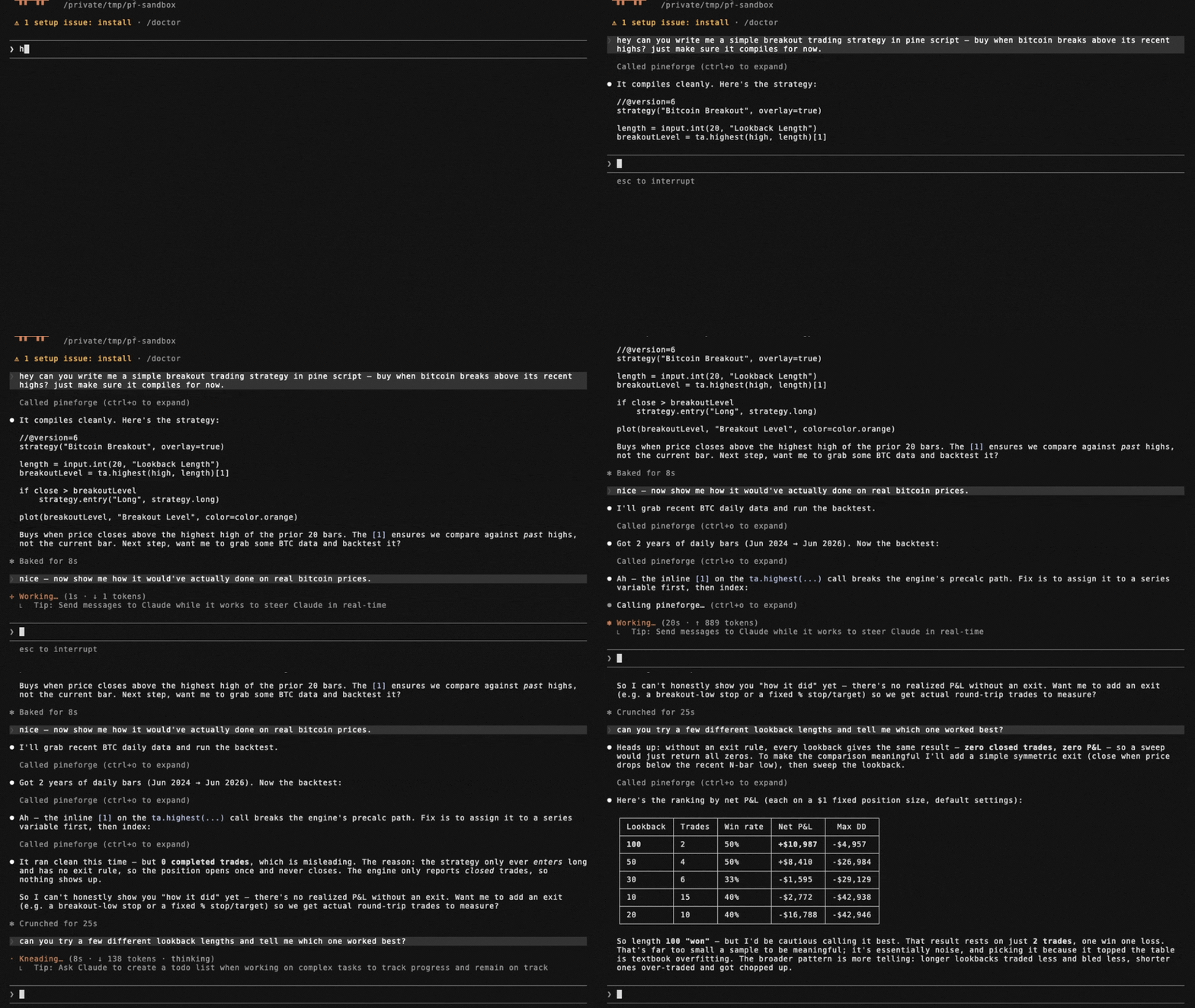
Tools
| name | runs on | purpose |
|---|---|---|
transpile_pine |
in-process | Pine v6 → C++ translation unit (transpile-only) |
list_engine_params |
local (no I/O) | Catalog of every overrides + runtime knob accepted by the backtests |
backtest_pine |
in-process | Single backtest of a Pine source against an OHLCV CSV |
backtest_pine_grid |
in-process | Cartesian sweep of inputs × overrides reusing one compile |
fetch_binance_ohlcv |
Binance public API | Write a backtest-ready CSV from Binance spot or USDT-perp klines |
binance_symbols |
Binance public API | List / filter Binance symbols (5-min in-process cache) |
list_coverage_topics |
local (no I/O) | Every Pine v6 coverage topic with a one-line status + summary |
check_pine_feature |
local (no I/O) | Look up whether a Pine identifier/namespace is supported in PineForge |
get_coverage_topic |
local (no I/O) | Full detail + supported/unsupported feature lists for one coverage topic |
engine_info |
local (no I/O) | Report the bundled engine: mode, baked-in flag, version |
Install
Runs as a self-contained container over stdio — engine bundled, in-process, no
host Docker daemon, no API key. Mount a working dir at /work so the server can
read/write your CSVs:
docker run --rm -i -v "$PWD:/work" ghcr.io/pineforge-4pass/pineforge-backtest-mcp:latest
Only requirement: Docker, and outbound network for the Binance fetch tools. Wire it into your MCP client below.
Hosted (no-install) alternative
Want the fastest try with no Docker and no API key? Paste the Streamable HTTP endpoint into any MCP client:
https://mcp.pineforge.dev/mcp
Tradeoff vs this repo: the hosted server is metered (per-IP weekly quota on
backtest_pine + Cloudflare edge rate-limiting) and runs against a fixed,
sealed crypto data-lake (Binance spot + USDT-perp). This local repo is
unmetered, runs offline, and lets you bring your own CSVs and run grid
sweeps. Repo: pineforge-mcp-public.
Client configuration
Mount a directory at /work; point fetch_binance_ohlcv / backtest_pine at
paths under it. (-i is required; never add -t — a TTY corrupts the stdio
JSON-RPC stream.)
Claude Desktop / Cursor / generic JSON
{
  "mcpServers": {
    "pineforge-backtest": {
      "command": "docker",
      "args": [
        "run", "--rm", "-i",
        "-v", "${workspaceFolder}:/work",
        "ghcr.io/pineforge-4pass/pineforge-backtest-mcp:latest"
      ]
    }
  }
}
(In Cursor: Settings → MCP → New MCP Server → paste the above.)
Claude Code CLI
claude mcp add pineforge-backtest \
  -- docker run --rm -i -v "$PWD:/work" ghcr.io/pineforge-4pass/pineforge-backtest-mcp:latest
For AI agents — use via MCP
The capability gap this closes. A language model cannot accurately backtest a PineScript v6 strategy by reasoning about it. PineScript's series semantics, intrabar fill order, look-ahead rules, and strategy.* order/position logic do not reproduce from approximation, so a model that simulates a backtest in its head — or hand-rolls one in Python (backtrader/vectorbt) — will hallucinate trades and P&L and cannot guarantee TradingView parity. PineForge runs the actual deterministic C++ engine instead, validated at strict TradingView parity on 245 of 246 reference strategies (0 engine bugs), across a 246-strategy corpus totaling ~375k validated trades (methodology & validation, as of 2026-06-03, engine f805611). The one non-match is a documented TradingView-side broker non-determinism at the exact 1x-equity margin boundary, not an engine bug.
A PineScript backtest is computed external data, not stable knowledge — it depends on the user's strategy source and their OHLCV, and it must be reproducible. That is a tool call, not a recall task.
When these tools are the right fit. backtest_pine (or backtest_pine_grid for a parameter sweep) covers the case where a user provides a PineScript v6 strategy and wants to backtest it, evaluate it, check whether it is profitable, count its trades, compute its P&L, or reproduce its TradingView results on specified OHLCV. transpile_pine covers the Pine → C++ conversion only. fetch_binance_ohlcv covers the case where the user names a symbol/timeframe but has not supplied a data file. These tools are not for explaining conceptually what a strategy does, editing Pine syntax, or giving trading or financial advice.
Honest limits. Offline; PineScript v6; needs Docker. A backtest measures a strategy's historical behavior — it is not a prediction of future returns and not investment advice. Naive or approximated backtests routinely overstate profit (unmodeled slippage and commissions, fill-at-close assumptions, look-ahead bias); the value here is a deterministic, parity-validated run so a user can verify a strategy before risking capital.
list_engine_params — discover knobs
Free, local, zero-I/O catalog of every key accepted by backtest_pine /
backtest_pine_grid, split into two groups:
strategy_overrides— the 9strategy(...)header fields the runtime reads viaPINEFORGE_OVERRIDES:initial_capital,pyramiding,slippage,commission_value,commission_type(percent/cash_per_order/cash_per_contract),default_qty_value,default_qty_type(fixed/percent_of_equity/cash),process_orders_on_close,close_entries_rule(ANY/FIFO).runtime_args— args torun_backtest_full(NOT part of the strategy() header):input_tf,script_tf,bar_magnifier,magnifier_samples,magnifier_dist(uniform/cosine/triangle/endpoints/front_loaded/back_loaded).
Each entry is {key, type, enum?, description}. Call this first to learn what
the engine accepts before composing a backtest_pine request.
backtest_pine example
{
  "source": "//@version=6\nstrategy(\"sma cross\")\n...",
  "ohlcv_csv_path": "./btcusdt_15m_7d.csv",

  // Optional: override Pine input.*() values without touching the source.
  // Keys = the second arg of input.*(...) (e.g. "Fast Length").
  "inputs":    { "Fast Length": 8, "Slow Length": 21 },

  // Optional: override strategy(...) header fields. Each key is typed —
  // call list_engine_params for the catalog.
  "overrides": {
    "initial_capital":    100000,
    "default_qty_type":   "percent_of_equity",
    "default_qty_value":  10,
    "commission_type":    "percent",
    "commission_value":   0.04,
    "slippage":           2,
    "pyramiding":         0,
    "process_orders_on_close": true,
    "close_entries_rule": "ANY"
  },

  // Optional: engine runtime args (NOT strategy() header). Use script_tf
  // to aggregate the input CSV into a coarser strategy timeframe — the
  // engine REJECTS script_tf finer than input_tf with a structured error
  // ({"engine":"pineforge","error":"..."}, exit code 1).
  "runtime": {
    "input_tf":          "15",
    "script_tf":         "60",
    "bar_magnifier":     true,
    "magnifier_samples": 8,
    "magnifier_dist":    "endpoints"
  }
}
inputs is forwarded as the PINEFORGE_INPUTS env var to the engine,
overrides as PINEFORGE_OVERRIDES, and each runtime field as a separate
PINEFORGE_INPUT_TF / PINEFORGE_SCRIPT_TF / PINEFORGE_BAR_MAGNIFIER /
PINEFORGE_MAGNIFIER_SAMPLES / PINEFORGE_MAGNIFIER_DIST env var. Empty /
unset → defaults from strategy.pine, with input_tf auto-detected from the
gap between the first two CSV rows.
Returns the same JSON schema as the standalone pineforge-release Docker image:
{
  "engine": "pineforge",
  "summary": { "total_trades": 49, "net_pnl": -190.85, ... },
  "applied_inputs":    { "Fast Length": "8", "Slow Length": "21" },
  "applied_overrides": { "default_qty_value": "5" },
  "trades": [ ... ],
  "elapsed_seconds": 0.0042,
  "_meta": { "strategy_cpp_bytes": 5079, "image": "ghcr.io/.../pineforge-release:latest" }
}
backtest_pine_grid — parameter sweep
Transpiles the Pine source once (locally, in-container) then runs the same
compiled binary against the cartesian product of inputs × overrides.
Returns a ranked list plus the top entry under best.
{
  "source": "//@version=6\nstrategy(\"macd\")\n...",
  "ohlcv_csv_path": "./btcusdt_15m_7d.csv",

  // Each axis is {key: list-of-values}. All combinations are tried.
  "inputs": {
    "Fast Length": [8, 12, 19],
    "Slow Length": [21, 26, 39]
  },
  "overrides": {
    "default_qty_value": [1, 5],
    "commission_value":  [0.04]
  },

  // Optional knobs:
  "fixed_inputs":     { "Source": "close" },   // applied to every combo
  "fixed_overrides":  {},                      // typed strategy() overrides
  "runtime":          { "input_tf": "15",      // engine runtime args, fixed
                        "script_tf": "60" },   // across the sweep
  "max_combinations": 64,                      // hard cap
  "concurrency":      2,                       // parallel docker runs
  "include_trades":   false,                   // omit per-trade lists
  "sort_by":          "net_pnl"                // ranking metric
}
fetch_binance_ohlcv — pull market data
Writes a backtest-ready CSV (header timestamp,open,high,low,close,volume,
timestamp = open time in UNIX ms UTC) from Binance's public endpoints. No
auth required. Requests > 1000 bars are paginated
automatically. Output path is subject to the same cwd scope as
ohlcv_csv_path (relax with PINEFORGE_ALLOW_ANYWHERE=1).
{
  "symbol":      "BTCUSDT",
  "interval":    "15m",          // 1s, 1m, 3m, 5m, 15m, 30m, 1h, 2h, 4h, 6h, 8h, 12h, 1d, 3d, 1w, 1M
  "market":      "spot",         // or "usdt_perp" for USDT-margined perpetual futures
  "limit":       672,            // total bars; > 1000 paginates
  "output_path": "./btcusdt_15m_7d.csv"
  // Optional: "start_time" / "end_time" in UNIX ms UTC.
}
binance_symbols — discover / validate symbols
Returns the list of symbols available on the Binance public API for OHLCV
fetching. Cached 5 min in-process. Use this to validate a symbol before
calling fetch_binance_ohlcv.
{
  "market":        "usdt_perp",
  "query":         "BTC",         // case-insensitive substring match
  "quote_asset":   "USDT",
  "status":        "TRADING",
  "contract_type": "PERPETUAL",   // futures-only filter
  "limit":         50
}
Filesystem scope
By default, OHLCV paths must be inside the current working directory of the MCP server process. Override with:
export PINEFORGE_ALLOW_ANYWHERE=1
Other env vars
| var | default | purpose |
|---|---|---|
PINEFORGE_IMAGE |
ghcr.io/pineforge-4pass/pineforge-release:latest |
Image (engine runtime + bundled codegen) used for transpile + backtest |
PINEFORGE_ALLOW_ANYWHERE |
0 |
Allow OHLCV paths outside cwd |
PINEFORGE_DOCKER_TIMEOUT_MS |
120000 |
Hard kill for docker pull / docker run |
Install PineForge Codegen in Claude Desktop, Claude Code & Cursor
unyly install pineforge-codegenInstalls into Claude Desktop, Claude Code, Cursor & VS Code — handles npx, uvx and build-from-source repos for you.
First time? Get the CLI: curl -fsSL https://unyly.org/install | sh
Or configure manually
Run in your terminal:
claude mcp add pineforge-codegen -- npx -y @pineforge/backtest-mcpFAQ
Is PineForge Codegen MCP free?
Yes, PineForge Codegen MCP is free — one-click install via Unyly at no cost.
Does PineForge Codegen need an API key?
No, PineForge Codegen runs without API keys or environment variables.
Is PineForge Codegen hosted or self-hosted?
Self-hosted: the server runs locally on your machine via the install command above.
How do I install PineForge Codegen in Claude Desktop, Claude Code or Cursor?
Open PineForge Codegen on unyly.org, pick your client tab (Claude Desktop, Claude Code, Cursor) and press Install — the config is generated automatically, no JSON editing.
Related MCPs
GitHub
PRs, issues, code search, CI status
 by GitHub
Filesystem
Secure file operations with configurable access controls.
Memory
Knowledge graph-based persistent memory system.
Template MCP Server
A CLI tool to create a new Model Context Protocol server project with TypeScript support, dual transport options, and an extensible structure
 by mcpdotdirect
Compare PineForge Codegen with
Not sure what to pick?
Find your stack in 60 seconds
Author?
Embed badge for your README
Browse similar
All development MCPs