
Plugmem
FreeNot checkedplugmem MCP server (stdio JSON-RPC) exposing embedded memory to agents and other programs.

About
plugmem MCP server (stdio JSON-RPC) exposing embedded memory to agents and other programs.
README







⚠️ Experimental. plugmem is mostly an AI-built experiment — written with the help of a small local model (Qwen3.6-35B-A3B-UD-Q4_K_XL.gguf) and various Claude models, in roughly equal measure. Expect non-professional design choices, rough edges, broken behavior, or mistakes. Use it at your own risk.
What it is · Which crate · How recall works · Measured scale · Install · License
What plugmem is
An embeddable memory database for local-first applications and agents — you
link it into your program like SQLite, in-process and file-backed. plugmem stores short
facts — with a subject entity, tags, optional metadata, an optional
embedding and two time axes — and answers a query with a ranked,
token-budgeted result with structured facts and edges plus an optional bounded
rendered block. It runs in-process from a manifest, immutable snapshot
generations, an append-only journal and a lock — no server, no daemon, one machine.
The core is no_std, so the same engine runs natively and in WebAssembly.
It is meant for a local-first application or agent on your own device or inside your own project — one process, one local database — not a multi-tenant service fielding queries from many users.
It is not a vector database. A vector is one of four recall sources — lexical (BM25), vector, entity graph and time — fused with reciprocal-rank fusion; tags act as filters. What the engine does:
- two clocks per fact.
valid_from/valid_tosay when a statement was true,recorded_atsays when the memory learned it.revisecloses an interval rather than overwriting, soas_ofanswers "what did I hold then";forgetis the destructive verb andmaintainerases the bytes. - a typed entity graph. Edges between entities, opened by
linkand closed byunlink, each optionally naming the fact it follows from. Anas_oftraversal walks the graph as it stood then, through edges since removed. - opaque per-fact metadata. A key→value map — a URI to the real payload in another store, a mime type, an external key. Stored and returned verbatim, never interpreted or searched; large blobs stay outside, by reference.
- conflicts surfaced, not resolved.
rememberreturns the live facts a new one may duplicate or contradict. The engine never merges on its own; the caller revises, forgets, or keeps both. - bounded ranked context. Recall returns structured facts and edges and can render text constrained by a token budget; prompt-ready rendering is one consumer of the result.
no_std + alloccore. Single-threaded, zero-allocation recall after warm-up, one local database, no server; built and tested onwasm32v1-noneand a real 32-bit wasm runtime in CI.
The two clocks are what differs from other stores. revise closes an interval
instead of overwriting a row, so the earlier state is still answerable:
$ plugmem-cli remember "lives in Moscow" --entity kim
remembered fact 0
$ plugmem-cli revise 0 "lives in Berlin" --entity kim
remembered fact 1

$ plugmem-cli recall --entity kim
- [f1] kim: lives in Berlin (2026-08; active)

$ plugmem-cli recall --entity kim --as-of <an instant between the two>
- [f0] kim: lives in Moscow (2026-08 → 2026-08; closed)
as_of moves both clocks: a fact answers only if it was valid at that
instant and had already been recorded by then. That second half is the one
people trip over — as_of before a fact was written returns nothing, because
the memory genuinely knew nothing then, and reporting today's knowledge would be
the wrong answer to "what did I hold".
--valid-from is the other half: a statement that became true before you heard
of it. Recording on March 10th that someone moved on March 1st closes the old
interval at March 1st, so a query as of March 5th finds neither — the old fact
was no longer true, and the new one was not yet known. That is not a gap in the
model, it is the honest answer for that instant.
Where it fits — and where it doesn't. plugmem is for local-first applications, agent memory and embedded systems: one process, one local database, no service to operate. Its interactive design center is about 100k active facts on one machine; the benchmark suite also tracks 1M-operation profiles to show how the same file-backed engine scales under heavier local workloads. These numbers are measured operating points, not format limits.
plugmem is not designed for multi-million or tens-of-millions vector workloads, cluster sharding, multi-tenant serving, or managed nearest-neighbour search. For that, use a dedicated vector system such as Qdrant, Milvus, Weaviate, Pinecone, or pgvector. plugmem's recall model is local and hybrid: keyword search, optional vectors, typed relationships, and time.
Which crate do I need?
If you write Rust and just want a working memory, use plugmem-host — it has everything. The other crates are for narrower needs.
| You want | Use | Why |
|---|---|---|
| A memory in a Rust program — the common case | plugmem-host (std) |
Everything included: files, locking, read-only mmap, HTTP embedders, integrity, cross-process concurrency. One dependency — it re-exports the engine. |
A memory in Rust with no std or your own storage (browser, wasm host, custom file layer) |
plugmem-core (no_std) |
The engine only. You bring the Storage trait, the clock, file I/O and embedding — so you also manage when the file opens and how memory loads. |
| Just the flat byte-pool containers, to build your own index/store | plugmem-arena (no_std) |
The storage substrate, engine-agnostic. |
| A memory from a terminal or shell script | plugmem-cli (plugmem) |
One local database, no server; plugmem repl keeps the engine open for host speed. |
| A memory for an agent, local-first app, or non-Rust program | plugmem-mcp | Long-lived stdio JSON-RPC; language-independent. Don't front your own Rust with it — embed host instead. |
| A memory in JavaScript / TypeScript (Node) | plugmem-napi | The engine as a native Node addon (napi-rs), in-process and typed for TS. On npm as plugmem. |
| A memory in Python | plugmem-py | The engine as a CPython extension (PyO3), in-process and typed. Every call releases the GIL. On PyPI as plugmem. |
Rust programs use the library (host, or core for specialists) — embedded
in-process, like linking SQLite. Other languages and agents come in through
mcp (or napi for Node/TS) — not the CLI, which is the human/scripting door.
One thing lives only in the CLI: the JSONL file format. export streams
every open fact and then every open edge to stdout, one per line, each tagged
with a kind; import reads it back in batches. Both halves stream, so a
memory of any size dumps and loads in bounded RAM. The library, the MCP server
and the Node addon return exported facts as structures, but none of them reads
or writes the file format, and none has an import verb — a program holding the
structures already knows how to write them back.
What crosses the round trip: text, subject entity, tags, metadata,
valid_from, graph edges, and each edge's provenance fact (retargeted to the id
the receiving database assigns). What does not: closed revisions and vectors
— history does not survive, and vectors are recomputed on import when an
embedder is configured. So JSONL is a portable knowledge dump, not a backup. For
a backup, copy the database files.
| Crate | What it is |
|---|---|
| plugmem-arena | flat byte-pool storage structures (no_std, wasm-first) |
| plugmem-core | the engine: data model, indexes, recall, snapshots (no_std) |
| plugmem-host | OS glue: files, locking, mmap read-only, embedder clients (std) |
| plugmem-cli | command-line surface, one-shot + interactive repl |
| plugmem-napi | native Node.js addon (napi-rs), on npm as plugmem |
| plugmem-py | CPython extension module (PyO3), on PyPI as plugmem |
| plugmem-mcp | MCP server (stdio JSON-RPC) for agents |
plugmem-testgen |
deterministic corpus generator for tests and benches |
What recall does
Recall is not a vector lookup — it fuses four sources with reciprocal-rank fusion and a recency boost (tags filter; they are not a source):
| Source | Algorithm | What it finds | Needs an embedder |
|---|---|---|---|
| Lexical | BM25 (Robertson idf) over a Unicode (UAX #29) tokenizer | exact terms / keyword overlap | no |
| Graph | entity graph with current typed edges on the hot path; as_of queries use edge history |
relational knowledge | no |
| Temporal | range scans over a recorded_at-ordered index; bitemporal validity |
"what was true then", time windows | no |
| Semantic | int8-quantized cosine — a flat two-phase scan below a threshold, an HNSW graph above | meaning / nearest neighbours | yes |
Three of the four need no model at all, so plugmem is usable with no API
key, no network and no per-query cost. What an embedder adds is matching by
meaning: without one, recall matches on words, so a fact reading "the user
prefers tokio" answers a query for tokio but not one for which runtime? —
anchor on the entity, or add an embedder, and it does. Configure one in
[embedder]; delete the section and everything else keeps working.
Many memories in one directory (optional)
Default: one logical memory backed by a local database layout. Point --db at it and nothing below applies.
When one process serves many independent memories — a memory per conversation, per tenant — point it at a directory instead and address them by name:
$ plugmem-cli --workspace ~/bot-data --db chat-42 remember "prefers tokio"
$ plugmem-mcp --workspace ~/bot-data          # every tool gains a `db` argument
A name ([a-z0-9][a-z0-9_-]*) is not a path and cannot become one, so it
resolves to exactly one named database inside the directory. A first write to an unused
name creates that memory — no registration step. Each memory can describe what
it is for, and workspace find searches those descriptions when the caller does
not know the name.
Two things worth knowing before you build on it:
- results are never merged across memories. Measured: asking the right memory answers 98–99 % of questions well, while asking all of them and fusing gives 92–94 % — and 62–66 % across topics. Routing beats merging, so pick a memory rather than searching them all.
- who may use which memory is not this project's responsibility. The
dbcomes from the caller. Your harness sees the call before the server does; put the policy there. The simplest setup avoids the question entirely: one process per conversation, started with--db <its own memory>, where the tools have nodbargument at all.
Details in specs/10-workspace.md; settings in crates/plugmem-host/SETTINGS.md.
Measured scale
The following is a like-for-like native, file-backed benchmark using the same
deterministic synthetic workload at both sizes (dim=0, so no embedding
service is involved). Recall values are p50 latencies after the database has
been checkpointed and maintained; the 1M SVGs live in
plugmem-host/assets.
Both columns of this table, and both of the edge table below, were measured in one session on one machine, so the sizes compare to each other. They do not compare to the arena charts, whose wasm rows come from a matrix run on other hardware and cannot be reproduced piecemeal without mixing machines into one picture — only numbers inside the same table or the same chart are like-for-like.
The size labels refer to ingested operations, not the final number of live facts. The 5k column is there because it is the size a personal memory actually is — and, until the shard layout followed the data, the size that behaved worst: it used to pay a fixed floor sized for a million facts.
| Measurement | 5k operations | 100k operations | 1M operations |
|---|---|---|---|
Active facts after maintain |
4,305 | 86,010 | 860,204 |
Pool bytes after maintain |
3.4 MB | 44.5 MB | 413.7 MB |
| Streaming load | 0.08 s (65,876 ops/s) | 1.65 s (60,589 ops/s) | 39.6 s (25,277 ops/s) |
| Text-only recall p50 | 6 µs | 25 µs | 147 µs |
| Full hybrid recall p50 | 34 µs | 60 µs | 302 µs |
| Single frequent term recall p50 | 0.09 ms | 2.47 ms | 25.6 ms |
| Checkpoint | 4 ms | 59 ms | 514 ms |
maintain |
0.01 s | 0.20 s | 1.96 s |
| Reopen (writer) | 1 ms | 15 ms | 166 ms |
verify |
1 ms | 34 ms | 320 ms |
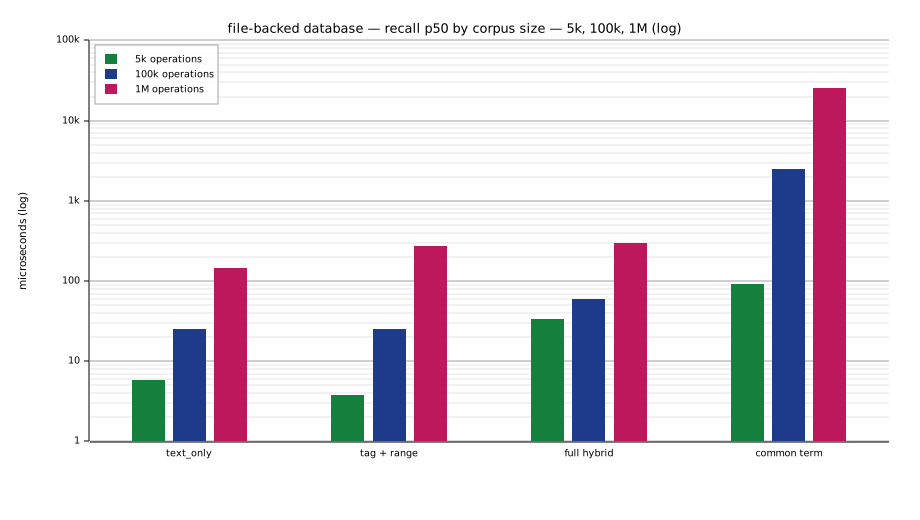
Across the two decades from 5k to 1M the pool grows 122× for 200× the facts — the per-fact cost falls (800 → 481 B) because the fixed floor amortizes away rather than dominating. Load time is 480× for 200× the operations, so the per-operation cost grows 2.4×; text-only recall grows 25×.
The single frequent term row is the worst lexical input there is, and it is charted next to the others because it is the number to budget for. A query made of one term the corpus uses everywhere has to decode a posting list that covers the corpus; the stop-frequency guard drops such a term only when the query offers a rarer one to fall back on. Ordinary queries cost microseconds, that one costs milliseconds, and no amount of index tuning changes the shape — only the constant.
Opening is deliberately cheap and verify deliberately is not: an open checks
that nothing in the image can make a read unsafe, while the cross-checks that
prove the graph consistent are what plugmem verify runs on demand.
These are machine-specific trend measurements, not release guarantees. Reproduce both columns with:
cargo run --release -p plugmem-host --example bench_database -- 100000 --diagnose-recall | tee database-benchmark-100k.tsv
cargo run --release -p plugmem-host --example bench_database -- 1000000 --diagnose-recall | tee database-benchmark-1m.tsv
cat database-benchmark-100k.tsv database-benchmark-1m.tsv > database-benchmark-scale.tsv
cargo run -p plugmem-bench-charts -- database-benchmark-scale.tsv --force
The chart tool averages repeated rows, so feeding it several runs of the same size gives a steadier picture than any single one.
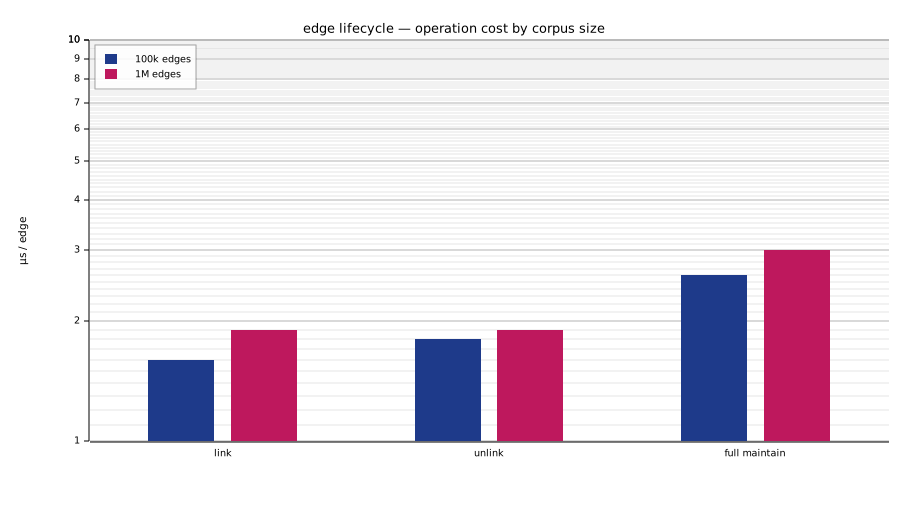
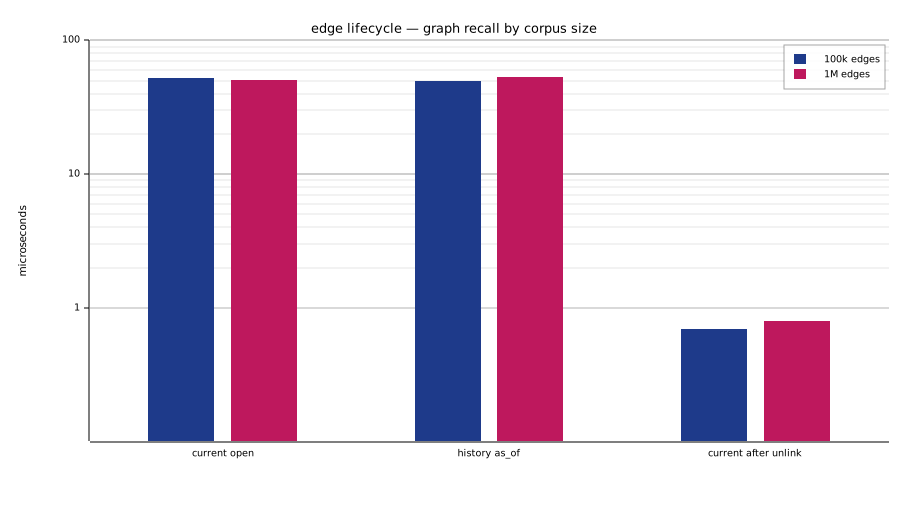
Edge lifecycle has a focused file-backed benchmark for link, unlink,
retained history, current graph recall, historical as_of graph recall, and
full maintenance after many closed edges:
cargo run --release -p plugmem-host --example bench_edges -- 100000 | tee edge-benchmark-100k.tsv
cargo run --release -p plugmem-host --example bench_edges -- 1000000 | tee edge-benchmark-1m.tsv
cat edge-benchmark-100k.tsv edge-benchmark-1m.tsv > edge-benchmark-scale.tsv
cargo run -p plugmem-bench-charts -- edge-benchmark-scale.tsv --force
The edge workload is a hub stress case: one entity links to every leaf, then all edges are unlinked while history is retained.
| Edge lifecycle measurement | 100k edges | 1M edges |
|---|---|---|
link latency |
1.6 µs/edge | 1.7 µs/edge |
unlink latency |
1.7 µs/edge | 1.7 µs/edge |
| Current graph recall p50 while edges are open | 53 µs | 59 µs |
Historical as_of graph recall p50 after unlink |
50 µs | 55 µs |
Full maintain after unlink |
0.33 s | 3.24 s |
| Retained edge-history records after unlink | 100,000 | 1,000,000 |
Per-edge cost is flat across the range rather than growing with it, and graph
recall is bounded by the expansion caps rather than by the size of the hub.
Unlinking closes an edge; it does not erase it. The history row above is the
whole point — after every edge is unlinked, and again after a full maintain,
the version count is unchanged and as_of still answers.
A second benchmark covers the other axis — a few relations relinked over and
over, which is what stresses historical traversal:
cargo run --release -p plugmem-host --example bench_edge_churn -- 200 1000
At 200k retained versions over 200 relations: current graph recall 31 µs,
as_of recall 32 µs, and a full maintain repacks the edge arenas from
31.9 MB to 23.4 MB in 59 ms without dropping a single version.
The lexical tokenizer is ICU4X-backed: it applies Unicode NFKC normalization, locale-neutral lowercase mapping, UAX #29 word boundaries, language-aware segmentation for complex scripts, Latin search folding and CJK bigrams. Its generic Unicode path reuses scratch buffers and performs no tokenizer-internal allocations after warm-up. ICU4X's dictionary/LSTM path may allocate a temporary boundary cache for scripts such as Thai and Khmer in exchange for better word segmentation. The tokenizer emits canonical lexical terms; it does not perform stemming or lemmatization.
Install
Two binaries — the plugmem-cli CLI (crate plugmem-cli) and the plugmem-mcp
server (crate plugmem-mcp) — built for Linux, Windows and macOS (x64 &
arm64) on every tagged release.
Pick the one method that's convenient — you don't need more than one. They all install the same binaries. Quick guide:
| If you… | Use |
|---|---|
| are on macOS / Linux with Homebrew | Homebrew |
| don't want a Rust toolchain | installer script, or the Windows .msi |
| want managed install/uninstall on Windows | .msi |
have cargo and want a cross-platform install |
cargo binstall |
| want to compile it yourself | from source |
Homebrew (macOS / Linux)
From the m62624/homebrew-plugmem
tap; brew upgrade / brew uninstall then manage it like any formula:
$ brew install m62624/plugmem/plugmem-cli     # the `plugmem-cli` CLI
$ brew install m62624/plugmem/plugmem-mcp     # the `plugmem-mcp` server
Installer scripts (no Rust toolchain)
Each binary has its own script on the
Releases page; latest always
points at the newest tag.
# Linux / macOS  (POSIX sh)
$ curl --proto '=https' --tlsv1.2 -LsSf https://github.com/m62624/plugmem/releases/latest/download/plugmem-cli-installer.sh | sh
$ curl --proto '=https' --tlsv1.2 -LsSf https://github.com/m62624/plugmem/releases/latest/download/plugmem-mcp-installer.sh | sh
Windows .msi
Download plugmem-cli-*.msi or plugmem-mcp-*.msi from the
Releases page. Double-click to
install; it registers the app in "Add or remove programs", so upgrades and
uninstalls go through the normal Windows UI.
Windows PowerShell script (alternative to .msi)
If you prefer a script over a GUI installer:
> powershell -ExecutionPolicy Bypass -c "irm https://github.com/m62624/plugmem/releases/latest/download/plugmem-cli-installer.ps1 | iex"
> powershell -ExecutionPolicy Bypass -c "irm https://github.com/m62624/plugmem/releases/latest/download/plugmem-mcp-installer.ps1 | iex"
cargo binstall
cargo-binstall downloads the prebuilt binary instead of compiling. It reads the release's cargo-dist manifest, so it just works on every OS/arch above — no extra config:
$ cargo binstall plugmem-cli     # the `plugmem-cli` binary
$ cargo binstall plugmem-mcp     # the `plugmem-mcp` binary
From source
Needs a Rust toolchain; compiles locally and works on any platform Rust targets. Both crates are published to crates.io, so you can build straight from there:
$ cargo install plugmem-cli     # the `plugmem-cli` binary
$ cargo install plugmem-mcp     # the `plugmem-mcp` binary
…or from a local checkout of this repo:
$ cargo install --path crates/plugmem-cli
$ cargo install --path crates/plugmem-mcp
Uninstall
Installed with cargo binstall / cargo install (either resolves to cargo's
own install tracking, so plain cargo uninstall works):
$ cargo uninstall plugmem-cli      # removes the `plugmem-cli` binary
$ cargo uninstall plugmem-mcp
Installed with Homebrew: brew uninstall plugmem-cli plugmem-mcp.
Installed from a Windows .msi: uninstall from "Add or remove programs"
(or Settings → Apps), exactly like any other Windows app.
Installed with the shell/PowerShell scripts: cargo-dist does not ship an
uninstaller, so remove the binaries and their install receipts by hand. By default
the binaries land in ~/.cargo/bin (note: cargo uninstall won't touch these —
cargo didn't track them), and a receipt is written per app.
# Linux / macOS
$ rm -f  ~/.cargo/bin/plugmem-cli ~/.cargo/bin/plugmem-mcp
$ rm -rf ~/.config/plugmem-cli ~/.config/plugmem-mcp     # install receipts
# Windows (PowerShell)
> Remove-Item "$env:USERPROFILE\.cargo\bin\plugmem-cli.exe","$env:USERPROFILE\.cargo\bin\plugmem-mcp.exe" -ErrorAction SilentlyContinue
> Remove-Item "$env:LOCALAPPDATA\plugmem-cli","$env:LOCALAPPDATA\plugmem-mcp" -Recurse -ErrorAction SilentlyContinue
If you pointed the installer somewhere else (PLUGMEM_CLI_INSTALL_DIR /
PLUGMEM_MCP_INSTALL_DIR, or CARGO_DIST_FORCE_INSTALL_DIR), delete from that
directory instead. The installer may also have added the bin dir to your PATH —
prune that line from your shell profile if nothing else uses it.
License
MIT.
Installing Plugmem
This server has no published package — it is built from source. Open the repository and follow its README.
▸ github.com/m62624/plugmemFAQ
Is Plugmem MCP free?
Yes, Plugmem MCP is free — one-click install via Unyly at no cost.
Does Plugmem need an API key?
No, Plugmem runs without API keys or environment variables.
Is Plugmem hosted or self-hosted?
Self-hosted: the server runs locally on your machine via the install command above.
How do I install Plugmem in Claude Desktop, Claude Code or Cursor?
Open Plugmem on unyly.org, pick your client tab (Claude Desktop, Claude Code, Cursor) and press Install — the config is generated automatically, no JSON editing.
Related MCPs
GitHub
PRs, issues, code search, CI status
 by GitHub
Filesystem
Secure file operations with configurable access controls.
Memory
Knowledge graph-based persistent memory system.
Template MCP Server
A CLI tool to create a new Model Context Protocol server project with TypeScript support, dual transport options, and an extensible structure
 by mcpdotdirect
Compare Plugmem with
Not sure what to pick?
Find your stack in 60 seconds
Author?
Embed badge for your README
Browse similar
All development MCPs