
Postgres Neo4j Server
FreeNot checkedEnables natural language queries to a Neo4j knowledge graph built from PostgreSQL data, integrating with Claude Desktop and REST API.

About
Enables natural language queries to a Neo4j knowledge graph built from PostgreSQL data, integrating with Claude Desktop and REST API.
README
Python Neo4j PostgreSQL License: MIT
A production-ready data pipeline that transforms structured content from PostgreSQL into a Neo4j knowledge graph, with Model Context Protocol (MCP) integration for AI/LLM interactions.
🌟 Key Features
- Automated ETL Pipeline: Seamlessly transfer data from PostgreSQL to Neo4j
- Entity & Relationship Extraction: Automatic identification of people, organizations, and topics
- MCP Integration: Natural language queries through Claude Desktop or REST API
- Graph Analytics: Discover patterns and relationships in your data
- Docker Support: Easy deployment with containerization
- Extensible Architecture: Ready for AI/LLM enhancements
🏗️ Architecture Overview
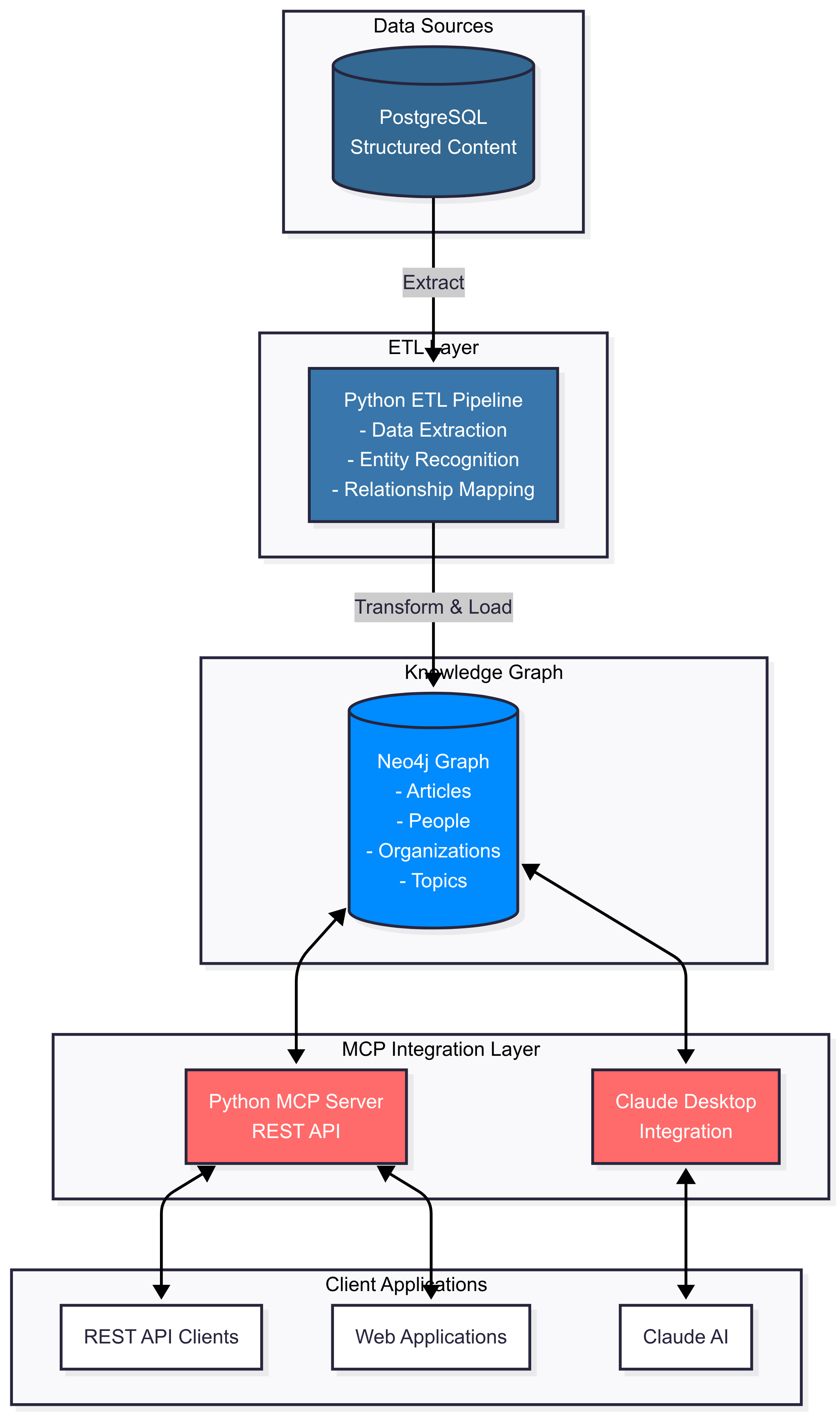
📋 Table of Contents
- System Requirements
- Quick Start
- Module Overview
- Installation
- Configuration
- Usage
- API Documentation
- Examples
- Docker Deployment
- Contributing
- License
💻 System Requirements
- Python 3.8 or higher
- PostgreSQL 14+
- Neo4j 5.0+ (Community or Enterprise)
- Node.js 16+ (for Claude Desktop integration)
- 4GB RAM minimum (8GB recommended)
- 10GB free disk space
🚀 Quick Start
# Clone the repository
git clone https://github.com/your-username/postgres-neo4j-mcp.git
cd postgres-neo4j-mcp

# Install dependencies
pip install -r requirements.txt

# Set up environment variables
cp .env.example .env
# Edit .env with your database credentials

# Run the ETL pipeline
python src/etl_pipeline.py

# Start the MCP server
python src/mcp_server.py

# Test the setup
python src/test_mcp_client.py
📦 Module Overview
Core Modules
1. ETL Pipeline (src/etl_pipeline.py)
The heart of the data transformation process.
Key Features:
- Connects to PostgreSQL and extracts structured content
- Transforms relational data into graph-ready format
- Creates nodes for Articles, People, Organizations, Topics, and Domains
- Establishes relationships based on content analysis
- Handles deduplication and data validation
Main Classes:
PostgreSQLConnector: Manages PostgreSQL connections and data retrievalNeo4jConnector: Handles Neo4j operations and graph creationPostgresToNeo4jETL: Orchestrates the complete ETL process
2. MCP Server (src/mcp_server.py)
Provides AI/LLM integration through a REST API.
Key Features:
- REST API endpoints for query execution
- Natural language to Cypher query conversion
- Schema introspection capabilities
- Support for both read and write operations
- Compatible with Claude Desktop and other LLM tools
API Endpoints:
/health: Service health check/schema: Get graph schema/execute: Execute Cypher or natural language queries/analyze: Analyze content for entity extraction
3. Test Client (src/test_mcp_client.py)
Comprehensive testing and demonstration tool.
Key Features:
- Automated test suite for all functionality
- Interactive query mode for manual testing
- Performance benchmarking
- Example queries and use cases
Data Schema
PostgreSQL Schema (sql/create_schema.sql)
structured_content
├── id (PRIMARY KEY)
├── domain (VARCHAR)
├── url (TEXT, UNIQUE)
├── title (TEXT)
├── content (TEXT)
├── author (VARCHAR)
├── published_date (TIMESTAMP)
├── category (VARCHAR)
├── tags (TEXT[])
├── entities (JSONB)
├── metadata (JSONB)
└── scraped_at (TIMESTAMP)
Neo4j Graph Schema (cypher/create_constraints.cypher)
Nodes:
├── Article (url, title, content, author, published_date, category)
├── Person (name)
├── Organization (name)
├── Topic (name)
└── Domain (name, type)

Relationships:
├── PUBLISHED_ON (Article → Domain)
├── MENTIONS_PERSON (Article → Person)
├── MENTIONS_ORGANIZATION (Article → Organization)
├── TAGGED_WITH (Article → Topic)
├── RELATED_TO (Article → Article)
└── SIMILAR_TO (Article → Article)
🔧 Installation
Step 1: Clone the Repository
git clone https://github.com/your-username/postgres-neo4j-mcp.git
cd postgres-neo4j-mcp
Step 2: Set Up Python Environment
# Create virtual environment
python -m venv venv

# Activate virtual environment
# On macOS/Linux:
source venv/bin/activate
# On Windows:
venv\Scripts\activate

# Install dependencies
pip install -r requirements.txt
Step 3: Set Up Databases
PostgreSQL Setup
# Create database
createdb content_scraper

# Run schema creation script
psql -U postgres -d content_scraper -f sql/create_schema.sql
Neo4j Setup
- Start Neo4j database
- Open Neo4j Browser (http://localhost:7474)
- Run the constraints script from
cypher/create_constraints.cypher
Step 4: Configure Environment
# Copy example environment file
cp .env.example .env

# Edit .env with your credentials
nano .env
⚙️ Configuration
Environment Variables
Create a .env file with the following variables:
# PostgreSQL Configuration
PG_HOST=localhost
PG_PORT=5432
PG_DATABASE=content_scraper
PG_USER=postgres
PG_PASSWORD=your_postgres_password

# Neo4j Configuration
NEO4J_URI=bolt://localhost:7687
NEO4J_USER=neo4j
NEO4J_PASSWORD=your_neo4j_password
NEO4J_DATABASE=neo4j

# MCP Server Configuration
MCP_SERVER_PORT=8080

# Optional: LLM Integration
OPENAI_API_KEY=your_openai_key
ANTHROPIC_API_KEY=your_anthropic_key
Claude Desktop Integration
Add to your Claude Desktop configuration file:
macOS: ~/Library/Application Support/Claude/claude_desktop_config.json
Windows: %APPDATA%\Claude\claude_desktop_config.json
{
  "mcpServers": {
    "local-neo4j": {
      "command": "uvx",
      "args": ["[email protected]"],
      "env": {
        "NEO4J_URI": "bolt://localhost:7687",
        "NEO4J_USERNAME": "neo4j",
        "NEO4J_PASSWORD": "your_password",
        "NEO4J_DATABASE": "neo4j",
        "NEO4J_NAMESPACE": "local"
      }
    }
  }
}
📖 Usage
Running the ETL Pipeline
# Run with default settings
python src/etl_pipeline.py

# Run with specific parameters
python src/etl_pipeline.py \
  --pg-password your_password \
  --neo4j-password your_password \
  --limit 100  # Process only 100 records
Starting the MCP Server
# Start the server
python src/mcp_server.py

# The server will be available at http://localhost:8080
Using the Test Client
# Run automated tests
python src/test_mcp_client.py

# Interactive mode
python src/test_mcp_client.py interactive
Example Queries
Natural Language Queries
# In interactive mode:
mcp> nl: show me all articles about AI
mcp> nl: find organizations mentioned in multiple domains
mcp> nl: count total number of nodes
Direct Cypher Queries
mcp> cypher: MATCH (a:Article)-[:TAGGED_WITH]->(t:Topic {name: 'AI'}) RETURN a.title
mcp> cypher: MATCH (p:Person)<-[:MENTIONS_PERSON]-(a:Article) RETURN p.name, count(a) as mentions
📡 API Documentation
REST API Endpoints
Health Check
GET /health
Response:
{
  "status": "healthy",
  "service": "neo4j-mcp-server"
}
Get Schema
GET /schema
Execute Query
POST /execute
Content-Type: application/json

{
  "query": "MATCH (n) RETURN count(n)",
  "type": "cypher",
  "parameters": {}
}
Natural Language Query
POST /execute
Content-Type: application/json

{
  "query": "show me all articles about AI",
  "type": "natural"
}
🐳 Docker Deployment
Using Docker Compose
# Build and start all services
docker-compose up -d

# View logs
docker-compose logs -f

# Stop services
docker-compose down
Individual Docker Commands
# Build the MCP server image
docker build -t neo4j-mcp-server .

# Run the container
docker run -d \
  -p 8080:8080 \
  --env-file .env \
  --name mcp-server \
  neo4j-mcp-server
🧪 Testing
Run the test suite:
# Run all tests
pytest tests/

# Run specific test file
pytest tests/test_etl.py

# Run with coverage
pytest --cov=src tests/
📊 Example Use Cases
1. Finding Cross-Domain Mentions
MATCH (o:Organization)<-[:MENTIONS_ORGANIZATION]-(a:Article)
WITH o, collect(DISTINCT a.domain) as domains
WHERE size(domains) > 1
RETURN o.name, domains
2. Article Similarity Analysis
MATCH (a1:Article)-[:TAGGED_WITH]->(t:Topic)<-[:TAGGED_WITH]-(a2:Article)
WHERE id(a1) < id(a2)
WITH a1, a2, collect(t.name) as shared_topics, count(t) as similarity
WHERE similarity >= 2
RETURN a1.title, a2.title, similarity
ORDER BY similarity DESC
3. Temporal Analysis
MATCH (a:Article)
WHERE a.published_date > datetime() - duration('P30D')
RETURN a.domain, count(a) as article_count
ORDER BY article_count DESC
🤝 Contributing
We welcome contributions! Please see our Contributing Guidelines for details.
- Fork the repository
- Create your feature branch (
git checkout -b feature/AmazingFeature) - Commit your changes (
git commit -m 'Add some AmazingFeature') - Push to the branch (
git push origin feature/AmazingFeature) - Open a Pull Request
📝 License
This project is licensed under the MIT License - see the LICENSE file for details.
🙏 Acknowledgments
- Neo4j team for the excellent graph database
- Anthropic for Claude and MCP protocol
- PostgreSQL community
- All contributors to this project
📧 Contact
- Project Link: https://github.com/your-username/postgres-neo4j-mcp
- Issues: https://github.com/your-username/postgres-neo4j-mcp/issues
Made with ❤️ by Faaiz Shah
Installing Postgres Neo4j Server
This server has no published package — it is built from source. Open the repository and follow its README.
▸ github.com/faaizshah/Postgres-Neo4j-MCPFAQ
Is Postgres Neo4j Server MCP free?
Yes, Postgres Neo4j Server MCP is free — one-click install via Unyly at no cost.
Does Postgres Neo4j Server need an API key?
No, Postgres Neo4j Server runs without API keys or environment variables.
Is Postgres Neo4j Server hosted or self-hosted?
A hosted option is available: Unyly runs the server in the cloud, no local setup required.
How do I install Postgres Neo4j Server in Claude Desktop, Claude Code or Cursor?
Open Postgres Neo4j Server on unyly.org, pick your client tab (Claude Desktop, Claude Code, Cursor) and press Install — the config is generated automatically, no JSON editing.
Related MCPs
wenb1n-dev/SmartDB_MCP
A universal database MCP server supporting simultaneous connections to multiple databases. It provides tools for database operations, health analysis, SQL optim
 by wenb1n-dev
Postgres Server
This server enables interaction with PostgreSQL databases through the Model Context Protocol, optimized for the AWS Bedrock AgentCore Runtime. It provides tools
 by madhurprash
Postgres
Query your database in natural language
 by Anthropic
PostgreSQL
Read-only database access with schema inspection.
by modelcontextprotocolCompare Postgres Neo4j Server with
Not sure what to pick?
Find your stack in 60 seconds
Author?
Embed badge for your README
Browse similar
All data MCPs