
Powerbi Claude Mcp Pipeline
FreeNot checkedEnd-to-end BI pipeline — Python data cleaning, MS SQL Server, Power BI dashboards, and Claude AI via MCP for natural language analysis and DAX generation.

About
End-to-end BI pipeline — Python data cleaning, MS SQL Server, Power BI dashboards, and Claude AI via MCP for natural language analysis and DAX generation.
README




An end-to-end Business Intelligence pipeline that integrates Claude AI via Model Context Protocol (MCP) into a real Power BI workflow — from raw data cleaning to AI-assisted dashboard development.
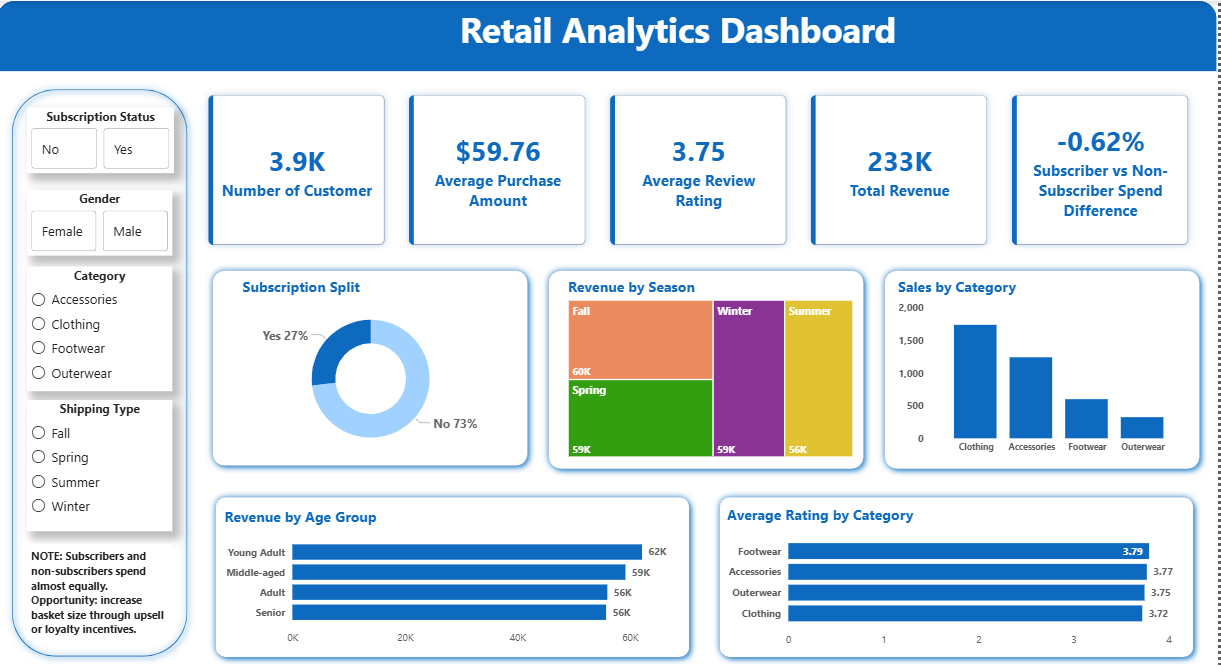
Dashboard Preview
Overview
This project demonstrates a complete, production-style BI pipeline where Claude AI acts as an active collaborator — not just a chatbot — helping build DAX measures, answer business questions, validate data, and create visuals directly within Power BI.
Pipeline — Step by Step
1. Data Cleaning (Python + Pandas)
- Ingested raw data and performed cleaning using Python and Pandas
- Handled null values, standardised field names, and validated record integrity
- Ensured data was analysis-ready before loading to the database
2. Database Layer (MS SQL Server)
- Established a Python-to-SQL Server connection using
pyodbc/sqlalchemy - Pushed the cleaned dataset into a structured SQL Server table
- Created a reliable, queryable single source of truth for downstream reporting
3. Power BI Connection
- Connected Power BI directly to the SQL Server table
- Loaded the clean dataset into the data model for reporting and visualisation
4. Claude MCP Integration
- Downloaded and configured the Claude MCP server
- Established a live AI-to-Power BI bridge
- Enabled Claude to interact directly with the Power BI data model
5. AI-Assisted Analysis & Development
With the MCP integration active, Claude was used to:
- Write and validate DAX measures for business KPIs
- Answer business questions in natural language (counts, aggregations, trends)
- Audit data quality — verifying total record counts and identifying anomalies
- Rename and standardise field labels for business-friendly reporting
- Recommend and generate appropriate visuals for each metric
Features
- AI-assisted Power BI development using Claude MCP
- Natural language querying against BI datasets
- Automated DAX measure generation
- SQL Server integration pipeline
- Python-based data cleaning and validation
- AI-assisted visual recommendation workflow
- Production-style BI architecture
Example AI Queries
With Claude MCP connected to Power BI, the assistant can respond to prompts such as:
- "Create a DAX measure for YoY sales growth"
- "Which customer segment generated the highest revenue?"
- "Recommend the best visual for monthly sales trends"
- "Validate total order counts against the SQL source table"
- "Show the top 5 products by profit margin"
Tech Stack
| Layer | Technology |
|---|---|
| Data cleaning | Python 3.x, Pandas |
| Database | Microsoft SQL Server |
| BI & Visualisation | Power BI |
| AI Integration | Claude AI, MCP Server |
| Query & Measures | DAX, SQL |
Architecture Flow
Raw CSV Data
    ↓
Python + Pandas Cleaning
    ↓
SQL Server Database
    ↓
Power BI Data Model
    ↓
Claude MCP Integration
    ↓
AI-Assisted Analytics & DAX Generation
Project Structure
powerbi-claude-mcp-pipeline/
├── README.md
├── data/
│   └── sample_data.csv          # Anonymised sample dataset
├── python/
│   ├── data_cleaning.py         # Data cleaning and transformation
│   └── sql_upload.py            # SQL Server connection and data upload
├── powerbi/
│   └── dashboard_screenshot.png # Final dashboard preview
├── mcp/
│   └── mcp_config.json          # MCP server config (credentials removed)
├── .env.example                 # Environment variable template
├── requirements.txt             # Python dependencies
└── .gitignore
Getting Started
Prerequisites
- Python 3.x
- Microsoft SQL Server (local or remote)
- Power BI Desktop
- Anthropic API key (get one here)
- Claude MCP server
Installation
# Clone the repository
git clone https://github.com/aakshadha/powerbi-claude-mcp-pipeline.git
cd powerbi-claude-mcp-pipeline

# Install Python dependencies
pip install -r requirements.txt

# Set up environment variables
cp .env.example .env
# Edit .env with your SQL Server credentials and Anthropic API key
Running the Pipeline
# Step 1: Clean the data
python python/data_cleaning.py

# Step 2: Upload to SQL Server
python python/sql_upload.py

# Step 3: Open Power BI Desktop and connect to your SQL Server table
# Step 4: Configure the MCP server (see mcp/mcp_config.json)
# Step 5: Connect Claude and start querying your data
Key Learnings
- MCP enables Claude to act as a BI collaborator — it understands the data model and contributes directly to report development, not just answers generic questions
- Combining a clean data pipeline with AI assistance dramatically reduces the time from raw data to business insight
- DAX measure creation, which typically requires specialist knowledge, can be accelerated significantly with Claude's assistance
Security Notes
- Never commit real credentials — use
.envfiles and environment variables - The
mcp_config.jsonfile in this repository contains placeholder API keys only - Sample data has been anonymized — do not upload real business or personal data
Author
Anjali Akshadha Singh
BI Engineer | Power BI · Snowflake · SQL | AI-augmented analytics
LinkedIn
License
MIT License — feel free to use and adapt this project.
Installing Powerbi Claude Mcp Pipeline
This server has no published package — it is built from source. Open the repository and follow its README.
▸ github.com/aakshadha/powerbi-claude-mcp-pipelineFAQ
Is Powerbi Claude Mcp Pipeline MCP free?
Yes, Powerbi Claude Mcp Pipeline MCP is free — one-click install via Unyly at no cost.
Does Powerbi Claude Mcp Pipeline need an API key?
No, Powerbi Claude Mcp Pipeline runs without API keys or environment variables.
Is Powerbi Claude Mcp Pipeline hosted or self-hosted?
Self-hosted: the server runs locally on your machine via the install command above.
How do I install Powerbi Claude Mcp Pipeline in Claude Desktop, Claude Code or Cursor?
Open Powerbi Claude Mcp Pipeline on unyly.org, pick your client tab (Claude Desktop, Claude Code, Cursor) and press Install — the config is generated automatically, no JSON editing.
Related MCPs
wenb1n-dev/SmartDB_MCP
A universal database MCP server supporting simultaneous connections to multiple databases. It provides tools for database operations, health analysis, SQL optim
 by wenb1n-dev
Postgres Server
This server enables interaction with PostgreSQL databases through the Model Context Protocol, optimized for the AWS Bedrock AgentCore Runtime. It provides tools
 by madhurprash
Postgres
Query your database in natural language
 by Anthropic
PostgreSQL
Read-only database access with schema inspection.
by modelcontextprotocolCompare Powerbi Claude Mcp Pipeline with
Not sure what to pick?
Find your stack in 60 seconds
Author?
Embed badge for your README
Browse similar
All data MCPs