
Praxis Datahub
FreeNot checkedEvidence-bound remediation agent for DataHub-governed data products. Turns one schema-drift incident into a proof-carrying, verified dbt change set — with an MC

About
Evidence-bound remediation agent for DataHub-governed data products. Turns one schema-drift incident into a proof-carrying, verified dbt change set — with an MCP server and a DataHub Skill so an agent can drive it, but never approve it.
README
The evidence-bound remediation agent for DataHub-governed data products.
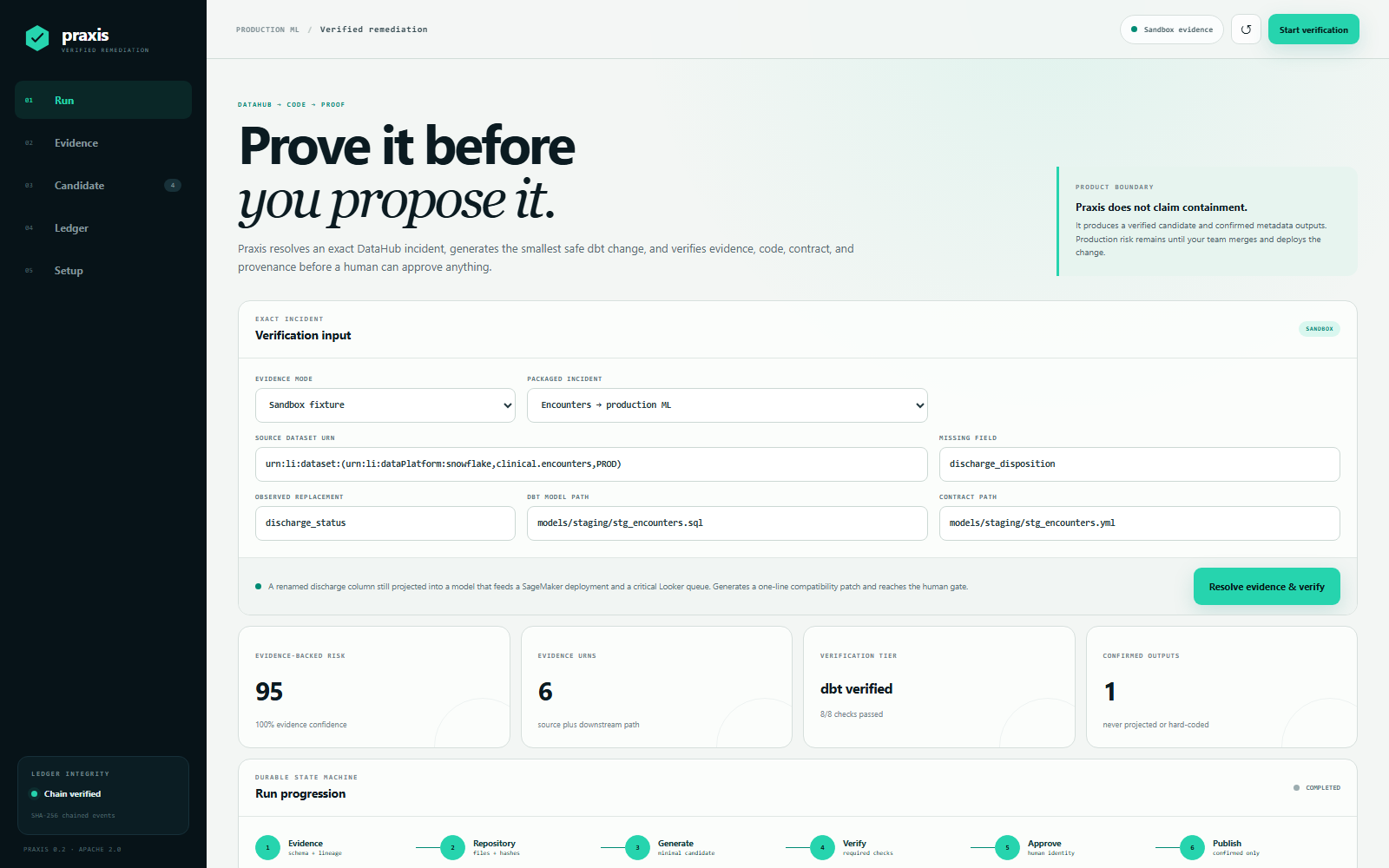
Praxis takes one narrow but expensive incident all the way to a mergeable fix: a source field was renamed, a dbt model still projects the old field, and the break can propagate into a production ML path. It reads the exact DataHub schema and lineage, inspects the real dbt files, generates a minimal compatibility patch, verifies it in isolation, pauses for a named human decision, and publishes only confirmed outputs.
The differentiator is not another incident summary. It is a proof-carrying change set. Every candidate contains DataHub evidence URNs, before/after SHA-256 hashes, validation results, and a rollback instruction. Praxis re-reads the repository and repeats verification after approval, so a stale review can never be applied.
It runs three ways: a web UI for the human at the gate, an MCP server so an agent can drive it, and a DataHub Skill that composes DataHub's own MCP server for discovery with Praxis for the verified fix.
▶ Watch the 2-minute demo — one incident, from DataHub evidence to a verified change set at the human gate.
Three ways in
| Command | Needs | |
|---|---|---|
| Sandbox UI, no credentials | python -m praxis |
Python 3.10+ |
| Live DataHub, one command | python setup/live_quickstart.py |
Docker |
| As agent tools over MCP | python -m praxis.mcp |
an MCP-capable agent host |
Try it in 60 seconds
Python 3.10+ is the only requirement for the sandbox's structural verification path.
python -m praxis
For the same real dbt parse gate used in the Docker image:
pip install -r requirements-dbt.txt
python -m praxis
Open http://127.0.0.1:8787, select Resolve evidence & verify, inspect the Evidence and Candidate tabs, and approve or reject the bundle. No credentials are required.
The sandbox is not a prerecorded UI. The backend loads a packaged DataHub-shaped
incident fixture, reads the intentionally broken dbt project under
sandbox/dbt_project, generates new files, validates them, persists a chained
ledger, and serves the resulting artifacts. The source project is deliberately
left unchanged; the approved bundle is written under .runtime/artifacts.
Packaged incident in the intake form switches between three of them, so the engine can be judged on more than one input:
| Incident | Blast radius | Outcome |
|---|---|---|
| Encounters rename | dbt → Feast → MLflow → SageMaker → Looker | risk 95, dbt_verified, approvable |
| Medications rename | dbt → dbt mart → Looker | risk 65 — the score is composed from evidence, not fixed |
| Lab results rename | dbt → Looker | refused: the column is wrapped in a coalesce, so no single projection can be proved safe |
The third one is the point. Praxis stops before generating anything rather than guess which part of an expression to rewrite, and the UI reports it as stopped safely rather than as a result.
Docker is equally self-contained and includes the pinned DataHub SDK plus dbt/DuckDB parser. Sandbox needs no credentials; the same image supports live column-lineage and deployment evidence when DataHub is configured:
docker compose up --build
What the agent proves
- The old source field is absent and its replacement is present.
- At least one DataHub column-lineage path confirms downstream field impact.
- DataHub entity lineage identifies the wider data/ML/dashboard blast radius.
- The dbt repository contains exactly one safe projection to repair.
- The candidate preserves every projected output in an enforced contract.
- The SQL has no destructive operations and input hashes are still current.
dbt parsepasses when dbt is installed; otherwise the UI saysstructurally verifiedand records the skipped check.- The exact candidate hashes still match immediately after human approval.
If any required proof is missing, Praxis stops before offering approval.
Outputs
Each successful sandbox run produces four inspectable artifacts:
- a one-line dbt compatibility repair;
- the existing dbt contract with enforcement enabled;
- a provenance manifest with DataHub URNs and input/output hashes;
- a complete verification report, including skipped checks.
The checked-in sample bundle is generated from the same code path by examples/regenerate.py. examples/README.md walks through each file and shows the one-line diff, so the output can be judged without running anything.
What it looks like
| Human gate | Evidence |
| The human gate: tier, external systems, rollback, named approver. | Exact DataHub schema, ownership, failed assertion, column path. |
| Candidate | Ledger |
| Generated files, unified diffs, hashes, every verification check. | The SHA-256 chained ledger for the run. |
Every screenshot in docs/screenshots/ is produced by
demo-video/scripts/capture-ui.py, which drives the shipped server in a real
browser rather than being posed by hand.
Demo film
https://youtu.be/tqZr-XEIfV8 (2:13)
demo-video/ builds the submission film with
Remotion and Edge neural TTS. It is data-driven: demo-video/scripts/capture-trace.py
drives this engine headlessly and every number, URN, hash and generated line on
screen is read from that capture; the human-gate scene is a real screen
recording of the product, not a mock-up. Render it with
demo-video\render-final.ps1.
Live DataHub and GitHub
Install the official DataHub SDK only for live column-level lineage:
pip install -r requirements-datahub.txt
Set the integrations you want:
PRAXIS_TARGET_REPO=/absolute/path/to/your/dbt-project
PRAXIS_DBT_COMMAND=dbt

DATAHUB_GMS_URL=http://localhost:8080
DATAHUB_TOKEN=...
DATAHUB_UI_URL=http://localhost:9002

GITHUB_REPOSITORY=owner/repository
GITHUB_TOKEN=...
GITHUB_BASE_BRANCH=main

# Required for live integrations on a public/non-loopback bind.
PRAXIS_APPROVAL_TOKEN=...
In live mode Praxis uses DataHub GraphQL for the exact dataset schema,
ownership, description, and entity blast radius, and the official lineage SDK
for field paths. After approval it adds praxis.verified-impact only to URNs
that DataHub confirms and appends a hash-bound memory note to the source
dataset. It never reports an attempted write as a successful graph delta.
When GitHub is configured, Praxis creates one Git tree, one commit, and one draft pull request through the Git database API. Existing files are updated atomically; it does not make one commit per file. Without GitHub credentials, the local bundle remains the only repository output.
One command to a live graph
python setup/live_quickstart.py
Installs the pinned SDK, brings up DataHub Core 1.6.0, waits for GMS to answer
GraphQL, and seeds a self-contained nine-entity graph: the post-rename source
schema, two-hop column lineage, three ML features, a production model, its model
group, its SageMaker deployment and a business-critical dashboard. No warehouse
and no datapack. --serve starts Praxis on it, --stop tears it down.
Quickstart publishes GMS on host port 8080, which is a popular port. If something else already holds it the script says so in seconds rather than failing several minutes into container startup, and moves DataHub out of the way on request:
python setup/live_quickstart.py --gms-port 58080
The equivalent by hand:
datahub docker quickstart --version v1.6.0
DATAHUB_GMS_URL=http://localhost:8080 python setup/seed_ml_lineage.py
See credential boundaries before connecting a
non-disposable deployment. In particular, the Quickstart datahub:datahub login
is not a DataHub API token.
Drive it from an agent (MCP)
Praxis is also an MCP server, so an agent can resolve an incident, read the diff and the verification result, and put the decision in front of a human:
python -m praxis.mcp # stdio JSON-RPC; --list-tools to inspect
Five tools: praxis_prepare_remediation, praxis_get_run, praxis_get_artifact,
praxis_approve_remediation, praxis_integration_status.
.mcp.json registers Praxis alongside DataHub's own MCP server, which is the intended pairing — DataHub does discovery and lineage, Praxis does the part a conversational surface cannot: generate a change and refuse to hand it over unverified.
The agent cannot approve. praxis_approve_remediation requires a named human
identity and an explicit human_approved flag that an agent is instructed never to
set on a person's behalf. A refused approval leaves the run in waiting with
nothing applied, and the tests assert it.
contrib/skills/datahub-verified-remediation/
is a DataHub Skill in the upstream datahub-skills layout that drives this whole
workflow, plus an RFC for the append-only
agent-memory aspect DataHub currently lacks. See contrib/.
References:
Truth matrix
| Mode | Reads | Writes after approval | Never does |
|---|---|---|---|
| Sandbox | Packaged evidence + local dbt project | Local review bundle | DataHub, GitHub, or source-repo mutation |
| Live DataHub | Exact DataHub schema + lineage + local dbt project | Confirmed DataHub tags/note; local bundle | Production traffic changes |
| Live + GitHub | Same as live | One atomic draft PR plus confirmed DataHub writes | Automatic merge or deployment |
| Agent over MCP | Same as the mode it is configured for | Nothing — an agent may prepare and inspect only | Approve on a human's behalf |
Test and audit
python -m compileall -q praxis tests
python -m unittest discover -s tests -v
node --check praxis/public/app.js
The tests cover the DataHub 1.6 GraphQL schema, two approval races (at worker handoff and during the preparation slot release), restart-safe state, rejection safety, candidate generation, verification, path traversal, API authorization, SQLite migration, connector truthfulness, tamper detection, and the MCP surface — protocol handshake, stdio framing, path redaction, and the refusal that stops an agent approving its own work. See the architecture and contest audit for the detailed boundaries and remaining deployment checks.
Apache 2.0 licensed.
Install Praxis Datahub in Claude Desktop, Claude Code & Cursor
unyly install praxis-datahubInstalls into Claude Desktop, Claude Code, Cursor & VS Code — handles npx, uvx and build-from-source repos for you.
First time? Get the CLI: curl -fsSL https://unyly.org/install | sh
Or configure manually
Run in your terminal:
claude mcp add praxis-datahub -- uvx --from git+https://github.com/Marc-Dvci/praxis-datahub praxis-datahubStep-by-step: how to install Praxis Datahub
FAQ
Is Praxis Datahub MCP free?
Yes, Praxis Datahub MCP is free — one-click install via Unyly at no cost.
Does Praxis Datahub need an API key?
No, Praxis Datahub runs without API keys or environment variables.
Is Praxis Datahub hosted or self-hosted?
Self-hosted: the server runs locally on your machine via the install command above.
How do I install Praxis Datahub in Claude Desktop, Claude Code or Cursor?
Open Praxis Datahub on unyly.org, pick your client tab (Claude Desktop, Claude Code, Cursor) and press Install — the config is generated automatically, no JSON editing.
Related MCPs
Notion
Read and write pages in your workspace
 by Notion
Linear
Issues, cycles, triage — from Claude
 by Linear
Google Drive
Search and read your Drive files
 by Google
mindsdb/mindsdb
Connect and unify data across various platforms and databases with [MindsDB as a single MCP server](https://docs.mindsdb.com/mcp/overview).
 by mindsdb
fulcradynamics/fulcra-context-mcp
MCP server for accessing personal health and biometric data including sleep stages, heart rate, HRV, glucose, workouts, calendar, and location via the Fulcra Li
 by fulcradynamics
aymericzip/intlayer
A MCP Server that enhance your IDE with AI-powered assistance for Intlayer i18n / CMS tool: smart CLI access, access to the docs.
 by aymericzip
rinadelph/Agent-MCP
A framework for creating multi-agent systems using MCP for coordinated AI collaboration, featuring task management, shared context, and RAG capabilities.
 by rinadelph
WhenLabs-org/when
Developer toolkit: auto-detect stack for AI context files, catch port conflicts, validate .env schemas, spot docs drift, audit dependency licenses, and time cod
 by WhenLabs-org
Beltran12138/wecom-docs-mcp-server
WeCom (Enterprise WeChat) document operations via MCP: create, read, and edit Docs and Smartsheets (9 tools). Fills the doc-CRUD gap — existing WeCom MCP server
 by Beltran12138
madbonez/caldav-mcp
Universal MCP server for CalDAV protocol integration. Works with any CalDAV-compatible calendar server including Yandex Calendar, Google Calendar (via CalDAV),
 by madbonez
Compare Praxis Datahub with
Not sure what to pick?
Find your stack in 60 seconds
Author?
Embed badge for your README
Browse similar
All productivity MCPs