
Quantum Resource Estimator
FreeNot checkedEstimates physical quantum resources (qubit count, runtime) for quantum algorithms on fault-tolerant hardware through natural language queries.

About
Estimates physical quantum resources (qubit count, runtime) for quantum algorithms on fault-tolerant hardware through natural language queries.
README
An MCP (Model Context Protocol) server that makes quantum resource estimation accessible through natural language. Built on Microsoft's QDK resource estimator.
What It Does
Estimates physical quantum resources (qubit count, runtime) needed to run quantum algorithms on fault-tolerant hardware. Helps researchers answer questions like:
- "How many qubits does it take to break RSA-2048 with Shor's algorithm?"
- "How does a superconducting qubit hardware compare to trapped-ion for this chemistry simulation?"
- "What's the tradeoff between qubit count and runtime for my algorithm?"
Tools
| Tool | Description |
|---|---|
estimate_resources |
Run a single resource estimation with defaults or custom params |
compare_configurations |
Side-by-side comparison across hardware architectures |
generate_frontier |
Pareto frontier: qubit-count vs. runtime tradeoff |
list_qubit_models |
Reference data for all 6 predefined qubit models |
list_qec_schemes |
Reference data for QEC schemes (surface_code, floquet_code) |
list_algorithm_templates |
Predefined algorithms with logical resource counts |
explain_parameters |
Domain-specific guidance (cryptography, chemistry, optimization) |
custom_qubit_model_estimate |
Estimation with fully custom qubit parameters |
Installation
Requires uv. The qsharp package bundles its own native runtime — no .NET SDK install needed.
Via PyPI (recommended)
No cloning needed. Configure your MCP client directly (see below) — uvx handles installation automatically on first run.
From source
git clone https://github.com/DeDuckProject/quantum-resource-estimator-mcp
cd quantum-resource-estimator-mcp
uv sync
Usage
Configure in Claude Desktop
macOS — ~/Library/Application Support/Claude/claude_desktop_config.json
Windows — %APPDATA%\Claude\claude_desktop_config.json
Linux — ~/.config/Claude/claude_desktop_config.json
{
  "mcpServers": {
    "quantum-resource-estimator": {
      "command": "/path/to/uvx",
      "args": [
        "--from",
        "quantum-resource-estimator-mcp",
        "qre-mcp"
      ]
    }
  }
}
Replace /path/to/uvx with the output of which uvx.
Configure in Claude Code
claude mcp add quantum-resource-estimator -- /path/to/uvx --from quantum-resource-estimator-mcp qre-mcp
Replace /path/to/uvx with the output of which uvx.
From source (development)
claude mcp add quantum-resource-estimator -- /path/to/uv run --directory /path/to/quantum-resource-estimator-mcp qre-mcp
Inspect with MCP dev tools
uv run mcp dev src/qre_mcp/server.py
Algorithm Input Methods
- Template (easiest):
algorithm_template="shor_2048"— uses predefined logical counts from published research - Logical counts:
logical_counts='{"numQubits": 100, "tCount": 200}'— provide your own circuit counts - Q# code:
qsharp_code="..."— provide Q# source with a parameterless entry point
Example Queries
Via an LLM with this MCP server connected:
"Estimate the resources to break RSA-2048 on superconducting hardware"
"Compare all qubit technologies for the FeMo-cofactor chemistry simulation"
"Show me the qubit vs runtime tradeoff for Shor's algorithm on trapped-ion hardware"
"I have a circuit with 500 logical qubits and 10 million T gates — how many physical qubits do I need?"
Example Output
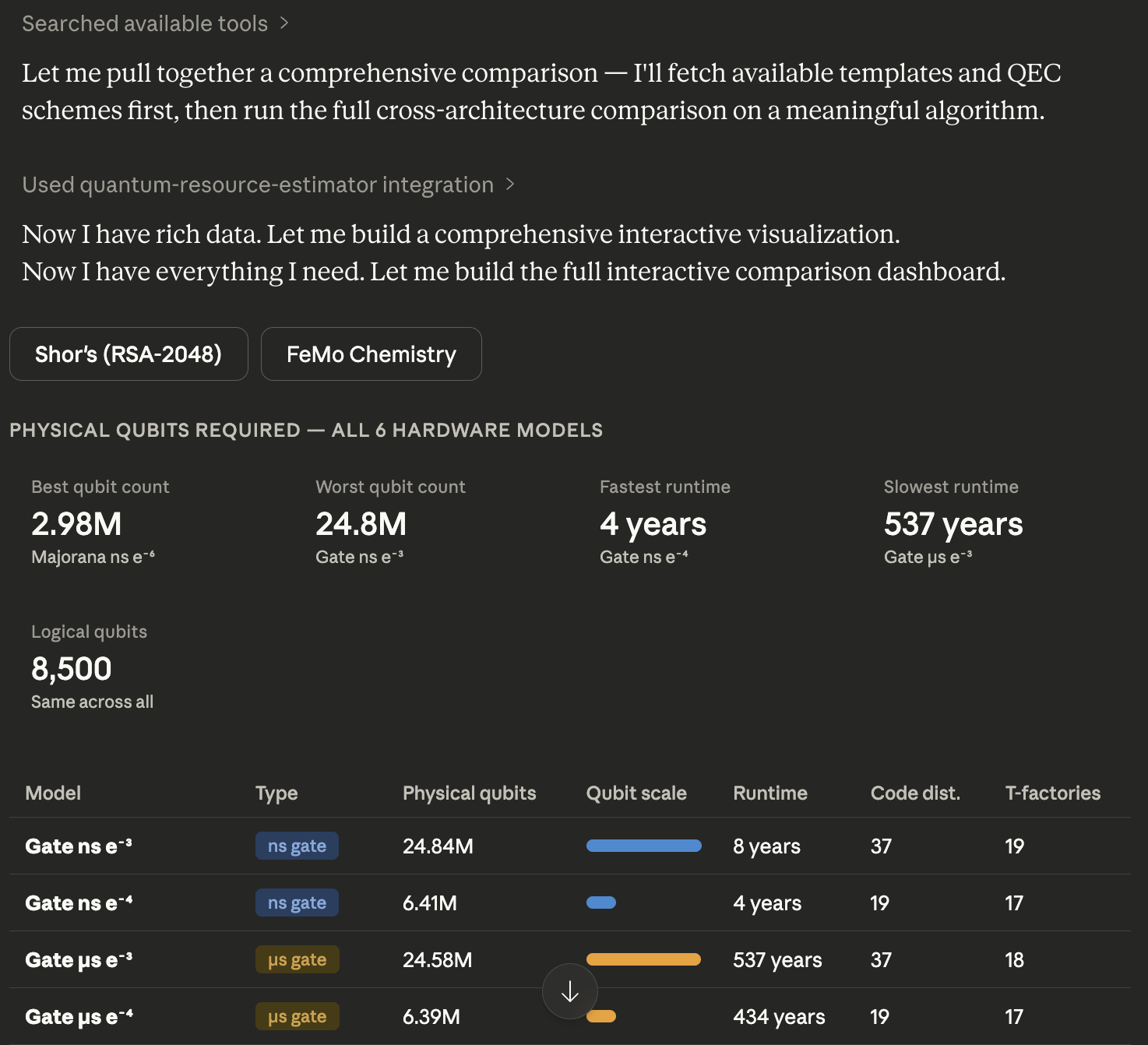
Predefined Algorithm Templates
| ID | Algorithm | Category |
|---|---|---|
shor_2048 |
Shor's factoring (RSA-2048) | Cryptography |
grover_aes128 |
Grover search (AES-128) | Cryptography |
chemistry_femo |
FeMo-cofactor simulation | Chemistry |
qpe_generic |
Quantum phase estimation | General |
Note: Templates are provided for demonstration and system exploration only. Logical counts are sourced from published research but may not capture significant details. For research-grade estimates, provide your own
logical_countssourced directly from primary publications. When using a template,estimate_resources()will include atemplate_infofield in the response with the source citation and relevant caveats.
Logs
The server runs over stdio (MCP protocol), so stdout/stderr are not available for human-readable output. Logs are written to a file you can follow in a separate terminal:
tail -F ~/.local/share/qre-mcp/qre-mcp.log
-F (capital F) handles log rotation — the file is capped at 5 MB with up to 3 backups.
To use a custom log path, set the QRE_MCP_LOG environment variable before starting the server.
Running Tests
uv run pytest
Tests cover validators, result formatting, reference data, and parameter building. Integration tests (requiring qsharp) are skipped if the package is not available.
from github.com/DeDuckProject/quantum-resource-estimator-mcp
Install Quantum Resource Estimator in Claude Desktop, Claude Code & Cursor
unyly install quantum-resource-estimatorInstalls into Claude Desktop, Claude Code, Cursor & VS Code — handles npx, uvx and build-from-source repos for you.
First time? Get the CLI: curl -fsSL https://unyly.org/install | sh
Or configure manually
Run in your terminal:
claude mcp add quantum-resource-estimator -- uvx quantum-resource-estimator-mcpFAQ
Is Quantum Resource Estimator MCP free?
Yes, Quantum Resource Estimator MCP is free — one-click install via Unyly at no cost.
Does Quantum Resource Estimator need an API key?
No, Quantum Resource Estimator runs without API keys or environment variables.
Is Quantum Resource Estimator hosted or self-hosted?
A hosted option is available: Unyly runs the server in the cloud, no local setup required.
How do I install Quantum Resource Estimator in Claude Desktop, Claude Code or Cursor?
Open Quantum Resource Estimator on unyly.org, pick your client tab (Claude Desktop, Claude Code, Cursor) and press Install — the config is generated automatically, no JSON editing.
Related MCPs
GitHub
PRs, issues, code search, CI status
 by GitHub
Filesystem
Secure file operations with configurable access controls.
Memory
Knowledge graph-based persistent memory system.
Template MCP Server
A CLI tool to create a new Model Context Protocol server project with TypeScript support, dual transport options, and an extensible structure
 by mcpdotdirect
Compare Quantum Resource Estimator with
Not sure what to pick?
Find your stack in 60 seconds
Author?
Embed badge for your README
Browse similar
All development MCPs