
Quicken Server
FreeNot checkedConverts Quicken QIF files into a queryable DuckDB database and exposes financial data through MCP tools, enabling LLMs to query transactions, accounts, and sum

About
Converts Quicken QIF files into a queryable DuckDB database and exposes financial data through MCP tools, enabling LLMs to query transactions, accounts, and summaries.
README
A containerized MCP (Model Context Protocol) server that converts a local export of Quicken in Quicken Interchange Format (QIF) files into a queryable DuckDB database, exposing financial data through standardized MCP tools to LLM Clients.
Features
- QIF Import: Parse and normalize Quicken QIF files into structured database tables
- In-Memory Database: Uses DuckDB for fast, SQL-compatible data access
- MCP Tools: Exposes financial data through standardized MCP tools including:
list_accounts- List all accounts with balanceslist_transactions- Query transactions with flexible filteringrun_sql- Execute safe SQL queries against the dataget_summaries- Generate financial summaries and statisticsget_categories- List transaction categoriessearch_transactions- Search transactions by text
- Multiple Transports: Supports both stdio and Server-Sent Events (SSE) protocols
- Security: SQL queries are restricted to SELECT operations only
- Resources: Export data as CSV files through MCP resources
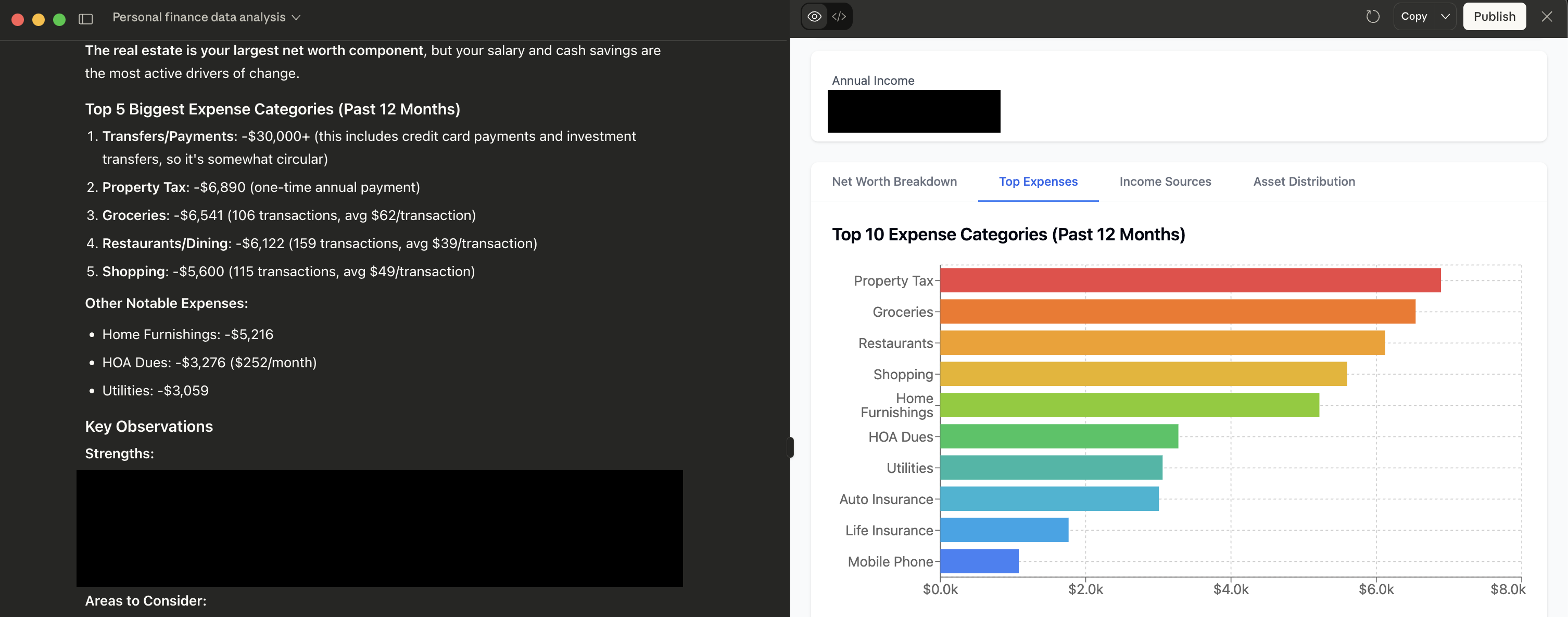
TLDR: Talk to your Quicken data in ChatGPT, Claude or ollama!
Quick Start
Using Docker (Recommended)
Build the container:
docker build -t quicken-mcp-server .Register the MCP in your LLM client config
Example of
claude-desktop-config.jsonentry:"quicken-mcp": { "command": "docker", "args": [ "run", "-i", "--rm", "-v", "<path>/data:/data:ro", "quicken-mcp-server", "--qif", "/data/personal-data.qif" ], "env": {} }In this example, I have exported my quicken data into the QIF format and named it "personal-data.qif". I then placed it into a folder called "data" and made that folder available to the docker image as a volume also named "data".
Local Development
Install dependencies:
pip install -r requirements.txtRun locally:
python -m app.main --qif /path/to/your/file.qif
Usage Examples
Command Line Options
python -m app.main --help
Required:
--qif PATH- Path to the QIF file to load
Optional:
--server-mode {stdio,sse}- Transport mode (default: stdio)--listen HOST:PORT- Listen address for SSE mode (default: 127.0.0.1:8700)--log-level {DEBUG,INFO,WARNING,ERROR}- Log level (default: INFO)--memory-limit SIZE- DuckDB memory limit (default: 8GB)
Environment Variables
You can also configure using environment variables:
QIF_PATH- Path to QIF fileSERVER_MODE- Transport modeLOG_LEVEL- Logging levelMEMORY_LIMIT- Memory limit
Docker Examples
Basic usage with bind mount:
docker run --rm \
  -v "$PWD/data:/data:ro" \
  --network host \
  quicken-mcp --qif /data/example-file.qif
SSE mode with custom port:
docker run --rm \
  -v "$PWD/data:/data:ro" \
  -p 8700:8700 \
  quicken-mcp \
  --qif /data/example-file.qif \
  --server-mode sse \
  --listen 0.0.0.0:8700
MCP Tools Reference
list_accounts
Returns all accounts with metadata:
{
  "success": true,
  "accounts": [
    {
      "account_id": 1,
      "name": "Checking Account",
      "type": "Bank",
      "balance": 1234.56
    }
  ]
}
list_transactions
Query transactions with optional filters:
{
  "account_type": "Bank",
  "date_from": "2023-01-01",
  "date_to": "2023-12-31",
  "category": "Food",
  "limit": 50
}
run_sql
Execute SELECT queries:
{
  "query": "SELECT category, SUM(amount) FROM transactions WHERE date >= '2023-01-01' GROUP BY category ORDER BY SUM(amount) DESC LIMIT 10"
}
get_summaries
Generate financial summaries:
{
  "period": "month"  // Options: "month", "category", "account", "all"
}
Database Schema
The server creates the following tables:
- accounts - Account information (name, type, balance, etc.)
- categories - Transaction categories and metadata
- transactions - Individual transactions
- transaction_splits - Split transaction details
Plus useful views:
- transactions_with_categories - Transactions joined with category info
- monthly_summaries - Monthly spending summaries
- category_summaries - Category-wise summaries
MCP Client Integration
Testing with MCP Inspector
The MCP Inspector is a powerful debugging tool for testing MCP servers. You can use it to explore available tools, test queries, and debug issues.
Using Docker (Recommended):
# Start the inspector (runs on http://localhost:5173)
docker run --rm --network host -p 5173:5173 ghcr.io/modelcontextprotocol/inspector:latest
Then connect to your server:
- Stdio mode: Use command
docker run --rm -v "/path/to/your/qif:/data:ro" --network host quicken-mcp --qif /data/yourfile.qif - SSE mode: Use URL
http://127.0.0.1:8700/sse
Using npx (Local Development):
# For stdio mode
npx @modelcontextprotocol/inspector docker run --rm -v "/path/to/your/qif:/data:ro" --network host quicken-mcp --qif /data/yourfile.qif

# For SSE mode, start the server first, then:
npx @modelcontextprotocol/inspector http://127.0.0.1:8700/sse
With mcpm (MCP Manager)
Create an mcpm profile:
mcpm profile create quicken-ledger
mcpm profile edit quicken-ledger --add local::quicken-mcp
With MCP-compatible editors
Configure your editor to use this server:
- Stdio mode: Point to the docker run command
- SSE mode: Use
http://127.0.0.1:8700/sseendpoint
Security Considerations
- QIF files should be trusted and local
- SQL execution is restricted to SELECT statements only
- Dangerous SQL keywords are blocked
- Container runs as non-root user
- File access is controlled through bind mounts
Performance
- Recommended memory limit: 8GB for large datasets
- File size warning at 100MB+
- Query results limited to prevent memory issues
- DuckDB provides excellent analytical performance
Development
Project Structure
quicken-mcp-server/
├── app/
│   ├── __init__.py
│   ├── config.py          # Configuration management
│   ├── qif_loader.py      # QIF parsing and database loading
│   ├── schema.sql         # Database schema definitions
│   ├── mcp_tools.py       # MCP tool implementations
│   ├── server.py          # MCP server setup
│   └── main.py           # Application entry point
├── tests/
├── Dockerfile
├── pyproject.toml
├── requirements.txt
└── README.md
Running Tests
pytest
Code Quality
ruff check .
mypy app/
License
MIT License - see LICENSE file for details.
Installing Quicken Server
This server has no published package — it is built from source. Open the repository and follow its README.
▸ github.com/sgoley/quicken-mcp-serverFAQ
Is Quicken Server MCP free?
Yes, Quicken Server MCP is free — one-click install via Unyly at no cost.
Does Quicken Server need an API key?
No, Quicken Server runs without API keys or environment variables.
Is Quicken Server hosted or self-hosted?
Self-hosted: the server runs locally on your machine via the install command above.
How do I install Quicken Server in Claude Desktop, Claude Code or Cursor?
Open Quicken Server on unyly.org, pick your client tab (Claude Desktop, Claude Code, Cursor) and press Install — the config is generated automatically, no JSON editing.
Related MCPs
wenb1n-dev/SmartDB_MCP
A universal database MCP server supporting simultaneous connections to multiple databases. It provides tools for database operations, health analysis, SQL optim
 by wenb1n-dev
Postgres Server
This server enables interaction with PostgreSQL databases through the Model Context Protocol, optimized for the AWS Bedrock AgentCore Runtime. It provides tools
 by madhurprash
Postgres
Query your database in natural language
 by Anthropic
PostgreSQL
Read-only database access with schema inspection.
by modelcontextprotocolCompare Quicken Server with
Not sure what to pick?
Find your stack in 60 seconds
Author?
Embed badge for your README
Browse similar
All data MCPs