
Rango
FreeNot checkedRango — Chameleon Ultra AI Copilot: MCP server + agent skills + offline dump analyzer on top of the official Chameleon Ultra CLI (Kimi Code plugin; adapters for

About
Rango — Chameleon Ultra AI Copilot: MCP server + agent skills + offline dump analyzer on top of the official Chameleon Ultra CLI (Kimi Code plugin; adapters for Claude Code, Codex, OpenCode)
README
Rango
Chameleon Ultra AI Copilot — read, crack, dump, analyze, emulate and clone RFID cards through natural language, with safety gates and a host-side card library.
CI License: MIT Python ≥ 3.10 MCP Harnesses
Prerequisites · Quick start · Other harnesses · MCP tools · Coverage · Development
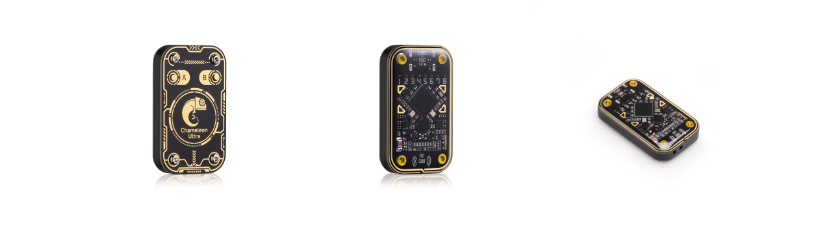
Chameleon Ultra — image © RfidResearchGroup
Rango turns a Chameleon Ultra into an agent-driven RFID copilot. It is only the AI layer: the official Chameleon Ultra CLI is not vendored into this repo — clone it separately; Rango locates and drives it in-process (see Prerequisites).
Two ways to use it:
- Kimi Code plugin (best experience) — an MCP server + skill + analysis subagent; the Kimi Code agent operates the device for you.
- Standalone AI shell — an enhanced REPL around the stock CLI where
?talks to an LLM (Moonshot/Kimi API or any OpenAI-compatible endpoint).
Architecture
flowchart LR
    U(["You — natural language"]) --> A["Agent harness<br/>Kimi Code · Claude Code · Codex · OpenCode"]
    SK["SKILL.md<br/>workflows · safety gates · coaching"] -. guides .-> A
    A -->|"MCP over stdio"| M["chameleon MCP server<br/>16 tools · one persistent serial owner"]
    M --> S["ai_shell<br/>bridge · ops · library · dictionaries · analyze"]
    S --> C["official Chameleon Ultra CLI<br/>fetched · unmodified · not vendored"]
    C -->|"USB serial"| D(["Chameleon Ultra"])
Prerequisites
git clone https://github.com/fedroraddict/rango rango && cd rango

scripts/install-cli.sh   # fetches the stock upstream CLI into ../ChameleonUltra
                         # (git clone, with a codeload tarball fallback when
                         #  github.com is unreachable)
uv sync
scripts/setup-plugin.sh  # writes plugin/.rango-root so the MCP launcher still
                         # finds this repo after /plugins install copies plugin/
The installer is idempotent and prints what it did. If you keep the upstream checkout
somewhere else, pass the path (scripts/install-cli.sh /path/to/ChameleonUltra) and set
export CHAMELEON_SOFTWARE=/path/to/ChameleonUltra/software.
Requires Python ≥ 3.10, uv, and the device on a data-capable USB-C cable.
Quick start
# Standalone AI shell (stock CLI commands pass through; '? ...' asks the AI)
cd rango && uv run python -m ai_shell
#   needs MOONSHOT_API_KEY (or another OpenAI-compatible endpoint in
#   ~/.chameleon_ai/config.toml) for AI features; plain CLI works without it

# Kimi Code plugin
#   in Kimi Code: /plugins install <this-repo>/plugin   then  /reload
Use from Codex, Claude Code, OpenCode
The MCP server is a standard stdio server — not Kimi-only. Per-harness config snippets
and install notes live in adapters/: Claude Code (.mcp.json /
claude mcp add + drop-in skill and agent), Codex CLI ([mcp_servers.chameleon] +
skill with stripped frontmatter), OpenCode (opencode.json + converted agent file).
MCP tools (16)
| Tool | Purpose |
|---|---|
chameleon_run |
Execute any official CLI command. Read-only runs directly; writes/attacks require confirm_dangerous=true after user approval |
chameleon_state |
One-call snapshot: firmware, battery, active slot, per-slot summary — the pre-flight check |
chameleon_help / chameleon_catalog |
Exact syntax of one command / the full command tree |
card_list / card_add / card_show / card_remove |
Host card library (~/.chameleon_ai/cards/) — unlimited named dumps, independent of the 8 device slots |
card_load |
Composite: library card → free device slot, verified order (type → eload → block0 → enable → nick), auto free-slot pick |
card_analyze |
Offline dump analysis (raw .bin or Flipper .nfc): access-bits decode, key audit with known-system fingerprints, value blocks, MAD/NDEF, card-type ID |
dict_list / dict_seed_default / dict_create / dict_merge / dict_import / dict_show |
Mifare key dictionaries (~/.chameleon_ai/dicts/); dict_show feeds keys positionally to hf mf fchk |
What the copilot layer adds
- Pre-flight ritual — workflows start with
chameleon_state; gated steps are announced first. - Detection coaching — failed scans trigger placement guidance, HF/LF alternation, app cross-check — not silent retry loops.
- Key-recovery decision tree — default dictionary → targeted dictionary built from a web search of the card system's known keys →
hf mf autopwn→ manual PRNG attacks (darkside / nested / senested / hardnested, with expected durations) → last resort: mfkey32v2 reader-side recovery (hf mf elog --decrypt). - Library-first model (mirrors the CU GUI's Saved Cards): dumps get user-chosen names in the library; slots are working memory.
- Slot discipline — list first, prefer free slots, ask before overwriting, always name, always enable (
(disabled)slots don't emulate), persist withhw slot store. - Collaboration modes — copilot (confirm each gated step) or autopilot (approve a stated workflow once).
hw dfu,hw factory_reset, and physical-card writes always get their own confirmation. - Offline analysis subagent (
card-analyst) for deep dump inspection.
Card coverage
| Band | Families |
|---|---|
| HF | Mifare Classic (full attack suite) · Ultralight/NTAG (incl. ulcg backdoor, UL-C authnonce) · DESFire (hf des chk) · SEOS · EMV payment · generic ISO14443-A sniff/auth-trace |
| LF | EM410x · EM4x05 · HID Prox · ioProx · PAC/Stanley · Viking · Jablotron · IDTECK · T5577 writing · raw lf sniff + offline analysis for unknown families |
Known quirks (verified on hardware)
hf mf fchk --dicis a no-op stub in some upstream builds — pass keys positionally (dict_showexists for this).- Serial desync (frame-error flood / connect timeout) happens if the process holding the port is killed mid-connection — unplug/replug the device;
hw disconnectbefore reloading the plugin. - A slot that starts as
(disabled)undefmust behw slot enabled after loading or it won't emulate. - The CLI tokenizes with a plain whitespace split — never quote arguments (
hw slot nick ... -n bike, not-n "bike", or the quotes become part of the nick) and keep paths space-free.
Development
cd rango
uv run ruff check ai_shell/ plugin/mcp/          # lint
uv run python -m ai_shell.selfcheck            # cited commands exist in the real CLI tree,
                                               # gate semantics, simulated /plugins install boot
uv run python -m ai_shell.test_analyze         # dump-analyzer regression tests
CI runs the same three gates on every push and PR (see .github/workflows/ci.yml).
Layout: ai_shell/ wrapper library · plugin/ Kimi Code plugin
(see plugin/README.md) · scripts/ upstream-CLI installer + plugin
setup · adapters/ other-harness configs (see adapters/README.md)
· AGENTS.md contributor/agent notes.
Credits
Everything device-side — the Chameleon Ultra firmware and the official CLI that Rango
drives — comes from
RfidResearchGroup/ChameleonUltra,
© its authors (see its AUTHORS.md). Rango is only the AI copilot layer on top: it
contains no upstream code, and the CLI is fetched by scripts/install-cli.sh and used
unmodified.
Also standing on:
- the Proxmark3 community — known-key
and MAD AID conventions (
mad.jsoncan be dropped into~/.chameleon_ai/dicts/); - NXP's MF1S50YYX datasheet — the access-bits and value-block decode tables in
ai_shell/analyze.pyfollow it; - the Model Context Protocol — the interface every supported agent harness speaks;
- Kimi Code — the plugin format and the default LLM endpoint for the standalone shell.
License & responsible use
Rango itself is MIT. The upstream Chameleon Ultra CLI is a separate project under GPL-3.0 — fetched, not vendored — so its license governs the CLI, not this repo. Operate only on cards and devices you own or are explicitly authorized to test.
Install Rango in Claude Desktop, Claude Code & Cursor
unyly install rangoInstalls into Claude Desktop, Claude Code, Cursor & VS Code — handles npx, uvx and build-from-source repos for you.
First time? Get the CLI: curl -fsSL https://unyly.org/install | sh
Or configure manually
Run in your terminal:
claude mcp add rango -- uvx rangoStep-by-step: how to install Rango
FAQ
Is Rango MCP free?
Yes, Rango MCP is free — one-click install via Unyly at no cost.
Does Rango need an API key?
No, Rango runs without API keys or environment variables.
Is Rango hosted or self-hosted?
Self-hosted: the server runs locally on your machine via the install command above.
How do I install Rango in Claude Desktop, Claude Code or Cursor?
Open Rango on unyly.org, pick your client tab (Claude Desktop, Claude Code, Cursor) and press Install — the config is generated automatically, no JSON editing.
Related MCPs
GitHub
PRs, issues, code search, CI status
 by GitHub
Filesystem
Secure file operations with configurable access controls.
Memory
Knowledge graph-based persistent memory system.
Template MCP Server
A CLI tool to create a new Model Context Protocol server project with TypeScript support, dual transport options, and an extensible structure
 by mcpdotdirect
Amap Maps Mcp Server
MCP server for using the AMap Maps API
 by duxiaohui
Supabase
Database, auth and storage
 by Supabase
Everything
Reference / test server with prompts, resources, and tools.
Git
Tools to read, search, and manipulate Git repositories.
Sequential Thinking
Dynamic and reflective problem-solving through thought sequences.
Time
Time and timezone conversion capabilities.
Compare Rango with
Not sure what to pick?
Find your stack in 60 seconds
Author?
Embed badge for your README
Browse similar
All development MCPs