
Remote Mcp Functions Python
FreeNot checkedGetting Started with Remote MCP Servers using Azure Functions (Python)

About
Getting Started with Remote MCP Servers using Azure Functions (Python)
README
Getting Started with Remote MCP Servers using Azure Functions (Python)
This repo has a collection of samples to help you easily build and deploy a custom remote MCP server to the cloud using Azure Functions. You can clone/restore/run on your local machine with debugging, and azd up to have a server in the cloud in a couple minutes.
All sample MCP servers are configured with built-in authentication using Microsoft Entra as the identity provider.
You can also use API Management to secure the server, as well as network isolation using VNET.
If you're looking for samples in more languages check out the .NET/C# and Node.js/TypeScript versions.
Prerequisites
- Python version 3.13 or higher
- Azure Functions Core Tools >=
4.8.0 - Azure Developer CLI 1.23.x or above (for deployment)
- Docker (for the Azurite storage emulator)
- Visual Studio Code (recommended)
- Azure Functions extension
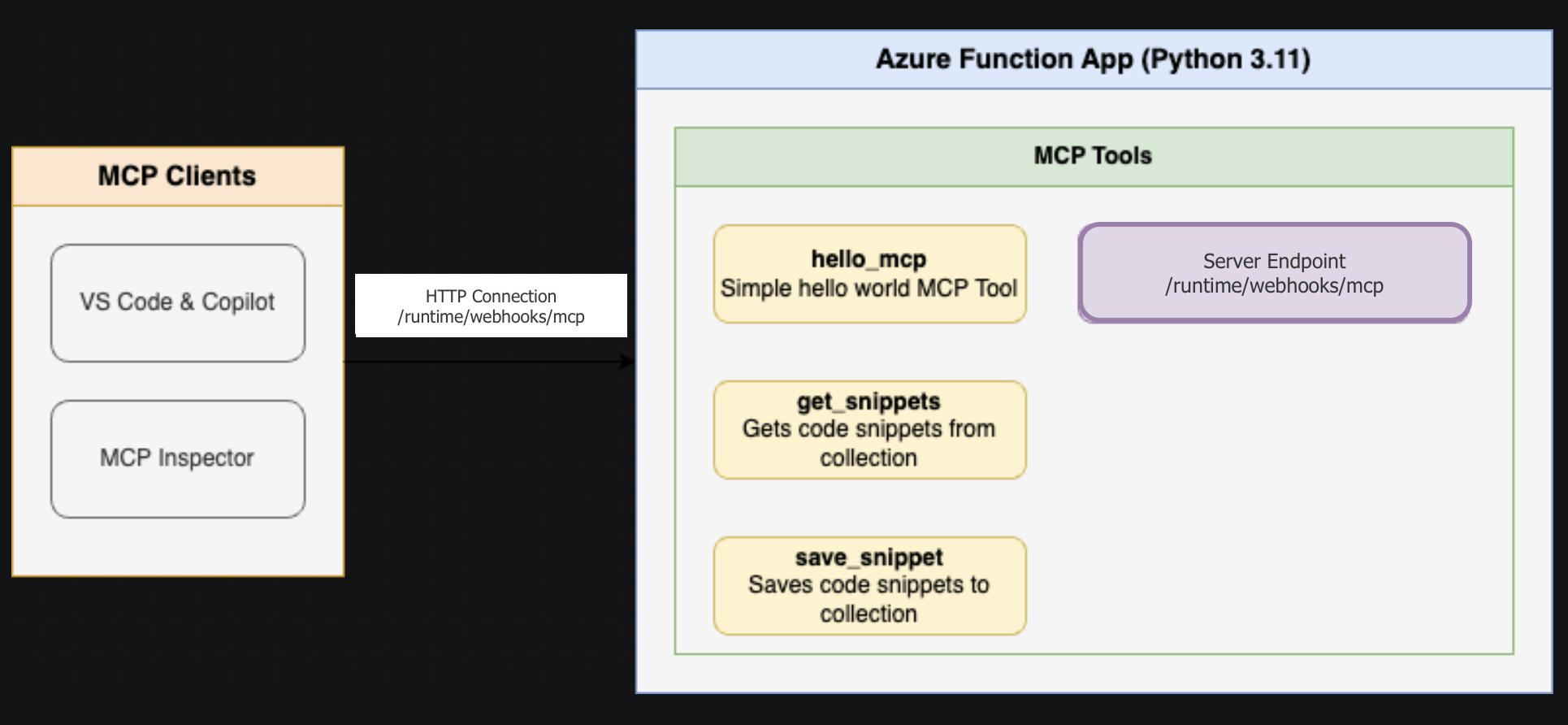
Below is the architecture diagram for the Remote MCP Server using Azure Functions:
Samples in this repo
Each project README has instructions for running locally, connecting to the MCP server, deploying to the cloud, and more.
| Project | Description | Getting Started |
|---|---|---|
| FunctionsMcpTool | MCP Tools — snippet CRUD, QR code generation, structured metadata, batch operations | README |
| FunctionsMcpResources | MCP Resources — snippet resource template, server info resource | README |
| FunctionsMcpPrompts | MCP Prompts — code review checklist, summarize content, generate docs | README |
| McpWeatherApp | Weather App — MCP App demo with interactive UI | README |
Next Steps
- Learn more about the Azure Functions MCP extension
- Learn more about built-in MCP auth
- Follow our blog posts on Azure SDK Blog and Tech Community for updates.
Installing Remote Mcp Functions Python
This server has no published package — it is built from source. Open the repository and follow its README.
▸ github.com/Azure-Samples/remote-mcp-functions-pythonFAQ
Is Remote Mcp Functions Python MCP free?
Yes, Remote Mcp Functions Python MCP is free — one-click install via Unyly at no cost.
Does Remote Mcp Functions Python need an API key?
No, Remote Mcp Functions Python runs without API keys or environment variables.
Is Remote Mcp Functions Python hosted or self-hosted?
Self-hosted: the server runs locally on your machine via the install command above.
How do I install Remote Mcp Functions Python in Claude Desktop, Claude Code or Cursor?
Open Remote Mcp Functions Python on unyly.org, pick your client tab (Claude Desktop, Claude Code, Cursor) and press Install — the config is generated automatically, no JSON editing.
Related MCPs
GitHub
PRs, issues, code search, CI status
 by GitHub
Filesystem
Secure file operations with configurable access controls.
Memory
Knowledge graph-based persistent memory system.
Template MCP Server
A CLI tool to create a new Model Context Protocol server project with TypeScript support, dual transport options, and an extensible structure
 by mcpdotdirect
Compare Remote Mcp Functions Python with
Not sure what to pick?
Find your stack in 60 seconds
Author?
Embed badge for your README
Browse similar
All development MCPs