
Repobase
FreeNot checkedMCP server for indexing and searching Git repositories with AI. Enables tools like listing repos, semantic search, file globbing, and regex grep.

About
MCP server for indexing and searching Git repositories with AI. Enables tools like listing repos, semantic search, file globbing, and regex grep.
README
npm version npm downloads CI License: MIT
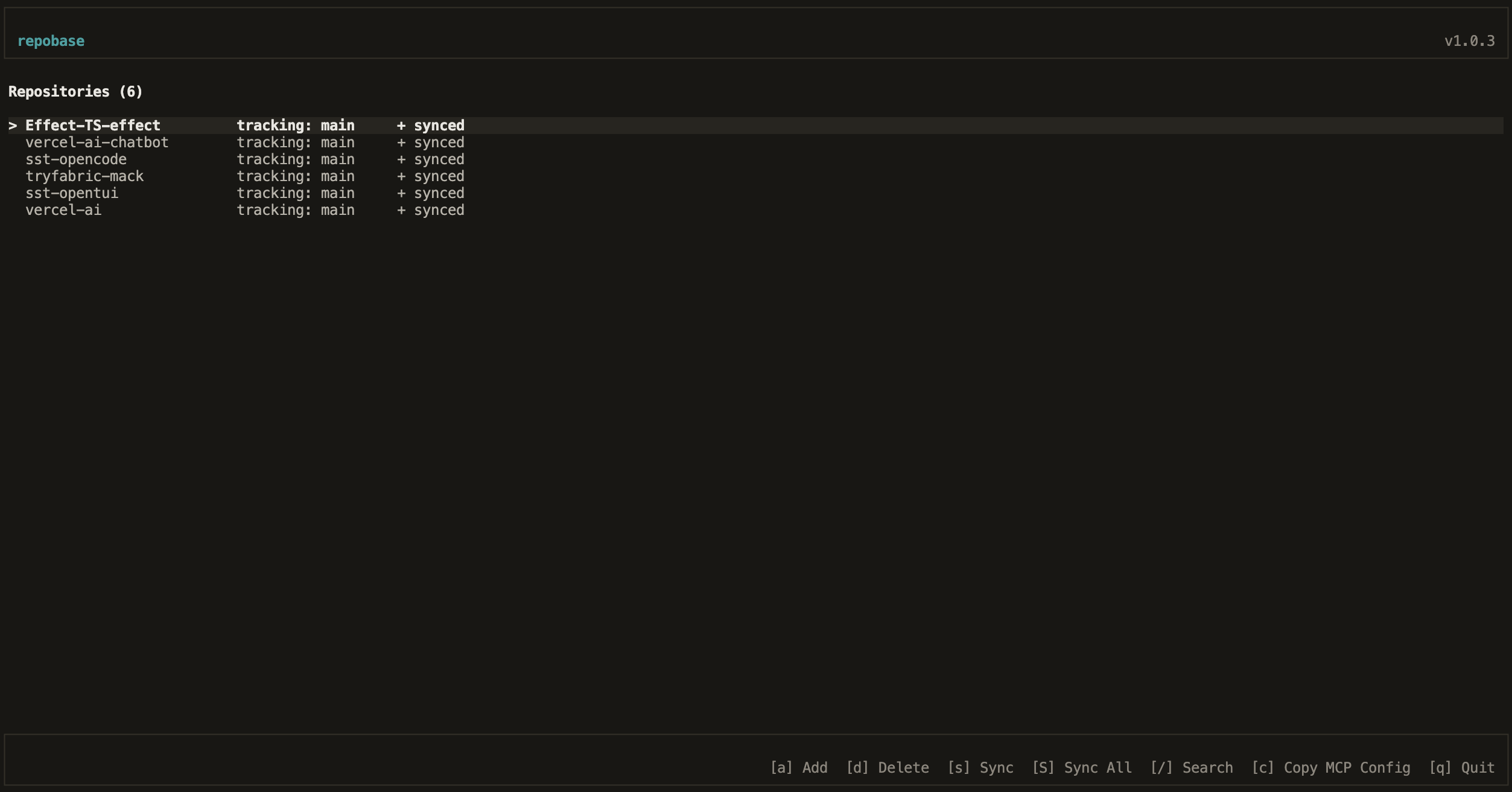
Index and search your Git repositories with AI. Includes a terminal UI and MCP server for AI tool integration.
Installation
Requires Bun runtime.
# Install globally
npm install -g repobase

# Or with bun
bun install -g repobase
Usage
Terminal UI
repobase
Keyboard shortcuts:
a- Add repositoryd- Delete repositorys- Sync selected repositoryS- Sync all repositories/- Searchq- Quit
MCP Server (Cursor, Claude, etc.)
Add to your MCP configuration (~/.cursor/mcp.json or Claude config):
{
  "mcpServers": {
    "repobase": {
      "command": "repobase-mcp"
    }
  }
}
Available tools:
list_repos- List all indexed repositoriessearch- Search across repositories (keyword, semantic, or hybrid mode)list_files- List files in a repositoryglob_files- Find files by glob patternread_file- Read file contentsgrep- Search file contents with regex
Development
# Install dependencies
bun install

# Run TUI in dev mode
bun run dev:tui

# Run MCP server in dev mode
bun run dev:mcp

# Run tests
bun run test

# Build for distribution
bun run build
Architecture
repobase/
├── packages/
│   ├── engine/      # Core library (indexing, search, git operations)
│   ├── tui/         # Terminal UI
│   └── mcp-server/  # MCP server for AI tools
└── dist/            # Built distribution (after bun run build)
Contributing
This project uses Conventional Commits for automated versioning and changelog generation.
Commit Message Format
<type>(<scope>): <description>

[optional body]

[optional footer(s)]
Types:
feat:- New features (triggers minor version bump)fix:- Bug fixes (triggers patch version bump)perf:- Performance improvements (triggers patch version bump)refactor:- Code refactoring (triggers patch version bump)docs:- Documentation changes (no release)style:- Code style changes (no release)test:- Test changes (no release)chore:- Maintenance tasks (no release)ci:- CI/CD changes (no release)
Breaking Changes:
Add BREAKING CHANGE: in the commit footer or ! after the type to trigger a major version bump:
feat!: remove deprecated API

BREAKING CHANGE: The old API has been removed.
Release Process
- Merges to
mainautomatically publish a release candidate to npm with the@nexttag - Manual trigger of the "Promote to Latest" workflow publishes to
@latestand creates a GitHub release
License
MIT
Install Repobase in Claude Desktop, Claude Code & Cursor
unyly install repobase-mcpInstalls into Claude Desktop, Claude Code, Cursor & VS Code — handles npx, uvx and build-from-source repos for you.
First time? Get the CLI: curl -fsSL https://unyly.org/install | sh
Or configure manually
Run in your terminal:
claude mcp add repobase-mcp -- npx -y repobaseFAQ
Is Repobase MCP free?
Yes, Repobase MCP is free — one-click install via Unyly at no cost.
Does Repobase need an API key?
No, Repobase runs without API keys or environment variables.
Is Repobase hosted or self-hosted?
Self-hosted: the server runs locally on your machine via the install command above.
How do I install Repobase in Claude Desktop, Claude Code or Cursor?
Open Repobase on unyly.org, pick your client tab (Claude Desktop, Claude Code, Cursor) and press Install — the config is generated automatically, no JSON editing.
Related MCPs
GitHub
PRs, issues, code search, CI status
 by GitHub
Filesystem
Secure file operations with configurable access controls.
Memory
Knowledge graph-based persistent memory system.
Template MCP Server
A CLI tool to create a new Model Context Protocol server project with TypeScript support, dual transport options, and an extensible structure
 by mcpdotdirect
Compare Repobase with
Not sure what to pick?
Find your stack in 60 seconds
Author?
Embed badge for your README
Browse similar
All development MCPs