
Runpost
БесплатноНе проверенThe HTTP client you and your AI agent share: a Postman-like desktop app (Rust + Tauri) with a built-in MCP server for Claude Code, Codex and other agents. One b

Описание
The HTTP client you and your AI agent share: a Postman-like desktop app (Rust + Tauri) with a built-in MCP server for Claude Code, Codex and other agents. One binary, no account, no telemetry.
README
English · Español

RunPost
One binary. No account. No telemetry.
The HTTP client you and your AI agent share: a Postman-like desktop app with a built-in MCP server.





Website · Download · MCP tools · Contributing
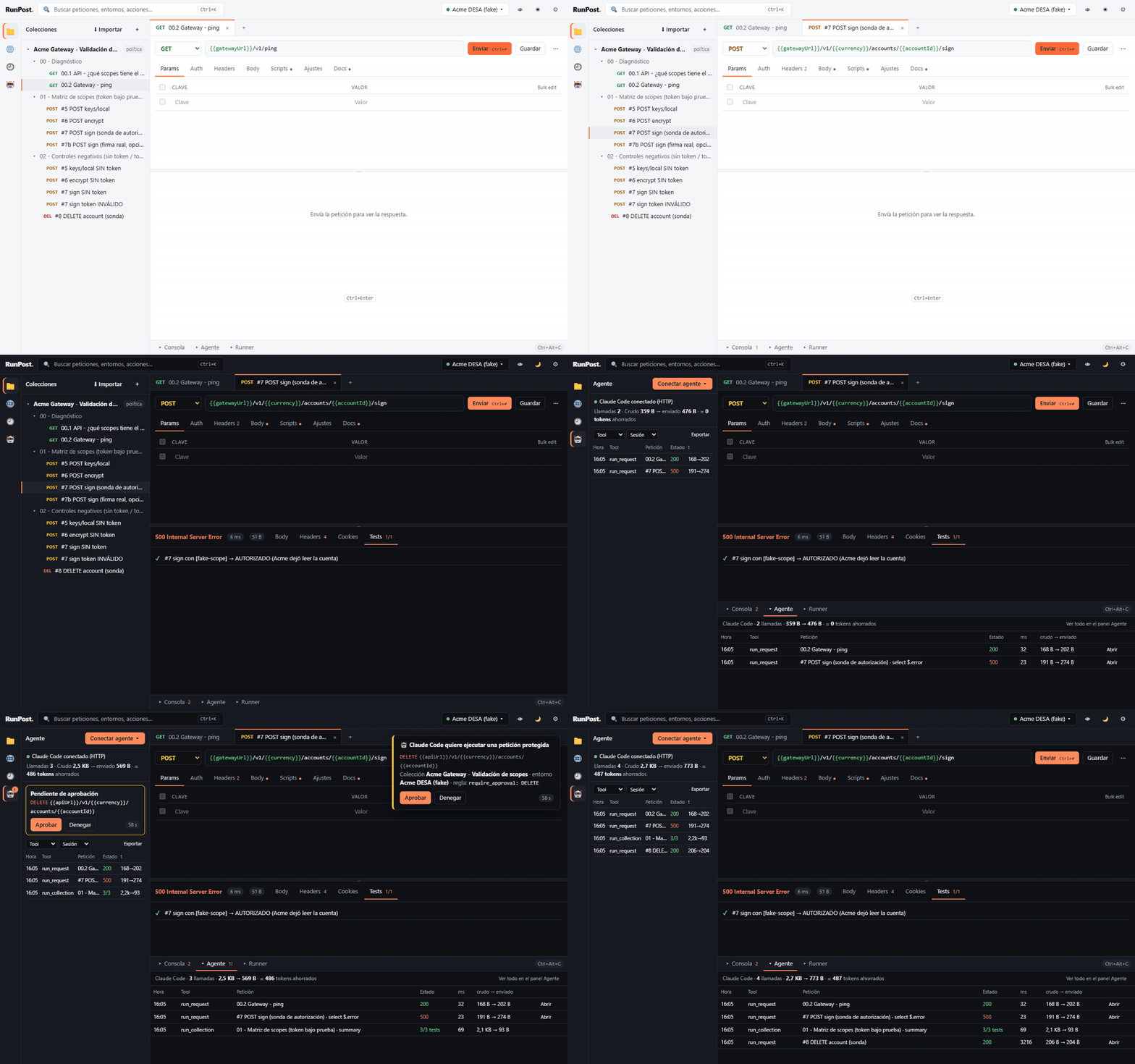
RunPost is a local HTTP client for people who live in Postman-style collections and work with AI coding agents. You build and send requests in a familiar UI; your agent (Claude Code, Codex…) runs the same saved requests through RunPost's MCP server, gets compact answers with secrets masked, and you watch every call live — and approve the risky ones — from the Agent panel.
Why RunPost
As of October 2026 (details and sources; corrections welcome):
| RunPost | Postman | Bruno | Insomnia | Yaak | |
|---|---|---|---|---|---|
| Account to save collections | No | Yes | No | Yes for projects | No |
| Plain-text files for Git | JSON per collection | YAML (v12), tied to a cloud workspace | YAML / .bru |
Git Sync, with account | Opt-in YAML |
| MCP server for agents | Built in (stdio + HTTP), no account | Separate (remote or npm), account | Separate, early (bruno-mcp) |
No (MCP client only) | In-app plugin |
| Live view of the agent's calls, approvals in the app | Yes | — | — | — | — |
| Secrets in the OS keychain | Per variable | Vault key | OS encryption | Vault key | Master key |
| CLI runner with JUnit | Yes | Yes (Postman CLI, Newman) | Yes (bru) |
No | No |
| License | AGPL-3.0, free; commercial license for closed products | Proprietary, free plan | MIT, paid tiers | Apache-2.0, free plan | MIT source, paid for work |
| Spanish UI | Yes | No | No | No | No |
"—": not found in their documentation.
Numbers
Measured with the real release binaries; the token figures use the bundled example collection against a simulated API (details in docs/BENCH.md):
| What | RunPost |
|---|---|
Whole tools/list (13 tools, sent once per session) |
≈ 1,675 tokens |
run_request "00.2 Gateway - ping" |
≈ 200 characters ≈ 50 tokens |
run_request with select on one field |
< 60 tokens |
| A typical 5 KB JSON response | < 700 tokens (minified, truncated, rest on demand) |
| Claude Code plugin always-on cost | ≈ 112 tokens (+ ≈ 630 when the skill fires) |
| Desktop app on Windows 11: size, start to usable window, memory at rest | 20.5 MB, 1.25–1.45 s, 35–37 MB (plus the system WebView) |
CLI / MCP server: size, start to initialize |
17.9 MB, ≈ 75 ms |
| Full Claude Code session, curl vs RunPost | being measured: the harness is in scripts/bench/ (see docs/BENCH.md) |
Install
Download from Releases. The builds are not code-signed yet, so the first launch asks for confirmation.
Windows: download RunPost_0.2.0_x64-setup.exe and double-click it. It installs for your user
in %LOCALAPPDATA%\RunPost (no admin), with runpost_mcp.exe, and adds RunPost to the Start menu.
RunPost_0.2.0_x64-portable.exe runs without installing. Or, in PowerShell:
Invoke-WebRequest https://github.com/paul0610/runpost/releases/download/v0.2.0/RunPost_0.2.0_x64-setup.exe -OutFile RunPost-setup.exe
.\RunPost-setup.exe
[Environment]::SetEnvironmentVariable('Path', [Environment]::GetEnvironmentVariable('Path','User') + ";$env:LOCALAPPDATA\RunPost", 'User')
macOS (Apple silicon):
curl -LO https://github.com/paul0610/runpost/releases/download/v0.2.0/RunPost_0.2.0_aarch64.dmg
hdiutil attach RunPost_0.2.0_aarch64.dmg && cp -R /Volumes/RunPost/RunPost.app /Applications/ && hdiutil detach /Volumes/RunPost
xattr -dr com.apple.quarantine /Applications/RunPost.app && sudo ln -sf /Applications/RunPost.app/Contents/MacOS/runpost_mcp /usr/local/bin/runpost_mcp
Linux (Debian/Ubuntu; there is also an .AppImage):
curl -LO https://github.com/paul0610/runpost/releases/download/v0.2.0/RunPost_0.2.0_amd64.deb
sudo apt install ./RunPost_0.2.0_amd64.deb
runpost_app
The last line of each block puts runpost_mcp (the CLI and MCP server) on your PATH, which the
agent integrations below need. CLI-only archives are in the release too.
Connect your agent
Claude Code — one line in your terminal (Claude Code 2.1.275 or later):
claude plugin install runpost --marketplace paul0610/runpost
(or inside Claude Code: /plugin marketplace add paul0610/runpost, then /plugin install runpost@runpost).
The plugin adds the RunPost MCP server, the api-testing skill (how to spend few tokens) and the
commands /runpost:run, /runpost:suite and /runpost:import. With the RunPost app open on the
same workspace, the plugin's calls go through the app: you see them in the Agent panel and protected
requests wait for your approval.
Codex, Claude Desktop and others — in the app, Agent → Connect agent ▾ copies a ready-made config with your paths. Examples: docs/mcp-client-configs/, including an AGENTS.md for Codex.
Features
- Postman-style UI: collections, folders, tabs, params/headers/body/auth editors, environments and globals, history, console, markdown docs, light and dark themes, Postman shortcuts. English and Spanish (Settings → Language).
- Import from Postman v2.1, OpenAPI 3, HAR, Insomnia (v4 and v5), Bruno (
.bru, YAML or JSON) and cURL (what is translated); export to Postman v2.1. Code snippets (cURL, fetch, PowerShell, Python) that keep secrets as{{variables}}, and GraphQL bodies (details). - Auth: bearer, basic, API key, digest and OAuth 2.0 (client credentials, and authorization code with PKCE and a local callback). Tokens stay in memory or the OS keyring, never in files (details).
- Cookie manager and client certificates per host for mutual TLS (details).
- Saved examples per request, find and replace across a collection (regex optional), and a trash with undo for 30 days (details).
pm.*pre-request and test scripts (QuickJS sandbox), Collection Runner with CSV/JSON data and JUnit/HTML reports — also from the terminal (runpost_mcp run).- MCP server (stdio, or Streamable HTTP when the app is open) with 13 compact tools: refer to saved
requests by name,
select(JSONPath),get_responseby ranges,diff_againstto see only what changed,run_collectionsummaries. - Agent guardrails per collection: allowed methods, approval in the app (60 s), calls per minute.
- Secrets masked everywhere (
***for the agent, history and logs) and optionally stored in the OS keyring (Windows Credential Manager, macOS Keychain, Secret Service) instead of the workspace file. - Plain-text, Git-friendly workspace: one JSON file per collection and environment.
Build from source
Rust (see rust-toolchain.toml), Node.js 22 and the Tauri v2 prerequisites:
cd ui && npm ci --ignore-scripts && npm run build && cd ..
cargo build --release
Then run target/release/runpost_app (desktop) or target/release/runpost_mcp serve --browser
(the same UI at http://127.0.0.1:7878). Developer notes in Spanish:
README.es.md.
License
RunPost is free software under the GNU AGPL-3.0. To build it into a closed-source product or service, a commercial license is available: see LICENSING.md. Versions 0.1.0 and 0.2.0 were released under the MIT license.
© 2026 Paul Rojas — created by Paul Rojas.
Установка Runpost
У этого сервера нет опубликованного пакета — он собирается из исходников. Открой репозиторий и следуй инструкции в README.
▸ github.com/paul0610/runpostFAQ
Runpost MCP бесплатный?
Да, Runpost MCP бесплатный — установка в пару кликов через Unyly без оплаты.
Нужен ли API-ключ для Runpost?
Нет, Runpost работает без API-ключей и переменных окружения.
Runpost — hosted или self-hosted?
Self-hosted: сервер запускается локально на твоей машине командой из раздела установки.
Как установить Runpost в Claude Desktop, Claude Code или Cursor?
Открой Runpost на unyly.org, выбери вкладку своего клиента (Claude Desktop, Claude Code, Cursor) и нажми Install — конфиг сгенерируется автоматически, без правки JSON.
Похожие MCP
GitHub
PRs, issues, code search, CI status
 автор: GitHub
Filesystem
Secure file operations with configurable access controls.
Memory
Knowledge graph-based persistent memory system.

Unyly Deploy
Deploy sites and MCP servers to Unyly straight from your AI agent
 автор: Unyly
Amap Maps Mcp Server
MCP server for using the AMap Maps API
 автор: duxiaohui
PayMCP
Lightweight payments layer for MCP servers: turn tools into paid endpoints with a two-line decorator. [PyPI](https://pypi.org/project/paymcp/) · [npm](https://w
 автор: blustAI
Server For Power BI
Enables exploring Microsoft Fabric / Power BI workspaces and semantic models, and executing ad-hoc DAX queries.
 автор: Mitsubishi-Fuso
Template MCP Server
A CLI tool to create a new Model Context Protocol server project with TypeScript support, dual transport options, and an extensible structure
 автор: mcpdotdirect
Supabase
Database, auth and storage
 автор: Supabase
Everything
Reference / test server with prompts, resources, and tools.
Compare Runpost with
Не уверен что выбрать?
Найди свой стек за 60 секунд
Автор?
Embed-бейдж для README
Похожее
Все в категории development