
Sample Architecture Diagram
БесплатноНе проверенMCP server that turns a described AWS architecture into a self-contained interactive HTML diagram (official AWS icons, walkthroughs, UML sequence tabs, .drawio/

Описание
MCP server that turns a described AWS architecture into a self-contained interactive HTML diagram (official AWS icons, walkthroughs, UML sequence tabs, .drawio/PNG/GIF/SVG export).
README
An MCP server that turns a list of AWS services and connections into a self-contained, interactive architecture diagram — a single HTML file you can open in any browser or attach to an email. No server, no internet, no build step for the consumer.
It also generates .drawio files and exports the diagram's elements as neutral
JSON — a machine-readable handoff (sidecar .json + export_diagram_json) that
downstream apps consume: the official AWS IaC MCP
for infrastructure, or a cost app such as aws-cost-app-mcp (a separate MCP) to
price it. This server draws the diagram; it does not price or deploy.
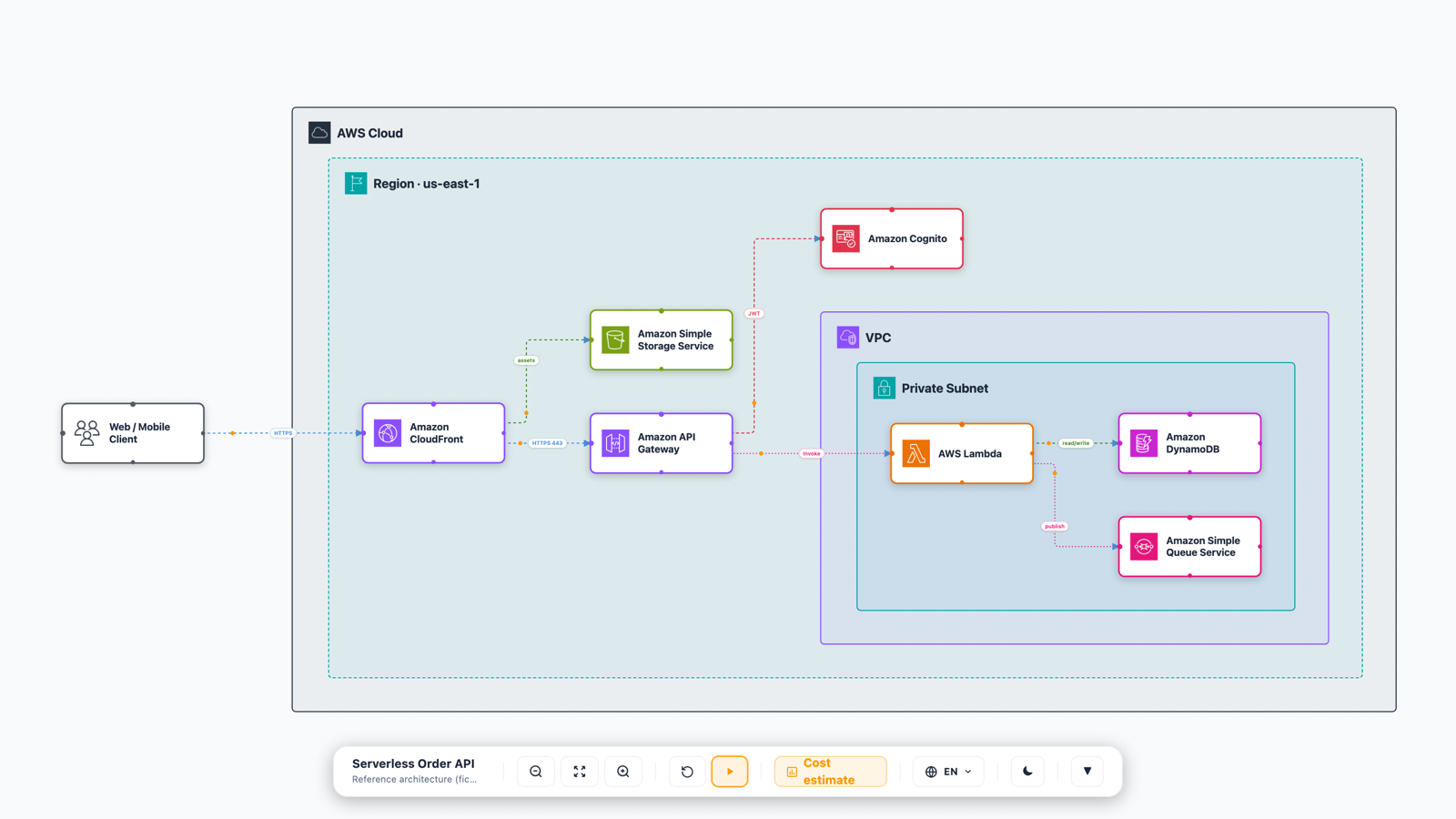
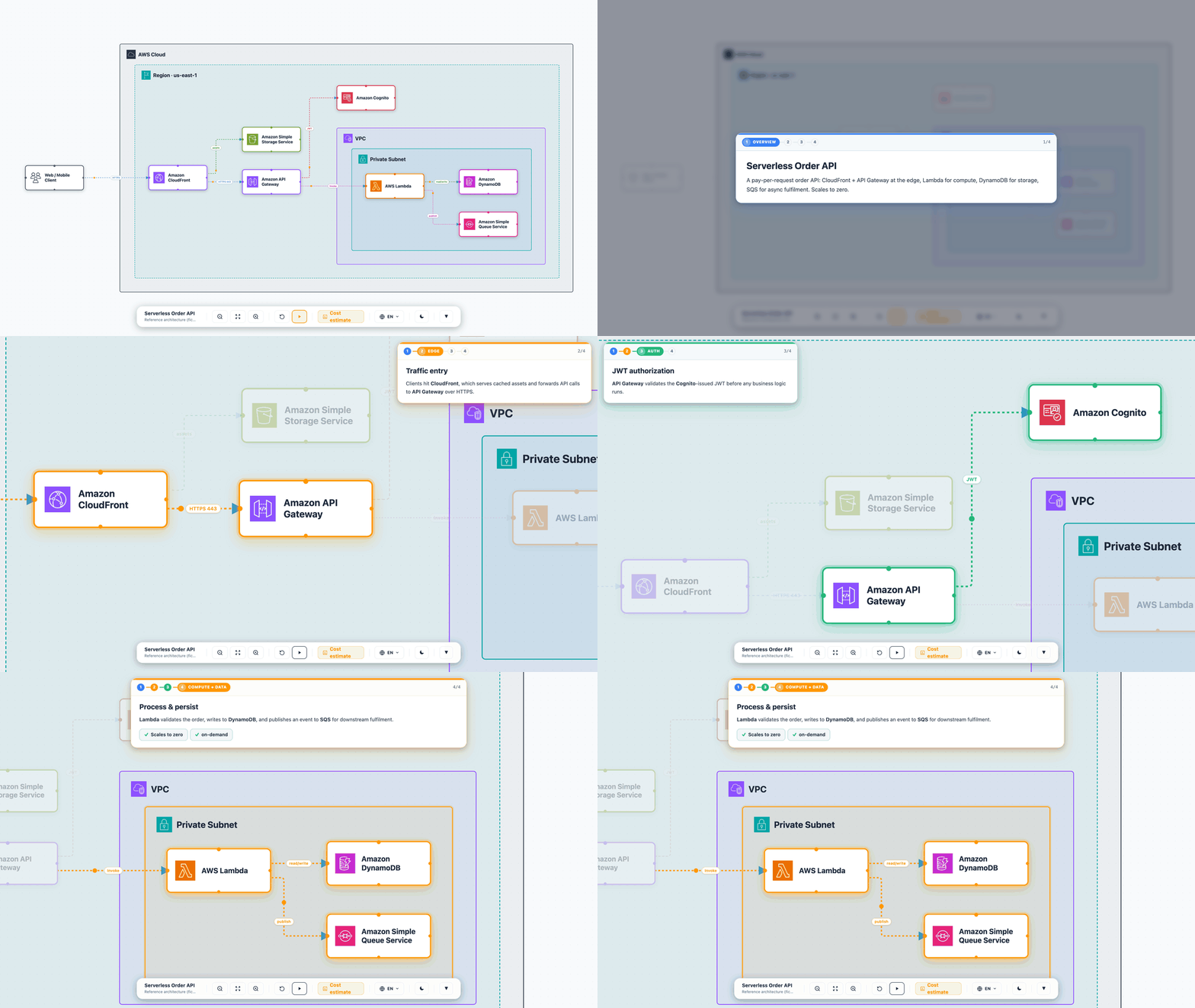
Guided walkthrough — step through the architecture beat by beat, with the camera framing each stage and an overlay card explaining the WHY:
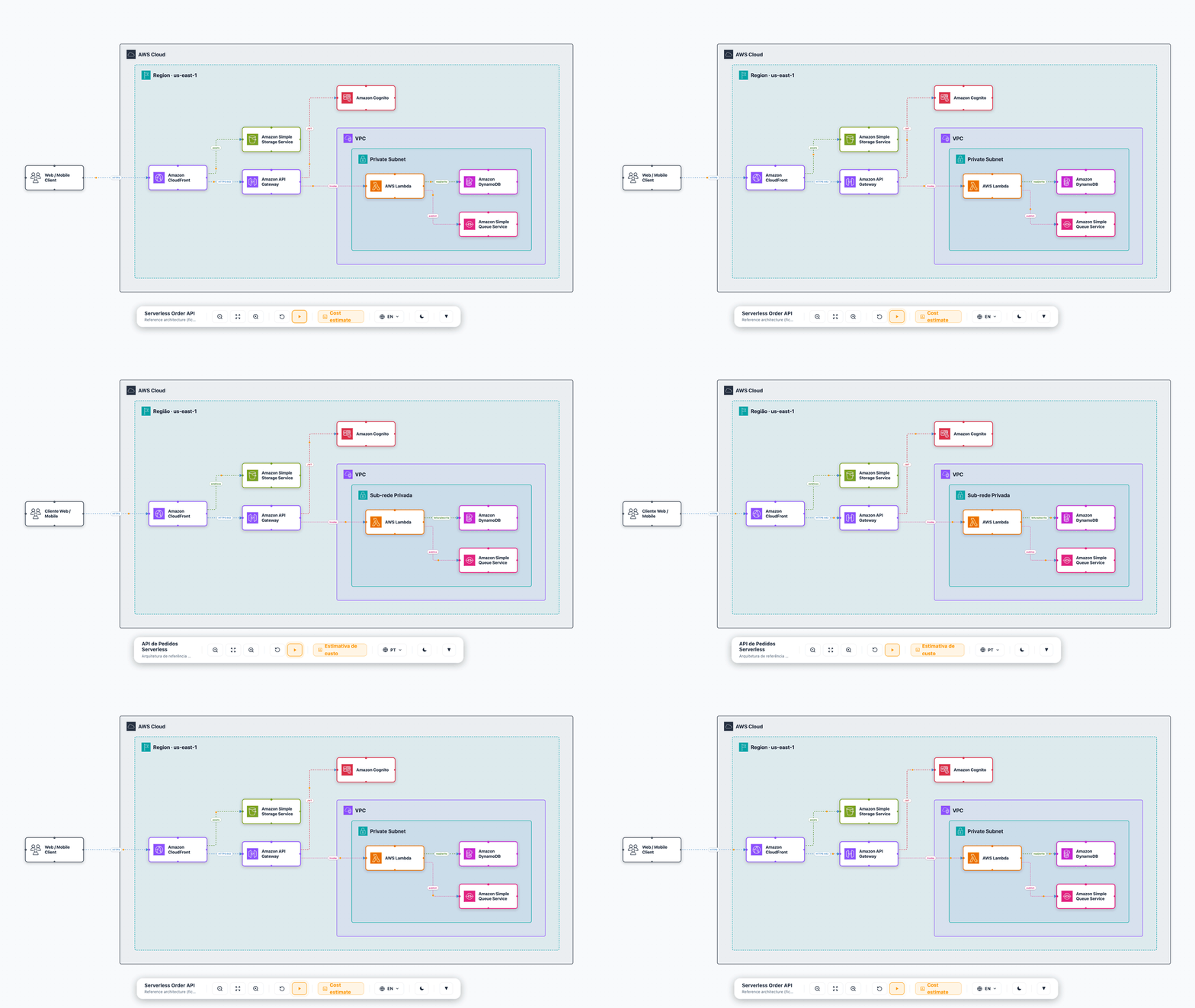
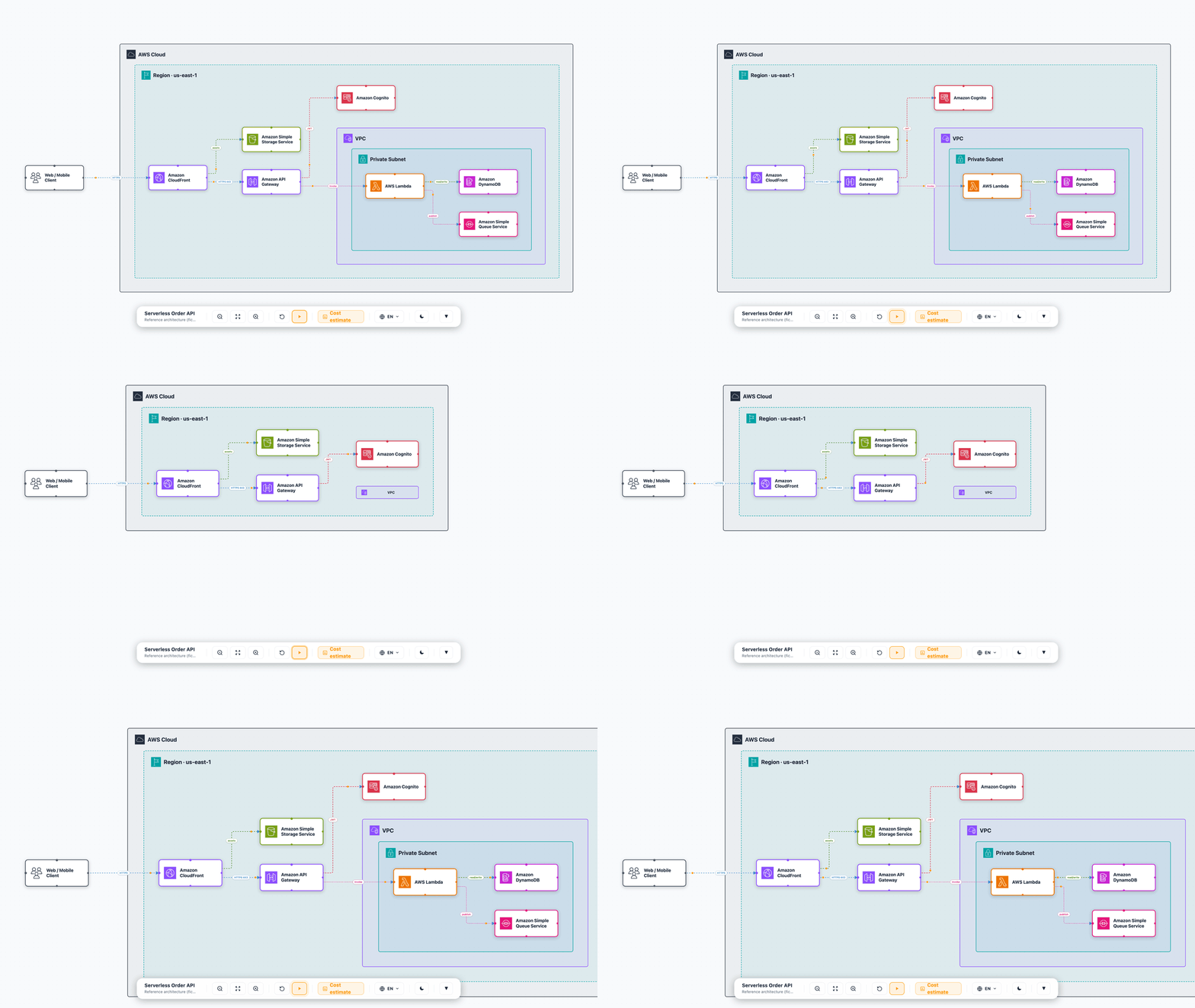
The same self-contained HTML is fully interactive — switch language, collapse containers, and flip the theme, all offline:
| Language switch (any language) | Collapsible containers | Light / dark theme |
|---|---|---|
 |
 |
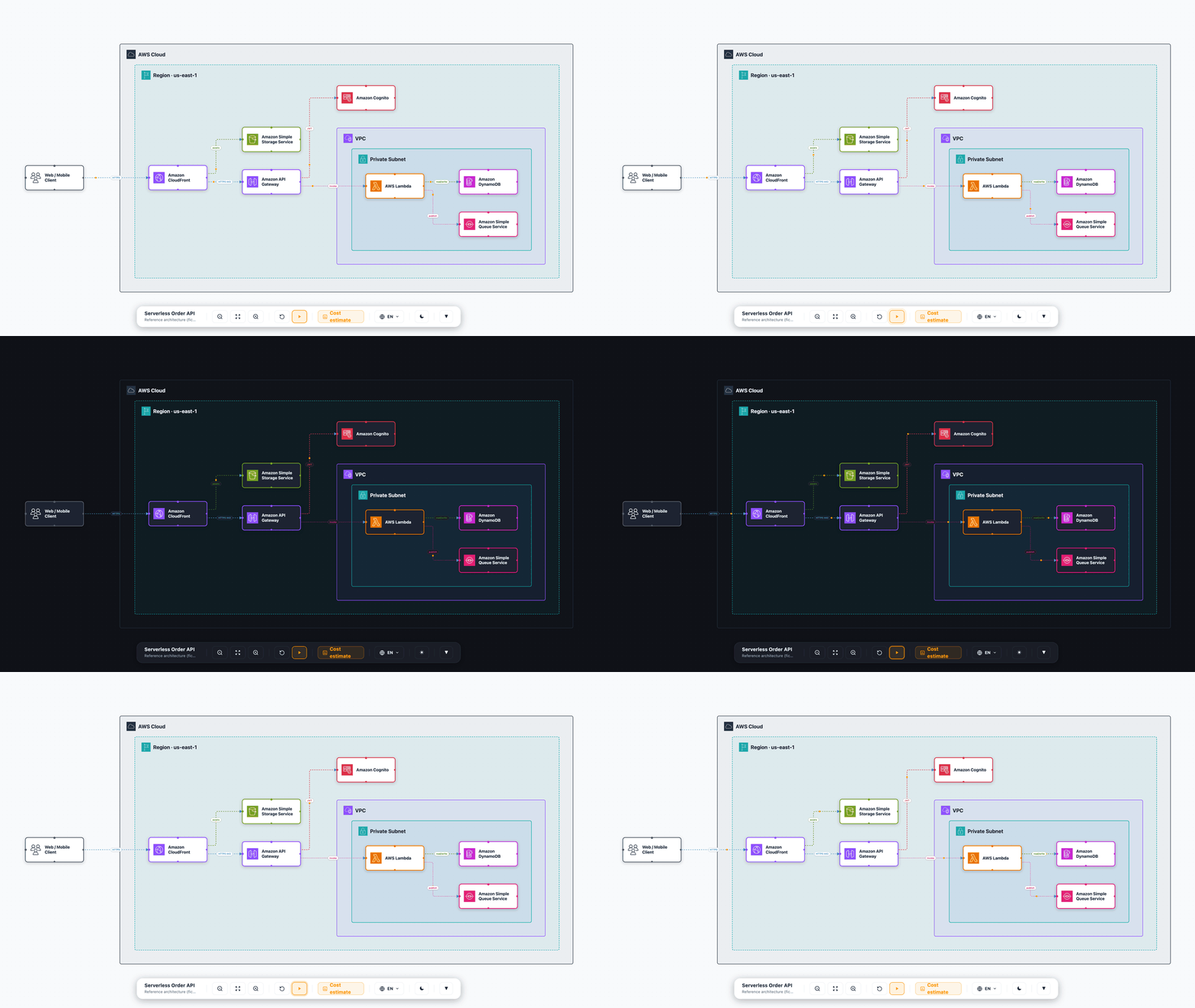 |
Disclaimer: Provided for illustration and documentation purposes, "as is" without warranty. The diagrams and any IaC or pricing it helps produce are starting points — review, test, and harden them (security, cost, and Well-Architected best practices) before using anything in production.
Features
- Interactive HTML diagram (React Flow) — draggable nodes, animated edges,
dark/light theme, any-language switch, LR/TB layout. Fully self-contained (icons
inlined as base64), so it works from
file://and as an email attachment. - Guided walkthrough — define ordered beats; arrow keys or the dock's play
button step through them. Each beat shows an overlay card (title, rich-markdown
body, bullets, status chips, code snippets) whose position you pick per beat via
cardSide(rightdefault,left,top, orfullcentered modal), and tints — and optionally zooms (stepZoom) or isolates (stepFocus) — a subset of the diagram. Effects are opt-in per diagram, so a single HTML file both is the diagram and narrates it. See Guided walkthrough for all knobs. - Any language — pass
languages: ['en','ja','fr', …]and author any text field as a{ en, ja, … }map; the toolbar shows a language dropdown and the whole diagram (labels, roles, walkthrough) re-renders in place. Not limited to EN/PT — localize the UI chrome for any language withuiStrings+langLabels. - Multi-tab documents — pass
sequence(or an explicittabs[]) and the same single HTML file becomes a small document with a tab rail: the architecture canvas, the animated UML sequence player (the same renderer as the standalonerender_diagram_mediasequence output — play/step/keyboard, activation bars,alt/opt/loop/parfragments, participant groups, notes, tone/badge narration cards with sourceprooflinks, PNG/SVG export), and free-formdoctabs (sections, bullets, code), andtypedtabs — any of 15 typed diagrams (Gantt, ER, swimlane, timeline, Kanban, journey, Wardley, decision workflow, …). Tabs deep-link via the URL hash. See Multi-tab documents. - Collapsible containers — every group header has a fold toggle; collapse a VPC
or account to a small box and the layout re-flows (start dense diagrams pre-collapsed
with
defaultCollapsed). - Typed connections — mark edges as
network/iam/event/data; each renders with a distinct color and dash style. Nodes carry aroledescribing what they do (shown on click). - Auto icon resolution — 350+ AWS services mapped to official icons; the
agent just passes a service name (
"Amazon RDS"), no icon path needed. .drawiooutput —auto_generate_diagramwrites a fully laid-out, editable.drawiofile (native AWS4 shapes) using the same ELK compound engine as the HTML, so it supports arbitrary group nesting and typed connections too;export_diagramconverts it to PNG/SVG/PDF (needs thedrawioCLI).- IaC handoff — exports a structured spec + instruction so an agent can generate production IaC via the official AWS IaC MCP (no re-implementation).
- Elements JSON handoff — every generated diagram writes a sidecar
.jsonnext to the HTML, andexport_diagram_jsonextracts the same neutral payload (title,services[],connections[],groups[], per-nodeconfig) from an existing file. This is the contract a downstream cost app (e.g.aws-cost-app-mcp) or inventory/docs tool consumes. This server makes no pricing calls itself.
AWS diagram guidelines
The output follows the official AWS architecture diagram guidance:
official icon set only, every node labeled, left-to-right / top-to-bottom flow,
and an editable source (.drawio). Process narration is kept off the canvas —
it lives in the guided-walkthrough overlay cards, not as clutter on the diagram.
For best results, label nodes with the canonical service name from the
AWS Architecture Icons set on first
use, and re-download the icon set when AWS refreshes it (quarterly).
Prerequisites
- Node.js 18+
- The AWS Architecture Icons (downloaded separately — see below). They are not bundled due to their Terms of Use.
Setup
git clone <this-repo>
cd sample-architecture-diagram-mcp-server
npm install

# Icons, once per MACHINE. Fetch the current package straight from AWS:
./scripts/fetch-icons.sh --latest
# ...or download Icon-package_<date>.zip from
# https://aws.amazon.com/architecture/icons/ (leave it in ~/Downloads), then:
./scripts/fetch-icons.sh
With no argument the script picks up the newest Icon-package*.zip (or an
older Asset-Package*.zip) in ~/Downloads (or ~/Desktop, or the current
directory); --latest downloads it from aws.amazon.com instead. Re-running with
a newer package overwrites the official icons, so the cache never goes stale. It installs ~810
official icons (services + group containers) into ~/.aws-architecture-icons
— a shared cache that every copy of this server reads, so a plugin install, an
npx run and a clone all see the same icons and reinstalling never means
downloading the zip again. Pass --dest assets to fill this checkout instead.
Or let the agent do it: ask it to run the setup_icons tool — same script,
no shell, and it reports the download link back if it can't find a zip.
Lookup order is: AWS_DIAGRAM_ICON_ROOT → this package's assets/ (if
populated) → ~/.aws-architecture-icons. An icon root holds icons/ plus,
optionally, aws-icons/ and tech-icons/ for your own SVGs.
Without icons the diagrams still render — nodes fall back to a category-colored initial, and every render tool says so in its result.
Register the MCP server
Clone this repo, run npm install, then point your MCP client at
mcp-server.js with an absolute path:
{
  "mcpServers": {
    "aws-architecture-diagram": {
      "command": "node",
      "args": ["/absolute/path/to/sample-architecture-diagram-mcp-server/mcp-server.js"]
    }
  }
}
Icons are not bundled (AWS Terms of Use). On first run without them, diagrams render category-colored initials; add them with
./scripts/fetch-icons.sh(or thesetup_iconstool) after downloading the Asset Package from https://aws.amazon.com/architecture/icons/. They install to the shared~/.aws-architecture-icons, so this is a one-time, per-machine step.
As a Claude Code plugin
This repo is also a Claude Code plugin: it ships .claude-plugin/plugin.json,
the .mcp.json above (resolved via ${CLAUDE_PLUGIN_ROOT}, so no absolute path
to edit), and skills/aws-architecture-diagram/ — a skill that teaches the
agent when to reach for an architecture view versus a sequence, a walkthrough or
a delta, and the authoring rules that make the output look right.
The repo doubles as its own single-plugin marketplace
(.claude-plugin/marketplace.json), so it installs in two commands:
/plugin marketplace add aws-samples/sample-architecture-diagram-mcp-server
/plugin install aws-architecture-diagram@aws-architecture-diagram
Installing a plugin clones the repo; it does not install dependencies. Run
npm install in the installed plugin directory before the server will start.
Icons need no extra step per install — the plugin reads the shared
~/.aws-architecture-icons cache, and if it is empty just ask the agent to run
setup_icons. Other MCP clients can read
skills/aws-architecture-diagram/SKILL.md as plain guidance.
Tools
| Tool | Purpose |
|---|---|
generate_html_diagram |
Interactive self-contained HTML diagram in one call (the main one) |
diagram_create |
Start an incremental draft; returns a draftId |
diagram_add_services |
Append services (nodes) to a draft |
diagram_add_connections |
Append connections (edges) to a draft |
diagram_add_groups |
Append container groups to a draft |
diagram_add_steps |
Append guided-walkthrough beats to a draft |
diagram_add_sequence |
Add an animated UML sequence diagram as a second tab of a draft |
diagram_add_doc_tab |
Add a prose tab (sections / bullets / code) to a draft |
diagram_render |
Render an incremental draft to a self-contained HTML file |
validate_diagram |
Lint a diagram payload before rendering: unresolved icons, dangling connection endpoints, orphaned parentId/step references |
diagram_delta |
Diff two diagram JSONs into a Before/Delta/After payload |
generate_sequence_diagram |
Standalone animated UML sequence player (no architecture canvas) |
sequence_create |
Start an incremental sequence draft; returns a draftId |
sequence_add_participants |
Append lifelines to a sequence draft |
sequence_add_messages |
Append messages (arrows) to a sequence draft |
sequence_add_notes |
Append notes to a sequence draft |
sequence_add_fragments |
Append combined fragments (alt / opt / loop / …) anchored by event id |
sequence_add_groups |
Append participant groups (bands) to a sequence draft |
sequence_render |
Render a sequence draft to a self-contained HTML file |
render_diagram_media |
Screenshot/record a generated HTML diagram to PNG, animated GIF or animated SVG |
auto_generate_diagram |
Fully auto-laid-out .drawio file |
generate_diagram |
.drawio with manual x/y positioning |
export_diagram |
Convert .drawio → PNG/SVG/PDF (needs drawio CLI) |
resolve_icon |
Resolve a service name to its icon filename (or list all) |
setup_icons |
Install the AWS Architecture Icons into the shared per-machine cache (auto-detects the Asset Package zip in ~/Downloads) |
list_shapes |
AWS4 drawio shape names (for the .drawio path) |
list_service_configs |
IaC config fields per service |
export_iac_json |
Extract an AWS IaC MCP handoff payload (resources + dependencies) from a diagram |
export_diagram_json |
Extract the diagram's elements as neutral JSON (title, services, connections, groups) for downstream apps |
For a diagram built up in stages (e.g. as an agent reasons through an
architecture), use the incremental builder: diagram_create →
diagram_add_* (in any order) → diagram_render. For a single-shot build, use
generate_html_diagram. Both speak the exact same service/connection/group/step
shape.
Example: generate_html_diagram
{
  "title": "My App",
  "subtitle": "Serverless API",
  "outputPath": "/tmp/my-app.html",
  // Optional header band above the canvas, for a file that has to explain itself
  // when opened cold (email attachment, wiki link). Omit for a bare canvas.
  // A plain string is shorthand for just `text`.
  "caption": {
    "eyebrow": "Reference architecture",
    "title": "My App — target state",
    "text": "What this diagram shows and for whom.",
    "meta": ["Version: v2", "Env: prod", "Owner: platform"]
  },
  "services": [
    { "id": "api", "service": "Amazon API Gateway", "shape": "api_gateway", "category": "networking",
      "role": "REST front door — routing, throttling, request validation" },
    { "id": "fn",  "service": "AWS Lambda", "shape": "lambda", "category": "compute", "subnet": "private",
      "role": "Handles CRUD operations", "config": { "iac": { "runtime": "nodejs22.x" } } },
    { "id": "db",  "service": "Amazon DynamoDB", "shape": "dynamodb", "category": "database", "subnet": "private",
      "role": "Primary store — single-digit-ms reads", "config": { "pricing": { "writeUnits": 100 } } }
  ],
  "connections": [
    { "id": "e1", "source": "api", "target": "fn", "type": "event", "label": "Invoke" },
    { "id": "e2", "source": "fn",  "target": "db", "type": "data",  "label": "Query" }
  ],
  "steps": [
    { "eyebrow": "1 · Compute + data", "title": "Process & persist",
      "body": "**Lambda** validates the request and writes to **DynamoDB**.",
      "nodes": ["fn", "db"], "zoom": ["fn", "db"], "badge": false }
  ],
  "stepZoom": true
}
Each service needs id, service, shape, and category. Everything below is optional.
Per service:
icon— auto-resolved from the service name (350+ mapped); pass it only to override (e.g. for a non-AWS component:"icon": "tech-icons/whatsapp.svg").label— friendly display name shown under the icon; keepservicea clean, icon-resolvable AWS name and put the custom name here.role— what the component does (the WHY); shown when the node is clicked.subnet: "public" | "private"— single-VPC placement shortcut. For arbitrary topologies use top-levelgroups+parentId(see Containers & nesting).external: true(+isApi) — place a third-party/on-prem actor outside the AWS Cloud boundary.pill/pillOverlay— a short qualifier badge on the node (e.g."On-premises","GPU").config.iac/config.pricing— key/value rows shown in the node's detail modal and carried into the elements JSON handoff (e.g.{ "iac": { "runtime": "nodejs22.x" } }); a downstream cost/IaC app reads them from there.
Per connection:
type—network/iam/event/data, each styled distinctly.label— a short pill on the edge (e.g."HTTPS 443").bidirectional— arrowheads at both ends (sync replication, peering, request/response).dashed— force a dashed line.
Per diagram:
steps(+stepZoom/stepFocus) — guided walkthrough beats (see Guided walkthrough).languages+lang(+uiStrings/langLabels) — offer a toolbar language switch; any text field may then be a{ en, ja, … }map instead of a plain string.collapsible/defaultCollapsed— fold/expand containers.direction—LR(default) orTBlayout flow.
Guided walkthrough
Pass a steps array to turn a static diagram into a narrated tour. Each beat is
an object; the viewer advances with the arrow keys or the dock's play button.
Card position — cardSide per beat controls where the overlay card sits:
cardSide |
Where the card renders |
|---|---|
right (default) |
Docked to the right of the canvas |
left |
Docked to the left |
top |
Flows above the canvas |
full |
Centered full-page modal over a dimmed backdrop — ideal for an intro/overview beat |
Effects — opt-in, set once on the diagram (not per beat):
| Field | Default | Effect |
|---|---|---|
stepZoom |
false |
Glide the camera onto each beat's zoom (or its nodes) |
stepFocus |
false |
Hide non-active nodes each beat (isolate) instead of just dimming them |
flowDots |
true |
Animate a dot travelling along each edge; set false for a static, print-friendly look |
Per-beat highlighting — nodes / edges / groups (ids to tint), zoom
(ids to frame, needs stepZoom), maxZoom, and tone / color for the accent.
Card content: eyebrow, title, body (markdown), bullets, chips, code,
process, sections.
"stepZoom": true,
"steps": [
  { "cardSide": "full", "eyebrow": "Overview", "title": "Serverless API",
    "body": "Edge → auth → compute → storage.", "badge": false },
  { "cardSide": "right", "eyebrow": "1 · Compute", "title": "Process & persist",
    "body": "**Lambda** writes to **DynamoDB**.",
    "nodes": ["fn", "db"], "zoom": ["fn", "db"], "badge": false }
]
Multi-tab documents (sequence + doc tabs)
A diagram is often only half the story: the other half is the order in which
things happen. Pass a sequence and the generated HTML grows a tab rail —
Architecture (the canvas, unchanged) plus Sequence — in the same
self-contained file. The sequence tab is the same player generate_sequence_diagram
ships standalone (same schema, same geometry, same narration card), so a flow you
already authored as its own file drops in unchanged.
"sequence": {
  "title": "Account vend",
  "subtitle": "Developer Hub → AFT → Control Tower",
  "participants": [
    { "id": "dev", "label": "Developer", "actor": true },
    { "id": "hub", "label": "Developer Hub", "icon": "tech-icons/backstage.svg",
      "stereotype": "boundary" },
    { "id": "sfn", "label": "Step Functions", "service": "AWS Step Functions",
      "sub": "aft-account-provisioning" }
  ],
  "groups": [
    { "label": "AWS Control Plane", "participants": ["sfn"], "tone": "info" }
  ],
  "events": [
    { "kind": "message", "id": "m1", "from": "dev", "to": "hub",
      "label": "fill the template form", "activate": true },
    { "kind": "message", "id": "m2", "from": "hub", "to": "sfn",
      "label": "start execution", "arrow": "async", "tone": "success",
      "title": "Vend starts", "desc": "Writes the `.tf` request and pushes.",
      "proof": { "repo": "https://github.com/…", "path": "lib/schemas.js", "lines": "40-58" } },
    { "kind": "message", "id": "m3", "from": "hub", "to": "dev",
      "label": "render HCL only", "arrow": "reply", "deactivate": true },
    { "kind": "note", "id": "n1", "over": ["hub", "sfn"],
      "label": "keyless (IRSA → STS)", "badge": "keyless" }
  ],
  "fragments": [
    { "kind": "alt", "label": "dispararVend = true", "startId": "m2", "endId": "m3",
      "dividers": [{ "beforeId": "m3", "label": "[else] dry-run" }] }
  ]
}
- Participants get an icon automatically from
service(any AWS name), or an expliciticon(tech-icons/vault.svg);actor: truerenders a stick-figure glyph,stereotypeadds a«…»line,suba smaller second line. - Events are a discriminated list —
kind: "message"orkind: "note"— and every event needs a stableid. A message carriesarrow(sync|async|reply),tone,badge(gate/keyless/async/sync/phase/fail), UML lifecycle flags (activate,deactivate,create,destroy,found,lost) and the narration fields (title,flow,desc,code,codeLabel,proof). A note spansover: [a, b]. - Fragments live in their own
fragments[]array and are anchored by event id (startId/endId, plusdividers[{beforeId,label}]for theelseof analt) —alt,opt,loop,par,break,critical,ref,neg,assert. Groups (groups[]) box a set of participant columns (PlantUMLbox). proofis free text or a structured{repo, path, ref, lines, url, text}ref rendered as a clickable link to the exact file@ref#Lx-Ly.- The view animates: play/pause, step, ←/→/space/Home/End, a speed slider,
"show all", per-step camera framing, participant search, and PNG / SVG
export. Activation bars are auto-derived unless a message sets
activate/deactivate(then explicit mode);autoActivate: falsehides them. - For full control pass
tabs[]instead, mixingkind: "architecture","sequence","doc"(prosesections[]withtitle,body,bullets,code) and"typed"(diagram: { kind: "gantt" | "er" | "workflow" | …, … }, validated against the core's typed specs). Labels default per kind (Architecture / Arquitetura / …);slugsets the URL hash so a tab is linkable. - Incrementally, the draft tools do the same:
diagram_add_sequenceanddiagram_add_doc_tabbeforediagram_render.
With fewer than two tabs nothing changes — the output stays the classic single-canvas diagram.
Development
npm run build:core         # build the shared @aws-sample-live-diagram/core render package
npm run build:standalone   # rebuild dist/index.html (the HTML template)
npm test                    # run the vitest unit suite
node mcp-server.js          # run the MCP server over stdio
The repo is an npm workspace. The render layer — the architecture canvas
(nodes, edges, group containers, walkthrough cards, layout engine), the flow and
sequence players, the palette/theme tokens and the UI strings — lives in
packages/diagram-core (@aws-sample-live-diagram/core, see its README) and is
shared by the standalone app in standalone/ + src/, by the self-contained
flow/sequence HTML players (which inline its layout and tokens) and by apps that
install it from a release. The MCP server and Node-side generators live in
mcp-server.js + lib/; lib/schemas.js is the single source of truth for the
input shape (imported by both the tools and the local example generators).
lib/html-generator.js injects the diagram data and base64-inlined icons into
the built dist/index.html. Tests (test/) cover the pure generators — icon
resolution, draw.io XML, service-config integrity, the core entries — and
npm run typecheck checks the standalone app against the core's types.
Containers & nesting
Declare arbitrary containers via the top-level groups array — any depth, any
topology. Each group has an id, label, optional parent (for nesting), and
a variant that maps to an official AWS group icon + color:
aws-cloud, region, vpc, public-subnet, private-subnet,
availability-zone, account, organization, auto-scaling-group, group
(generic logical), corporate-data-center, on-premises.
Services join a group via parentId. This models multi-VPC, multi-account,
multi-AZ, and hybrid (on-prem ↔ AWS) architectures. If you omit groups, a
single AWS Cloud → VPC → public/private subnet tree is derived automatically
from each service's subnet field (the common single-VPC case).
Both output paths share one layout engine (ELK compound), so the .drawio
path (auto_generate_diagram) supports the same 12 container variants, arbitrary
nesting, and typed connections as the interactive HTML — the two stay visually
consistent.
"groups": [
  { "id": "prod", "label": "Prod Account", "variant": "account" },
  { "id": "vpcA", "label": "VPC A", "parent": "prod", "variant": "vpc" },
  { "id": "subA", "label": "Private Subnet", "parent": "vpcA", "variant": "private-subnet" }
],
"services": [ { "id": "fn", "service": "AWS Lambda", "category": "compute", "parentId": "subA" } ]
Remaining limit: services
without a mapped icon render as a category-colored initial (300+ services mapped;
run resolve_icon to check coverage).
License
Licensed under MIT-0. See LICENSE. Third-party dependency notices and
attributions (including elkjs, under EPL-2.0) are in THIRD-PARTY-LICENSES.
The AWS Architecture Icons are subject to their own
Terms of Use and are not
distributed with this project.
from github.com/aws-samples/sample-architecture-diagram-mcp-server
Установка Sample Architecture Diagram
У этого сервера нет опубликованного пакета — он собирается из исходников. Открой репозиторий и следуй инструкции в README.
▸ github.com/aws-samples/sample-architecture-diagram-mcp-serverFAQ
Sample Architecture Diagram MCP бесплатный?
Да, Sample Architecture Diagram MCP бесплатный — установка в пару кликов через Unyly без оплаты.
Нужен ли API-ключ для Sample Architecture Diagram?
Нет, Sample Architecture Diagram работает без API-ключей и переменных окружения.
Sample Architecture Diagram — hosted или self-hosted?
Self-hosted: сервер запускается локально на твоей машине командой из раздела установки.
Как установить Sample Architecture Diagram в Claude Desktop, Claude Code или Cursor?
Открой Sample Architecture Diagram на unyly.org, выбери вкладку своего клиента (Claude Desktop, Claude Code, Cursor) и нажми Install — конфиг сгенерируется автоматически, без правки JSON.
Похожие MCP
GitHub
PRs, issues, code search, CI status
 автор: GitHub
Filesystem
Secure file operations with configurable access controls.
Memory
Knowledge graph-based persistent memory system.

Unyly Deploy
Deploy sites and MCP servers to Unyly straight from your AI agent
 автор: Unyly
Amap Maps Mcp Server
MCP server for using the AMap Maps API
 автор: duxiaohui
PayMCP
Lightweight payments layer for MCP servers: turn tools into paid endpoints with a two-line decorator. [PyPI](https://pypi.org/project/paymcp/) · [npm](https://w
 автор: blustAI
Server For Power BI
Enables exploring Microsoft Fabric / Power BI workspaces and semantic models, and executing ad-hoc DAX queries.
 автор: Mitsubishi-Fuso
Template MCP Server
A CLI tool to create a new Model Context Protocol server project with TypeScript support, dual transport options, and an extensible structure
 автор: mcpdotdirect
Supabase
Database, auth and storage
 автор: Supabase
Everything
Reference / test server with prompts, resources, and tools.
Compare Sample Architecture Diagram with
Не уверен что выбрать?
Найди свой стек за 60 секунд
Автор?
Embed-бейдж для README
Похожее
Все в категории development