
Scavier Engine
FreeNot checkedSelf-hosted website intelligence engine. Analyze any URL and get structured knowledge — tech stack, server info, libraries — via REST API or MCP.

About
Self-hosted website intelligence engine. Analyze any URL and get structured knowledge — tech stack, server info, libraries — via REST API or MCP.
README
License: MIT PHP 8.3+ Zero Dependencies
Open-source Website Intelligence Engine. Analyzes any public URL and returns structured knowledge about its technology stack, infrastructure, security posture, business signals, and more. One API call. No API keys. Self-hosted.
Live demo: engine.scavier.io — try the API directly. A graphical web interface is also in development at scavier.io.
What it detects: CMS, frameworks, libraries, analytics, hosting provider, CDN, DNS, SSL/TLS, security headers, email security, e-commerce platforms, payment providers, CRM, chat widgets, A/B testing tools, social profiles, company data, SEO health, AI readiness, and much more — 44 detectors across 8 categories.
Quick Start
Docker (recommended)
git clone https://github.com/grabowskiadrian/scavier-engine.git
cd scavier
docker compose up -d
Scavier is now running at http://localhost:8000.
Manual
Requires PHP 8.3+ with curl and dom extensions. System tools: dig, openssl, whois.
git clone https://github.com/grabowskiadrian/scavier-engine.git
cd scavier
composer install
php -S localhost:8000 -t public
Usage
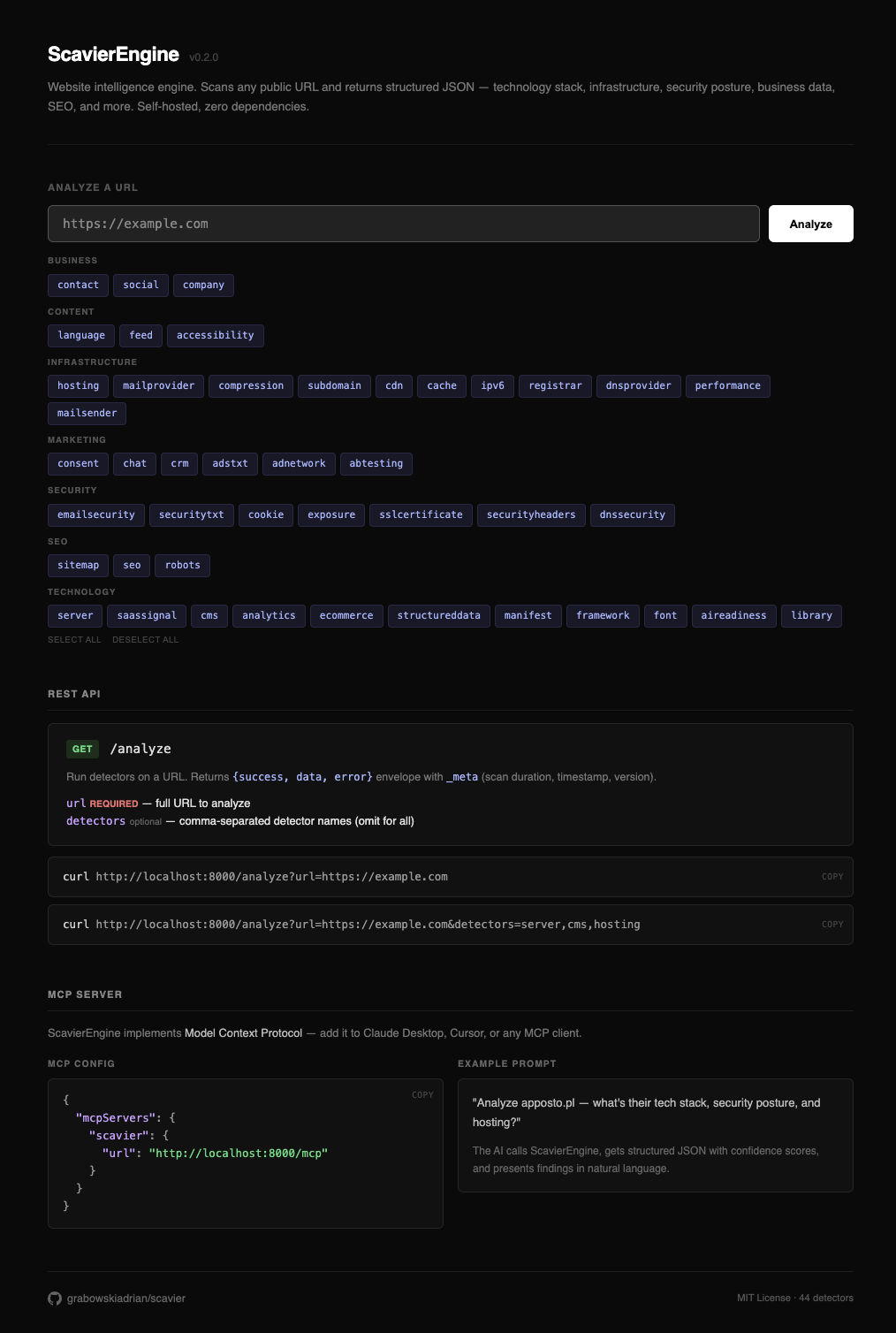
REST API
# All detectors
curl "http://localhost:8000/analyze?url=https://example.com"

# Specific detectors
curl "http://localhost:8000/analyze?url=https://example.com&detectors=cms,hosting,analytics"
Response:
{
  "success": true,
  "url": "https://example.com",
  "data": {
    "technology": {
      "cms": {
        "value": "WordPress",
        "confidence": 0.95,
        "evidence": "Meta generator tag",
        "version": "6.4",
        "plugins": ["woocommerce", "yoast-seo"],
        "theme": "flavor"
      },
      "frameworks": [
        { "value": "React", "type": "frontend", "confidence": 0.85, "evidence": "Script src match" }
      ]
    },
    "infrastructure": {
      "hosting": { "value": "Hetzner", "confidence": 0.8, "evidence": "WHOIS ASN match" },
      "cdn": { "value": "Cloudflare", "confidence": 1, "evidence": "HTTP header: cf-ray" }
    },
    "security": {
      "headers": {
        "present": [
          { "header": "Strict-Transport-Security", "value": "max-age=31536000; includeSubDomains" }
        ],
        "missing": ["Content-Security-Policy", "Permissions-Policy"]
      }
    },
    "audit": {
      "security_score": { "score": 0.6, "grade": "C", "present_count": 6, "total_count": 10 },
      "seo_score": { "score": 0.82, "passed": 9, "total": 11 }
    },
    "_meta": {
      "scan_duration": 14.2,
      "timestamp": "2025-01-15T10:30:00+00:00",
      "engine_version": "0.2.0",
      "detectors_run": ["cms", "hosting", "analytics"],
      "tags": ["Cloudflare", "Google Analytics", "React", "WordPress"]
    }
  }
}
Open http://localhost:8000 in a browser for interactive docs with a detector picker UI.
MCP Server
Scavier implements Model Context Protocol — add it to Claude Desktop, Cursor, or any MCP client:
{
  "mcpServers": {
    "scavier": {
      "url": "http://localhost:8000/mcp"
    }
  }
}
Then ask your AI: "Analyze example.com and tell me what tech stack they use"
PHP API
use Scavier\Engine\Scavier;

$scavier = new Scavier();
$result = $scavier->analyze('https://example.com');

if ($result['success']) {
    $data = $result['data'];
    // $data['technology']['cms']['value'] => 'WordPress'
}
Detectors
44 detectors organized in 8 categories. Use short names with the detectors query parameter.
Technology (11)
| Short name | Description |
|---|---|
server |
Web server software and runtime (nginx, Apache, PHP version) |
cms |
CMS with version, plugins, theme (WordPress, Drupal, Joomla, Wix, ...) |
framework |
Frontend and backend frameworks (React, Vue, Next.js, Laravel, Django, ...) |
library |
JS/CSS libraries with versions (jQuery, Bootstrap, HTMX, D3.js, ...) |
analytics |
Analytics tools and tracking IDs (GA4, GTM, Hotjar, Mixpanel, ...) |
ecommerce |
E-commerce platform and 14 payment processors |
font |
Font services and families (Google Fonts, Adobe Fonts, Bunny Fonts) |
structureddata |
JSON-LD structured data types |
manifest |
PWA manifest detection |
aireadiness |
AI readiness: llms.txt, MCP server, OpenAPI docs, AI crawler policy |
saassignal |
Strategic SaaS signals: auth, search, push, monitoring, feature flags, headless CMS |
Infrastructure (11)
| Short name | Description |
|---|---|
hosting |
Hosting provider via headers, CNAME, IP, ASN (30+ providers) |
cdn |
Content delivery network (Cloudflare, Fastly, CloudFront, Akamai, ...) |
dnsprovider |
DNS hosting provider (16 providers) |
mailprovider |
Mailbox hosting via MX records (Google Workspace, Microsoft 365, ...) |
mailsender |
Email sending services from SPF (Mailchimp, SendGrid, ...) |
registrar |
Domain registration, registrar, age, WHOIS data |
subdomain |
Subdomain discovery via TLS SAN, crt.sh, DNS brute force |
performance |
Response timing, TTFB grading, page weight, HTTP version |
compression |
HTTP compression (gzip, brotli) |
cache |
Caching headers analysis |
ipv6 |
IPv4/IPv6 dual-stack support |
Security (7)
| Short name | Description |
|---|---|
securityheaders |
Security headers audit with A-F grading (HSTS, CSP, X-Frame-Options, ...) |
sslcertificate |
SSL certificate, TLS config, OCSP stapling, issuer identification |
cookie |
Cookie analysis and tracker identification |
emailsecurity |
Email authentication (SPF, DMARC) |
dnssecurity |
DNS security (DNSSEC, CAA, DANE) |
exposure |
Sensitive file exposure (.env, .git, DNS zone transfer) |
securitytxt |
security.txt vulnerability disclosure file |
Business (3)
| Short name | Description |
|---|---|
company |
Company identity, registration numbers (NIP, REGON, KRS, VAT) |
contact |
Contact info from multi-page scan (email, phone, address) |
social |
Social media profiles (8 platforms) |
Marketing (6)
| Short name | Description |
|---|---|
crm |
CRM and marketing automation (HubSpot, Salesforce, Marketo, ...) |
adnetwork |
Advertising networks (AdSense, Ad Manager, Taboola, ...) |
adstxt |
ads.txt file and programmatic ad exchanges |
abtesting |
A/B testing tools (Optimizely, VWO, LaunchDarkly, ...) |
chat |
Live chat widgets (Intercom, Drift, Zendesk, Crisp, ...) |
consent |
Cookie consent management (Cookiebot, OneTrust, ...) |
SEO (3)
| Short name | Description |
|---|---|
robots |
robots.txt analysis and AI bot blocking detection |
sitemap |
sitemap.xml detection and structure |
seo |
SEO audit: meta tags, Open Graph, canonical, structured data (11 checks) |
Content (3)
| Short name | Description |
|---|---|
language |
Website language and multilingual support |
accessibility |
Accessibility signals and overlay tool detection |
feed |
RSS/Atom feed detection |
Architecture
URL -> Target (SSRF check) -> Collectors (fetch data) -> Context -> Detectors (extract knowledge) -> JSON
- 11 Collectors fetch raw data: HTTP response, HTML DOM, DNS records, TLS certificate, WHOIS, RDAP, Certificate Transparency, subdomain brute-force, zone transfer testing
- 44 Detectors analyze collected data and extract structured knowledge with confidence scores
- Context is a shared typed data store between collectors and detectors
- Auto-discovery — drop a PHP class in the right directory, it's available instantly
- Dependency resolution — topological sort ensures correct execution order
Full architecture documentation: doc/architecture.md
Output format
Every detected fact carries:
| Field | Description |
|---|---|
value |
The detected technology/service name |
confidence |
0.0 - 1.0 — how certain the detection is |
evidence |
What signal triggered the detection |
Confidence is calibrated by evidence type: HTTP headers = 1.0, meta generator = 0.95, script URL = 0.9, inline pattern = 0.85, cookies = 0.8, HTML patterns = 0.7, text patterns = 0.6.
The _meta.tags array provides a flat, deduplicated list of all technology/service names found — a quick summary without traversing the full result tree.
The audit section aggregates cross-detector scores: security grade (A-F), SEO score, SSL issues, and exposure alerts.
Extending
Adding a detector
Drop a PHP class into any subdirectory of src/Detector/ — it's auto-discovered and available via API and MCP instantly.
<?php

namespace Scavier\Detector\Technology;

use Scavier\Collector\HtmlCollector;
use Scavier\Collector\Data\HtmlData;
use Scavier\Engine\Context;
use Scavier\Engine\Contract\Detector;

class MyDetector extends Detector
{
    public static function dependencies(): array
    {
        return [HtmlCollector::class];
    }

    public function detect(Context $context): ?array
    {
        $html = $context->get(HtmlData::class);

        if ($html->hasScriptMatching('/my-tool\.js/')) {
            return [
                'technology' => [
                    'my_tool' => [
                        'value' => 'MyTool',
                        'confidence' => 0.9,
                        'evidence' => 'Script src match',
                    ],
                ],
                '_tags' => ['MyTool'],
            ];
        }

        return null;
    }
}
Adding a collector
Same pattern — drop a class into src/Collector/:
<?php

namespace Scavier\Collector;

use Scavier\Engine\Context;
use Scavier\Engine\Contract\Collector;
use Scavier\Engine\Target;

class MyCollector extends Collector
{
    public static function dependencies(): array
    {
        return []; // other collectors this one depends on
    }

    public function execute(Target $target, Context $context): void
    {
        // Fetch data, store in context via $context->set(new MyData(...))
    }
}
Documentation
- Architecture — pipeline, components, output structure, security model
- Collectors reference — all 11 collectors with fields and implementation notes
- Detectors reference — all 44 detectors with detection logic and output keys
Development
composer install        # install dependencies (including dev)
composer test           # run PHPUnit tests (250 tests, 541 assertions)
php -S localhost:8000 -t public   # start dev server
Contributing
Contributions are welcome. See CONTRIBUTING.md for details and Code of Conduct.
License
Installing Scavier Engine
This server has no published package — it is built from source. Open the repository and follow its README.
▸ github.com/grabowskiadrian/scavier-engineFAQ
Is Scavier Engine MCP free?
Yes, Scavier Engine MCP is free — one-click install via Unyly at no cost.
Does Scavier Engine need an API key?
No, Scavier Engine runs without API keys or environment variables.
Is Scavier Engine hosted or self-hosted?
Self-hosted: the server runs locally on your machine via the install command above.
How do I install Scavier Engine in Claude Desktop, Claude Code or Cursor?
Open Scavier Engine on unyly.org, pick your client tab (Claude Desktop, Claude Code, Cursor) and press Install — the config is generated automatically, no JSON editing.
Related MCPs
GitHub
PRs, issues, code search, CI status
 by GitHub
Filesystem
Secure file operations with configurable access controls.
Memory
Knowledge graph-based persistent memory system.
Template MCP Server
A CLI tool to create a new Model Context Protocol server project with TypeScript support, dual transport options, and an extensible structure
 by mcpdotdirect
Amap Maps Mcp Server
MCP server for using the AMap Maps API
 by duxiaohui
Supabase
Database, auth and storage
 by Supabase
Everything
Reference / test server with prompts, resources, and tools.
Git
Tools to read, search, and manipulate Git repositories.
Sequential Thinking
Dynamic and reflective problem-solving through thought sequences.
Time
Time and timezone conversion capabilities.
Compare Scavier Engine with
Not sure what to pick?
Find your stack in 60 seconds
Author?
Embed badge for your README
Browse similar
All development MCPs