
Scryfall
FreeNot checkedIntegrates with the Scryfall Magic: The Gathering API to enable card searches, retrieval of card details, rulings, and pricing information for deck building and

About
Integrates with the Scryfall Magic: The Gathering API to enable card searches, retrieval of card details, rulings, and pricing information for deck building and game analysis.
README
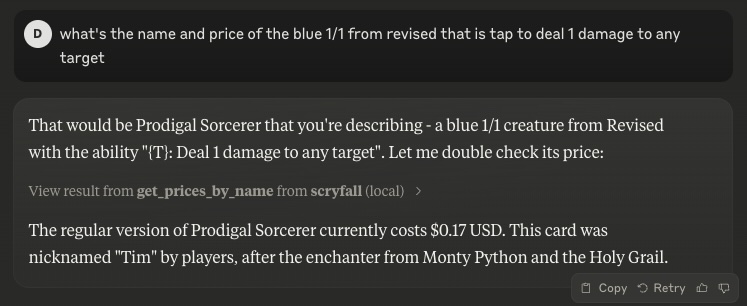
A Model Context Protocol (MCP) server for interacting with the Scryfall API. It provides tools to look up Magic: The Gathering card details, card rulings, and price information.
Features
- search_cards
Perform a text-based search on Scryfall. Returns a list of matching cards. - get_card_by_id
Retrieve a card directly via its Scryfall UUID. - get_card_by_name
Retrieve a card by exact English name. - random_card
Get a random card from the entire Scryfall database. - get_rulings
Retrieve official rulings for a card, which may clarify card interactions or rules. - get_prices_by_id
Retrieve current pricing information (USD, USD foil, EUR, TIX) for a given card by Scryfall ID. - get_prices_by_name
Retrieve current pricing information (USD, USD foil, EUR, TIX) for a given card by exact name.
Usage
The server can be run in two modes:
- Standard stdio mode (default)
- Server-Sent Events (SSE) mode with HTTP endpoints
Using NPX
If you have Node.js installed locally:
# Stdio mode
npx scryfall-mcp-server

# SSE mode
npx scryfall-mcp-server --sse
Connecting to the Server
Stdio Mode
Your application or environment (like Claude Desktop) can communicate directly via stdio with the server.
SSE Mode
When running in SSE mode (with --sse), you can connect using the MCP CLI:
npx @wong2/mcp-cli --sse http://localhost:3000/sse
The server will be available at:
- SSE endpoint:
http://localhost:3000/sse - Message endpoint:
http://localhost:3000/messages
Integration in claude_desktop_config.json
Example snippet for stdio mode:
{
  "mcpServers": {
    "scryfall": {
      "command": "docker",
      "args": ["run", "-i", "--rm", "mcp/scryfall"]
    }
  }
}
Or with npx:
{
  "mcpServers": {
    "scryfall": {
      "command": "npx",
      "args": ["scryfall-mcp-server"]
    }
  }
}
Building from Docker
docker build -t mcp/scryfall .
Then you can run in stdio mode:
docker run -i --rm mcp/scryfall
Or in SSE mode:
docker run -i --rm -p 3000:3000 mcp/scryfall --sse
License
Licensed under the MIT License.
Installing Scryfall
This server has no published package — it is built from source. Open the repository and follow its README.
▸ github.com/cryppadotta/scryfall-mcpFAQ
Is Scryfall MCP free?
Yes, Scryfall MCP is free — one-click install via Unyly at no cost.
Does Scryfall need an API key?
No, Scryfall runs without API keys or environment variables.
Is Scryfall hosted or self-hosted?
Self-hosted: the server runs locally on your machine via the install command above.
How do I install Scryfall in Claude Desktop, Claude Code or Cursor?
Open Scryfall on unyly.org, pick your client tab (Claude Desktop, Claude Code, Cursor) and press Install — the config is generated automatically, no JSON editing.
Related MCPs
GitHub
PRs, issues, code search, CI status
 by GitHub
Filesystem
Secure file operations with configurable access controls.
Memory
Knowledge graph-based persistent memory system.
Template MCP Server
A CLI tool to create a new Model Context Protocol server project with TypeScript support, dual transport options, and an extensible structure
 by mcpdotdirect
Compare Scryfall with
Not sure what to pick?
Find your stack in 60 seconds
Author?
Embed badge for your README
Browse similar
All development MCPs