
Secure Telegram
БесплатноНе проверенAllows AI clients to securely interact with Telegram accounts through scoped endpoints, with encrypted session storage and per-tool permission checks.

Описание
Allows AI clients to securely interact with Telegram accounts through scoped endpoints, with encrypted session storage and per-tool permission checks.
README

Connect Claude, Cursor, or any MCP client to Telegram — without handing any of them your whole account.


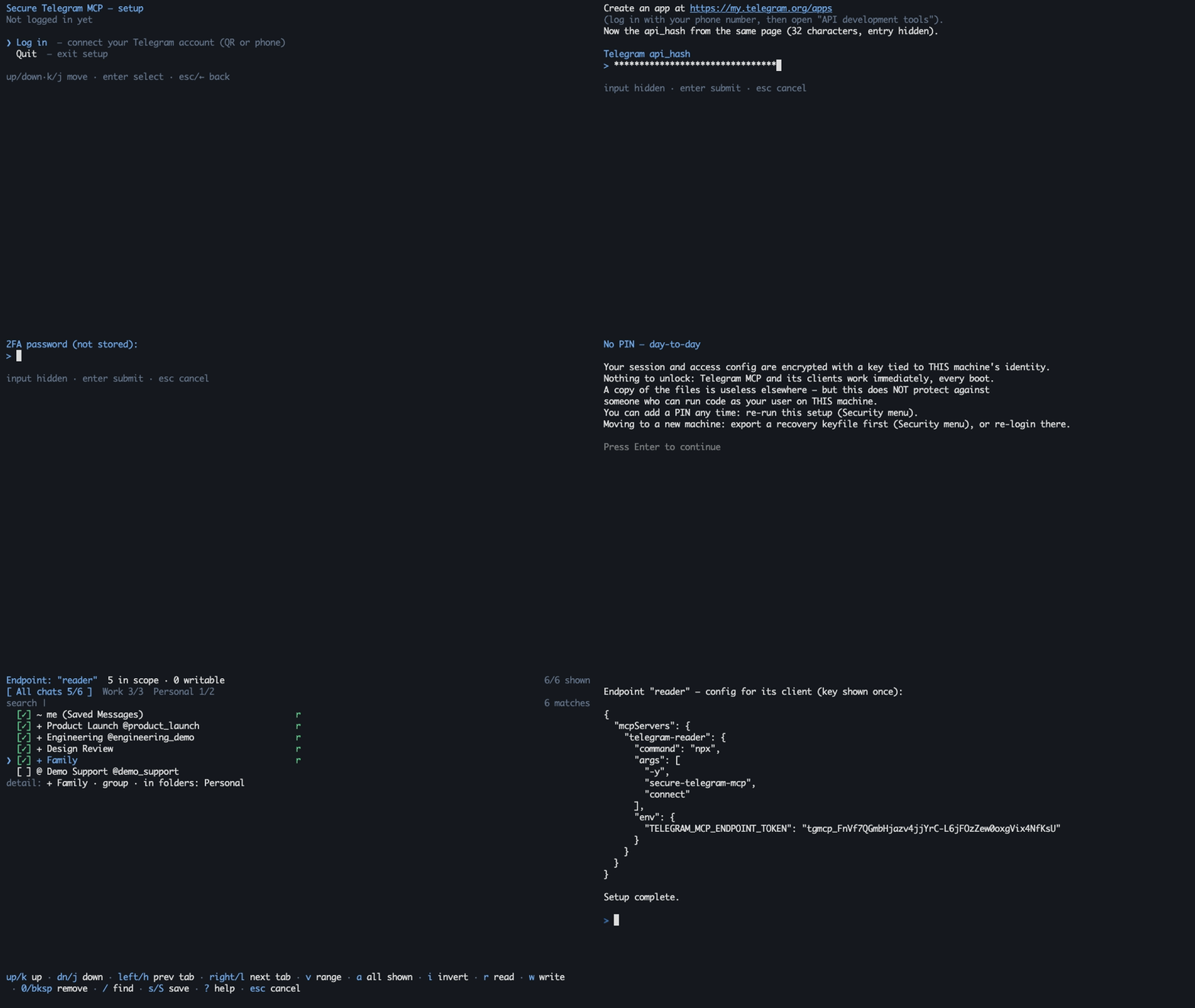
The demo runs against synthetic data — no real Telegram connection, no usable credential.
❌ The usual Telegram MCP setup
- The AI client holds your full account session — every chat, every contact, every write.
- Access is all-or-nothing: your work agent can read your family group.
- The session credential sits in plaintext in a config file or
.env.
✅ With secure-telegram-mcp
- Each AI client gets an endpoint: its own API key, scoped to the chats and folders you pick.
- Read/write verbs are re-checked on every call and fail closed — the tool menu is discovery, not authority.
- The Telegram session is encrypted at rest (AES-256-GCM, scrypt-wrapped keys), machine-bound by default or PIN-protected.
For example:
| AI client | Endpoint | Account | Telegram scope | Access |
|---|---|---|---|---|
| Personal agent | personal |
main |
private chats | read + write |
| Work agent | work |
work-acc |
the Work folder |
read-only |
Every MCP connection authenticates one endpoint and receives a scope-bound Telegram adapter for that endpoint's account. Endpoints can ride different logged-in accounts; endpoints on the same account share one background Telegram connection. Out-of-scope chats are not addressable at all.
Features
- 🔑 Per-endpoint API keys — each AI client gets its own key and scope, pinned to one of your logged-in accounts (one or many); only salted key hashes are stored.
- 📁 Folder-scoped access — bind an endpoint to Telegram folders, chats, or channels; write access is opt-in per endpoint.
- 🔒 Encrypted session at rest — AES-256-GCM envelopes for sessions and policy; PIN, recovery-keyfile, and machine-bound unlock slots.
- 🚦 Anti-ban pacing — per-account token buckets on messages, forwards, and search, plus a circuit breaker that backs the whole account off at the first sign of saturation. Pacing lowers the risk of flood limits; nothing can guarantee against a ban.
- 👤 Human-in-the-loop writes — optional per-endpoint confirmation; requires a client that supports MCP elicitation. On clients that don't, a confirm-writes endpoint fails closed: writes are blocked, never silent.
- ⛔ No raw MTProto surface — no
invokeescape hatch, no model-accessible scope mutation; a CI architecture guard keeps it that way.
Quickstart
Prerequisites: Node.js ≥ 20.10 and Telegram api_id/api_hash from my.telegram.org/apps.
1. Run setup
npx -y secure-telegram-mcp setup
Setup walks you through, in order:
- Telegram app credentials — the
api_id/api_hashfrom the prerequisite link. - Login method — QR code (scan from a phone that's already logged in) or phone number + code. If your account has two-step verification, setup also asks for that password.
- Session name — press Enter to accept the suggestion (your Telegram username, or
mainif you have none). - PIN or no PIN — default is no PIN (encryption keyed to this machine, nothing to unlock). With a PIN you re-enter it after each reboot; a forgotten PIN is unrecoverable.
- Endpoint — name it, then pick chats/folders in the picker:
ror Space grants read,wwrite,ssaves,?shows the full keymap.
At exit the endpoint's API key is printed once, inside a ready-to-paste client config — copy it before closing the terminal. Hit a snag? See Troubleshooting.
2. Add the endpoint to one MCP client
{
  "mcpServers": {
    "telegram": {
      "command": "npx",
      "args": ["-y", "secure-telegram-mcp", "connect"],
      "env": {
        "TELEGRAM_MCP_ENDPOINT_TOKEN": "tgmcp_..."
      }
    }
  }
}
The token alone selects and authorizes the endpoint — no api_id, api_hash, or PIN material ever goes into client config. Setup prints one block per endpoint; each goes only into its own client — combining entries in one client intentionally grants it the union of the scopes.
Claude Code
claude mcp add telegram --env TELEGRAM_MCP_ENDPOINT_TOKEN=tgmcp_... -- npx -y secure-telegram-mcp connect
Claude Desktop
Add the JSON block above to claude_desktop_config.json (Settings → Developer → Edit Config).
Cursor

Run setup first, then click and replace the placeholder token — or add the JSON block above to ~/.cursor/mcp.json yourself.
VS Code
VS Code prompts for the endpoint token as a masked secret — it never lands in a settings file in plain sight of other extensions' recommendations.
Docker
See Usage and operations → Docker for the setup and stdio-connect containers.
3. Unlock (PIN posture only)
If you kept the default machine-bound protection, skip this — the service starts automatically when a client connects. With a PIN:
npx -y secure-telegram-mcp start
Enter the PIN interactively; clients never need it. Multi-client examples, unattended unlock, environment variables, and manual policy editing live in Usage and operations.
Tools
18 tools, gated by 8 permission verbs that are checked at execution time.
| Category | Tools | Verb |
|---|---|---|
| Read | get_messages, search_messages, list_dialogs, list_topics, get_chat_info, get_media_info, get_pinned_messages, list_participants |
read |
| Media download | download_media (strict size cap, server-chosen destination) |
read_media |
| Send & edit | send_message, edit_message, prepare_media, send_media |
send |
| Other writes | save_draft, delete_message, mark_read, send_reaction, forward_message |
draft, delete, mark_read, react, forward |
Forwarding is two-sided: read on the source chat and forward on the destination. Sending local media is a deliberate two-phase flow — prepare_media returns an opaque, expiring handle for a file inside the confined media root; send_media consumes it. The full catalogue and verb semantics are in Usage and operations.
Security model
- One local service owns the encrypted Telegram session and the sealed policy; MCP shims never open a second Telegram session.
- Every call re-verifies the endpoint token against the current sealed policy, so rotating a key revokes live connections.
- There is no raw MTProto tool and no way for the model to widen its own scope.
- Writes pass ACL → optional human confirmation → quota → audit, in that order, and fail closed at each gate.
- Telegram prose is Unicode-sanitized (control/format characters stripped, length-capped) before it reaches the model; writes, denials, and media egress land in an append-only NDJSON audit log.
- Known limits: the enforcement boundary is your local OS user; endpoint ACLs cannot shrink what the underlying full-account session could do if the process itself were compromised; sanitization cannot neutralize semantic prompt injection.
A read-only endpoint attempting send_message is stopped at the ACL gate and audited — one NDJSON line, no message content:
{"v":1,"timestampIso":"2026-07-17T09:41:22.310Z","endpointName":"work","verb":"send","outcome":"deny","targetChatId":"-1001234567890","reason":"VERB_NOT_GRANTED"}
The client sees only an ACL_DENIED error. An out-of-scope peer denies the same way, with PEER_OUT_OF_SCOPE.
Read the complete threat model — including non-objectives and residual risks — before pointing this at a Telegram account you care about. Component boundaries are in Architecture.
Documentation
- Usage and operations — clients, endpoints, commands, environment variables, Docker, media, tool catalogue.
- Security — threat model, guarantees, residual risks, hardened deployment.
- Architecture — process ownership, trust boundaries, policy lifecycle.
- Example configuration — schema-valid, deliberately unusable placeholders.
Development
npm run ci     # typecheck + lint + architecture guard + knip + tests
npm run build
The architecture guard rejects forbidden MCP surfaces and unreviewed MTProto request constructors; ESLint enforces dependency boundaries and confines GramJS to the infrastructure layer. See CONTRIBUTING.md before opening a PR.
License
Unofficial project: not affiliated with, endorsed by, or sponsored by Telegram FZ-LLC. "Telegram" is a trademark of Telegram FZ-LLC. This software connects to the Telegram API; each user supplies their own API credentials.
Установка Secure Telegram
У этого сервера нет опубликованного пакета — он собирается из исходников. Открой репозиторий и следуй инструкции в README.
▸ github.com/antonorlov/secure-telegram-mcpFAQ
Secure Telegram MCP бесплатный?
Да, Secure Telegram MCP бесплатный — установка в пару кликов через Unyly без оплаты.
Нужен ли API-ключ для Secure Telegram?
Нет, Secure Telegram работает без API-ключей и переменных окружения.
Secure Telegram — hosted или self-hosted?
Self-hosted: сервер запускается локально на твоей машине командой из раздела установки.
Как установить Secure Telegram в Claude Desktop, Claude Code или Cursor?
Открой Secure Telegram на unyly.org, выбери вкладку своего клиента (Claude Desktop, Claude Code, Cursor) и нажми Install — конфиг сгенерируется автоматически, без правки JSON.
Похожие MCP
Gmail
Read, send and search emails from Claude
 автор: Google
Slack
Send, search and summarize Slack messages
 автор: Slack
Runbear
No-code MCP client for team chat platforms, such as Slack, Microsoft Teams, and Discord.
Discord Server
A community discord server dedicated to MCP by [Frank Fiegel](https://github.com/punkpeye)
Klavis AI
Open Source MCP Infra. Hosted MCP servers and MCP clients on Slack and Discord.
Work90210/APIFold
Turn any REST API into a hosted MCP server, with ready-made public servers for GitHub, Stripe, Slack, OpenAI, Notion and more.
 автор: Work90210
arikusi/deepseek-mcp-server
DeepSeek AI chat and reasoning with multi-turn sessions, function calling, thinking mode and cost tracking.
 автор: arikusi
hashgraph-online/hashnet-mcp-js
Discover, register and chat with AI agents on the Hashgraph network via the Registry Broker.
 автор: hashgraph-online
profullstack/mcp-server
Developer utilities: SEO optimization, document conversion, domain lookup, email validation, QR codes, weather data, social media posting and security scanning.
 автор: profullstack
WayStation-ai/mcp
Connect MCP hosts to apps such as Notion, Slack, Monday and Airtable.
 автор: waystation-ai
Compare Secure Telegram with
Не уверен что выбрать?
Найди свой стек за 60 секунд
Автор?
Embed-бейдж для README
Похожее
Все в категории communication