
Seolens
FreeNot checkedFree, AI-friendly SEO auditor. 106 checks across 22 categories. Runs as a Claude Code skill, a CLI, or in your CI. Generates a polished 8-page PDF report. MIT-l

About
Free, AI-friendly SEO auditor. 106 checks across 22 categories. Runs as a Claude Code skill, a CLI, or in your CI. Generates a polished 8-page PDF report. MIT-licensed.
README
Seolens
The fastest, most thorough on-page SEO auditor — runs as a Claude Code skill, a CLI, or a VS Code extension.
License: MIT Node Checks Categories Stars
/seolens https://your-site.com           →  audit + chat summary
/seolens-pdf https://your-site.com       →  audit + 8-page PDF report
🚀 Quick Start (60 seconds)
Already using Claude Code in VS Code, Cursor, or JetBrains?
# 1. Install the skill
mkdir -p ~/.claude/skills && cd ~/.claude/skills && \
  git clone https://github.com/bluegalaxydev/seolens.git && \
  cd seolens && npm install

# 2. Register the slash commands
mkdir -p ~/.claude/commands && \
  cp ~/.claude/skills/seolens/commands/*.md ~/.claude/commands/

# 3. Quit your IDE (Cmd+Q), reopen, then in any Claude Code chat:
#    /seolens https://your-site.com
#    /seolens-pdf https://your-site.com
That's it. Three commands. The PDF lands on your Desktop.
Using the Claude Code CLI in your terminal instead? Just run
/plugin install github:bluegalaxydev/seolensfrom insideclaude.
What is Seolens?
Seolens audits any URL across 106 SEO checks in 22 categories and produces:
- A chat summary in Claude Code with score, top issues, and what's working — perfect for quick iteration
- An 8-page PDF report with editorial-grade design — perfect for client deliverables, board reviews, or portfolio audits
It runs in 5–10 seconds, requires no signup, no dashboard, and no API keys. The only thing it doesn't do is full-site crawling and backlink analysis — those live in Seolens Pro.
How it works (the two-command workflow)
Seolens uses two slash commands designed to work together:
/seolens <url>          ← run this FIRST
                          • Runs all 106 checks (5-10 seconds)
                          • Shows summary in chat
                          • Caches results to /tmp/seolens-last-audit.json

/seolens-pdf <url>      ← run this SECOND (within 1 hour)
                          • Reads the cached audit (1-2 seconds, no re-running)
                          • Generates 8-page PDF
                          • Saves to ~/Desktop/seolens-<host>-<timestamp>.pdf
This is intentional — /seolens-pdf cannot run by itself. You must always do a /seolens audit first. This avoids accidentally re-running 106 checks just to regenerate a PDF.
If you try /seolens-pdf without a fresh /seolens audit, you'll get a clear error telling you what to do.
What gets checked
106 checks across 22 categories, organized into 6 marketing-grade scoring buckets:
SEO & Discoverability (20%)
Technical & Performance (20%)
Content & Messaging (15%)
|
Conversion Optimization (15%)
Brand & Trust (15%)
Off-page Authority (15%)
|
Every failed check comes with a one-line "how to fix" so you (or your AI assistant) can immediately act on it.
The 8-page PDF report
Each /seolens-pdf run produces a polished, editorial-grade PDF with:
| # | Page | Contains |
|---|---|---|
| 1 | Cover | Big donut score gauge, executive summary card, navy + gold premium design |
| 2 | Score Breakdown | 6 marketing-bucket bar chart + detailed weights table |
| 3 | Key Findings | Top 10 issues with severity badges, navy-header table |
| 4 | What's Working Well | 12 strength cards (2-column grid, green accent) |
| 5 | Action Plan — Quick Wins | This-week priorities, green theme |
| 6 | Action Plan — Medium Term | 1-3 month items, blue theme |
| 7 | Action Plan — Strategic | 3-6 month items, navy theme |
| 8 | Methodology | Category weights + scoring legend |
Cream background (not flat white), subtle gold accent rules, severity-coded badges, and editorial typography. Send it to a client without modification.
Other ways to use Seolens
Plain CLI (no Claude required)
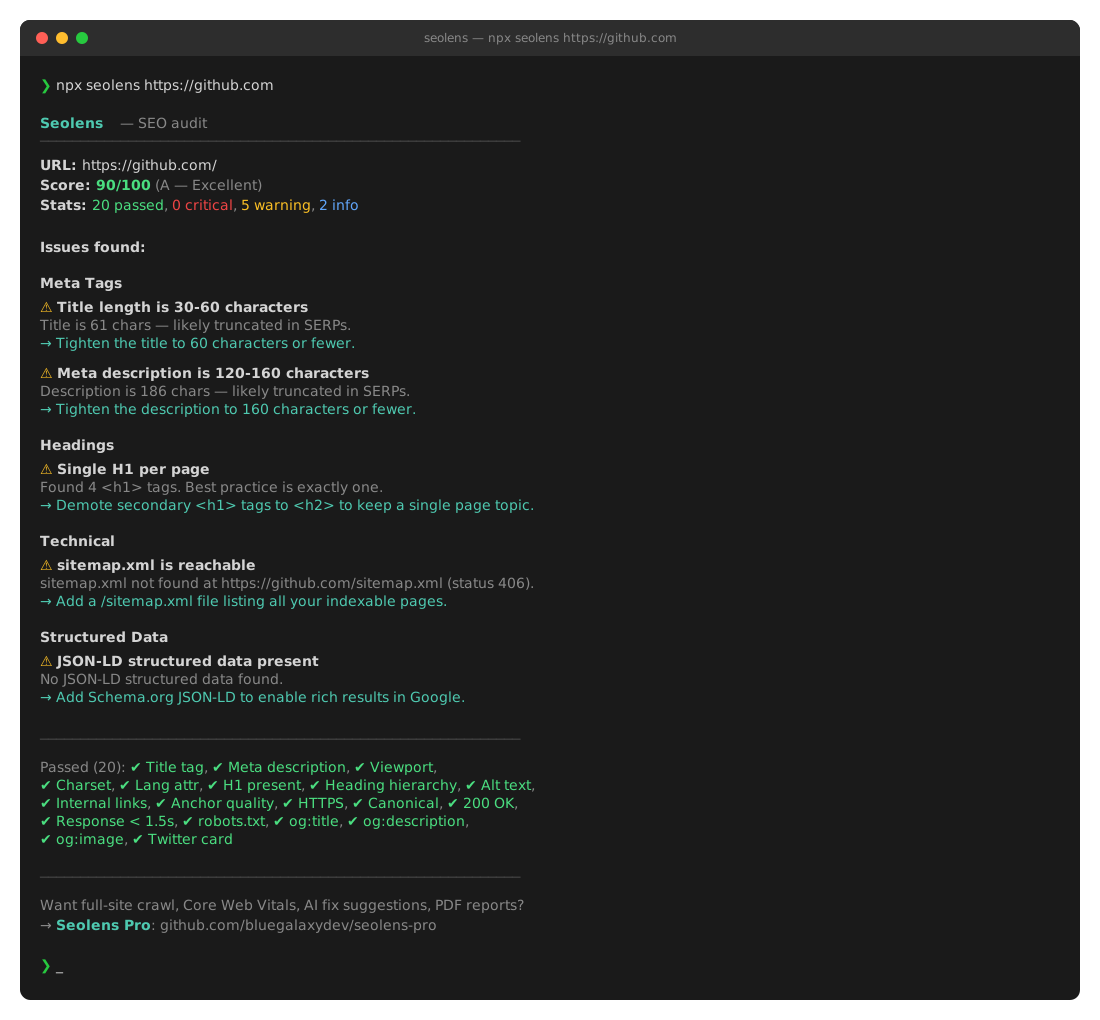
npx seolens https://example.com                  # one-off
npm install -g seolens && seolens example.com    # global
CLI flags:
seolens <url>              → colored terminal report
seolens <url> --json       → full JSON
seolens <url> --markdown   → Markdown
seolens <url> --pdf FILE   → 8-page PDF
seolens <url> --pptx FILE  → PowerPoint deck
As a JS library
import { audit, renderPdf, renderMarkdown } from 'seolens';

const result = await audit('https://example.com');
console.log(`Score: ${result.score.value}/100`);

// Generate a PDF
await renderPdf(result, '/tmp/report.pdf');
In your CI pipeline
- run: npx seolens https://staging.example.com
  # Exit code is 0 if score >= 70, else 1 — gate deploys on SEO regressions
As a VS Code extension (separate from Claude Code)
A standalone extension in vscode/ — adds a "Seolens: Audit URL…" command palette entry with a webview results panel and PPT/MD export buttons.
Troubleshooting
❌ /plugin isn't available in this environment
You're using the Claude Code IDE extension (VS Code/Cursor/JetBrains), which doesn't yet support /plugin install. Use the Quick Start at the top — manually clone the skill and copy commands.
❌ /seolens-pdf returns "No cached audit found"
You need to run /seolens <url> first. The PDF command builds on top of a recent audit. Re-run the same URL with /seolens, then immediately run /seolens-pdf.
❌ /seolens-pdf returns "Cached audit is for X, not Y"
The cache is for a different URL. Run /seolens <new-url> first to refresh.
❌ /seolens-pdf returns "Cached audit is N minutes old"
The cache expires after 1 hour. Re-run /seolens <url> for fresh data.
❌ Slash commands /seolens-pdf etc. don't show up in autocomplete
You probably skipped step 2 of the Quick Start (copying commands to ~/.claude/commands/). Run:
mkdir -p ~/.claude/commands && \
  cp ~/.claude/skills/seolens/commands/*.md ~/.claude/commands/
Then fully quit and reopen your IDE (Cmd+Q, not just Reload Window).
❌ "Could not load Seolens" error
Run npm install inside ~/.claude/skills/seolens/:
cd ~/.claude/skills/seolens && npm install
❌ Audit fails on local files (file://...)
Currently Seolens fetches over HTTP/HTTPS only. For local development, run a dev server (e.g. python3 -m http.server) and audit http://localhost:8000.
❌ The audit is slow
106 checks normally take 5-10 seconds. If it's slower, the target site is slow to respond (server TTFB). The audit waits up to 15 seconds before timing out — pass --timeout 30000 for slow sites.
Updating Seolens
To pull the latest checks and PDF improvements:
cd ~/.claude/skills/seolens && git pull && npm install && \
  cp ~/.claude/skills/seolens/commands/*.md ~/.claude/commands/
Then Cmd+Q your IDE and reopen.
Want more? → Seolens Pro
The free version covers single-URL auditing with 106 checks. Seolens Pro adds:
- 🕷️ Full-site crawl — audit up to 50,000 pages with one command
- ⚡ Core Web Vitals — real LCP, CLS, INP measurements
- 🤖 AI-powered fix suggestions — not just "title is missing", but "recommended title: 'Independent Insurance Agency in Huntington Beach, CA'"
- 🔗 Real backlink data — referring domains, domain authority, anchor text (via DataForSEO/Ahrefs API)
- 📊 White-label PDF reports with your logo and brand colors
- 🔔 Scheduled monitoring — get alerts when scores drop
- 🌍 hreflang validation at full scale
- 🧠 80+ additional advanced checks
Pricing starts at $29/month. → Learn more
Roadmap
- 106 on-page checks across 22 categories
- CLI with colored terminal output
- Markdown + JSON + PDF + PPTX outputs
- Claude Code plugin (skills + slash commands)
- VS Code extension wrapper
- Premium 8-page PDF report
- Sitemap-driven multi-page audit (in Pro)
- Real Core Web Vitals via headless browser (in Pro)
- Live monitoring + change alerts (in Pro)
Contributing
Pull requests welcome. To add a new check:
- Pick the right category file in
src/checks/(or create a new one) - Add an entry to the exported array following the existing pattern
- Register it in
src/checks/index.jsif it's a new category - Run
node bin/seolens.js https://example.com --jsonto verify it executes
By contributing, you agree to the Contributor License Agreement.
License
MIT © 2026 bluegalaxydev
⭐ If Seolens saves you time, star the repo — it's the single best way to support the project.
Install Seolens in Claude Desktop, Claude Code & Cursor
unyly install seolensInstalls into Claude Desktop, Claude Code, Cursor & VS Code — handles npx, uvx and build-from-source repos for you.
First time? Get the CLI: curl -fsSL https://unyly.org/install | sh
Or configure manually
Run in your terminal:
claude mcp add seolens -- npx -y github:bluegalaxydev/seolensStep-by-step: how to install Seolens
FAQ
Is Seolens MCP free?
Yes, Seolens MCP is free — one-click install via Unyly at no cost.
Does Seolens need an API key?
No, Seolens runs without API keys or environment variables.
Is Seolens hosted or self-hosted?
Self-hosted: the server runs locally on your machine via the install command above.
How do I install Seolens in Claude Desktop, Claude Code or Cursor?
Open Seolens on unyly.org, pick your client tab (Claude Desktop, Claude Code, Cursor) and press Install — the config is generated automatically, no JSON editing.
Related MCPs
GitHub
PRs, issues, code search, CI status
 by GitHub
Filesystem
Secure file operations with configurable access controls.
Memory
Knowledge graph-based persistent memory system.
Template MCP Server
A CLI tool to create a new Model Context Protocol server project with TypeScript support, dual transport options, and an extensible structure
 by mcpdotdirect
Amap Maps Mcp Server
MCP server for using the AMap Maps API
 by duxiaohui
Supabase
Database, auth and storage
 by Supabase
Everything
Reference / test server with prompts, resources, and tools.
Git
Tools to read, search, and manipulate Git repositories.
Sequential Thinking
Dynamic and reflective problem-solving through thought sequences.
Time
Time and timezone conversion capabilities.
Compare Seolens with
Not sure what to pick?
Find your stack in 60 seconds
Author?
Embed badge for your README
Browse similar
All development MCPs