
Server Commands Rtk
FreeNot checkedMCP server for executing shell commands with automatic RTK token reduction, persistent caching, and execution logging.

About
MCP server for executing shell commands with automatic RTK token reduction, persistent caching, and execution logging.
README
License: MIT CI npm version server-commands-rtk MCP server server-commands-rtk MCP server
MCP server that executes shell commands via MCP tools - with streaming spawn, automatic RTK token reduction, persistent caching, and full execution logging.
- Streaming spawn - uses
spawn(notexec), nomaxBufferceiling, pipes stdout/stderr directly - Auto-RTK - transparently wraps commands with RTK for ~90% token reduction
- Timeout + cancellation -
AbortControllercancels stream collection immediately,SIGKILLterminates process tree - Persistent cache - results cached in
~/.local/share/state/commands-rtk/command-cache.jsonacross sessions - Execution logger - append-only JSONL with auto-rotation, gzip compression, archive listing
- Safe file writes -
write_filewith base64 content avoids JSON serialization breakage on special characters - URI resolver -
resolve_uriresolvesscheme://pathto absolute file paths via shared TOML config
Includes
- ✅ License - This repository contains a LICENSE file
- ✅ Prompts - This MCP Server includes prompts users can invoke
- ✅ Resources - This MCP Server includes resources for attaching and managing context data
Requirements
- Node.js 24+ (ESM,
"type": "module"in package.json) - rtk CLI - install via
curl -fsSL https://raw.githubusercontent.com/rtk-ai/rtk/refs/heads/master/install.sh | sh
Installation
npx (no install)
npx commands-rtk                    # Run MCP server (downloads on demand)
npx commands-rtk setup              # Apply one-time patches (rtk fix, etc.)
npm (global install)
npm install -g commands-rtk
commands-rtk setup                  # One-time patch setup
From source
git clone https://github.com/Ev3lynx727/server-commands-rtk.git
cd server-commands-rtk
npm install
npm run build
npm run setup                       # One-time patch setup (rebuilds rtk from source if needed)
npx (no install, MCP client config)
{
  "mcpServers": {
    "commands-rtk": {
      "command": "npx",
      "args": ["commands-rtk"],
      "env": {}
    }
  }
}
First run: Run
npx commands-rtk setuponce before first use to apply one-time patches.
Global install (MCP client config)
{
  "mcpServers": {
    "commands-rtk": {
      "command": "commands-rtk",
      "args": [],
      "env": {}
    }
  }
}
OpenCode
{
  "mcp": {
    "commands-rtk": {
      "type": "local",
      "command": ["node", "/path/to/commands-rtk/dist/index.js"],
      "enabled": true,
      "timeout": 60000
    }
  }
}
Tools
| Tool | Description |
|---|---|
run_process |
Execute a shell command with RTK auto-filtering |
get_cache_stats |
Show cache hit/miss counts and entry count |
clear_command_cache |
Wipe all cached command results |
cached_commands |
List all cached command keys and timestamps |
execution_log |
Read execution log entries, optionally from archives |
list_archives |
List rotated .jsonl.gz archive files |
write_file |
Write a file from base64 content (safe for special characters) |
resolve_uri |
Resolve scheme://path to absolute file path via TOML config or MCP_RESOURCE_ROOTS |
Schema
How commands-rtk processes an MCP tool call:
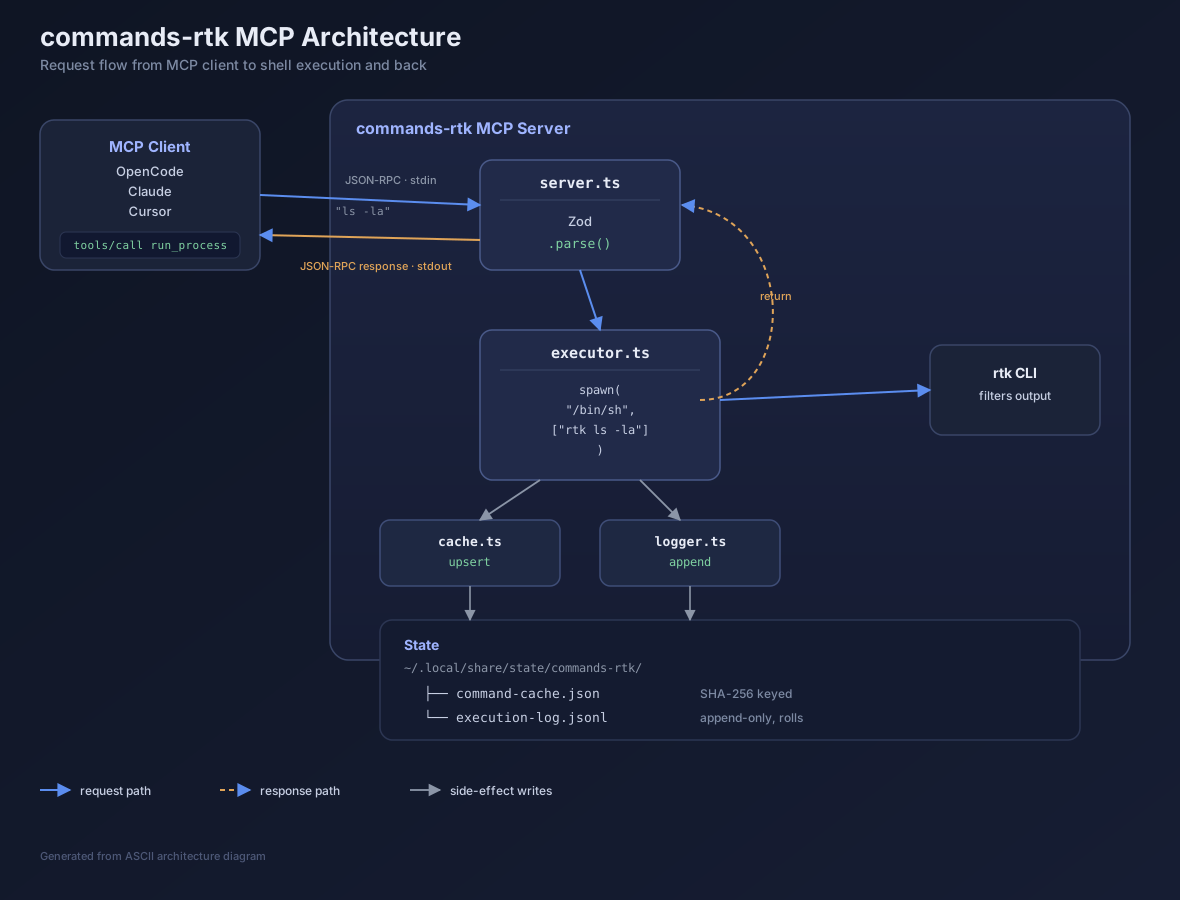
The flow: server.ts receives tools/call → Zod.parse() validates → executor.ts spawns with rtk prefix → result cached + logged → JSON-RPC response returned.
Usage
// Auto-RTK (default) - ~90% token reduction
run_process({command: "ls -la"})

// Bypass RTK filtering entirely
run_process({command: "ls -la"})

// Explicitly enable/disable RTK
run_process({command: "ls -la"})

// Override default timeout (60s) per call
run_process({command: "sleep 30", timeout_ms: 5000})

// Set working directory and attach metadata
run_process({
  command: "npm test",
  cwd: "/path/to/project",
  description: "run unit tests",
  model_used: "claude-sonnet-4",
  timeout_ms: 30000
})

// Force cache bypass
run_process({command: "npm install", clear_cache: true})
execution_log
// Tail last 100 entries
execution_log({limit: 100})

// Include rotated archives for full history
execution_log({limit: 500, include_archives: true})
write_file
MCP tool parameters are JSON-serialized. Content with quotes, backticks, or long special-character strings can break the JSON framing. Use write_file with base64 encoding:
write_file({
  path: "/tmp/output.txt",
  content_b64: "SGVsbG8gV29ybGQ="
})
resolve_uri
resolve_uri({uri: "headquarters://."})
// { scheme: "headquarters", relativePath: ".", absolutePath: "/home/ev3lynx/headquarters" }

resolve_uri({uri: "datasets://train/run-001.parquet"})
// { scheme: "datasets", relativePath: "train/run-001.parquet", absolutePath: "/home/ev3lynx/datasets/memory-graph/train/run-001.parquet" }
Schemes are loaded from ~/.config/uri-resolver/config.toml (primary) with MCP_RESOURCE_ROOTS as fallback. scheme://. resolves to the base directory.
list_archives
list_archives()
// Returns: { archives: ["file1.jsonl.gz", ...], count: 7 }
Configuration (rtk-hook.toml)
| Section | Key | Default | Description |
|---|---|---|---|
[execution] |
timeout_ms |
60000 |
Default per-command timeout (overridable per call) |
[execution] |
max_buffer_mb |
10 |
Max stdout/stderr collected per command |
[execution] |
max_log_entries |
1000 |
Entries kept in active log before rotation |
[execution] |
max_archives |
50 |
Max rotated archive files retained |
[execution] |
compress_archives |
true |
Compress rotated logs with gzip |
[cache] |
debounce_ms |
2000 |
Window for deduplicating identical commands |
Example:
[execution]
timeout_ms = 60000
max_buffer_mb = 10
max_log_entries = 1000
max_archives = 50
compress_archives = true

[cache]
debounce_ms = 2000
State Files
All runtime state lives under ~/.local/share/state/commands-rtk/:
~/.local/share/state/commands-rtk/
├── command-cache.json      # Persistent command cache
└── execution-log.jsonl     # Append-only execution log
Created automatically on first run (mkdirSync with recursive: true).
Cache
- File:
command-cache.json- persistent JSON, survives server restart - Key: SHA-256 hash of
(command + cwd) - Stats: Hit/miss counters via
get_cache_stats - Flush: Written to disk on every mutation + on SIGTERM/SIGINT
Execution Log
- File:
execution-log.jsonl- append-only, one JSON object per line - Rotation: When
max_log_entriesreached, half of entries archived. Rotated files land alongside the active log asexecution-log-{timestamp}.jsonl.gz - Per-entry metadata:
timestamp,key,command,rtk_filtered,rtk_rewritten,cached,success,exitCode,duration_ms,error_type,stdout/stderr,stdout_lines/stderr_lines,model_used
MCP Resources & URI Resolution
Resource templates and URI resolution share a unified scheme registry loaded from two sources (TOML wins):
- Primary:
~/.config/uri-resolver/config.toml— shared with the standalone uri-resolver MCP server - Fallback:
MCP_RESOURCE_ROOTSenv var — for deployment-specific overrides
export MCP_RESOURCE_ROOTS='{"headquarters": "~/headquarters"}'
Each scheme registers a resource template {scheme}://{path} and is queryable via the resolve_uri tool. Path traversal is denied via startsWith() guard.
Response Format
All tools return JSON:
{
  "cached": false,
  "key": "sha256-hash",
  "command": "echo hello",
  "result": {
    "success": true,
    "stdout": "hello\n",
    "stderr": "",
    "exitCode": 0,
    "duration_ms": 12,
    "error_type": null
  },
  "rtk_filtered": true,
  "rtk_rewritten": true
}
Error types: timeout, not_found (ENOENT), permission_error (EACCES/EPERM), memory_error (ENOMEM), unknown_error.
Timeout returns exitCode: 124 with message in stderr.
Token Savings
| Command | Raw Tokens | RTK Tokens | Savings |
|---|---|---|---|
ls -la |
~25,000 | ~3,000 | 88% |
tree |
~50,000 | ~5,000 | 90% |
git diff |
~15,000 | ~500 | 97% |
npm install |
~5,000 | ~200 | 96% |
Environment Variables
| Variable | Required | Description |
|---|---|---|
SERVER_DIR |
No | Custom server root (defaults to directory containing dist/) |
RTK_MODEL_USED |
No | Override for model_used in execution log metadata |
MCP_RESOURCE_ROOTS |
No | JSON object mapping scheme names to directory paths (fallback, TOML config is primary) |
LOG_LEVEL |
No | Log level (error, warn, info, debug) |
Credit
This project would not work without RTK — the Rust token reducer that filters shell command output for ~90% token savings.
License
MIT
Install Server Commands Rtk in Claude Desktop, Claude Code & Cursor
unyly install server-commands-rtkInstalls into Claude Desktop, Claude Code, Cursor & VS Code — handles npx, uvx and build-from-source repos for you.
First time? Get the CLI: curl -fsSL https://unyly.org/install | sh
Or configure manually
Run in your terminal:
claude mcp add server-commands-rtk -- npx -y commands-rtkFAQ
Is Server Commands Rtk MCP free?
Yes, Server Commands Rtk MCP is free — one-click install via Unyly at no cost.
Does Server Commands Rtk need an API key?
No, Server Commands Rtk runs without API keys or environment variables.
Is Server Commands Rtk hosted or self-hosted?
Self-hosted: the server runs locally on your machine via the install command above.
How do I install Server Commands Rtk in Claude Desktop, Claude Code or Cursor?
Open Server Commands Rtk on unyly.org, pick your client tab (Claude Desktop, Claude Code, Cursor) and press Install — the config is generated automatically, no JSON editing.
Related MCPs
GitHub
PRs, issues, code search, CI status
 by GitHub
Filesystem
Secure file operations with configurable access controls.
Memory
Knowledge graph-based persistent memory system.
Template MCP Server
A CLI tool to create a new Model Context Protocol server project with TypeScript support, dual transport options, and an extensible structure
 by mcpdotdirect
Compare Server Commands Rtk with
Not sure what to pick?
Find your stack in 60 seconds
Author?
Embed badge for your README
Browse similar
All development MCPs