
Shelly Integrations
FreeNot checkedRest API & MCP Server to integrate anything with Shelly Cloud

About
Rest API & MCP Server to integrate anything with Shelly Cloud
README
Integration project that connects Shelly Cloud to anything in the world!
License: PolyForm Noncommercial Docker Image Size (MCP) Docker Pulls (MCP)
Docker Image Size (API) Docker Pulls
The project provides two independent components that you can run as containers:
- MCP Server — exposes MCP server for AI assistants
- REST API Gateway — exposes REST Api for dashboards, home automation platforms, and any REST-capable client
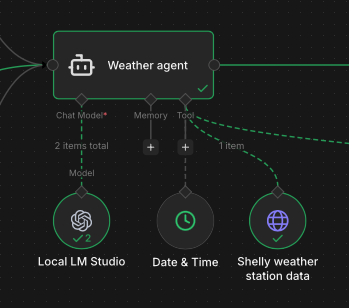
⬆️ Usage example of this API project as n8n agent tool
🏆 1st place in the "Crafter" category at the Shelly Smart Home Challenge 2025 🏆
Startup
You can find these projects on docker hub and docker-compose in docker directory.
If you want to startup MCP server read this doc (run with docker section).
If you want to startup API rest endpoint read this docs (run with docker section).
Usage example
- I'm using this project (api) as tool used by AI agents, with purpose to get historical/real time data from Shelly weather station
- Control shelly device from AI Agents (like n8n or OpenClaw 🦞)
- Get information about weather history
Documentation
- Project Structure — solution layout, purpose and contents of each project
- MCP Server — configuration, Docker setup, Claude Desktop and Claude Code integration
- REST API Gateway — available endpoints, Docker setup, how to enable or disable the service
- Device Loading & Store Initialization — how the device store is initialized at startup, loading priorities, and merge logic between the local file and the Shelly Cloud API
Security
This project doesn't implement security token or auth because it's designed to run into a protected environment and not exposed to external world.
Device mapping file
docs/resources/template/devices.template.json is the JSON template to define your devices locally. It maps physical device IDs to friendly names used by the MCP tools and REST endpoints. Copy and fill it in to use a local mapping file (see DeviceMappingFile configuration key).
Changelog
See CHANGELOG.md for the full version history.
License
This project is licensed under the GNU GPL v3.
- Anyone can copy, modify and distribute this software.
- You have to include the license and copyright notice with each and every distribution.
- You can use this software privately.
- You can use this software for commercial purposes.
- If you dare build your business solely from this code, you risk open-sourcing the whole code base.
- If you modify it, you have to indicate changes made to the code.
- Any modifications of this code base MUST be distributed with the same license, GPLv3.
- This software is provided without warranty.
- The software author or license can not be held liable for any damages inflicted by the software.
Installing Shelly Integrations
This server has no published package — it is built from source. Open the repository and follow its README.
▸ github.com/giogdev/shelly-integrationsFAQ
Is Shelly Integrations MCP free?
Yes, Shelly Integrations MCP is free — one-click install via Unyly at no cost.
Does Shelly Integrations need an API key?
No, Shelly Integrations runs without API keys or environment variables.
Is Shelly Integrations hosted or self-hosted?
Self-hosted: the server runs locally on your machine via the install command above.
How do I install Shelly Integrations in Claude Desktop, Claude Code or Cursor?
Open Shelly Integrations on unyly.org, pick your client tab (Claude Desktop, Claude Code, Cursor) and press Install — the config is generated automatically, no JSON editing.
Related MCPs
GitHub
PRs, issues, code search, CI status
 by GitHub
Filesystem
Secure file operations with configurable access controls.
Memory
Knowledge graph-based persistent memory system.
Template MCP Server
A CLI tool to create a new Model Context Protocol server project with TypeScript support, dual transport options, and an extensible structure
 by mcpdotdirect
Compare Shelly Integrations with
Not sure what to pick?
Find your stack in 60 seconds
Author?
Embed badge for your README
Browse similar
All development MCPs