
Shortcut Pad
FreeNot checkedLocal MCP server for the Shortcut Pad launcher — list and launch Windows utilities by name, allowlist-enforced

About
Local MCP server for the Shortcut Pad launcher — list and launch Windows utilities by name, allowlist-enforced
README
Let an AI assistant list and launch your Windows apps, folders and links by name, and only the names already on your Shortcut Pad allowlist.
A real tool call and its real response, from server.py against the synthetic
examples/config.sample.json (os.startfile mocked, nothing launched —
see docs/media/demo-capture.txt for the full session):
> shortcutpad_launch {"name": "C:\\Windows\\System32\\calc.exe"}
< Error: No shortcut named 'C:\Windows\System32\calc.exe'. Available: 'Focus Timer', 'Focus Music',
  'Clipboard History', 'Project Notes'. Use shortcutpad_list_items for details.
A raw path is not a name on the allowlist, so nothing runs — the same call with "name": "focus timer"
instead launches the sample's Focus Timer entry.
Quick start · Tools · How it works · Proof · Limitations
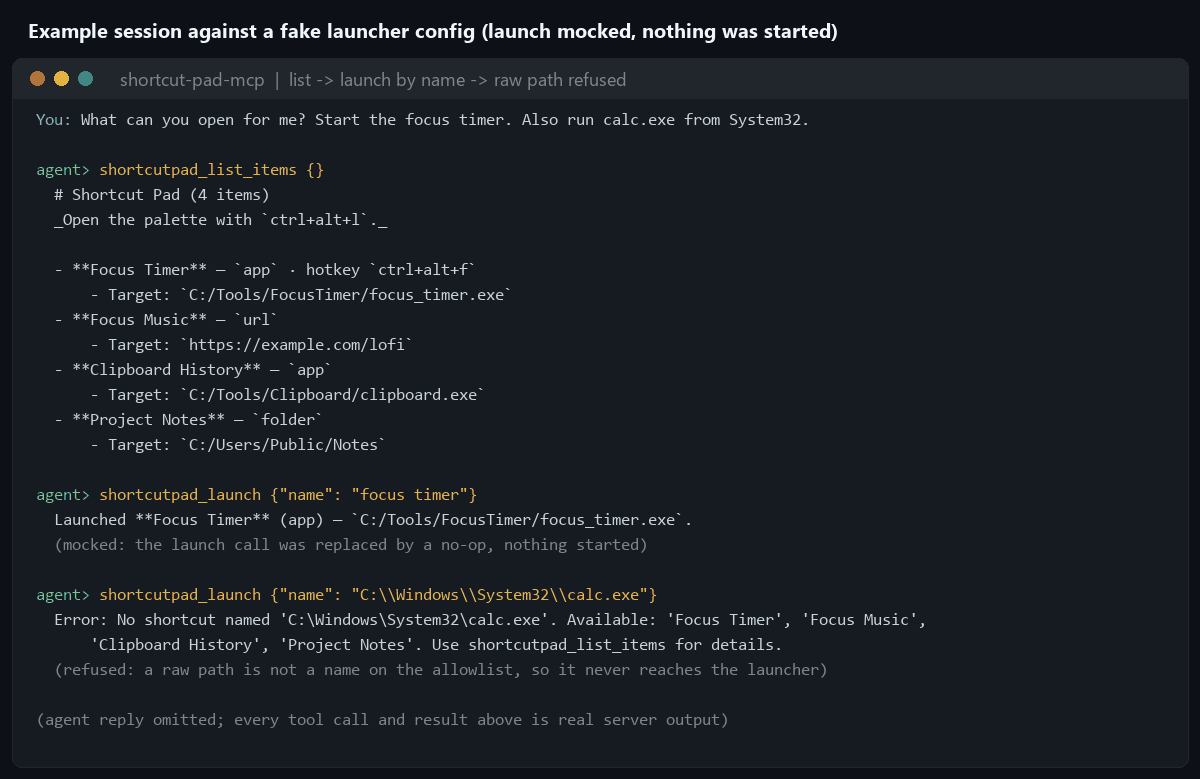
Example session against a fake config (examples/config.sample.json).
Every tool result is real output from server.py over MCP, captured by
scripts/build_media.py. Nothing was launched: that script replaces
os.startfile and webbrowser.open with no-ops and treats the sample's fake paths as existing.
How the allowlist is enforced. shortcutpad_launch takes a name, never a path or a command line.
Its input schema has exactly one field, name. It resolves that name against the launcher's existing
config.json and refuses anything not already there, so the check sits at the only entry point rather
than being applied to a command afterwards. An MCP tool that accepted an arbitrary command would be a
remote shell wearing a launcher costume. Read Limitations for what this does not cover.
Quick start
Requires Windows, Python 3.11 or newer (verified on 3.13), an MCP client such as Claude Code or Claude
Desktop, and a Shortcut Pad config.json (or use the sample to try it;
its fake app and folder paths report "no longer exists" on launch, the intended safe failure, but its URL entry would really open https://example.com).
git clone https://github.com/darkspaz-v1/shortcut-pad-mcp.git
cd shortcut-pad-mcp
python -m venv .venv
.venv\Scripts\activate
pip install -r requirements.txt
python test_server.py
Claude Code:
claude mcp add shortcut-pad -e SHORTCUTPAD_CONFIG_FILE=C:/path/to/launcher/config.json -- C:/path/to/shortcut-pad-mcp/.venv/Scripts/python.exe C:/path/to/shortcut-pad-mcp/server.py
Claude Desktop, in %APPDATA%\Claude\claude_desktop_config.json:
{
  "mcpServers": {
    "shortcut-pad": {
      "command": "C:/path/to/shortcut-pad-mcp/.venv/Scripts/python.exe",
      "args": ["C:/path/to/shortcut-pad-mcp/server.py"],
      "env": { "SHORTCUTPAD_CONFIG_FILE": "C:/path/to/launcher/config.json" }
    }
  }
}
Use the Python from the environment where you ran pip install. Claude Code and Claude Desktop read
separate config files, so register the server in each client you use.
| Environment variable | Meaning | Default |
|---|---|---|
SHORTCUTPAD_CONFIG_FILE |
Path to the Shortcut Pad launcher's config.json (the allowlist of items). |
~/Desktop/Claude/launcher/config.json |
Then ask: "What's on my shortcut pad?" followed by "Open the focus timer."
Tools
| Tool | Does |
|---|---|
shortcutpad_list_items |
Every configured entry, with type, target and optional hotkey |
shortcutpad_launch |
Start one by name (case-insensitive; a partial name works when unambiguous) |
shortcutpad_add_item |
Add an entry; app and folder targets must already exist on disk |
shortcutpad_remove_item |
Remove an entry (marked destructive); the target program is never deleted |
shortcutpad_launch is annotated as open-world (it starts things outside the server) and
shortcutpad_remove_item as destructive, so MCP clients that honour annotations can ask you first.
How it works
flowchart LR
    Client["MCP client<br/>Claude Code / Claude Desktop"] <-->|stdio| Server["server.py<br/>FastMCP"]
    Server --> T1["shortcutpad_list_items"]
    Server --> T2["shortcutpad_add_item"]
    Server --> T3["shortcutpad_remove_item"]
    Server --> T4["shortcutpad_launch"]
    T1 --> Config[("config.json<br/>allowlist")]
    T2 --> Config
    T3 --> Config
    T4 -->|"name must already be in the allowlist"| Config
    T4 --> App(["starts the matching<br/>app / URL"])
- The launcher's own
config.jsonis the allowlist and the only copy of state. This server is a view onto the existing Shortcut Pad app, not a second store. Edits show up in its palette after a restart of the launcher. - Name matching is progressively looser but never guesses. Exact (case-insensitive), then prefix, then substring. If more than one item matches, nothing launches and the candidates are returned.
- Adding then launching is a deliberate two-call sequence, so each step surfaces to you separately.
- Stale entries fail safe. If a target no longer exists, launch reports it and suggests removing the entry instead of raising.
- Writes go to a temp file that is swapped into place, under an in-process lock.
Proof
python test_server.pyruns 21 checks through the real tool handlers against a temporary config. It never starts a program: the launch path is exercised through name resolution and validation, and the one successful-launch check replacesos.startfilewith a recorder. It asserts that a raw path passed as a name is refused, that launch's input has only anamefield, and that exactly four tools exist.- CI runs
ruff check .and the test script on Windows for Python 3.12 and 3.13. - The demo image comes from a real stdio session, with the launch primitives mocked as described above.
- Removing a non-existent item is an error, not a silent no-op, so a typo surfaces immediately.
Limitations
- Windows only. Launching uses
os.startfile, a Windows-only API; there is no macOS/Linux equivalent in this server. - No arbitrary command execution, by design.
shortcutpad_launchtakes a name and nothing else — it cannot run an arbitrary path, URL, or shell command. This is the security boundary described above, not an accidental restriction. - The item must already exist in
config.json.shortcutpad_launchcan only start entries already on the allowlist; there is no way to launch anything else in a single call. - The allowlist is only as strong as who can edit it.
shortcutpad_add_itemextends the allowlist with any existing file or folder path, andshortcutpad_launchcan then start it. An assistant that was manipulated could chain the two calls. The defence is that they are separate tool calls; keep per-call approval on in your MCP client, and review whatadd_itemis asked to add. - URL entries are passed to the default browser as given, without checking the scheme.
- Item hotkeys are stored, but this server does not register them; that is the launcher app's job.
- Tests never start a real program, so real-launch behaviour is verified only by inspection.
Development and license
Before changing code, run python test_server.py and ruff check .. To rebuild the README images:
pip install pillow, then python scripts/build_media.py.
MIT. See LICENSE. Built on the Model Context Protocol.
Installing Shortcut Pad
This server has no published package — it is built from source. Open the repository and follow its README.
▸ github.com/darkspaz-v1/shortcut-pad-mcpFAQ
Is Shortcut Pad MCP free?
Yes, Shortcut Pad MCP is free — one-click install via Unyly at no cost.
Does Shortcut Pad need an API key?
No, Shortcut Pad runs without API keys or environment variables.
Is Shortcut Pad hosted or self-hosted?
Self-hosted: the server runs locally on your machine via the install command above.
How do I install Shortcut Pad in Claude Desktop, Claude Code or Cursor?
Open Shortcut Pad on unyly.org, pick your client tab (Claude Desktop, Claude Code, Cursor) and press Install — the config is generated automatically, no JSON editing.
Related MCPs
GitHub
PRs, issues, code search, CI status
 by GitHub
Filesystem
Secure file operations with configurable access controls.
Memory
Knowledge graph-based persistent memory system.
Template MCP Server
A CLI tool to create a new Model Context Protocol server project with TypeScript support, dual transport options, and an extensible structure
 by mcpdotdirect
Amap Maps Mcp Server
MCP server for using the AMap Maps API
 by duxiaohui
Supabase
Database, auth and storage
 by Supabase
Everything
Reference / test server with prompts, resources, and tools.
Git
Tools to read, search, and manipulate Git repositories.
Sequential Thinking
Dynamic and reflective problem-solving through thought sequences.
Time
Time and timezone conversion capabilities.
Compare Shortcut Pad with
Not sure what to pick?
Find your stack in 60 seconds
Author?
Embed badge for your README
Browse similar
All development MCPs