
Signal Scanner
FreeNot checkedYAML-rule stock/crypto screener: define a watchlist + plain rules (RSI, SMA cross, volume, 52-week) and get matches via console, Telegram, or MCP. Keyless (yfin

About
YAML-rule stock/crypto screener: define a watchlist + plain rules (RSI, SMA cross, volume, 52-week) and get matches via console, Telegram, or MCP. Keyless (yfinance).
README
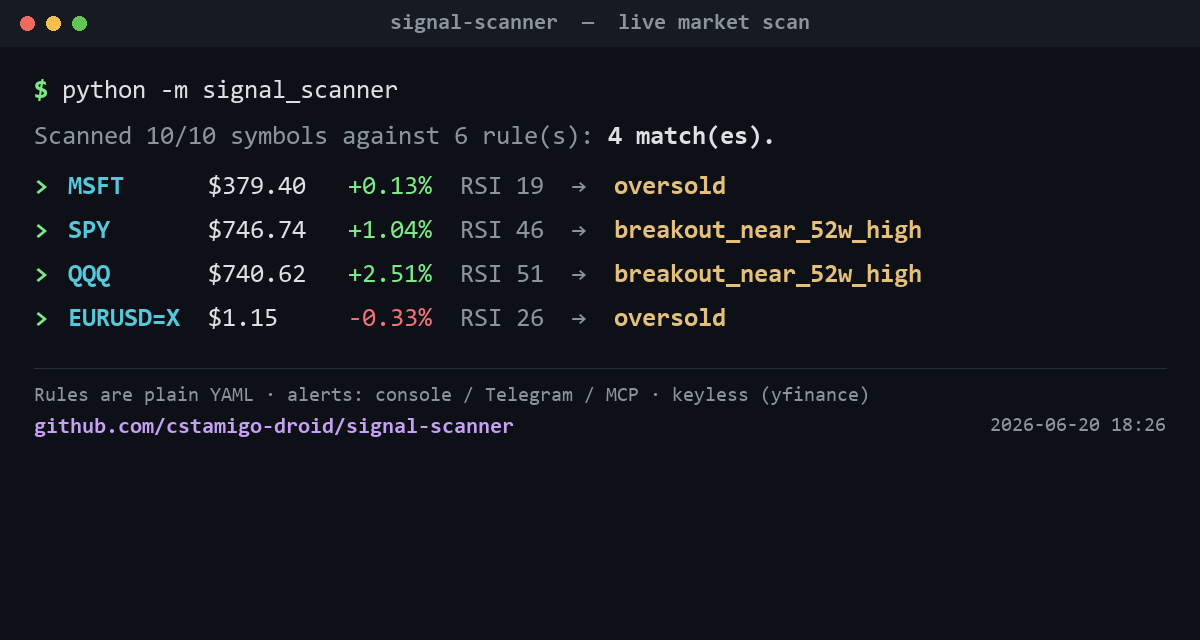
Define a watchlist and a ruleset (plain YAML); the scanner pulls market data, computes indicators, and tells you which symbols match — on the console, in Telegram, or from any MCP host (Claude Desktop / Claude Code).
Built once, reskinned per client: swap
watchlist.txt+rules.yaml, ship.
Why it's different
- Keyless by default. Market data via yfinance — no API key. Works for stocks, ETFs, FX (
EURUSD=X) and crypto (BTC-USD). Demo it anywhere. - No-code rules. Clients edit
rules.yaml(conditions on indicators) — never the code. - Honest signals. Indicators are computed from closed bars (no look-ahead); a symbol with no data is reported, never faked.
- Delivery that degrades. Telegram alerts when a bot token is set; otherwise prints to console. The scanner always runs.
- Three surfaces, one engine. CLI (one-shot or
--watch), Telegram push, and an MCPscantool.
Indicators & rules
Indicators per symbol: price, pct_change, rsi, sma_fast, sma_slow,
sma_cross (golden/death), vol_ratio (vs 20-day avg), pct_from_52w_high, pct_from_52w_low.
A rule fires when all its conditions are true:
rules:
  - name: oversold
    when:
      - {indicator: rsi, op: "<", value: 30}
  - name: volume_spike_up
    when:
      - {indicator: vol_ratio, op: ">", value: 2.0}
      - {indicator: pct_change, op: ">", value: 1.0}
Quickstart
pip install -r requirements.txt
PYTHONUTF8=1 python tests/test_smoke.py     # deterministic, no network — proves the engine

python -m signal_scanner                    # scan the watchlist once, print matches
python -m signal_scanner AAPL MSFT BTC-USD  # scan ad-hoc symbols
python -m signal_scanner --watch            # loop every SCAN_INTERVAL_S (default 15m)
python -m signal_scanner --notify           # also push matches to Telegram (if configured)
Telegram (optional)
Create a bot with @BotFather, get the token; get your chat id from @userinfobot. Then in .env:
TELEGRAM_BOT_TOKEN=...
TELEGRAM_CHAT_ID=...
As an MCP server (Claude Desktop)
{
  "signal-scanner": {
    "command": "python",
    "args": ["-m", "signal_scanner.server"],
    "cwd": "C:/path/to/signal-scanner"
  }
}
Use the full path to your Python (e.g. the one where you ran pip install -r requirements.txt) if python isn't on PATH. Then ask Claude: "Run my scanner" or "Any signals on NVDA and BTC-USD?" — it calls the scan tool.
Configuration
All knobs in config.py / .env (see .env.example): RSI period, SMA fast/slow,
volume window, lookback, poll interval, data backend, Telegram. A client reskin is
usually just watchlist.txt + rules.yaml.
Architecture
watchlist.txt ─┐
               ├─ scanner.py ─ data.py(yfinance) ─ indicators.py ─ rules.py(rules.yaml)
rules.yaml ────┘                                                         │
                                                  signals ──> console / Telegram / MCP `scan`
Reuses the mcp-factory contract (Result, formatting, cache) so it composes with the rest of the catalog.
License
MIT.
Install Signal Scanner in Claude Desktop, Claude Code & Cursor
unyly install signal-scannerInstalls into Claude Desktop, Claude Code, Cursor & VS Code — handles npx, uvx and build-from-source repos for you.
First time? Get the CLI: curl -fsSL https://unyly.org/install | sh
Or configure manually
Run in your terminal:
claude mcp add signal-scanner -- uvx --from git+https://github.com/cstamigo-droid/signal-scanner signal-scannerFAQ
Is Signal Scanner MCP free?
Yes, Signal Scanner MCP is free — one-click install via Unyly at no cost.
Does Signal Scanner need an API key?
No, Signal Scanner runs without API keys or environment variables.
Is Signal Scanner hosted or self-hosted?
A hosted option is available: Unyly runs the server in the cloud, no local setup required.
How do I install Signal Scanner in Claude Desktop, Claude Code or Cursor?
Open Signal Scanner on unyly.org, pick your client tab (Claude Desktop, Claude Code, Cursor) and press Install — the config is generated automatically, no JSON editing.
Related MCPs
Gmail
Read, send and search emails from Claude
 by Google
Slack
Send, search and summarize Slack messages
 by Slack
Runbear
No-code MCP client for team chat platforms, such as Slack, Microsoft Teams, and Discord.
Discord Server
A community discord server dedicated to MCP by [Frank Fiegel](https://github.com/punkpeye)
Compare Signal Scanner with
Not sure what to pick?
Find your stack in 60 seconds
Author?
Embed badge for your README
Browse similar
All communication MCPs