
Site Doctor
FreeNot checkedAudit rendered websites for broken links, images, accessibility, SEO, security headers, and more. CLI + MCP server for AI agents.

About
Audit rendered websites for broken links, images, accessibility, SEO, security headers, and more. CLI + MCP server for AI agents.
README
npm version License: MIT Node.js >=20
Audit rendered websites for broken links, images, accessibility violations, security header gaps, design issues, SEO metadata problems, console errors, hydration errors, and mixed content. Works with any URL — localhost, staging, or production.
MCP server included — use site-doctor directly from Claude, Cursor, Windsurf, or any MCP-compatible AI tool.
Install
npm install -g site-doctor
Or run without installing:
npx site-doctor audit --url http://localhost:3000
CLI Usage
Interactive mode
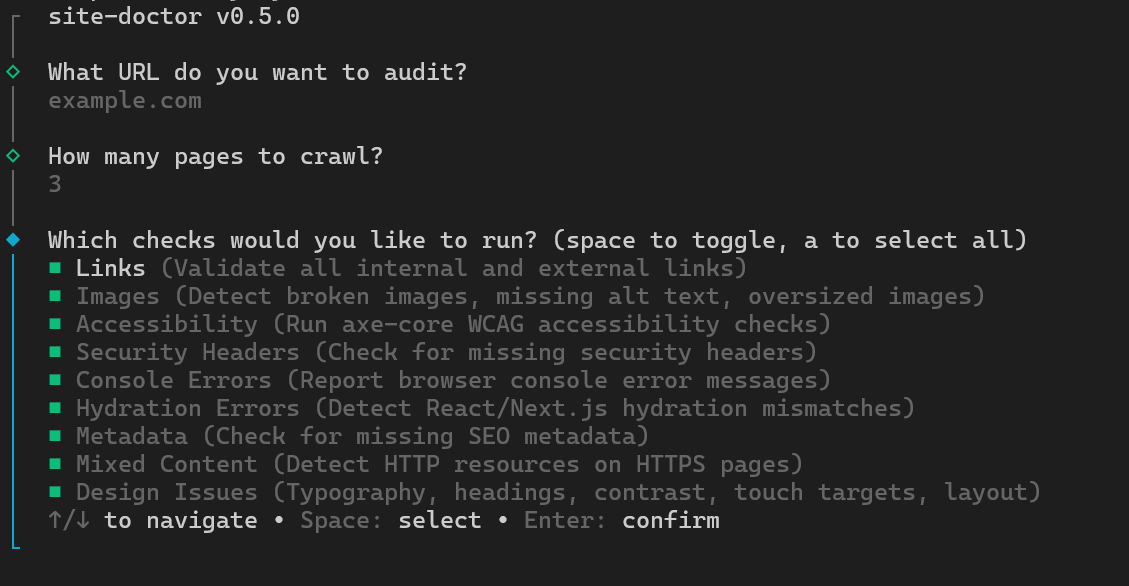
Run without --url to launch an interactive prompt:
site-doctor audit
You'll be guided through selecting a URL, checks, severity filters, and output format.
One-shot mode
site-doctor audit --url http://localhost:3000
Options
| Option | Description | Default |
|---|---|---|
--url <url> |
Base URL to audit. Omit to launch interactive mode. | — |
--max-pages <number> |
Maximum pages to crawl. | 25 |
--report <terminal|json|html> |
Output format. | terminal |
--output <path> |
Write JSON or HTML report to a file. | — |
--open |
Open HTML report in the browser. | true for HTML |
--no-open |
Do not open HTML report in the browser. | — |
--open-files |
Open source files with critical/high issues in your editor. | false |
--project-dir <path> |
Path to project source for source-file links. | — |
--editor <vscode|cursor|webstorm> |
Editor for source-file links. | vscode |
--only <checks> |
Run only these checks (comma-separated). Mutually exclusive with --skip. |
— |
--skip <checks> |
Skip these checks (comma-separated). Mutually exclusive with --only. |
— |
--severity <levels> |
Filter issues by severity (comma-separated: critical,high,medium,low,info). |
— |
--category <cats> |
Filter issues by category (comma-separated: links,images,accessibility,security,console,hydration,metadata,mixed-content,design,performance). |
— |
Check name aliases
--only and --skip accept both kebab-case and common aliases:
| Check | Aliases |
|---|---|
links |
links |
images |
images |
accessibility |
accessibility, a11y |
securityHeaders |
security-headers, securityheaders |
consoleErrors |
console-errors, consoleerrors |
hydrationErrors |
hydration-errors, hydrationerrors |
metadata |
metadata, seo |
mixedContent |
mixed-content, mixedcontent |
designIssues |
design-issues, designissues, design |
performance |
performance, perf |
Examples
Interactive audit (prompts for URL, checks, severity, format):
site-doctor audit
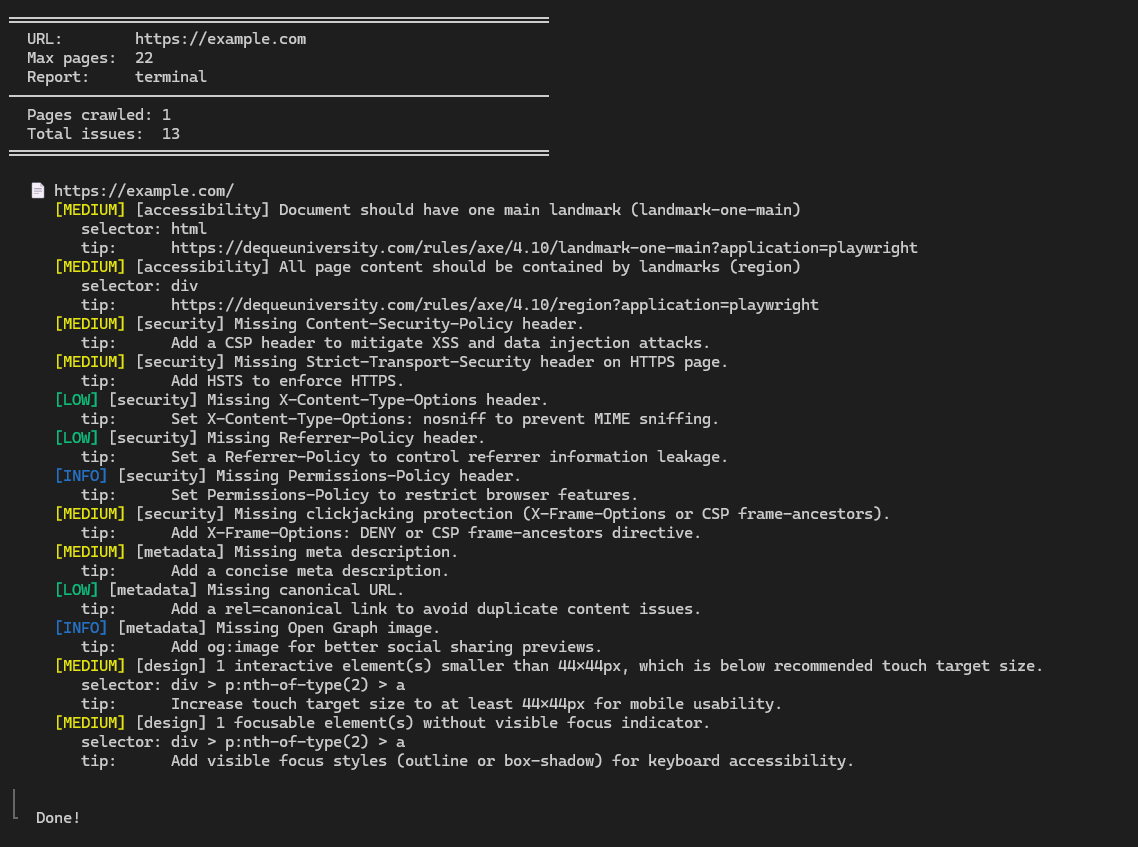
Terminal report:
site-doctor audit --url http://localhost:3000 --max-pages 10
Run only design and accessibility checks:
site-doctor audit --url http://localhost:3000 --only design,a11y
Skip console and hydration checks, show only critical/high issues:
site-doctor audit --url http://localhost:3000 --skip console-errors,hydration-errors --severity critical,high
Filter by category and output as JSON:
site-doctor audit --url http://localhost:3000 --category design,security --report json --output report.json
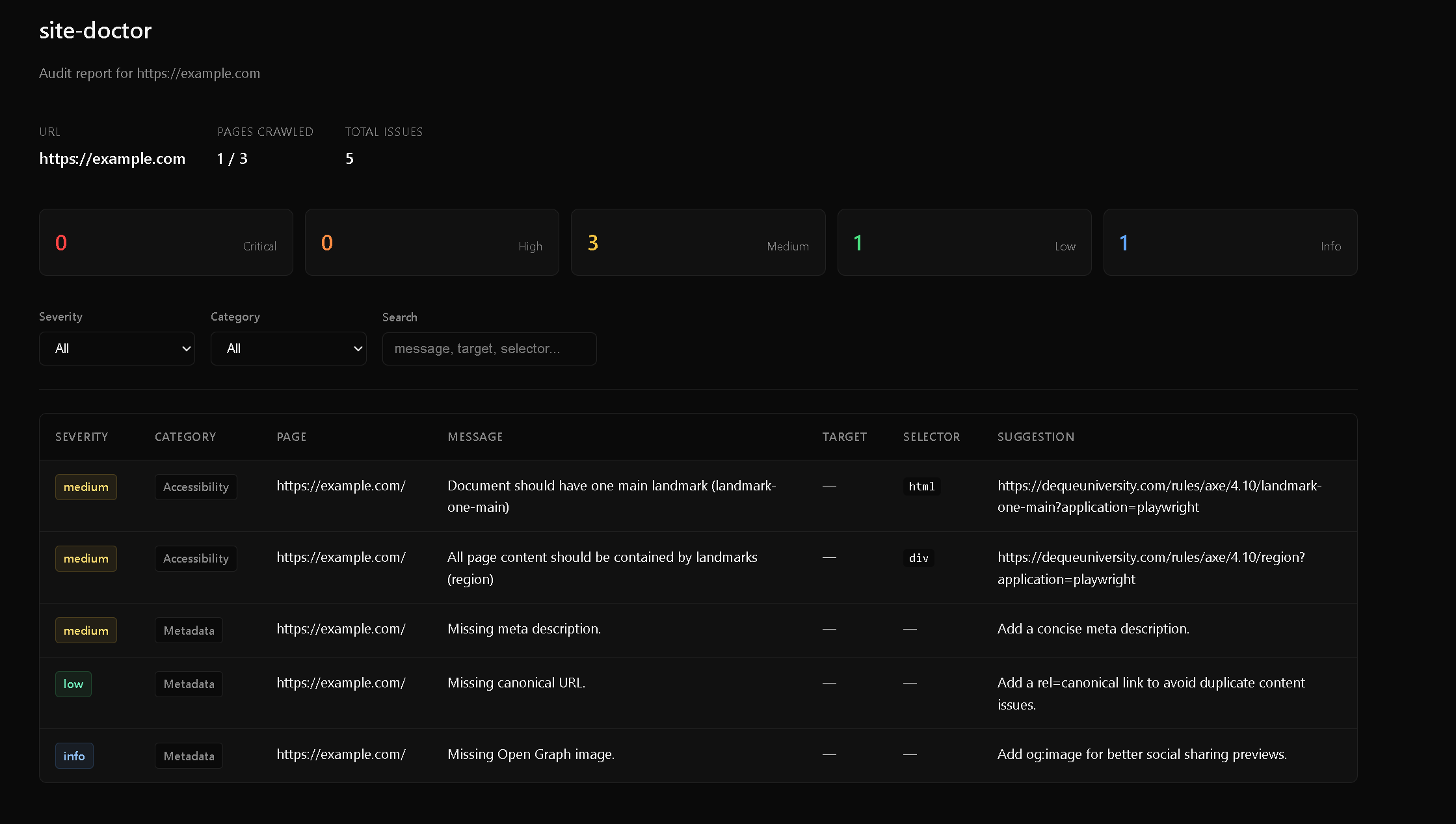
HTML report (auto-opens browser):
site-doctor audit --url http://localhost:3000 --report html --project-dir ./apps/web
Open source files in VSCode for critical/high issues:
site-doctor audit --url http://localhost:3000 --report html --project-dir ./apps/web --open-files
List available checks
site-doctor list-checks
MCP Server
site-doctor ships a built-in Model Context Protocol server so AI agents can run audits without the CLI.
Tools
| Tool | Description |
|---|---|
audit |
Run a full audit. Parameters: url (required), maxPages (default 25), checks (toggle individual checks). Returns a markdown summary grouped by severity. |
list-checks |
List all available audit checks with descriptions. Use this before running a full audit. |
Claude Desktop
Add to ~/Library/Application Support/Claude/claude_desktop_config.json (macOS) or %APPDATA%\Claude\claude_desktop_config.json (Windows):
{
  "mcpServers": {
    "site-doctor": {
      "command": "npx",
      "args": ["-y", "site-doctor-mcp"]
    }
  }
}
Cursor
Add to your Cursor MCP settings (.cursor/mcp.json in your project or global settings):
{
  "mcpServers": {
    "site-doctor": {
      "command": "npx",
      "args": ["-y", "site-doctor-mcp"]
    }
  }
}
Windsurf
Add to ~/.codeium/windsurf/mcp_config.json:
{
  "mcpServers": {
    "site-doctor": {
      "command": "npx",
      "args": ["-y", "site-doctor-mcp"]
    }
  }
}
opencode
Add to opencode.json:
{
  "mcp": {
    "site-doctor": {
      "type": "local",
      "command": ["npx", "-y", "site-doctor-mcp"],
      "enabled": true
    }
  }
}
Global install
If installed globally, you can use the binary directly instead of npx:
{
  "mcpServers": {
    "site-doctor": {
      "command": "site-doctor-mcp"
    }
  }
}
Checks
| Check | Flag name | What it finds |
|---|---|---|
| Crawl | — | Discovers same-origin pages, respects maxPages, skips downloads |
| Links | links |
Broken internal/external links, redirect loops, blocked URLs |
| Images | images |
Broken images, missing alt, missing dimensions, oversized files, lazy-loaded hero images |
| Accessibility | accessibility (a11y) |
axe-core WCAG violations — contrast, labels, landmarks, ARIA, heading order |
| Security headers | security-headers |
Missing CSP, HSTS, X-Content-Type-Options, Referrer-Policy, Permissions-Policy, frame protection |
| Console errors | console-errors |
Grouped browser console errors with page context |
| Hydration errors | hydration-errors |
React / Next.js hydration mismatches |
| Metadata | metadata (seo) |
Missing title, description, canonical, Open Graph image, H1 issues |
| Mixed content | mixed-content |
HTTP resources loaded on HTTPS pages |
| Design issues | design-issues (design) |
Heading hierarchy, typography scale & readability, color contrast, touch targets, responsive layout, text walls |
| Performance | performance (perf) |
LCP, CLS, INP, render-blocking resources, JS/CSS bundle size, DOM size, compression, third-party hosts |
Source-file links
When you pass --project-dir, the HTML report links each page to its source file. Supports Next.js app/ and pages/ routers, including monorepos. Click the file link to open it in VS Code, Cursor, or WebStorm.
Programmatic API
You can also use site-doctor as a library:
import { runAudit, buildConfig } from "site-doctor";

const config = buildConfig({ url: "http://localhost:3000", maxPages: 10 });
const result = await runAudit(config);

console.log(`Found ${result.issues.length} issues`);
for (const issue of result.issues) {
  console.log(`[${issue.severity}] ${issue.category}: ${issue.message}`);
}
License
MIT
Install Site Doctor in Claude Desktop, Claude Code & Cursor
unyly install site-doctorInstalls into Claude Desktop, Claude Code, Cursor & VS Code — handles npx, uvx and build-from-source repos for you.
First time? Get the CLI: curl -fsSL https://unyly.org/install | sh
Or configure manually
Run in your terminal:
claude mcp add site-doctor -- npx -y site-doctorFAQ
Is Site Doctor MCP free?
Yes, Site Doctor MCP is free — one-click install via Unyly at no cost.
Does Site Doctor need an API key?
No, Site Doctor runs without API keys or environment variables.
Is Site Doctor hosted or self-hosted?
Self-hosted: the server runs locally on your machine via the install command above.
How do I install Site Doctor in Claude Desktop, Claude Code or Cursor?
Open Site Doctor on unyly.org, pick your client tab (Claude Desktop, Claude Code, Cursor) and press Install — the config is generated automatically, no JSON editing.
Related MCPs
Playwright
Browser automation, scraping, screenshots
 by Microsoft
Puppeteer
Browser automation and web scraping.
 by modelcontextprotocol
opentabs-dev/opentabs
Plugin-based MCP server + Chrome extension that gives AI agents access to web applications through the user's authenticated browser session. 100+ plugins with a
 by opentabs-dev
robhunter/agentdeals
1,500+ developer infrastructure deals, free tiers, and startup programs across 54 categories. Search deals, compare vendors, plan stacks, and track pricing chan
 by robhunter
Compare Site Doctor with
Not sure what to pick?
Find your stack in 60 seconds
Author?
Embed badge for your README
Browse similar
All browse MCPs